iOS 27 New Features, Release Date, Supported Devices & More
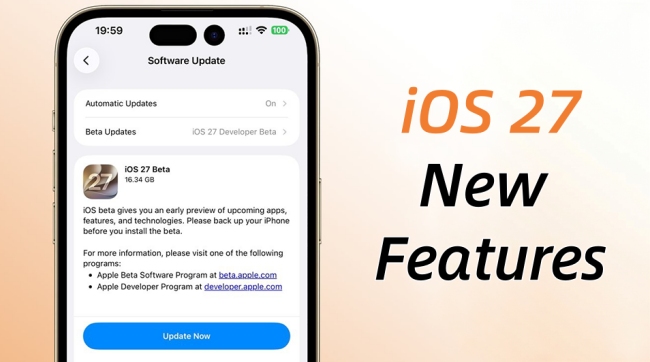
- Release Date: September 2026
- Public Beta: July 2026
- Developer Beta: Available (June 8, 2026)
- Best New Feature: Smarter Siri
- Supports: iPhone SE (2nd Gen), 11 and newer
- Worth Updating? Yes, especially for users interested in Apple Intelligence.
Apple has officially introduced iOS 27, bringing a stronger focus on artificial intelligence, personalization, and everyday productivity. While some updates are mainly about visual changes, iOS 27 is designed to make your device smarter and more useful in daily life.
If you're wondering whether iOS 27 is worth installing, this guide covers the biggest new features, compatible devices, release information, and what to expect before upgrading.
- Quick Overview of iOS 27 Features
- Our First Impressions of iOS 27
- AI and Siri Features
- Design and Customization Features
- Productivity and Communication Features
- Photos and Media Features
- Family Features
- iOS 27 vs iOS 26: What's Changed?
- iOS 27 Supported Devices
- Common iOS 27 Update Problems and Fixes
- FAQs: What You Should Know About iOS 27
- Final Verdict: Is iOS 27 Worth Updating?
Quick Overview of iOS 27 Features
| Category | Key Changes |
|---|---|
| AI & Siri | Smarter Siri, dedicated Siri app, Apple Intelligence upgrades |
| Design | Refined Liquid Glass interface and customization options |
| Productivity | Better Messages, Safari, Phone, and Shortcuts experiences |
| Photos | New AI-powered editing and search tools |
| Family Features | Improved Screen Time and parental controls |
Our First Impressions of iOS 27
Based on Apple's WWDC demonstrations and early beta previews, iOS 27 feels less like a dramatic redesign and more like a practical upgrade.
Many of the improvements focus on reducing small frustrations that users encounter every day. Instead of introducing entirely new ways to use an iPhone, Apple has concentrated on making existing tasks faster, easier, and more intelligent.
For example, Siri can better understand follow-up requests, Photos can handle more editing automatically, and Screen Time offers clearer insights for families. These may seem like small changes individually, but together they make the iPhone feel noticeably more helpful.
AI and Siri Features
Artificial intelligence is the biggest theme of iOS 27. Apple continues to expand its Apple Intelligence platform, bringing smarter assistance across the operating system.
Feature 1. Smarter Siri Conversations
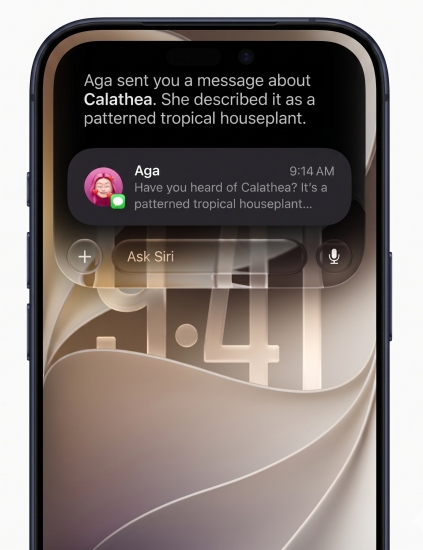
The most significant improvement in iOS 27 is Siri. Previous versions of Siri often struggled to maintain context during conversations. Users frequently had to repeat information or start over with each request. In iOS 27, Siri is much better at understanding follow-up questions and maintaining context.
For example, you might ask Siri to show your flight details. A few moments later, you can simply ask, "When does it leave?" or "Add that to my calendar." Siri understands what "it" refers to and continues the conversation naturally. In practical use, this should make Siri feel less like a command-based tool and more like a genuine digital assistant.
Feature 2. A Dedicated Siri App
Another major change is the introduction of a dedicated Siri experience. Instead of relying entirely on voice commands, users can interact with Siri through a chat-style interface. This allows you to type questions, attach screenshots, review previous conversations, and continue discussions across multiple Apple devices.
For users who already rely on AI assistants for work or study, this could become one of the most useful additions in iOS 27.
Feature 3. Expanded Apple Intelligence Features
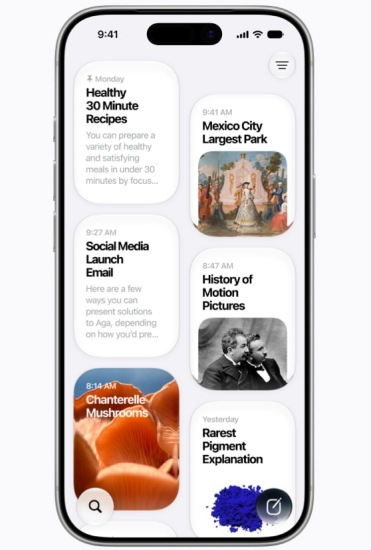
Apple Intelligence now reaches more parts of the operating system. The platform can help summarize information, organize content, generate suggestions, and simplify repetitive tasks. Rather than existing as a standalone app, these tools are integrated directly into daily workflows.
Based on Apple's demonstrations, the goal is not to replace user decisions but to reduce the amount of manual work required to complete common tasks.

Design and Customization Features
While AI receives most of the attention, Apple has also refined the visual experience.
Feature 4. Liquid Glass Gets More Practical
The Liquid Glass design language introduced in earlier versions continues to evolve. In iOS 27, transparency effects appear more balanced and easier to read. Interface elements still feel modern and dynamic, but they no longer distract from the content underneath.
This refinement may seem minor, but many users prefer designs that prioritize readability over visual effects.

 View Also: How to Turn Off iOS 26 Liquid Glass Design
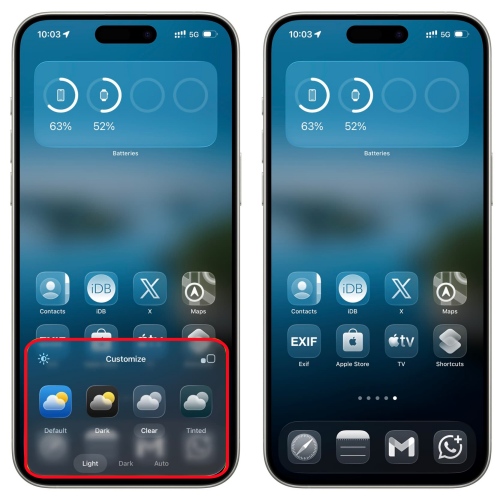
Feature 5. Better Lock Screen Personalization
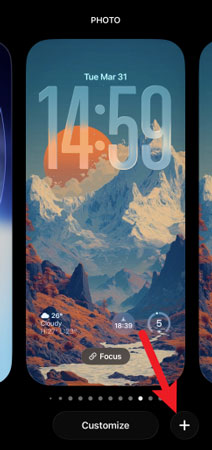
Apple continues to expand Lock Screen customization. Users have more flexibility when arranging widgets, choosing information layouts, and creating personalized views for different situations.
For example, a work-focused Lock Screen can prioritize calendars and reminders, while a personal setup may highlight weather, fitness data, and media controls.
Feature 6. Improved Home Screen Flexibility
The Home Screen also receives additional customization options. Apps, widgets, and shortcuts can be organized more freely, helping users build layouts that better match their daily habits.
Although these changes are subtle compared to major redesigns, they contribute to a more personalized iPhone experience.
Productivity and Communication Features
Many of the most useful iOS 27 upgrades focus on productivity and communication.
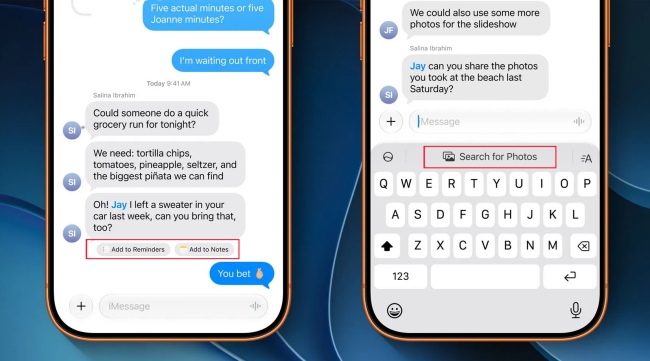
Feature 7. Messages Becomes Smarter
Messages receives several improvements designed to make conversations easier to manage. Long group chats can be overwhelming, especially when dozens of messages arrive throughout the day. Apple is introducing smarter tools to help users stay organized and quickly understand important discussions.
In daily use, this could save significant time for people who regularly participate in busy group conversations.
Feature 8. Better Safari Browsing
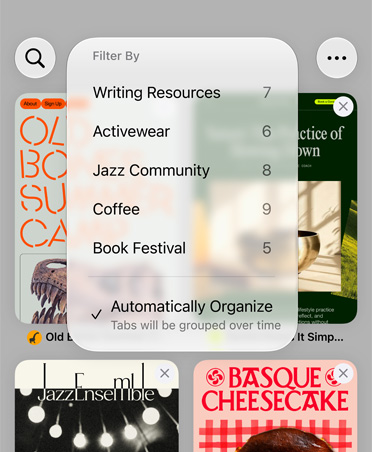
Safari continues to receive performance and usability improvements. Web pages load more smoothly, tab management becomes easier, and browsing sessions feel more organized overall. Users who frequently keep dozens of tabs open may notice the benefits most.
Feature 9. Call Context and Phone App Enhancements
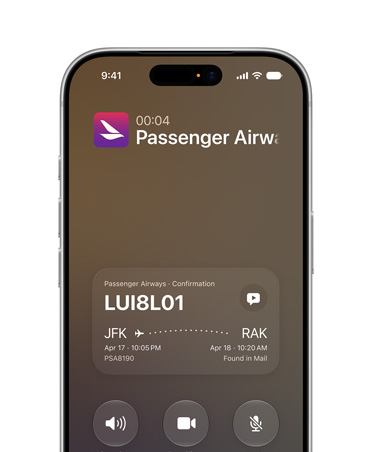
The Phone app becomes more intelligent in iOS 27. Apple is improving how information is presented during calls, helping users understand who is contacting them and why. Better context can make communication more efficient and reduce interruptions from unwanted calls.
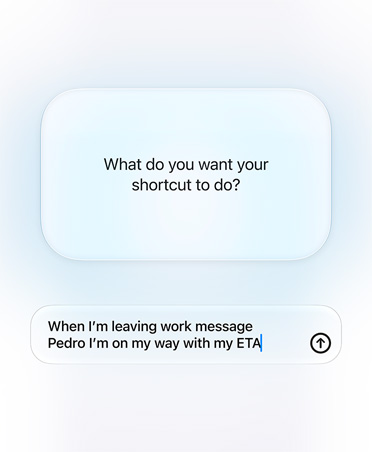
Feature 10. More Powerful Shortcuts
Shortcuts remains one of the most underrated features on the iPhone. In iOS 27, Apple is making automation easier to create while expanding the number of actions available across apps. Users can automate more tasks without needing advanced technical knowledge. For power users, this could be one of the most valuable updates in the entire release.
Photos and Media Features
Photos continues to benefit from Apple's investment in artificial intelligence.
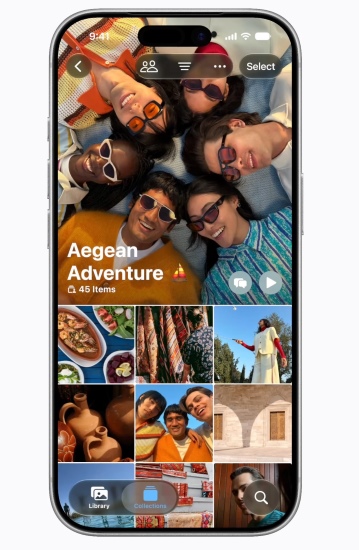
Feature 11. AI-Powered Photo Editing
Photo editing becomes faster and more accessible. Instead of manually adjusting every image, users can rely on AI-assisted tools to remove distractions, improve image quality, and make corrections automatically. For casual photographers, these tools can help produce better results with less effort.

Feature 12. Smarter Photo Search
Finding specific images becomes easier in iOS 27. The Photos app can better understand the content of your library, helping you locate pictures using natural language descriptions rather than exact dates or file names. For users with thousands of photos stored on their devices, this improvement could save a considerable amount of time.

Feature 13. Better Shared Album Experiences
Shared Albums also receive enhancements. Families and friends can collaborate more easily, manage content more efficiently, and keep memories organized without constantly switching between apps. The result is a smoother experience for group photo sharing.
Family Features
Apple has spent the past several years improving digital well-being and online safety, and iOS 27 continues that effort with updates aimed at families, children, and privacy-conscious users.
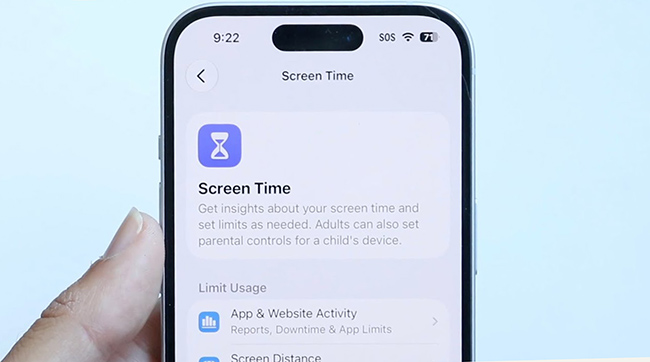
Feature 14. A Redesigned Screen Time Experience
Screen Time has been refreshed to make usage data easier to understand. Instead of digging through multiple menus, parents can now view activity trends, app usage patterns, and device habits more quickly. The interface feels cleaner and provides a better overview of how children spend time on their devices.
Based on Apple's preview, the goal is to help families make informed decisions rather than simply restrict usage. In practice, this could be particularly useful for parents who want to balance educational apps, entertainment, and social media without constantly checking detailed reports.
View Also: How to Turn Off Screen Time Without Passcode
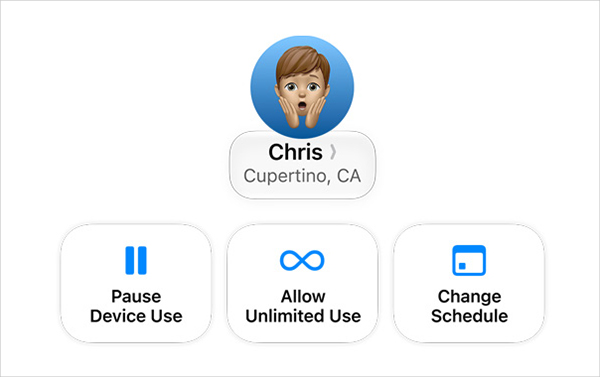
Feature 15. Better Parental Controls
Parental controls are becoming more flexible and easier to manage. Apple is improving how child accounts are created and configured. New setup options help parents apply age-appropriate protections from the beginning, reducing the amount of manual configuration required later. Parents can also manage app access, communication limits, and content restrictions more efficiently.
For families with multiple Apple devices, these changes should simplify daily management considerably.
iOS 27 vs iOS 26: What's Changed?
If you're currently running iOS 26, you may wonder whether iOS 27 is worth the upgrade. The biggest difference is Apple's stronger focus on artificial intelligence and practical usability improvements.
Here's a quick comparison:
| Feature | iOS 26 | iOS 27 |
|---|---|---|
| Siri | Basic AI improvements | Context-aware assistant with deeper integration |
| Apple Intelligence | Limited integration | Expanded system-wide capabilities |
| Photos | Standard editing tools | Advanced AI-powered editing |
| Design | Early Liquid Glass experience | Refined and more customizable interface |
| Screen Time | Existing controls | Redesigned family management tools |
For most users, the upgrade is less about one revolutionary feature and more about dozens of smaller improvements that collectively enhance everyday use.
iOS 27 Supported Devices
Before installing iOS 27, you'll want to confirm that your iPhone is compatible. Apple has continued supporting a wide range of devices, allowing iPhone SE (2nd Gen), 11 and newer users to upgrade without purchasing new hardware.
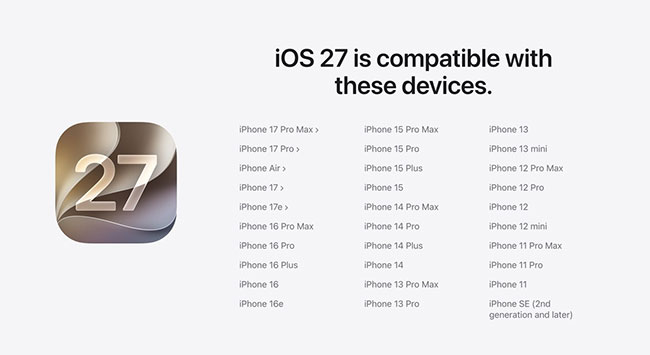
However, some advanced Apple Intelligence features may require newer processors and additional memory. This means that while older devices can run iOS 27, they may not support every AI-powered feature.
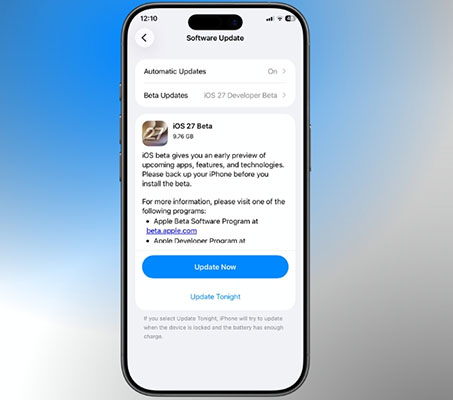
To check whether your device is eligible to update, please follow these simple instructions:
- Step 1. Open the Settings app on your iPhone and tap on General.
- Step 2. Select Software Update, allowing your device to securely check Apple's servers.
- Step 3. Confirm if the iOS 27 update prompt is available for download on your screen.
 Pro Tips:
Before updating to iOS 27, please make sure you've done the following three important things:
- Create a full, encrypted backup of your device using iCloud or your local Mac/PC to ensure your photos and messages are completely secure.
- Free up adequate internal storage space, aiming for at least 10GB to 15GB of available room, as large operating system files require substantial temporary space to unpack safely.
- Connect your iPhone to a fast, highly stable Wi-Fi network and keep it physically plugged into a charger throughout the entire installation progress.
Common iOS 27 Update Problems and Fixes
Although most users install iOS 27 without difficulty, major software updates occasionally cause problems, especially during beta testing. Some of the most frequently reported issues include iPhones getting permanently stuck on the Apple logo, the update freezing entirely during the verification stage, or devices entering a continuous, frustrating Recovery Mode loop.
If you encounter one of these issues, start with basic troubleshooting. A force restart often resolves temporary software glitches. You can also check available storage space and attempt the installation again. In more serious cases, updating or restoring through Finder on macOS or iTunes on Windows may help.
However, some devices remain stuck even after these steps.
In situations like these, a dedicated iOS repair solution can be useful. For example, TunesKit iOS System Recovery is designed to address common system-level issues such as update failures, boot loops, frozen screens, and Recovery Mode problems. The software also offers repair modes intended to fix iOS system issues while preserving user data whenever possible. This can be a practical option for users who encounter installation problems but want to avoid a full device restore.
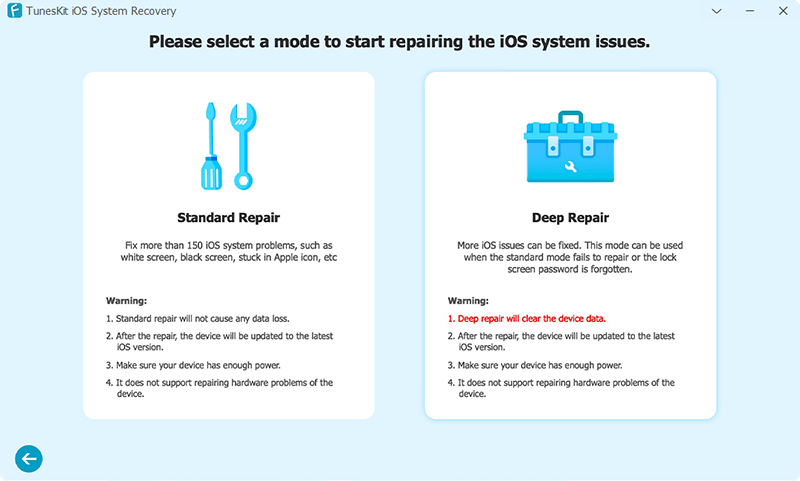
Fix iOS 27 update and system stuck problems in one click without losing data.
 600,000+ Downloads
 Note
Note
Regardless of which solution you choose, backing up important data before installing a beta version of iOS is always highly recommended.
FAQs: What You Should Know About iOS 27
-
What are the best new features in iOS 27?
The biggest additions include a smarter Siri, expanded Apple Intelligence capabilities, AI-powered photo editing tools, improved Screen Time controls, and refinements to the Liquid Glass interface.
-
When is iOS 27 coming out?
The developer beta is currently available for early technical testing. The official, highly stable public release is expected to launch later this year, typically arriving in September alongside Apple's fall hardware announcements.
-
Which iPhone will get iOS 27?
iOS 27 is supported on the iPhone SE (2nd Gen), 11 series and newer devices, although some Apple Intelligence features may require newer hardware.
-
Should I install the iOS 27 beta?
If you enjoy testing new features and don't mind occasional bugs, the beta can be an interesting preview. However, users who depend on their iPhone for work or daily tasks may prefer waiting for the stable public release.
-
Can I downgrade from iOS 27 beta?
Yes, you can choose to return to a stable version of iOS if beta software causes performance or compatibility issues. Always create a backup before installing beta software to make this process easier.
View Also: How to Downgrade iOS 27 to iOS 26 Without Data Loss
Final Verdict: Is iOS 27 Worth Updating?
For most users, the answer is yes.
iOS 27 may not introduce the most dramatic visual redesign in iPhone history, but it delivers meaningful improvements where they matter most. Siri is smarter, Apple Intelligence is more deeply integrated, Photos gains useful AI tools, and family management features become easier to use.
What stands out most is Apple's focus on practical improvements. Instead of adding features that look impressive in marketing materials but rarely get used, iOS 27 aims to simplify everyday tasks and reduce friction throughout the operating system.
- If you're excited about AI-powered experiences, you'll likely find plenty to explore.
- If you simply want a faster, smoother, and more capable iPhone, iOS 27 appears to offer that as well.
- For cautious users, waiting for the public release is still the safest choice.
But based on everything Apple has shown so far, iOS 27 looks set to become one of the most useful iPhone updates in recent years.