


vnROM Bypass Review: Is It Safe and Does It Really Work for FRP Unlock?
Unlocking a Google-locked Android device can be frustrating, especially when you've forgotten the Google account credentials linked to the phone. Many users looking for a quick, free way to resolve this issue come across vnROM Bypass, an online tool and APK often recommended for bypassing Google's Factory Reset Protection (FRP). But does it actually work? Is it safe? And are there better alternatives?
This article provides a comprehensive, detailed review of vnROM Bypass based on real user experiences, technical analysis, and current Android security behavior.

Part 1. Full Review of vnROM Bypass
Before exploring whether vnROM Bypass is truly effective and safe to use, it's important to understand what the tool actually offers and how it works. Many Android users turn to vnROM when they find themselves locked out after a factory reset, but not all FRP bypass solutions deliver the same results. In this section, we'll take a closer look at vnROM Bypass itself starting with a clear explanation of what it is
1.1 What is vnROM Bypass?
vnROM Bypass (also called vnROM FRP Bypass or vnROM.net Bypass) is a free third-party solution designed to help users bypass Google's FRP lock after factory resetting their Android device. FRP is a built-in security feature introduced by Google to prevent unauthorized access to a device after it has been wiped.
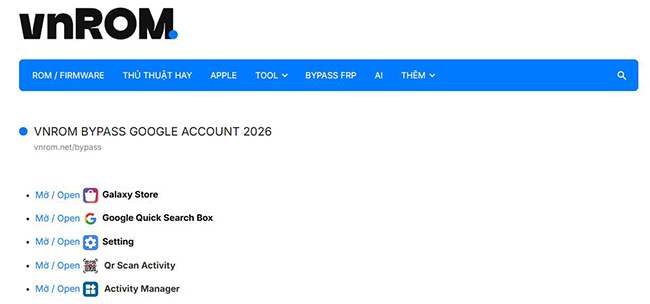
What vnROM Bypass Claims to Do
- Bypass Google FRP lock
- Allow device setup without prior Google credentials
- Support a wide range of Android brands
- Offer a free unlocking method
However, as we'll explore below, the real-world performance varies significantly depending on device brand, age, and Android version.
1.2 How Does vnROM Bypass Work?
Most FRP bypass tools exploit loopholes in the Android setup process, and vnROM Bypass uses similar methods. The process usually involves navigating to the browser during device setup and downloading the vnROM APK.
Typical vnROM Bypass Workflow:
- Trigger an accessibility shortcut (often TalkBack).
- Navigate through Settings or Help/Feedback into a browser.
- Open the vnROM website and download the APK.
- Install the APK (requires enabling "Unknown Sources").
- Reset the device or complete setup without Google verification.
This was effective on Android versions 5–8, partially on 9 and 10, and rarely on 11–14.
1.3 Supported Devices & Android Versions
vnROM Bypass does not provide an official list of supported devices, but real-world testing and community reports offer clarity:
 Works Best On:
- Older Android devices (Android 5, 6, 7, 8)
- Samsung phones before the 2017–2018 security updates
- Older LG, Motorola, HTC, and Vivo models
- Devices with outdated security patches
 Limited or No Success On:
- Android 9 and 10 (some partial success, often unstable)
- Android 11+ (modern security makes APK injection nearly impossible)
- Samsung models with Knox Guard
- Xiaomi/Redmi phones with Mi Account Protection
- Google Pixel devices
1.4 Pros and Cons of vnROM Bypass
Pros:- Completely free to use
- No account creation required
- Straightforward method on older Android versions
- Lightweight APK file
- Works offline after installation
Cons:- Very high failure rate on modern devices
- Requires installing unknown APKs, posing malware risks
- Can cause system instability or soft-brick
- Often requires OTG cable or complex exploit steps
- No official support or updates
- May violate Google's security policies
1.5 Is vnROM Bypass Safe?
Safety is one of the most important concerns for users. vnROM Bypass has some risks in terms of security, device, and privacy.
Security Risks
- Installing APKs from unknown sources exposes users to malware risks.
- Browser-based download pathways can be exploited by malicious redirects.
- Some users report that certain versions contain adware-like behavior.
Device Risks
- System corruption after forced resets
- Boot loops or setup screen crashes
- Failure to add a new Google account afterward
Privacy Risks
Unknown apps can potentially access:
- Device identifiers
- Network data
- Location
- Files and storage
1.6 How to Use vnROM Bypass (General Example)
While specific steps vary by model, here is a simplified workflow illustrating how the method is typically used.
Step 1. On another phone, go to the vnROM website. After choosing Bypass FRP, pick vnROM Bypass APK. After downloading, store it on a USB disk.
Step 2. Use an OTG cable to attach the USB drive to your locked phone.
Step 3. To turn on TalkBack on your phone, triple-tap the Home button.

Step 4. To access the Help & Feedback menu, choose TalkBack Settings and then triple-tap the Home button once more.
Step 5. Play the YouTube video that comes after selecting Get Started with Voice Access.
Step 6. While the video is playing, select Get Started with Voice. In the top right corner, tap the user profile icon.
Step 7. After selecting Terms and Privacy, click Cancel.
Step 8. Click on the Bookmark tab, select Download History, and then select My Files.
Step 9. Find and install the vnROM APK file from your USB drive. If asked, enable installation from unknown sources in the phone's settings.
Step 10. After installation, go to Settings > General Management > Reset > Factory Data Reset. Confirm and reset the device.
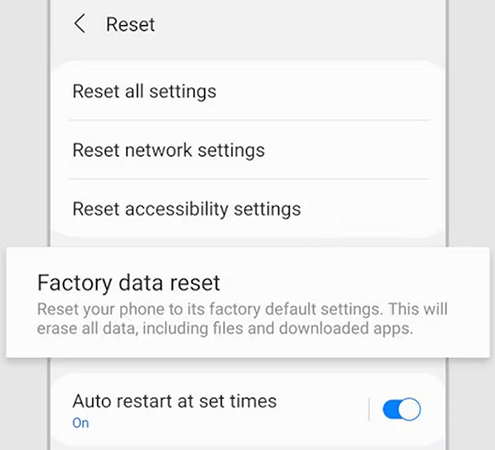
Step 11. When the phone restarts, set it up without the Google account verification step.
1.7 User Reviews: What People are Saying
Positive Reviews:- Works for old Samsung models
- Free tool with no subscription
- Good for repair shops handling legacy phones
Negative Reviews:- Doesn't work on Android 10+
- APK refused to install
- Failed after reboot
- Sketchy website behavior
- Device bricked during reset
Summarily, vnROM is a free FRP bypass tool that can be useful for older Samsung devices, especially in repair scenarios involving legacy phones. However, it has major drawbacks, including incompatibility with Android 10 and newer versions, installation failures, and unreliable performance after reboot.
Part 2. Best Alternative to vnROM Bypass - TunesKit Android Unlocker
TunesKit Android Unlocker is a professional Android unlocking tool designed to help users quickly bypass various types of locks, including screen locks and FRP. Whether you're locked out due to a forgotten password, pattern, PIN, fingerprint issues, or Google FRP lock, TunesKit Android Unlocker provides a simple, guided solution without requiring technical skills.
Key Features of TunesKit Android Unlocker
Bypass FRP lock with few steps. Unlock Android screen without passcode with ease. Supports lots of Android versions including 12.
 600,000+ Downloads
The detailed steps to use TunesKit Android Unlocker is shown below. Follow it.
Step 1 Connect phone to computer
After downloading and installing TuneKit Android Unlocker, you can open the tool and connect your phone to a computer via a USB cable.
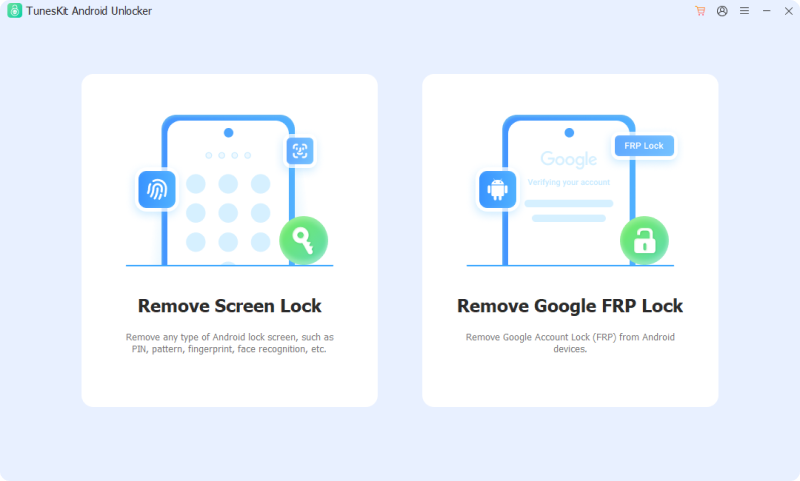
Step 2 Select unlock feature
Choose the Remove Google FRP Lock option. You should select your phone brand. After that, click the Start button.
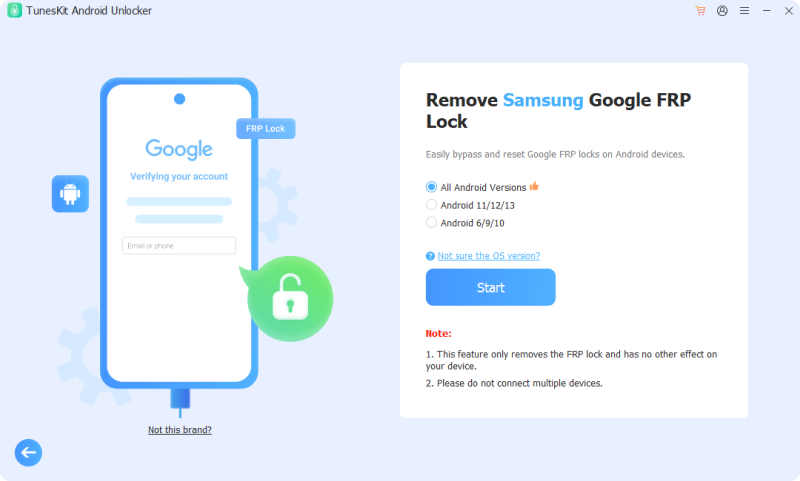
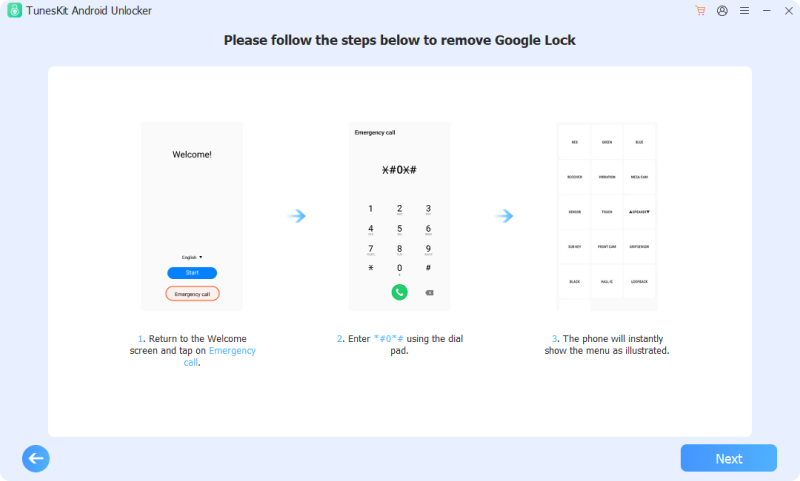
Step 3 Bypass Google FRP lock
Follow the steps shown on the tool's screen. After finishing, click the Next button to continue the bypass process. A prompt will be shown on your phone, tap Allow.
Part 3. FAQs about vnROM Bypass
-
1. Can vnROM remove screen lock (PIN, pattern, password)?
No. vnROM focuses on Google FRP. It cannot remove standard Android screen locks. For removing screen passwords, you need tools like TunesKit Android Unlocker.
-
2. Will using vnROM erase my data?
The FRP bypass process usually happens after a factory reset. Since FRP activates only after a reset, the data is already erased. vnROM itself does not erase data, but you cannot perform FRP bypass without losing data first.
-
3. Does vnROM require my Google account or password?
No. The purpose of vnROM is to help you bypass FRP without entering the previous Google account credentials.
Part 4. Conclusion
vnROM Bypass can work on older Android devices (Android 5–8), offering a free way to bypass Google FRP. However, its effectiveness is very limited on newer devices, and using it carries security and legal risks.
For most users, safer alternatives like TunesKit Android Unlocker provide higher success rates, better compatibility, and professional support.


