


Bader Tool V2.6 Full Review: How to Download and Use It 2026
For Android technicians and enthusiasts, finding a reliable utility to manage device security is a constant pursuit. The Bader Tool has emerged in niche circles as a potential solution for unlocking, formatting, and repairing a wide range of smartphones.
With the release of Bader Tool 2.6, interest has grown rapidly - but so have concerns. Many non-tech-savvy users are now asking important questions: Is Bader Tool safe to use? Does it really work for FRP bypass? This article provides an in-depth review of the Bader Tool, its download risks, and introduces a more reliable, user-friendly alternative for 2026.
Part 1. What Is Bader Tool - Key Features & Limits
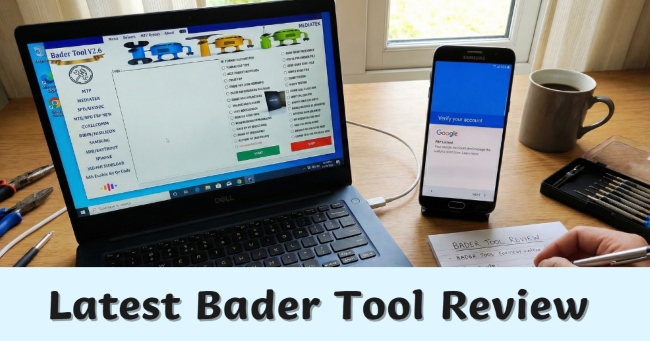
Bader Tool (latest version: Bader Tool v2.6) is a free, specialized Windows utility designed for Android device servicing. Unlike basic file management tools, it works directly with a phone's bootloader and system partitions. This makes it popular among repair technicians who deal with locked, damaged, or even “bricked” Android devices.
| Tool | Bader Tool |
|---|---|
| Latest Version | V2.6 |
| Supported OS | Windows |
| Compatible Brands | Samsung, Xiaomi, OPPO, Vivo, Huawei, Realme and more |
| Supported Chipsets | Samsung, MediaTek (MTK), SPD, Qualcomm, Xiaomi and more |
| Download Link | Bader Tool V2.6 Download |
| File Size | 545.54MB |
Key Features of Bader Tool V2.6
- Multi-Brand Support: Works with major Android chipsets, including Qualcomm (EDL), MediaTek (MTK), and SPD (Spreadtrum).
- FRP Bypass: Known for removing Google Account Verification (FRP), especially on Samsung and many Chinese-brand devices - no original account required.
- System Repair Tools: Allows factory resets, data wipes, and firmware flashing to help fix boot loops and software-related issues.

Limitations of Bader Tool V2.6
- Not Beginner-Friendly: The interface relies heavily on technical commands and can be overwhelming for non-professionals.
- Driver Setup Required: Users must manually install ADB, VCOM, and USB drivers, which often leads to detection or connection errors.
- No Official Support: There's no dedicated customer service or official documentation for troubleshooting.
- High Technical Barrier: Users must understand chipsets, boot modes, and flashing procedures - this is not a one-click solution.
- Risk of Data Loss: Most operations, including FRP bypass and formatting, will permanently erase user data.
Part 2. Is Bader Tool Safe to Download and Use?
Before you proceed with a Bader Tool v2.6 download, it's important to understand the potential security risks. Unlike official software with verified websites, Bader Tool is usually shared through forums or third-party file-hosting platforms. This distribution method naturally raises safety concerns.
In general, Bader Tool v2.6 can work as intended, but there's an important catch: you often need to disable antivirus protection on your Windows PC to install or run it. While this doesn't automatically mean the tool is malicious, it does increase the risk of exposing your system to unwanted or unsafe files.
Risks You Should Keep in Mind
1. Data Privacy: Unofficial tools often lack privacy policies, meaning your device data (IMEI, serial numbers) could potentially be logged or misused.
2. Device Bricking: Selecting the wrong chipset or flashing an incompatible file, such as using a Samsung module on an OPPO device, can permanently damage the phone's motherboard, leaving the device unusable.
3. Lack of Updates: Unlike paid and officially supported tools, Bader Tool may not receive regular updates. This makes it less effective on newer Android versions like Android 15 or 16, especially as security protections continue to evolve.
Part 3. How to Download and Use Bader Tool V2.6 to Bypass FRP
If you're an experienced technician and fully aware of the risks involved, you can follow the general steps below to use Bader Tool v2.6 for FRP bypass. This process is not recommended for beginners, as incorrect operation may cause data loss or device damage.
Step 1. Download and Extract Bader Tool V2.6
Download the zip file from the link we provided in Part 1 and unzip it with the password "2025".
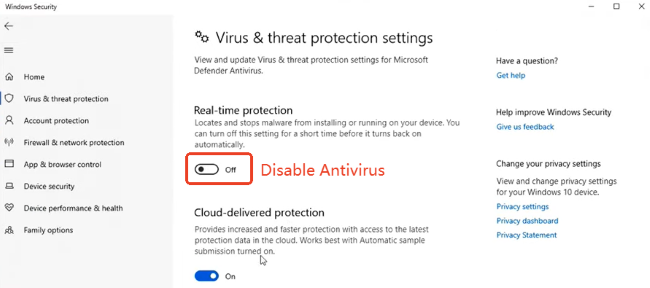
Step 2. Disable Antivirus on Your Computer
Go to Windows Security, click Virus & threat protection, and toggle off the Real-time protection.
Step 3. Install Bader Tool V2.6
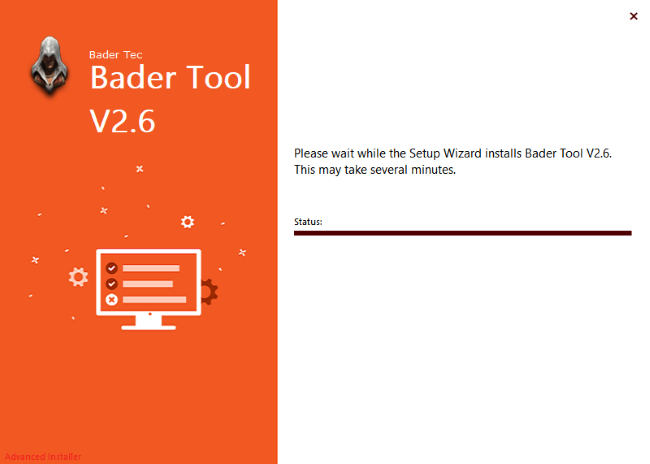
Open the extracted folder and double-click the application file named "Bader Tool V2.6" to start the installation process.
Step 4. Launch the Bader Tool V2.6
Right-click the Bader Tool icon on your desktop and select Run as administrator. Wait a few seconds for the tool to fully load.

Step 5. Select the Right Mode to Bypass FRP
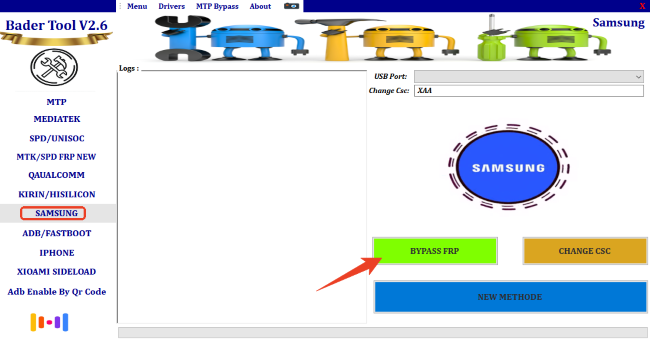
Taking Samsung devices as an example, click SAMSUNG in the left panel, then choose Bypass FRP. After that, connect your phone to the computer and follow the on-screen instructions to continue.
Part 4. Easier Alternative to Bater Tool for FRP Bypassing 2026
For users who want a safer, more reliable, and beginner-friendly way to bypass FRP, without worrying about viruses, complex steps, or device bricking, TunesKit Android Unlocker stands out as a professional and trustworthy alternative to Bader Tool.
What Is TunesKit Android Unlocker
TunesKit Android Unlocker is an officially verified software designed to remove Android screen locks and bypass Google FRP verification with ease. Unlike Bader Tool, it is developed and maintained by a professional team, ensuring strong security, stable performance, and full compatibility with the latest Android versions.
Even better, TunesKit Android Unlocker works on both Windows and macOS, making it accessible to more users.
Why Choose TunesKit Android Unlocker
 Pros:
Pros:- Simple and Fast Operation: Clear navigation and guided steps make the entire process quick and stress-free.
- Beginner-Friendly Design: No command lines, no manual driver installation, and no technical knowledge required - just a clean, visual interface.
- High Success Rate: Regular updates help it keep up with the latest Android security systems.
- Broad Compatibility: Supports many popular Android brands, including Samsung, Huawei, Xiaomi, Motorola, LG, and more.
- 24/7 Customer Support: Get help from real support agents whenever you need assistance.
Bypass FRP in Minutes with TunesKit Android Unlocker
Connect your phone, click start, and remove Google FRP safely - no tech skills, no risks, just results.
 600,000+ Downloads
How to Use TunesKit Android Unlocker to Bypass FRP
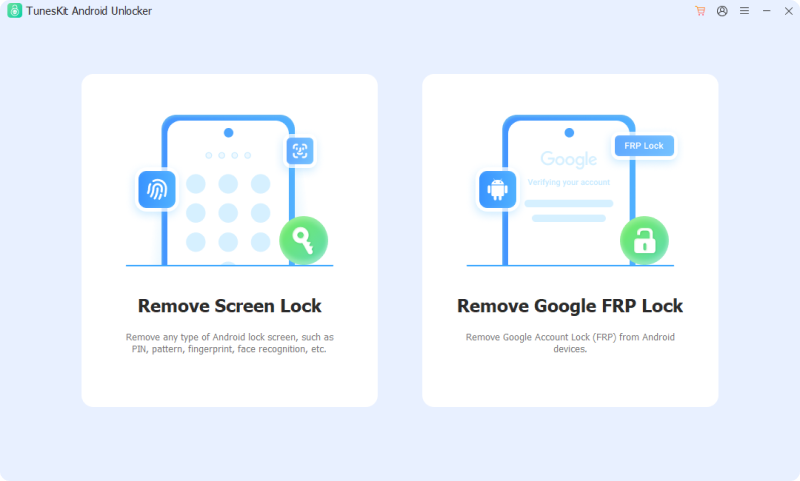
Step 1 Connect Your Phone to the Computer
Download and launch TunesKit Android Unlocker on your computer. Select "Remove Google FRP Lock", then connect your Samsung or Android device using a USB cable.
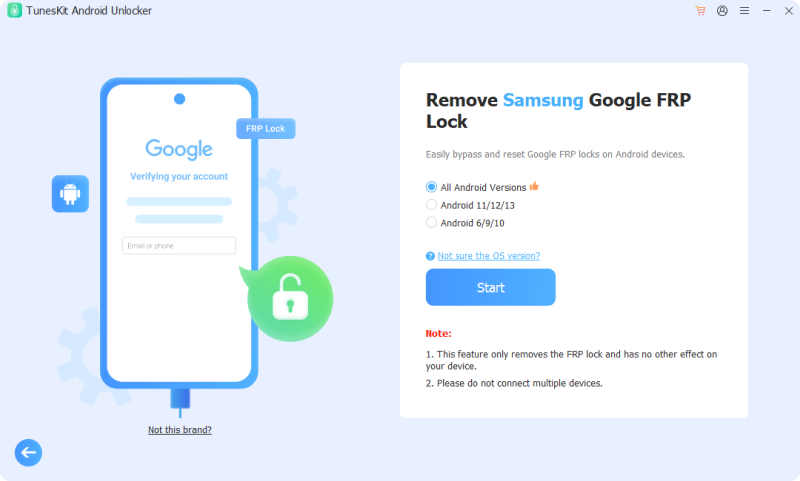
Step 2 Select Brand and System Version
Choose your phone's brand and system version when prompted. If you're unsure, TunesKit provides simple instructions to help you check, ensuring the safest unlock method is applied.
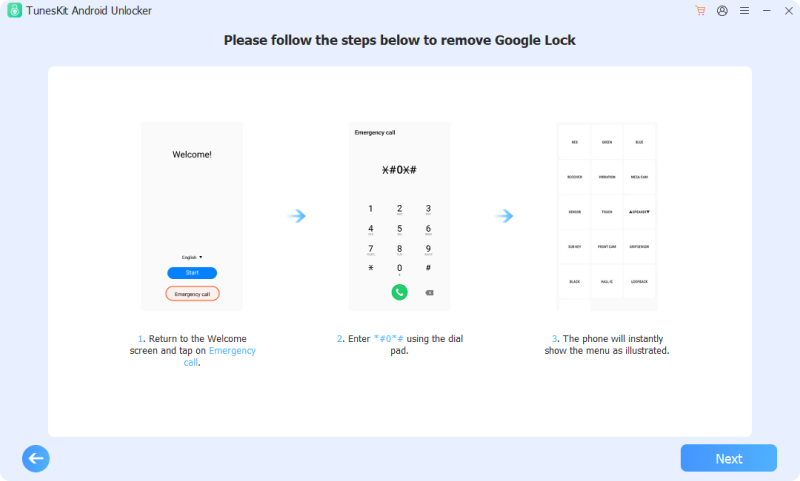
Step 3 Bypass the FRP Lock
Follow the on-screen instructions to put your device into Recovery Mode or Download Mode. Click Start, and TunesKit will automatically download the required firmware and remove the Google account lock.
Part 5. Conclusion
In conclusion, while Bader Tool v2.6 remains popular among technicians for its free, all-in-one features, it also comes with real risks. Unverified downloads, disabled antivirus protection, and the possibility of malware or device damage make it a risky option for non tech-savvy users.
For a safer and more stress-free solution, TunesKit Android Unlocker is the better choice. It delivers reliable FRP bypass results through a secure, beginner-friendly interface, helping protect both your computer and your Android device every step of the way.


