


How to Bypass FRP on LG with or without Computer
Staring at the "Verify your account" screen on your LG device can be incredibly frustrating. This security feature, known as Factory Reset Protection (FRP), is designed to protect your data, but it often locks out legitimate owners who have simply forgotten their Google login details after a reset. If you are looking for a reliable way to regain access to your device, you have found the right guide.
In this guide, we will cover the manual "no computer" bypass for those without access to a PC. Then, we will list the methods to bypass FRP on LG with computer.
Part 1. Learn about LG FRP and Android Security
Factory Reset Protection (FRP) was introduced in Android 5.1 and later. When a Google account is added to an LG device, the FRP lock activates automatically. Any factory reset will require the original Google account credentials which will prevent unauthorized access to the phone after theft or loss.
What triggers FRP on LG devices?
FRP is triggered when:
- The device is factory reset via recovery mode.
- The phone is hard reset without removing Google account.
- A new user tries to set up a second-hand LG phone.
Symptoms of FRP lock:
- "This device was reset. To continue, sign in with a Google Account that was previously synced on this device."
- No access to home screen or apps until verification.
Part 2. How to Bypass FRP on LG Without a Computer
If you do not have a PC, you can unlock your device manually. This method exploits a loophole in the LG Keyboard and Accessibility settings. This specific technique involves restoring a backup file containing a shortcut app. You will need a secondary Android phone to create a Wi-Fi hotspot if you don't have a standard Wi-Fi network available.
Step 1. Access the Keyboard Settings
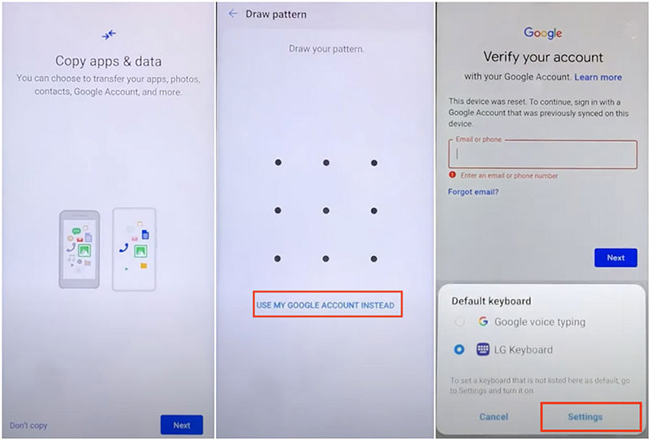
Connect your locked LG phone to Wi-Fi. On the "Verify your account" screen, tap the text field to bring up the keyboard. Tap Settings to enter LG Keyboard settings.
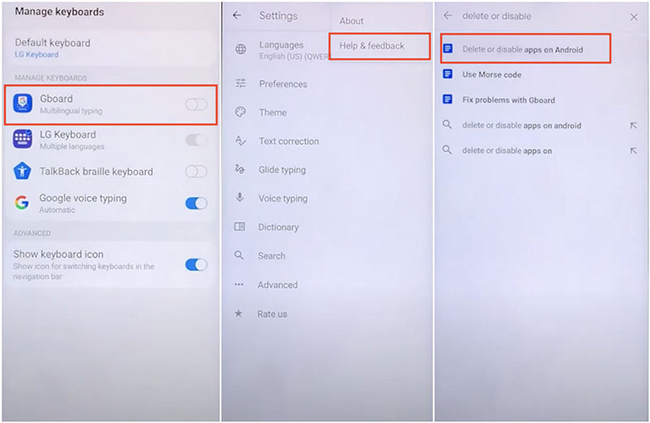
From there, select Gboard and then tap Help & Feedback after tapping the three-dot icon at the top right of screen. In the Help menu, search for "Delete or disable apps on Android."
Step 2. Open the Browser via Help
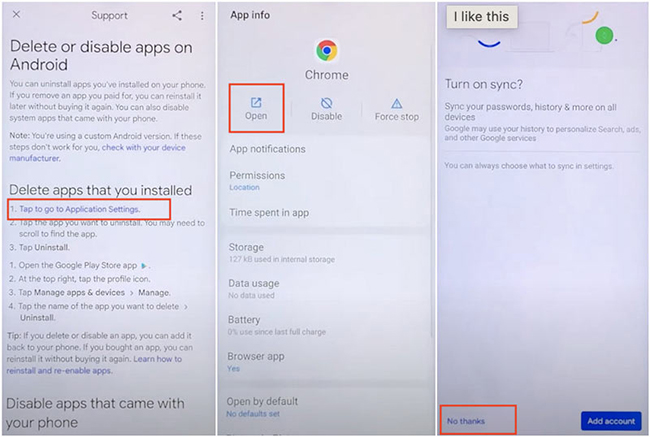
Find the text that says "Tap to go to Application Settings."
When the app list opens, scroll down until you find Google Chrome or YouTube. Tap the app and select Open. This will launch the browser. Tap Accept & continue > Next > No thanks.
Step 3. Download the Backup File
In the Chrome address bar, type the URL like bit.ly/lgbackup for a trusted LG Backup file. You are looking for a file typically named LGBackup.lbf. Download this file to your device.
Step 4. Restore the Backup
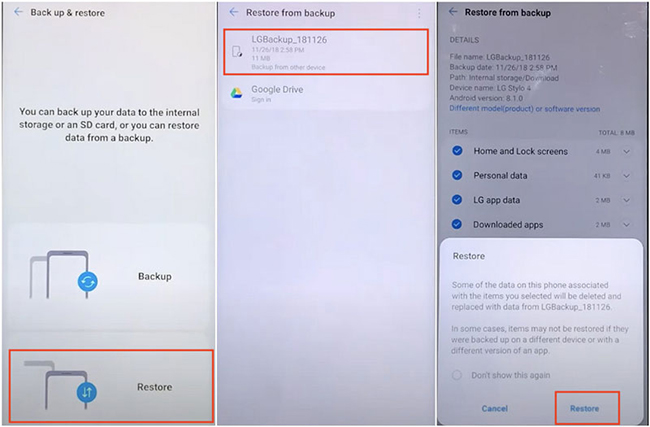
Navigate back to the "Application Settings" list using the back arrow. Find the Settings app in the list and open it. Go to System > Backup > Backup & Restore > Restore.
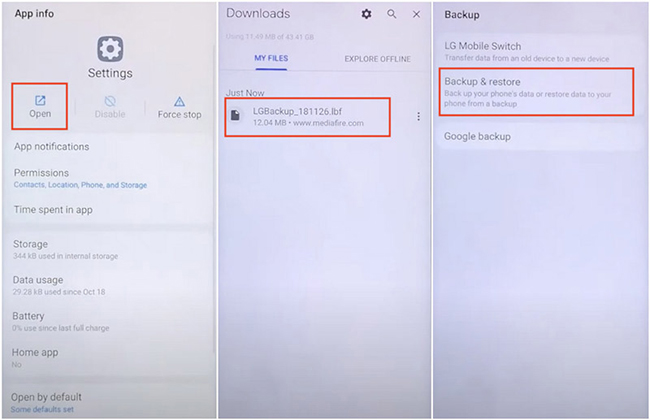
Select the backup file you just downloaded. Crucially, uncheck all options except for "Downloaded Apps". We only want to restore the "QuickShortcutMaker" app contained in that backup. Proceed with the restore.
Step 5. Launch the Setup Wizard
Restart your phone. Repeat Step 1 and Step 2 to get back to the "Application Settings" list. Find QuickShortcutMaker in the list (it is now installed). Tap Open.
Inside the app, search for "Setup Wizard." Look for the result with a purple icon (different from the standard Google icon). Tap it to expand the menu, select the third option (usually ending in .SetupWizardActivity), and tap Try.
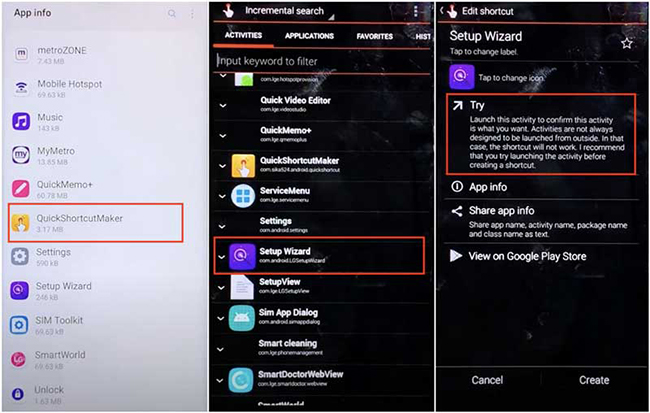
Your phone will force-launch the final setup phase, skipping the Google lock.
Part 3. How to Bypass FRP on LG with a Computer
Method 1. Use Google Account Recovery [Need Google Account]
If you own the device and simply forgot the password, this is the safest official method.
Step 1. Visit Google account recovery website.
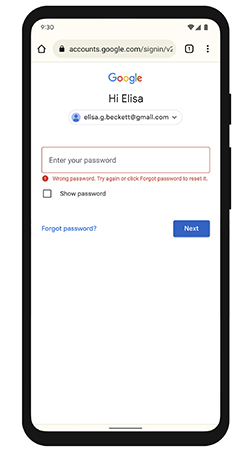
Step 2. Choose "Forgot password?"
Step 3. Use your recovery email, phone, or security questions.
Step 4. Reset your password.
Step 5. Wait 24 hours to let Google sync changes.
Step 6. Enter the new password on your LG device.
Method 2. Use SamFW FRP Tool (The Fastest Solution)
There is a quick way that minimizes human error to bypass FRP lock on your LG phone. Instead of navigating complex hidden menus, we will use a specialized utility called the SamFW FRP Tool.
Step 1. Search for and download the LG Unified Mobile Driver. Install it on your Windows PC and restart your computer to ensure the drivers load correctly.
Step 2. Download the latest version of the SamFW FRP Tool (ensure you download from a reputable source to avoid malware). Extract the ZIP file. Right-click the application icon and select "Run as Administrator."
You need to put your phone into a state where it can accept external commands:
- Turn off your LG phone completely.
- Press and hold the Volume Up button.
- While holding the button, connect the USB cable to your phone (ensure the other end is already plugged into the PC).
- Keep holding Volume Up until you see a screen that says "Firmware Update" or "Download Mode."
Step 4. Look at the SamFW tool on your computer. Under the "Port" section, you should see your device listed.
Step 5. Click the button labeled Remove FRP (or sometimes MTP Bypass). The tool will run a script to locate the FRP partition and wipe the lock data.
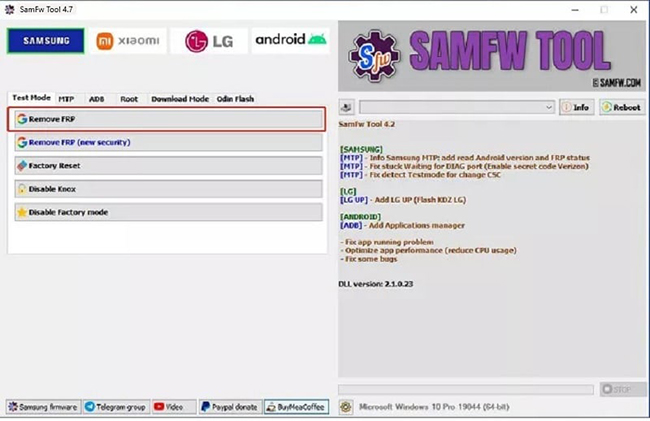
Watch your phone screen. It may reboot or show a progress bar. Once the tool displays a "Success" message, your phone will restart automatically. When it boots up, it should go straight to the home screen, bypassing the Google setup entirely.
Part 4. Extra Tip: How to Bypass LG Lock Screen without Password or Google Account
If you are stuck at the screen lock (pattern, PIN, or password) rather than the FRP Google verification screen, there is a dedicated software solution available.
TunesKit Android Unlocker is a professional unlocking tool designed to remove screen locks from different Android models, including LG devices. It is particularly useful if you have bought a second-hand LG phone with an unknown passcode or if your screen is broken and won't accept touch inputs.
Key Features of TunesKit Android Unlocker
Unlock Android screen without passcode with ease. Supports All Android versions. Available on Windows and Mac.
 600,000+ Downloads
Here we will show you how to remove screen lock on Android phone via TunesKit Android Unlocker.
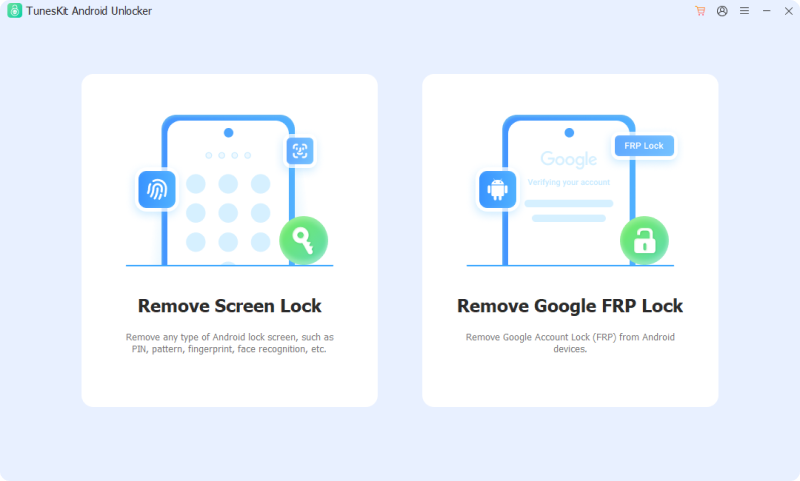
Step 1 Select Remove Screen Lock
Download and Launch Download and install TunesKit Android Unlocker on your PC or Mac. Open the program and select the feature labeled "Remove Screen Lock".
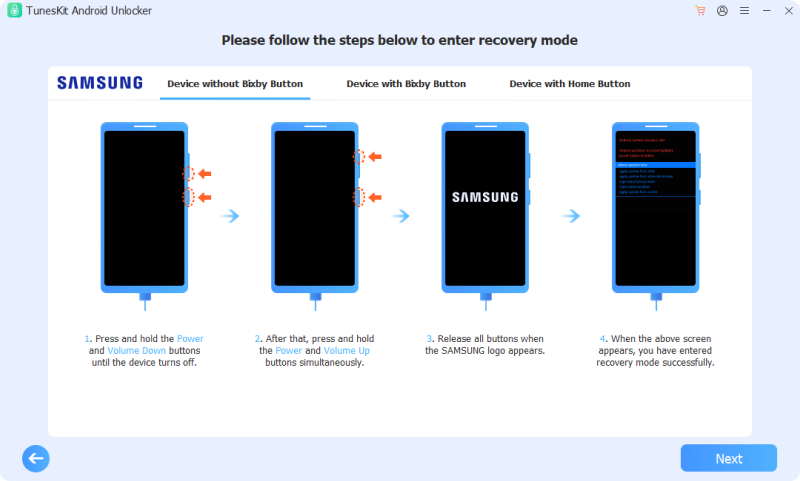
Step 2 Enter recovery mode
Follow the instructions on your computer screen to let your phone enter recovery mode. Follow it and then click the Next button.
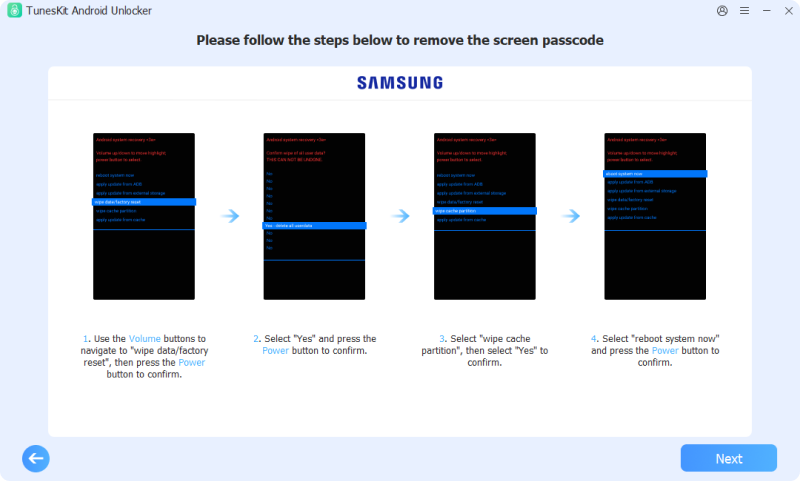
Step 3 Remove screen lock
Follow the steps shown on the computer to unlock your phone screen lock. After that, click the Next button.
Part 5. Conclusion
Bypassing FRP on LG can feel like a daunting technical challenge, especially when you are locked out of your own device. However, as we have outlined in this guide, it is entirely possible to reclaim access whether you have a computer handy or are relying solely on the device itself.


