


UnlockTool Review: Features, Safety, Pricing, and User Real Feedback
Unlocking or flashing a smartphone can be tricky — especially with the increasing number of Android security layers. That's where tools like UnlockTool come in. Marketed as a powerful solution for FRP bypass, flashing, and device unlocking, it has gained attention among technicians and advanced users worldwide.
But is UnlockTool safe and worth using? This detailed review explores its features, pricing, user experience, and most importantly, its safety reputation, so you can decide confidently.

Part 1. Full Review of UnlockTool
To determine whether UnlockTool is a reliable and practical solution for mobile device unlocking, it's essential to start with a clear understanding of what the software actually does. In this section, we'll begin our in-depth review by explaining what UnlockTool is, its core purpose, and the main features it provides for Android device servicing.
1.1 What is UnlockTool?
UnlockTool is a Windows-based mobile servicing software designed to help users perform advanced operations such as:
- FRP (Factory Reset Protection) bypass
- Flashing and firmware updates
- Bootloader unlocking and relocking
- Screen lock and pattern removal
- Repair and IMEI-related services
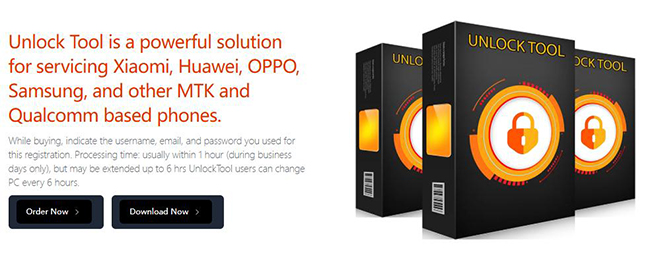
It primarily targets Android devices, supporting brands like Samsung, Xiaomi, Huawei, Vivo, OPPO, Vsmart, and many MTK or Qualcomm-based phones.
1.2 Main Features of UnlockTool
FRP and Screen Lock Removal
For many users, FRP bypass is the main reason to try UnlockTool. It supports multiple FRP methods depending on chipset and Android version, though success rates vary by brand.
Flashing and Firmware Repair
Technicians can use UnlockTool to flash firmware, fix bootloops, or unbrick certain devices — tasks that typically require multiple OEM tools.
Broad Device Compatibility
UnlockTool updates frequently to support new Android models. According to its changelog, each update adds new bootloaders, FRP fixes, or firmware options. This dynamic update schedule is one reason professionals continue using it.
Regular Software Updates
UnlockTool developers release periodic updates via their portal, introducing bug fixes and new device compatibility. Active updates show a degree of reliability, though each update may trigger antivirus alerts (more on that below).
Online License and Activation Management
UnlockTool uses a license-based system where users purchase activation keys or temporary access (like 6-hour, 3-month, 6-month, or 12-month plans).
1.3 Pricing and License Options
UnlockTool isn't a free tool. Licenses are sold officially and through authorized resellers. Typical prices are:
- 3-Month License: $20
- 6-Month License: $30
- 1-Year License: $50
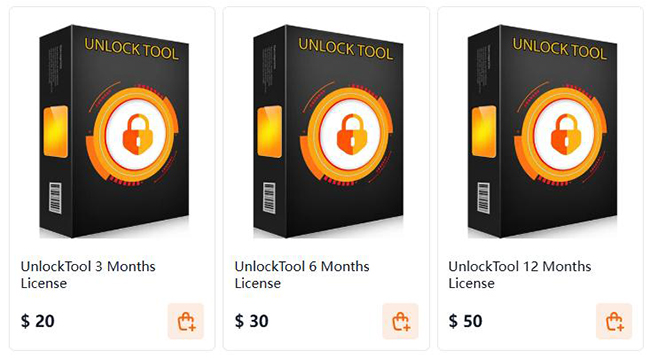
You can buy a license key and activate it through the official client.
 Note
Note
Only purchase from trusted resellers listed on the official website to avoid counterfeit or malware-infected builds.
1.4 Ease of Use and Performance
Installation: UnlockTool installation is relatively straightforward, but many antivirus programs flag it as "riskware" during setup. Some users report needing to disable their antivirus to install it, which is risky.
User Interface: The interface is functional but not beginner-friendly. Options are grouped by brand and operation type. It's designed for users familiar with firmware flashing, not average consumers.
Performance: In user reports, UnlockTool performs well for certain Android chipsets (especially MTK). However, inconsistent success rates and connection issues are common, particularly with newer devices or protected firmware.
1.5 Is UnlockTool Safe and Legitimate?
This is the most important question users ask, and the answer is mixed. Users from different platforms gives different answers for these questions.
FortiGuard Labs classifies UnlockTool as "Riskware/UnlockTool", indicating it's potentially unwanted or risky software, though not outright malware.
ScamAdviser and similar trust checkers show low to medium trust scores for the website, suggesting caution.
Community forums (XDA, Reddit, Microsoft Answers) report antivirus detections and possible Trojan warnings on certain unofficial installers.
Some users claim that this tool has a high success rate.
In summary, UnlockTool's detection as riskware doesn't automatically mean it's malicious. Many system-modifying tools trigger antivirus flags. However, the real risk lies in:
- Downloading from unofficial mirrors, which may host infected files.
- Granting the tool administrator privileges, which can be exploited if the source is unsafe.
1.6 User Feedback: What Do Real Users Say?
| Positive Feedback | Negative Feedback |
|---|---|
| Works well for specific Android brands (especially Xiaomi and Vivo). | Flagged as virus by Windows Defender. |
| Affordable for technicians managing multiple devices. | Complex interface and setup process. |
| Frequent updates and new device support. | No official customer support; responses only in forums. |
| Successful FRP and flashing results reported. | Some users report "scam" resellers and license issues. |
In short, experienced technicians find UnlockTool useful, but casual users may find it intimidating and potentially unsafe.
1.7 Pros and Cons of UnlockTool
 Pros:
Pros:- Supports many Android chipsets and brands.
- Offers FRP, flashing, and repair functions in one tool.
- Frequent updates.
- Affordable compared to enterprise solutions.
 Cons:
Cons:- Triggered by antivirus as riskware.
- No official support channel.
- Risk of counterfeit downloads.
- Requires technical knowledge.
- Not suitable for iPhone/iCloud unlocking (despite claims from unofficial sources).
1.8 How to Download & Activate & Use UnlockTool
To download UnlockTool, you should go to its official download website. You will get the UnlockTool latest version download for PC.
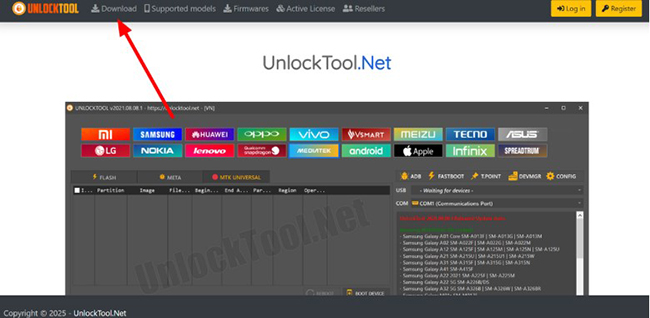
How to activate UnlockTool?
Step 1. After you download and install UnlockTool on your computer from its official website, open it and create an account.
Step 2. Subscribe to a plan for it.
Step 3. Log in to UnlockTool with your credentials.
Step 4. Enter the activation key provided after purchasing.
How to use UnlockTool to bypass FRP?
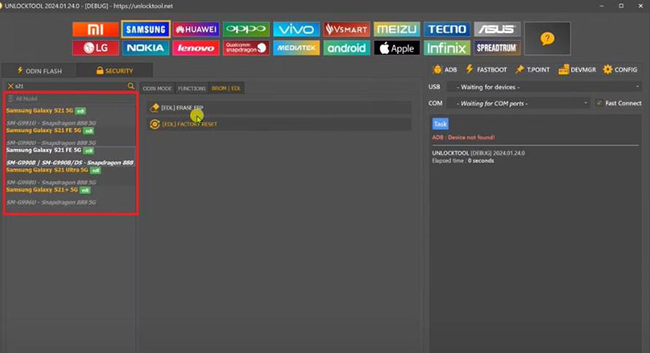
Step 1. Log in to UnlockTool.
Step 2. Connect your Android phone to the computer via a USB cable.
Step 3. At the top of the software, you will see many phone brand. You should choose the one that your phone is.
Step 4. At the left side bar, select the specific model.
Step 5. Choose Erase FRP on the center panel.
Part 2. Best UnlockTool Alternative - TunesKit Android Unlocker (Casual Users Friendly)
Given that UnlockTool has a complex process in use, the software is not suitable for all users. You may need an easier method to bypass FRP on your phone.
TunesKit Android Unlocker is a professional Android unlocking tool designed to help users remove various types of screen locks and Google FRP locks without needing a password. It supports PIN, pattern, password, fingerprint, and face lock removal on most Android devices, including Samsung, Xiaomi, Huawei, and others.
Key Features of TunesKit Android Unlocker
Bypass FRP lock with few steps. Unlock Android screen without passcode with ease. Supports lots of Android versions including 12.
 600,000+ Downloads
How to bypass FRP with TunesKit Android Unlocker
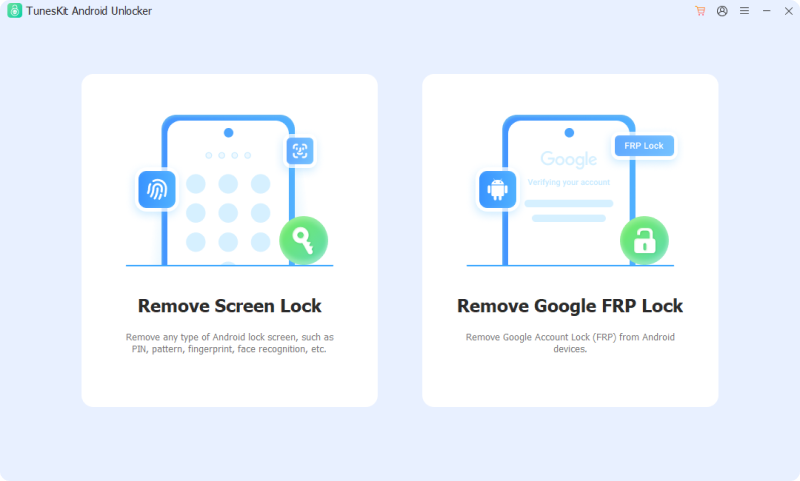
Step 1 Connect phone to computer
Download and install TunesKit Android Unlocker on your computer. Connect your Android phone to this computer via a USB cable.
Step 2 Select removal feature
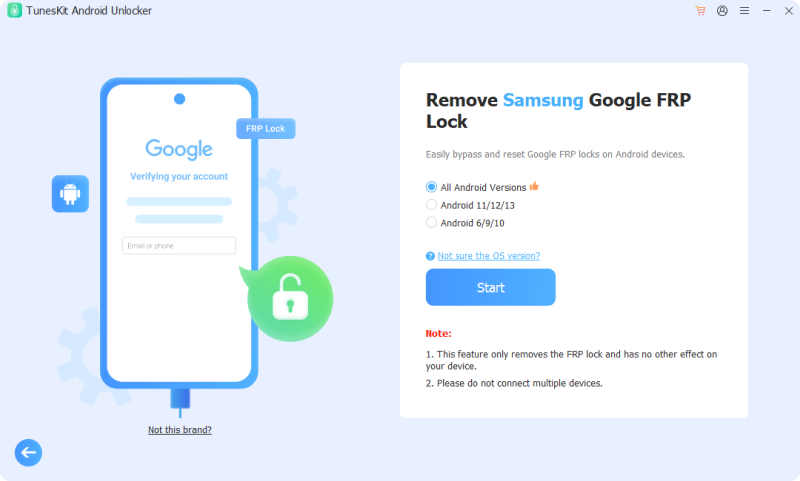
Open your phone and select Remove Google FRP Lock and then select the device brand. Click the Start button.
Step 3 Start FRP bypass
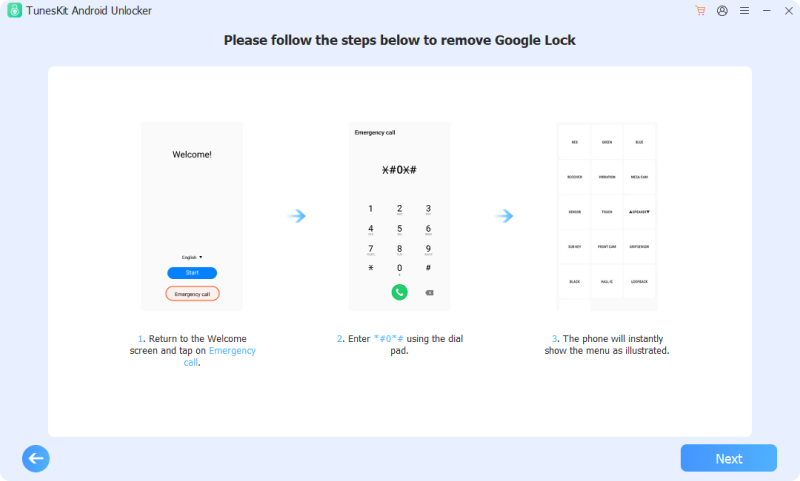
Follow the instruction on the screen to set your phone. Next, click the Next button to start bypassing FRP. Your phone will receive a prompt, tap Allow. The process will finish after a few seconds.
Part 3. FAQs About UnlockTool
-
1. Does UnlockTool support iPhone unlocking?
No. UnlockTool focuses on Android devices. Claims about iCloud bypass are misleading and should be ignored.
-
2. What to do if UnlockTool license fails to activate?
Contact your official reseller for reactivation or check whether the activation server is online. Avoid sharing your license key publicly.
Part 4. Conclusion
UnlockTool delivers impressive capabilities for Android technicians but comes with substantial risk and learning difficulty. For professionals, it can be a cost-effective utility. For everyone else, safer, user-friendly alternatives like TunesKit Android Unlocker offer a better experience without compromising system security.


