


AddROM FRP Bypass Review 2026: Is It Worth Trying?
Factory Reset Protection (FRP) is one of Android's most important security mechanisms, designed to prevent unauthorized access after a device is reset. However, when legitimate users forget their Google account credentials, FRP can quickly turn from a security feature into a serious roadblock. This frustration is exactly why many users start searching for tools like AddROM FRP Bypass.
In this AddROM FRP Bypass review, we take a detailed, experience-driven look at what AddROM actually offers, how it works in practice, where it falls short, and whether it's still a viable option today.
Part 1. What is AddROM FRP Bypass?
AddROM FRP Bypass refers to a collection of unofficial APK files and workaround methods designed to help users bypass Google's Factory Reset Protection on Android devices. These files are typically used during the initial device setup process, when the phone is locked at the Google account verification screen and normal access to settings or apps is restricted.
Unlike professional FRP removal software, AddROM does not offer a guided interface, customer support, or guaranteed compatibility. Instead, it relies on older Android system behaviors that may or may not still function on your device.
Part 2. Supported Devices and Android Versions
Compatibility is one of the most important—and most misunderstood—factors when it comes to AddROM FRP Bypass. Many failed attempts happen simply because users try to apply the method on devices it was never designed to support.
Android Version Support
- Most reliable on Android 5.0 to Android 8.1
- Limited and inconsistent results on Android 9
- Rarely works on Android 10 and newer
Device Compatibility
- Commonly used on older Samsung, LG, Huawei, and Motorola models
Part 3. Pros and Cons of AddROM FRP Bypass
Any honest AddROM FRP Bypass review must weigh both its advantages and its limitations. While the tool remains popular due to its accessibility, it also comes with significant drawbacks that users should consider carefully before attempting it.
 Pros:
Pros:- Free to use, with no subscription or activation required
- PC-free approach, appealing to users without technical tools
- Widely documented online, with tutorials available
 Cons:
Cons:- Low success rate on newer Android versions
- Complex, multi-step process prone to errors
- No official support or updates
- Requires installing APKs from unverified sources
- Results vary widely depending on device and OS
Part 4. How to Use AddROM to Bypass FRP
The steps below outline the "Classic Method," which is highly effective for devices running Android 5.0 through Android 9.0. This direct method often fails on newer updates due to enhanced security. If you are using Android 10, 11, or newer, consider the alternatives listed later in this article.
Step 1. Connect your locked phone to a strong Wi-Fi network. Insert a SIM card into your locked phone.
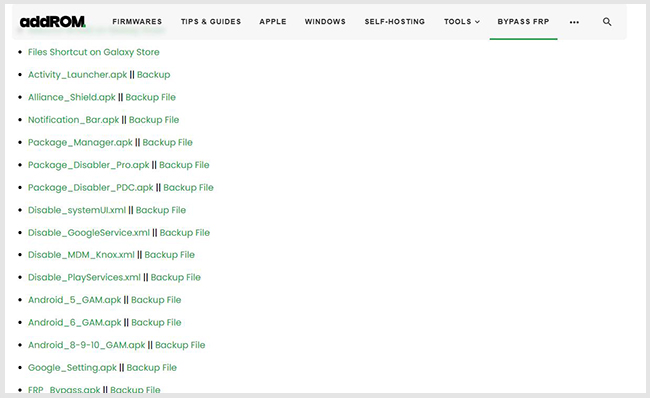
Step 2. Visit the AddROM FRP Bypass website.
Step 3. Click HushSMS.apk.
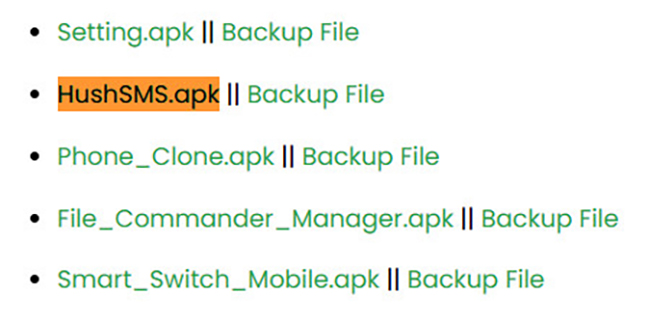
Step 4. Install the APK file and you need to allow the unknown it by following the prompt.
Step 5. Sign in to the app and select WAP PUSH SL. Enter the number of your locked phone. Enter www.youtube.com/@addROMcom in the text box. Next, tap SEND WAP PUSH SL.
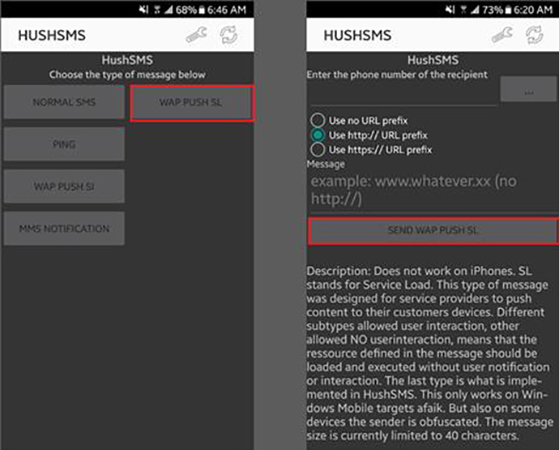
Step 6. Now, your locked phone will show a prompt and you need to tap the OK button to enter YouTube. Go to Menu and then Terms & Privacy Policies in YouTube and you will see a browser page.
Step 7. Tap the search bar and go to AddROM FRP Bypass website.
Step 8. Scroll down and download the Google Account Manage (GAM) APK and the FRP bypass APK. Install the two APKs on your locked phone.
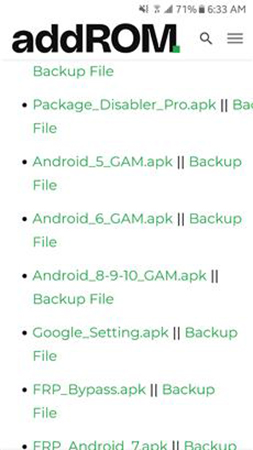
Step 9. Open the FRP bypass app. Tap Menu and choose Brower sign-in to sign in it with your Google account you want an then restart your device. The FRP lock should be removed.
Part 5. Best Alternative to AddROM FRP Bypass
For users whose devices run newer Android versions or who repeatedly fail with APK-based methods, a more structured solution may be necessary. One commonly used alternative is TunesKit Android Unlocker, a PC-based tool designed to remove various Android locks, including Google FRP.
Unlike AddROM FRP Bypass, which depends on system loopholes that may already be patched, TunesKit Android Unlocker follows a guided unlocking process that communicates directly with the device through a computer. This approach reduces reliance on unstable setup exploits and is generally more predictable on modern Android systems.
Why Choose TunesKit Android Unlocker:- Remove Google FRP lock after factory reset without previous Google account
- Support newer Android versions where APK methods fail
- Work especially well with Samsung devices
- Provide on-screen guidance, reducing user error
Key Features of TunesKit Android Unlocker
No complex tools, no risk - just connect, follow clear instructions, and bypass FRP lock on your Android device.
 600,000+ Downloads
Here are the detailed Steps to Use TunesKit Android Unlocker to Bypass FRP Lock.
Step 1 Connect the FRP-Locked Android Device
Download and install TunesKit Android Unlocker on a Windows or macOS computer. Use a USB cable to connect your Android phone (stuck on Google verification screen) to the computer.
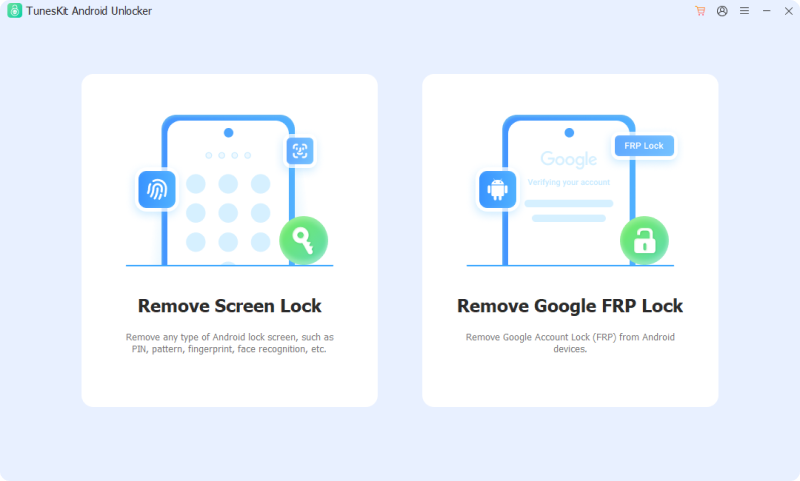
Step 2 Select Remove Google FRP Lock
From the main interface, choose the Remove Google FRP Lock option. At this stage, the software may ask you to select your device brand and confirm Android version. Click the Start button if no problem.
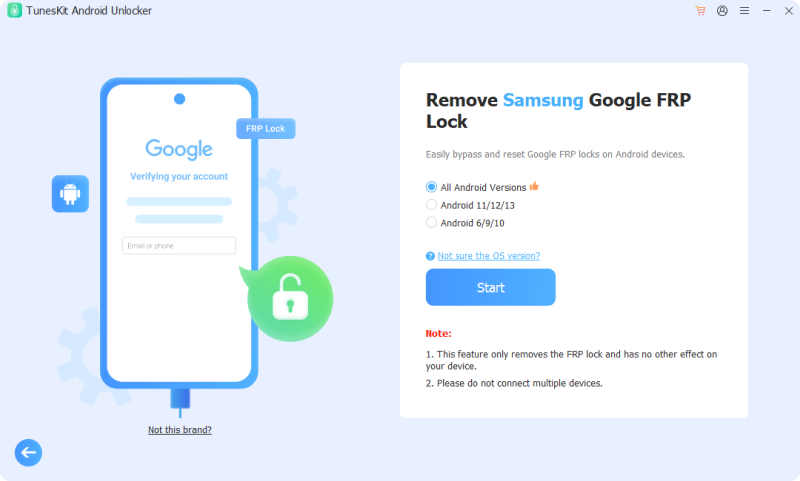
Step 3 Bypass the FRP Lock
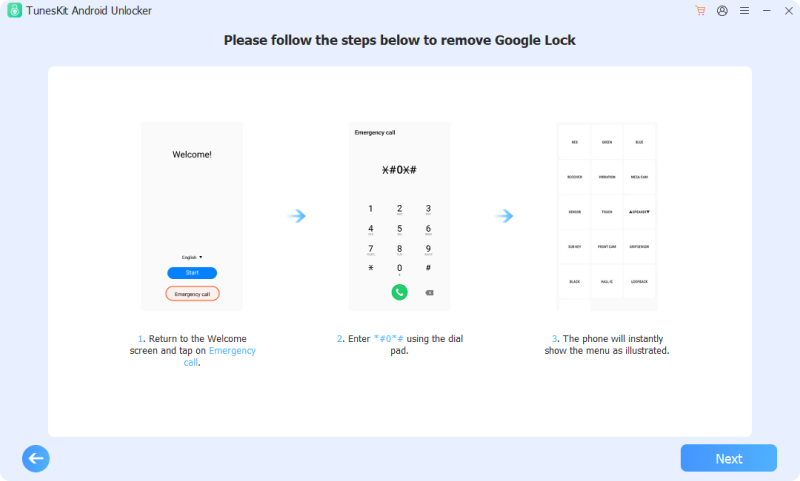
TunesKit provides step-by-step instructions based on your device model. Follow the instructions and then click the Next > Start button to bypass FRP lock on your locked phone.
Part 6. FAQs about AddROM FRP Bypass
-
1. Is AddROM FRP Bypass completely free?
Yes, AddROM FRP Bypass itself does not require payment, subscriptions, or license activation. Users can access the required APK files without directly paying for the tool.
-
2. Does AddROM FRP Bypass permanently remove FRP?
In most cases, no. AddROM FRP Bypass typically works by temporarily bypassing the Google account verification step during setup, rather than fully removing FRP protection at the system level. If the device is factory reset again without properly managing the Google account, FRP can reappear and lock the phone once more.
Part 7. Conclusion
AddROM FRP Bypass is best described as a legacy workaround rather than a modern unlocking solution. It still holds some value for users with older devices, but its relevance continues to decline as Android security evolves.
If your phone meets the right conditions and you're willing to accept the risks, AddROM may be worth trying. For most modern devices, however, safer and more reliable alternatives like TunesKit Android Unlocker are likely to deliver better results with less frustration.


