iPhone 5s/5c Activation Lock: How to Remove or Bypass It

Seeing the Activation Lock screen on an iPhone 5s or iPhone 5c can be frustrating, especially if you bought the device second-hand or forgot the Apple Account previously used on it. You may also see a message such as "iPhone Locked to Owner" after resetting the device.
The good news is that the correct solution depends on why Activation Lock is enabled. This guide explains how Activation Lock works on the iPhone 5s and iPhone 5c, what to do after a factory reset, and which options are available if you cannot access the original Apple Account. It also explains the limitations of DNS-based bypass methods and discusses a third-party solution for situations where the official options are not practical.
 Note
Note
Activation Lock is a security feature designed to prevent unauthorized use of a lost or stolen iPhone. You should only attempt to remove Activation Lock from a device you own or are authorized to use.

- Can You Remove Activation Lock from an iPhone 5s or 5c?
- Why Does My iPhone 5s/5c Say "iPhone Locked to Owner"?
- Before You Try to Remove Activation Lock
- How to Remove Activation Lock on iPhone 5s/5c
- iPhone 5s/5c Activation Lock Removal: Which Method Should You Choose?
- FAQs About iPhone 5s/5c Activation Lock
- Final Thoughts
Can You Remove Activation Lock from an iPhone 5s or 5c?
Yes, but the available options depend on your situation.
Activation Lock is associated with Find My and the Apple Account linked to the device. Simply erasing the iPhone or restoring it to factory settings does not normally remove the Activation Lock. When the device is activated again, Apple's activation servers can check whether it is still associated with the previous owner's account.
Here is the best approach for common situations:
| Your Situation | Recommended Solution |
|---|---|
| You know the Apple Account and password | Remove Activation Lock directly on the iPhone |
| You forgot your Apple Account password | Recover your Apple Account and then remove the device |
| You bought a used iPhone 5s/5c | Ask the previous owner to remove the device |
| You cannot contact the previous owner | Check whether you have valid proof of purchase and contact Apple |
| You only want to access limited device functions | A DNS-based method may provide limited temporary access, but it does not permanently remove Activation Lock |
| Official options are unavailable | Consider a compatible third-party Activation Lock removal solution |
The most reliable solution is always to remove the device from the Apple Account that is currently associated with it.
Why Does My iPhone 5s/5c Say "iPhone Locked to Owner"?
The "iPhone Locked to Owner" message usually means that the iPhone is still protected by Activation Lock. This commonly happens when:
- The previous owner did not remove the iPhone from their Apple Account before selling it.
- The iPhone was erased without disabling Find My.
- You restored a second-hand iPhone to factory settings and discovered that it was still linked to the previous owner's account.
- You purchased a used device that was not properly removed from the seller's account.
- You forgot the Apple Account credentials associated with your own iPhone.
A factory reset only erases the data stored on the device. It does not automatically remove the device from the Apple Account or disable Activation Lock.
This distinction is important: Factory Reset ≠ Activation Lock Removal
If your iPhone 5s or iPhone 5c displays the Activation Lock screen after a reset, repeatedly restoring the device will not normally solve the problem. You need to address the Apple Account association itself.
Before You Try to Remove Activation Lock
Before choosing a method, identify which situation applies to you.
- You Know the Apple Account: If you know the Apple Account and password associated with the iPhone, you can normally remove Activation Lock using the account credentials. This is the simplest and most reliable solution.
- You Forgot Your Apple Account Password: If the iPhone belongs to you but you cannot remember your password, try to recover your Apple Account first. Once you regain access, you can remove the device from your account.
- You Bought a Second-Hand iPhone 5s or 5c: If you purchased the device from another person, the previous owner should remove it from their account. This is usually the best solution because the device can then be activated normally without workarounds.
- You Cannot Contact the Previous Owner: This situation is more complicated. If you have legitimate proof that you purchased the device, you can contact Apple Support and ask whether they can assist. Apple may require documentation proving ownership before providing support for Activation Lock.
- You Are Looking for a Temporary Bypass: Some users search for DNS-based Activation Lock bypass methods. These techniques may provide limited access to certain functions, but they should not be confused with permanent Activation Lock removal.
How to Remove Activation Lock on iPhone 5s/5c
There are several ways to remove Activation Lock from an iPhone 5s or iPhone 5c, depending on whether you know the linked Apple Account or can contact the previous owner. Below, we'll walk you through the most reliable options, starting with the official method for second-hand devices.
Method 1. Remove Activation Lock with the Previous Owner
If you bought a second-hand iPhone 5s or iPhone 5c and it is still linked to the previous owner's Apple Account, the best solution is to ask the previous owner to remove the device from their account. The steps are slightly different depending on whether they still have the iPhone.
 View Also:
 If the Previous Owner Has the iPhone
If the previous owner still has the iPhone 5s or iPhone 5c, ask them to remove Activation Lock directly from the device.
- Step 1. Turn on the iPhone and connect it to a Wi-Fi network.
- Step 2. When the Activation Lock screen appears, ask the previous owner to enter the Apple Account and password associated with the device.
- Step 3. Follow the on-screen instructions to complete the activation process.
- Step 4. Once the device is activated, the previous owner can erase the iPhone and sign out of their Apple Account if you have not already done so.
- Step 5. Restart the iPhone and complete the setup using your own Apple Account.
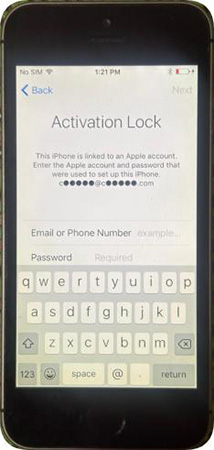
This is usually the simplest option because the previous owner can verify their account directly on the device.
If the Previous Owner No Longer Has the iPhone
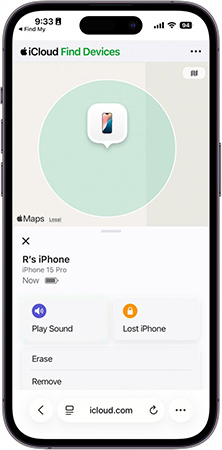
If the previous owner has already sold or handed over the iPhone, they can remove it remotely from their Apple Account.
- Step 1. Ask the previous owner to sign in to their Apple Account on a device they can access or sign in to the iCloud.com website with the Apple Account.
- Step 2. Open the Find My service and locate the iPhone 5s or iPhone 5c in their list of devices.
- Step 3. Select the iPhone and choose the Erase option to erase the device if it is still listed as active.
- Step 4. After the erase process is complete, select the Remove option to remove the device from the account.
- Step 5. Restart the iPhone and connect it to Wi-Fi.
- Step 6. Begin the setup process again. If the previous owner has successfully removed the device from their account, the Activation Lock screen should no longer prevent activation.
Method 2. Remove Activation Lock Using Your Apple Account
If the iPhone belongs to you and you still have access to the Apple Account associated with it, you can remove Activation Lock by signing in with the correct account credentials. This is particularly useful if you recently erased your own iPhone and are now asked to verify the Apple Account during setup.
- Step 1. Start the iPhone 5s or iPhone 5c and proceed through the setup process until you reach the Activation Lock screen. Enter the Apple Account and password previously linked to the device. Make sure you use the account that was originally associated with Find My on the iPhone.
- Step 2. After the credentials are successfully verified, follow the remaining setup instructions.
- Step 3. You can then sign in with your own Apple Account if necessary and configure the iPhone as a new device or restore your personal data from an available backup.
Forgot Your Apple Account Password?
If you know which Apple Account is associated with the iPhone but cannot remember the password, account recovery is generally the appropriate next step. After regaining access to the account, you can return to the iPhone and complete the activation process.
Method 3. Ask Apple Support to Help Remove Activation Lock
If you are the legitimate owner of an iPhone 5s or iPhone 5c but cannot access the associated Apple Account, contacting Apple Support may be another option. Apple's ability to assist depends on the circumstances and the documentation you can provide. In particular, you may need valid proof of purchase that clearly identifies the device.
Before contacting Apple, prepare as much relevant information as possible, such as:
- The iPhone's serial number or other identifying information.
- Your original purchase documentation.
- Information about where and when the device was purchased.
- Any other documentation that can demonstrate legitimate ownership.
Keep in mind that owning the physical device alone does not necessarily prove that you are authorized to remove Activation Lock. Apple's support team determines whether the available documentation is sufficient. For a second-hand iPhone, this is why purchasing from a reputable seller and keeping the original receipt can be important.

Method 4. Use TunesKit iPhone Unlocker to Remove Activation Lock
If you cannot contact the previous owner, cannot access the Apple Account, or are unable to resolve the Activation Lock through the official options, you may consider using a third-party Activation Lock removal tool.
TunesKit iPhone Unlocker is designed to help users deal with certain iPhone lock-related issues, including Activation Lock in supported scenarios. It can be an option for users who have already tried the official solutions but still cannot activate their device. Before using any third-party tool, check the latest supported device models and iOS versions on the official product page. Compatibility can vary depending on the iPhone model, iOS version, and the specific lock state.
Key Features of TunesKit iPhone Unlocker
Remove activation lock without previous owner. Unlock iOS screen without passcode. High success rate.
 600,000+ Downloads
Step 1. Select unlock feature
Download the latest version of TunesKit iPhone Unlocker from its official website and install it on a compatible Windows or Mac computer. Launch the program and connect your iPhone 5s or iPhone 5c to the computer using a compatible USB cable. Choose the Remove iCloud Activation Lock feature.

Step 2. Put the iPhone into the Required Mode
Follow the instructions provided by the software to place your iPhone into the required mode and prepare it for the unlocking process.
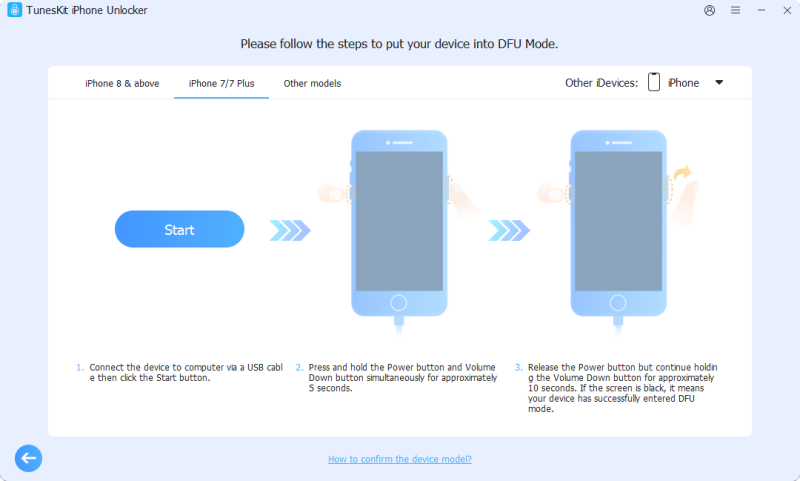
Step 3. Start the Removal Process
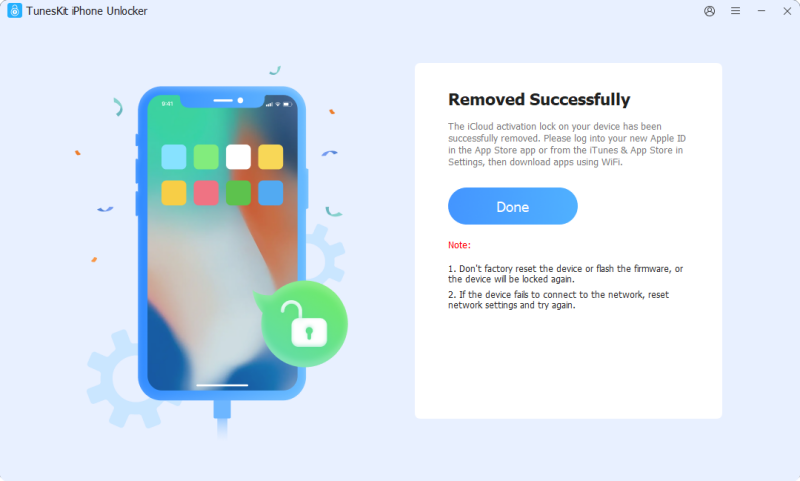
Confirm the device information and begin the process. Keep the iPhone connected to the computer and follow the instructions shown on the screen. After the process is completed, restart the iPhone and follow the setup instructions.
Method 5. Try a DNS Bypass for Limited Access
If you search for "iPhone 5s Activation Lock bypass" or "iPhone 5c Activation Lock bypass," you may come across DNS-based bypass methods. A DNS bypass attempts to redirect the device's network requests to a different server during the activation process.
Depending on the device and network configuration, this may provide access to a limited interface or a small number of functions. However, DNS bypass should not be confused with permanent Activation Lock removal.
- Step 1. Wake up your iPhone and set up the Settings and region.
- Step 2. Click on the WiFi Settings. Click on the i icon.
- Step 3. Navigate to the DNS section and enter the DNS address based on the region.
- USA: 104.154.51.7
- South America: 35.199.88.219
- Europe: 104.155.28.90
- Asia: 104.155.220.58
- Other: 78.100.17.60
- Step 4. Go back to the Activation Lock screen and click on the Activation Help option. Then, you will be able to enter the Home screen and bypass the Activation Lock on iPhone 5S.

Limitations of DNS Activation Lock Bypass
DNS-based methods are generally not equivalent to removing Activation Lock from an iPhone. Depending on the method, you may experience limitations such as:
- The Activation Lock may still remain on the device.
- The bypass may only provide temporary or limited access.
- Cellular functions may not work normally.
- Phone calls and mobile data may be unavailable.
- The App Store may not function as expected.
- You may not be able to sign in with your own Apple Account.
- Some features may stop working after restarting the device.
- The method may become unavailable if the DNS service stops working.
For these reasons, DNS bypass is best viewed as a temporary workaround rather than a permanent Activation Lock removal solution. If your goal is to fully activate an iPhone 5s or iPhone 5c and use it as a normal device, removing the device from the original Apple Account remains the preferred solution.
iPhone 5s/5c Activation Lock Removal: Which Method Should You Choose?
The best method depends on your specific situation. Before trying a bypass method, consider whether you can resolve the problem through the official Activation Lock removal process.
| Method | Apple Account Required | Previous Owner Required | Computer Required | Permanent Removal | Difficulty |
|---|---|---|---|---|---|
| Previous Owner Removes Device | No, for the new owner | Yes | No | Yes | Easy |
| Use Your Apple Account | Yes | No | No | Yes | Easy |
| Apple Support | May be required | No | No | Depends | Medium |
| TunesKit iPhone Unlocker | Depends on supported scenario | No | Yes | Depends on device/software support | Medium |
| DNS Bypass | No | No | Usually No | No | Easy |
FAQs About iPhone 5s/5c Activation Lock
-
Does a Factory Reset Remove Activation Lock?
No. A factory reset erases the content and settings stored on the iPhone, but it does not necessarily remove the device from the Apple Account associated with Find My. That is why a previously reset iPhone can still display "iPhone Locked to Owner" during setup. The previous owner must remove the device from their account, or the legitimate owner must regain access to the associated Apple Account.
-
Is iPhone 5s Activation Lock the Same as a Screen Passcode?
No. A screen passcode protects access to the data on the device. Activation Lock is associated with Find My and the Apple Account linked to the iPhone. These are different security mechanisms.
Final Thoughts
Removing Activation Lock depends on your access to the linked Apple Account and device ownership. Try the official solutions first, contact Apple with proof of purchase when applicable, or consider TunesKit iPhone Unlocker if other options are unavailable.