How to Remove Activation Lock Without Previous Owner [2026]

Bought a used iPhone only to find it stuck on Activation Lock or iPhone Locked to Owner, but you can no longer contact the previous owner? Your options depend on whether you have valid proof of purchase and which iPhone and iOS version you are using.
If you legally own the device, you can first submit an Activation Lock support request to Apple with proof of purchase. For certain supported older iPhones, TunesKit iPhone Unlocker provides another computer-based option. A DNS workaround is also available for some very old iOS versions, but it only provides limited access and does not permanently remove Activation Lock.

- Quick Answer: Can You Remove Activation Lock Without the Previous Owner?
- What Is Activation Lock?
- How to Remove Activation Lock Without Previous Owner
- Activation Lock Removal vs Bypass: What's the Difference?
- What If You Can Contact the Previous Owner Later?
- FAQs About Removing Activation Lock Without Previous Owner
- Conclusion
Quick Answer: Can You Remove Activation Lock Without the Previous Owner?
Yes, but only in specific situations. Apple can help remove Activation Lock if you can provide acceptable proof of purchase. If that route is unavailable, a compatible Activation Lock removal tool may work on certain older iPhones you own or are authorized to manage. DNS bypass is free but works only on legacy iOS versions and does not remove the lock from Apple's activation servers.
Here is a quick comparison:
| Situation | Best Option | Permanent Removal? | Cost |
|---|---|---|---|
| You have valid proof of purchase | Apple Activation Lock support request | Yes, if approved | Free |
| You own a supported older iPhone | TunesKit iPhone Unlocker | Software-based bypass/removal | Paid |
| Device runs iOS 8–10 | DNS bypass | No | Free |
| You later reach the previous owner | Ask them to remove the device from Find My | Yes | Free |
| You suspect the device is lost or stolen | Return it to the seller or rightful owner | — | — |
 Note
Note
Activation Lock is an anti-theft feature. Only try these methods on an iPhone or iPad you legally own. Apple advises against taking ownership of a used device that is still protected by Activation Lock.
What Is Activation Lock?
Activation Lock is part of Apple's Find My security system. It turns on automatically when Find My is enabled and links the iPhone or iPad to the owner's Apple Account on Apple's activation servers.
Even after the device is erased, Activation Lock can remain active and prevent another person from setting up and using it without the required Apple Account credentials or another supported authorization method. That is why simply factory-resetting an iPhone does not solve an Activation Lock problem.
How to Remove Activation Lock Without Previous Owner
If you cannot contact the previous owner, use the method that matches your ownership proof, device model, and iOS version. Apple Support is the preferred route when you have valid purchase documentation, while the other methods apply only to specific situations.
Method 1. Ask Apple to Remove Activation Lock with Proof of Purchase
 Best For: Users who purchased the device legitimately and still have valid proof of purchase.
If you legally purchased the iPhone and have proof of purchase documentation, Apple's official Activation Lock support request should be your first option. Apple's current support page specifically states that users who need help removing Activation Lock and have proof of purchase can submit an Activation Lock support request.
This is the best method because an approved request addresses Activation Lock through Apple's own system rather than relying on a device-specific workaround.
 Pros:
Pros:- the locked iPhone or iPad;
- valid proof of purchase;
- identifying information for the device when requested;
- contact information that Apple can use during the request.
The exact information Apple requests can vary, so follow the current instructions on Apple's support page instead of relying on an older checklist.
How to Submit an Activation Lock Support Request
- Step 1. Open Apple's official How to remove Activation Lock support page.
- Step 2. Find the Start a support request section.
- Step 3. Open the Activation Lock support-request page.

- Step 4. Follow Apple's onscreen instructions and provide the requested device and purchase information.
- Step 5. Submit the request and wait for Apple to review your documentation.
Apple decides whether the submitted information is sufficient to establish eligibility for removal.
Method 2. Use TunesKit iPhone Unlocker on a Supported iPhone
Best For: Supported older iPhones when the previous owner is unavailable.If you cannot contact the previous owner and Apple's support-request option does not fit your situation, TunesKit iPhone Unlocker provides an Activation Lock mode for supported older iPhones. This is the current TunesKit product that includes Activation Lock removal.
The current TunesKit iPhone Unlocker product page lists Activation Lock support for iPhone 5s through iPhone X running iOS 12.0–16.7.15 and describes its current Activation Lock workflow as requiring no jailbreak on some specific iPhones.
Why Use TunesKit iPhone Unlocker?
TunesKit iPhone Unlocker is designed for users who prefer a graphical, step-by-step desktop process instead of manually working with jailbreak utilities or technical command-line tools.
 600,000+ Downloads
How to Remove Activation Lock with TunesKit iPhone Unlocker
- Step 1. Download and install the current version of TunesKit iPhone Unlocker on your Windows PC or Mac. Connect the locked iPhone to the computer with a USB cable. On the main interface, choose Remove iCloud Activation Lock. Then click the Start button.
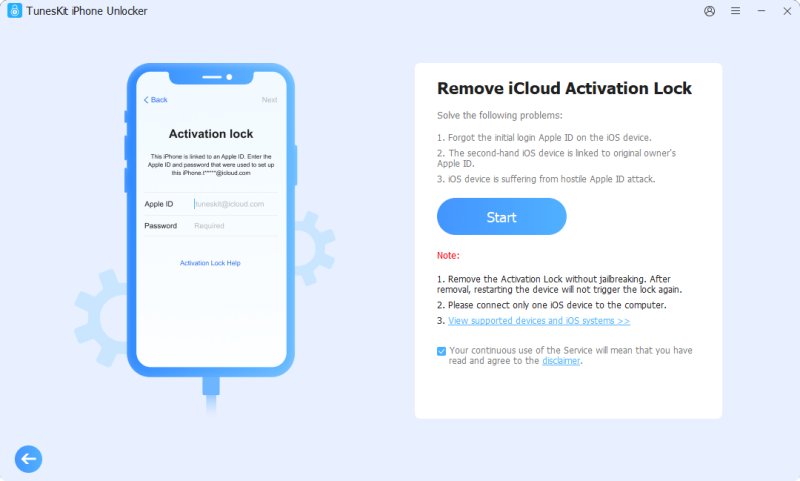
- Step 2. TunesKit will first prepare the connected device and display instructions for entering DFU mode. Follow the onscreen button sequence for your iPhone model carefully until the program recognizes the device in DFU mode.
- Step 3. Once the supported device is recognized correctly, continue with the removal process. Keep the iPhone connected to the computer while TunesKit processes the device. Do not disconnect the USB cable until the software reports that the process has finished.
Method 3. Try DNS Bypass on iOS 8–10 [Free But Limited]
Best For: Testing limited access on an old iPhone or iPad running iOS 8–10.You may also find tutorials suggesting an iCloud DNS bypass as a free way to get past Activation Lock without the previous owner. This method should be treated very differently from the first two.
DNS bypass does not permanently remove Activation Lock. It redirects part of the activation process to another server and can provide access to limited functions when it works. TunesKit's own current DNS documentation states that the method is mainly compatible with iOS 8 through iOS 10 and does not provide full access to the device. For a modern iPhone, this method is usually irrelevant.
How to Try DNS Bypass on an Old iPhone
- Step 1. Restart the iPhone and continue setup until you reach the Wi-Fi screen.
- Step 2. Tap the i icon next to the Wi-Fi network you want to use.
- Step 3. Tap Configure DNS and choose Manual.
- Step 4. Remove the existing DNS entry and add the appropriate DNS server. Common legacy DNS addresses include:
- North America:
104.154.51.7 - South America:
35.199.88.219 - Europe:
104.155.28.90 - Asia:
104.155.220.58 - Australia/Oceania:
35.189.47.23 - Other regions:
78.100.17.60
- Step 5. Save the setting, return to Wi-Fi, reconnect to the network, and continue setup.
Activation Lock Removal vs Bypass: What's the Difference?
The words remove, unlock, and bypass are often used interchangeably online, but they do not always mean the same thing.
| Method | What It Actually Does |
|---|---|
| Apple official removal | Removes Activation Lock through Apple's account/activation system |
| Previous owner removal | Previous owner removes the device from their Apple Account/Find My |
| Software-based bypass/removal | Changes the activation state on a supported device using a third-party process |
| DNS bypass | Redirects activation traffic to provide limited temporary functionality |
| Factory reset | Erases local data but does not remove server-side Activation Lock |
This distinction matters when comparing solutions. For example, a factory reset is not an Activation Lock removal method. Apple states that Activation Lock can continue protecting a device even after it is erased.
What If You Can Contact the Previous Owner Later?
If you eventually reach the previous owner, asking them to remove the iPhone from their Apple Account is the simplest official solution. They do not necessarily need to have the iPhone physically with them. Apple's current web instructions allow the account owner to:
- Step 1. Go to iCloud.com/find.
- Step 2. Sign in to the Apple Account linked to the device.
- Step 3. Select the iPhone or iPad.
- Step 4. Choose Remove.
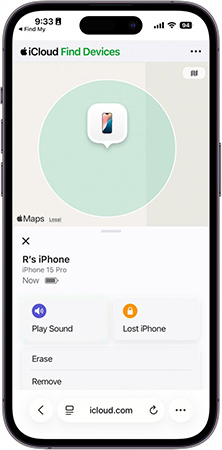
After the device is properly removed from the previous owner's account, restart setup and connect it to the internet again. If you can contact the seller, this should generally be preferred over a bypass.
FAQs About Removing Activation Lock Without Previous Owner
-
Can Apple remove Activation Lock without the previous owner?
Yes. Apple states that users who need help removing Activation Lock and have proof of purchase documentation can start an Activation Lock support request. Apple reviews the request before deciding whether the lock can be removed.
-
Does factory reset remove Activation Lock?
No. Activation Lock is linked to Apple's activation system rather than simply being stored as local iPhone data. It can remain enabled even after an iPhone or iPad is erased.
-
Can I remove Activation Lock without Apple ID or password?
If you have valid proof of purchase, Apple's support-request process does not depend on contacting the previous owner directly. For supported older devices you own, a tool such as TunesKit iPhone Unlocker also provides an Activation Lock mode without requiring the previous owner's Apple Account credentials. Check compatibility before using it.
Conclusion
If you need to remove Activation Lock without the previous owner, start with Apple's official support request when you have valid proof of purchase. For a supported older iPhone, TunesKit iPhone Unlocker offers another guided option without the old manual-jailbreak workflow.
DNS bypass can be tested on legacy iOS 8–10 devices, but it provides limited access rather than permanent removal. Before buying any used iPhone, always confirm that Activation Lock has already been removed.