


Solved! How to Unlock a Second Hand iPhone 2026
Buying a second-hand iPhone is a smart way to save money, but it often comes with a common headache: discovering the device is locked. Whether you are facing a forgotten screen passcode or the dreaded "iPhone Locked to Owner" (Activation Lock), this guide provides the most effective solutions to regain access.
Unlock Screen Lock/Activation Lock with Ease
Unlock used or second-hand iPhone in minutes whether screen lock or Activation Lock. No Apple Account or password required. Easy-to-use operation and user-friendly interface.
 600,000+ Downloads

Quick Comparison of Unlocking Methods
| Unlock What? | Success Rate | Data Loss | Requirements | |
|---|---|---|---|---|
| iOS 15.2+ Feature | Unlock Screen | Medium | Yes | iOS 15.2+ & Apple Account Password |
| iTunes / Finder | Unlock Screen | Medium | Yes | Recovery Mode knowledge |
| iCloud Remote | Remove Activation Lock/Screen Lock | High | Yes | Original Apple Account & Find My enabled |
| TunesKit Unlocker | Remove Activation Lock/Screen Lock | High | Yes | A computer & USB cable |
Video Guide: How to Unlock Second Hand iPhone Without Password
Crucial Pre-Check Before Unlocking
Before attempting any software fix, it is essential to identify the type of lock you are dealing with.
- Step 1. Check if the device is stuck on the "Activation Lock" screen. If it says "Locked to Owner," you are lock by iCloud.
- Step 2. If the device asks for a 4-digit or 6-digit code, it is a Screen Passcode lock.
- Step 3. Use a free online IMEI checker to verify the "Find My" status. This helps you decide whether you need a screen unlocker or an activation bypass tool.
How to Unlock a Second Hand iPhone Without Apple Account & Password
If you don't have the original Apple Account or password, unlocking a used iPhone can be challenging. Thankfully, here are two effective methods to bypass the locks on your iPhone.
Method 1. Restore Used iPhone via iTunes
If there is only a screen lock on your iPhone, you can unlock a second-hand iPhone without password by restoring it via iTunes (on Windows or macOS Mojave and earlier) or Finder (on macOS Catalina and later). This will erase all data on iPhone, including the previous Apple Account and screen lock.
Here's how to unlock iPhone via iTunes.
- Step 1. Connect the iPhone to a Mac or Windows computer.
- Step 2. Put your iPhone into Recovery mode based on your iPhone model:
- For iPhone 6s or earlier: Press the Home and Volume Up buttons together. Hold them until you see the screen with a recovery mode.
- For iPhone 7/7 Plus: Press and hold the Top and Volume Down buttons together. Continue holding them until the recovery mode appears on the screen.
- For iPhone 8 or later: Press the Volume Up and Volume Down buttons. Then press and hold the Side button until the recovery mode screen appears.

 Note
Note
If iTunes or Finder doesn't recognize your iPhone, unplug and reconnect it. If the issue persists, try using TunesKit iPhone Unlocker as an alternative.
- Step 3. Open iTunes/Finder on your computer. At the sidebar, locate your device and click on it.
- Step 4. A pop-up window will appear with two options: Update and Restore.
- Step 5. Click Restore to unlock the used iPhone.
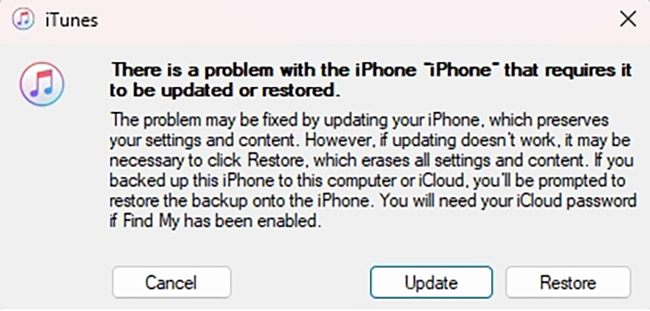
Then, your iPhone will restart as a brand-new device, allowing you to set it up with a new Apple Account.
However, also be aware that if your iPhone shows "Activation Lock" or "iPhone Locked to Owner", or the Find My feature is enabled, iTunes cannot remove it. You can use the following tool to unlock it.
Method 2. Use Professional Tool to Unlock Second Hand iPhone
One of the most efficient ways to unlock a second hand iPhone is by using TunesKit iPhone Unlocker. This professional iPhone unlock software allows you to unlock iPhones, iPads, and iPod Touch devices without a passcode.
With just a few simple steps, you can remove iPhone screen lock, the Apple Account, factory reset iOS device, and even Mobile Device Management lock. You bought a second hand iPhone with iCloud Lock? Don't worry, this comprehensive tool can also remove it with ease!
The process to unlock a used iPhone with TunesKit iPhone Unlocker is easy. Follow the given step-by-step guide:
Step 1Launch the Unlocker and Connect iPhone to Computer
Install, download and launch TunesKit iPhone Unlocker on your computer. Connect your iPhone to the computer using a USB cable. On the main interface, choose the "Unlock iOS Screen" option and click "Start".

Step 2Put iPhone into DFU Mode
The software will guide you on how to enter DFU (Device Firmware Update) mode/Recovery mode, depending on your iPhone model. Follow the guide and boot the locked iPhone into DFU or Recovery mode.

Step 3Download Firmware Package
Once your device is in DFU mode, the Unlocker will display your iPhone's information. Verify the details and correct them if needed. Now click on the "Download" to install the Firmware package.

Step 4Unlock Second-hand iPhone without Passcode
After downloading the firmware, click "Unlock" to start the unlocking process. In a few minutes, the Unlocker will restore your iPhone. Then, click "Done" to complete the process. You can now use the second-hand iPhone with a new passcode.

How to Unlock Used iPhone If You Have Apple Account Password
Unlocking used iPhone is much easier if you have the Apple Account credentials for the account on your used iPhone. However, there are a few conditions to keep in mind. Below are three simple ways to remove the lock.
Note
Method 1. Erase iPhone on Lock Screen (iOS 15.2+)
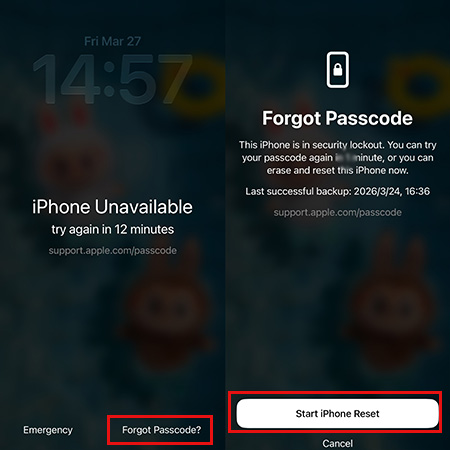
If the second-hand iPhone is running iOS 15.2 or later, there's a built-in way to erase the device right from the lock screen. However, you must know the Apple Account password and your second-hand iPhone should be connected to a stable network for this method to work.
- Step 1. Enter wrong screen passcode until your second-hand iPhone being disabled.
- Step 2. You will see an option at the bottom of the screen showing Erase iPhone or Forgot Passcode?, tap it.
- Step 3. Tap on the Start iPhone Reset button if prompted. Enter the Apple Account password when prompted.
- Step 4. When your iPhone restarts, it is successfully unlocked.
Method 2. Erase iPhone by Using iCloud
When the Find My feature is turned on and you have access to the Apple Account and password, it is suggested to take advantage of iCloud to unlock second-hand iPhone. This method works on any browser and any device, and it’s even easier if the iPhone was previously marked as a Trusted Device.
- Step 1. Visit the iCloud webpage on a browser and sign in with the Apple Account.
- Step 2. Locate the Find My section.
- Step 3. In the All Devices list, choose the second-hand iPhone.
- Step 4. Click Erase This Device and then click Remove This Device. Follow the on-screen prompts to unlock the screen lock and the Activation Lock on the iPhone.

Method 3. Erase Used iPhone via Find My App
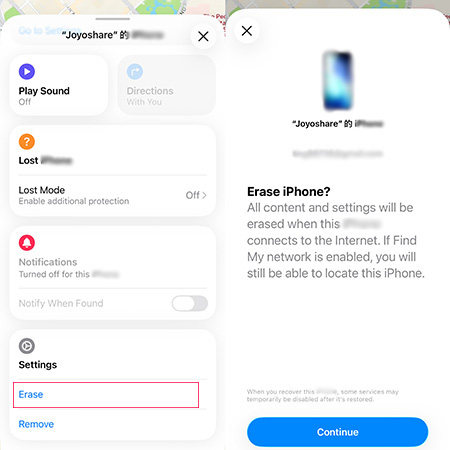
If you can contact the seller and they still have another Apple device (iPhone, iPad, or Mac) signed in with the same Apple Account, they can use the Find My app to remotely erase the iPhone. But this only works when Find My iPhone is enabled on the used iPhone.
Follow the given guide to unlocking a second-hand iPhone through Find My iPhone:
- Step 1. Open the Find My app on another device that signed in with the same account.
- Step 2. Choose the Devices tab and select the second-hand iPhone.
- Step 3. Scroll down to the Erase option and tap it to unlock your iPhone screen lock. Then tap Remove to remove the Apple Account from your second-hand iPhone
FAQs on Unlocking A Second Hand iPhone
-
Does unlocking a second-hand iPhone remove the Activation Lock?
Standard screen unlocking tools remove the passcode. If the device is still linked to an Apple Account, you will need a specific feature like "Bypass iCloud Activation Lock" found in advanced versions of TunesKit.
-
I bought a stolen iPhone, can I use it?
If the iPhone is locked by the original owner or has Stolen Device Protection enabled, you may not be able to use it. Here is what you can do:
🔹 Try contacting the seller - if they sold you a stolen iPhone, you may need to request a legal assistance.
🔹 Check the lock screen for a contact number - sometimes, the rightful owner leaves their details.
🔹 If all else fails, you can attempt to use a professional unlocking tool like TunesKit to unlock stolen iPhone.
Conclusion
How to unlock second hand iPhone if you are locked by the screen lock or Activation Lock? This article provides you with 5 solutions. While it's free to unlock used iPhone via iTunes, iCloud, Find My App, and an iOS feature, these methods come with limitations.
To unlock your iPhone without hassle, TunesKit iPhone Unlocker is an effecient and reliable method. Whether it's a screen lock, Activation Lock, or remove Apple Account, click the Try It Free buttons below to unlock your iPhone with TunesKit!


