iOS 16.7/16.7.16 iCloud Bypass: How to Remove Activation Lock

Start by entering the linked Apple Account password or device passcode. For a used iPhone, ask the previous owner to remove it through Find My. Apple may also help if you have proof of purchase. For supported iPhones running up to iOS 16.7.15, TunesKit iPhone Unlocker provides another option. If your device runs iOS 16.7.16, check compatibility carefully before using any third-party tool.
Stuck on iCloud Activation Lock after updating or restoring an iPhone running iOS 16.7? The screen may ask for the Apple Account previously linked to the device, especially after a factory reset or when setting up a second-hand iPhone.
This guide covers practical iOS 16.7 iCloud bypass and Activation Lock removal methods, including the latest iOS 16.7.16 versions. Whether you know the account password, can contact the previous owner, or need another option for a supported device, you can find the right solution below.
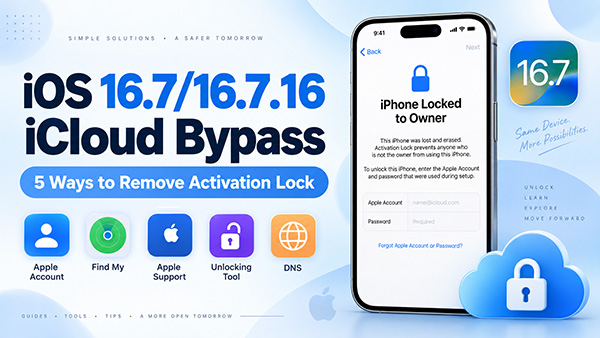
- What Is iCloud Activation Lock on iOS 16.7?
-
5 Ways for iOS 16.7/16.7.16 iCloud Bypass
- Method 1. Remove Activation Lock with Apple Account or Screen Passcode
- Method 2. Ask the Previous Owner to Remove the iPhone from Find My
- Method 3. Request Activation Lock Removal from Apple
- Method 4. Remove iOS 16.7 Activation Lock with TunesKit iPhone Unlocker HOT
- Method 5. Does DNS Bypass Work on iOS 16.7?
- iOS 16.7.16 Supported Devices
- Is iOS 16 the Same as iPhone 16?
- FAQs About iOS 16.7 iCloud Bypass
- Conclusion
What Is iCloud Activation Lock on iOS 16.7?
Activation Lock is part of Apple's Find My security system. Once Find My is turned on, the device becomes linked to the owner's Apple Account. Even after the iPhone is erased, Apple can require the associated Apple Account before the device can be activated again. This helps prevent a lost or stolen iPhone from being reused without the owner's permission.
On iOS 15 and later, a locked device commonly displays iPhone Locked to Owner. Therefore, simply performing a factory reset normally does not remove iCloud Activation Lock.
Can You Bypass iCloud Activation Lock on iOS 16.7?
Yes, if you own the device or are authorized to manage it, several options are available. The best method depends on whether you have the Apple Account password, can reach the previous owner, have proof of purchase, or use a supported iPhone model. Here is a quick comparison:
| Method | Password Needed | Best For | iOS 16.7.16 |
|---|---|---|---|
| Apple Account or passcode | Yes | Your own iPhone | Yes |
| Remove via Find My | Previous owner signs in | Used iPhone | Yes |
| Apple Support | No password | Users with proof of purchase | Yes |
| TunesKit iPhone Unlocker | No original account password | Supported older iPhones | Currently listed up to 16.7.15 |
| DNS workaround | No | Legacy/limited access | Not recommended |
5 Ways for iOS 16.7/16.7.16 iCloud Bypass
If your iPhone is stuck on Activation Lock, start with Apple's official options before trying another solution. The five methods below cover different situations, from forgotten credentials and second-hand devices to supported older iPhones without access to the original account.
Method 1. Remove Activation Lock with Apple Account or Screen Passcode
The easiest method is to use the Apple Account originally linked to the iPhone. Apple currently allows users to follow the instructions on the Activation Lock screen and enter the Apple Account and password used to set up the device. In some cases, the previously used device passcode is also accepted.
- Step 1. Turn on the iPhone and connect it to the internet.
- Step 2. Continue setup until you see the Activation Lock or iPhone Locked to Owner screen.
- Step 3. Enter the Apple Account email address or phone number and password associated with the device.
- Step 4. If an option to use the device passcode appears, enter the passcode previously used on the iPhone.

After verification, continue setting up the device.
 Further Reading: What If Forgot Apple Account Password?
Method 2. Ask the Previous Owner to Remove the iPhone from Find My
This method is ideal if you bought a used iPhone that is still linked to the seller's Apple Account. The previous owner does not have to meet you in person. They can remove Activation Lock remotely using Find My on iCloud.com. Apple specifically recommends asking the previous owner to remove the device from their account before taking ownership of a used iPhone.
- Step 1. Go to iCloud.com/find and sign in with the Apple Account linked to the iPhone.
- Step 2. Select the locked iPhone.
- Step 3. Choose Remove.
- Step 4. Restart the iPhone and begin setup again.
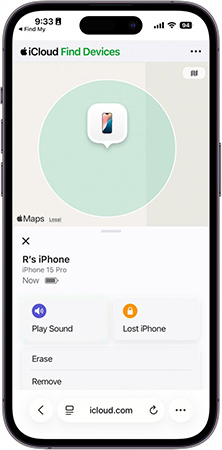
Removing a device from Find My also removes its Activation Lock, allowing the new owner to access the device.
Method 3. Request Activation Lock Removal from Apple
If the iPhone belongs to you but you cannot access the linked Apple Account, Apple may be able to help when you have valid proof of purchase. Apple provides an official Activation Lock support request for eligible users.
Before starting, prepare information such as:
- Proof of purchase
- Device serial number
- IMEI
- Purchase details
Then submit the Activation Lock support request and follow Apple's verification process.

Method 4. Remove iOS 16.7 Activation Lock with TunesKit iPhone Unlocker
If you cannot use the linked Apple Account and the previous owner is unavailable, TunesKit iPhone Unlocker provides another option for supported devices that you own or are authorized to manage.
The current TunesKit iPhone Unlocker includes an Activation Lock removal feature that can remove the lock without requiring the original Apple Account password. More importantly, this software now can complete the removing process without jailbreak.
Key Features of TunesKit iPhone Unlocker
Remove iCloud Activation Lock without the original Apple Account password. No jailbreak required on currently supported iPhone 6s–iPhone X configurations. Support iOS versions up to iOS 16.7.15.
 600,000+ Downloads
Check Compatibility First
| Device/System | Activation Lock Support |
|---|---|
| iPhone 6s–iPhone X | Supported by current jailbreak-free workflow |
| iOS 12–16.7.15 | Supported |
| iOS 16.7.15 | Supported |
| iOS 16.7.16 | Not currently listed as supported |
| iPhone 16 series | Not supported for this Activation Lock feature |
How to Remove iOS 16.7 Activation Lock with TunesKit
Step 1. Connect Your iPhone
Download and launch TunesKit iPhone Unlocker on your Windows PC or Mac. Connect the locked iPhone with a USB cable and select Remove iCloud Activation Lock from the main interface.

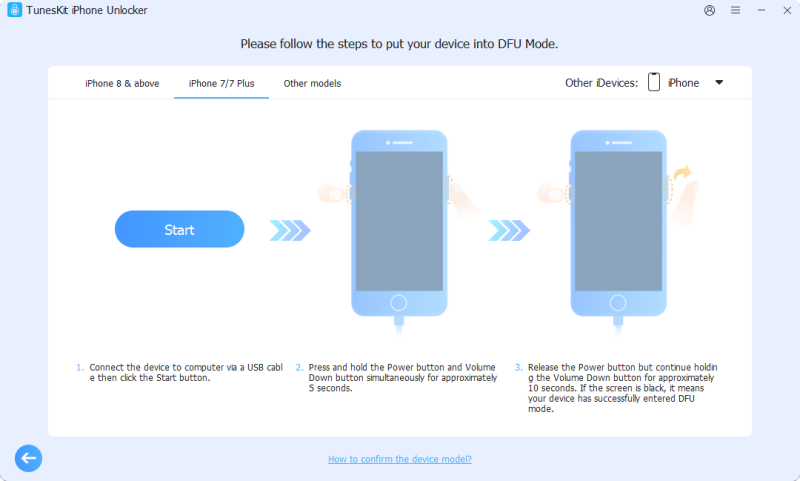
Step 2. Put iPhone Into DFU Mode
TunesKit will put your iPhone into Recovery Mode automatically. After that, you should let your iPhone enter DFU Mode manually by following the on-screen instruction.
Step 3. Remove Activation Lock
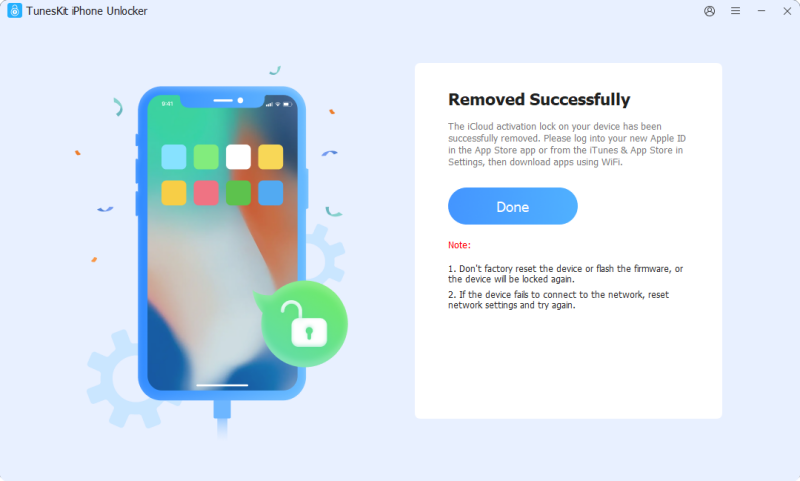
Follow the on-screen instructions and start the removal process. Keep the iPhone connected until TunesKit finishes. Then follow the instructions shown in the program to set up the device.
Method 5. Does DNS Bypass Work on iOS 16.7?
You may find tutorials claiming that changing the Wi-Fi DNS server can bypass iCloud Activation Lock for free. However, traditional DNS bypass is not a reliable solution for iOS 16.7 or iOS 16.7.16.
DNS-based workarounds are mainly associated with much older iOS versions. Even when available, they generally provide limited access rather than permanently removing Activation Lock. If your device runs iOS 16.7.x, use one of the first four methods whenever possible.
iOS 16.7.16 Supported Devices
Apple released iOS 16.7.16 on May 11, 2026 for the following devices:
- iPhone 8
- iPhone 8 Plus
- iPhone X
- iPad 5th generation
- iPad Pro 9.7-inch
- iPad Pro 12.9-inch (1st generation)
For iPhone users, this means searches for iPhone 8 iOS 16.7.16 Activation Lock and iPhone X iOS 16.7.16 bypass are particularly relevant.
iOS 16.7.15 vs iOS 16.7.16: Does It Matter?
Yes, especially when using third-party software.
| Version | Apple Methods | TunesKit Activation Lock Removal |
|---|---|---|
| iOS 16.7 | Available | Supported on compatible devices |
| iOS 16.7.10 | Available | Supported on compatible devices |
| iOS 16.7.12 | Available | Supported on compatible devices |
| iOS 16.7.15 | Available | Supported |
| iOS 16.7.16 | Available | Not currently listed as supported |
If you are already on iOS 16.7.16, the Apple Account/passcode, previous-owner, and Apple Support methods should be your first choices.
Is iOS 16 the Same as iPhone 16?
No. iOS 16 and iPhone 16 refer to two completely different things.
- iOS 16 is a version of Apple's operating system.
- iPhone 16 is an iPhone hardware generation.
This guide covers devices running iOS 16.7 and iOS 16.7.x. It does not provide instructions specifically for bypassing Activation Lock on the iPhone 16 series.
FAQs About iOS 16.7 iCloud Bypass
-
Can I bypass iOS 16 Activation Lock without an Apple Account password?
If you own the device, you may ask the previous owner to remove it remotely, submit an Apple support request with proof of purchase, or use a compatible Activation Lock removal tool on supported hardware.
-
Does factory resetting an iPhone remove Activation Lock?
No. Activation Lock can remain active after an iPhone is erased because it is linked to the Apple Account and Apple's activation system.
Conclusion
There are several ways to handle iOS 16.7 iCloud Activation Lock. Start with the linked Apple Account or device passcode, ask the previous owner to remove the iPhone from Find My, or contact Apple if you have proof of purchase.
For supported devices running up to iOS 16.7.15, TunesKit iPhone Unlocker provides another option without requiring the original Apple Account password or jailbreak. For iOS 16.7.16, use the official methods first and check tool compatibility before proceeding.