


GSMNEO FRP Bypass Review: Does It Really Work and Is It Safe?
Factory Reset Protection (FRP) is designed to protect Android devices from unauthorized access. However, if you've legitimately reset your phone and forgotten the original Google account, FRP can become a serious obstacle. This is why many users search for solutions like GSMNEO FRP Bypass.
In this in-depth GSMNEO FRP Bypass review, we analyze what the tool is, how it works, its real-world effectiveness, safety concerns, and whether it's the right choice for your situation—based on user intent, accuracy, and practical value.
- Part 1. What is GSMNEO FRP Bypass?
- Part 2. Supported Devices and Android Versions
- Part 3. Pros and Cons of GSMNEO FRP Bypass
- Part 4. Is GSMNEO FRP Bypass Safe and Legit?
- Part 5. How to Use GSMNEO FRP Bypass
- Part 6. A Reliable Alternative: TunesKit Android UnlockerHOT
- Part 7. FAQs about GSMNEO FRP Bypass
- Part 8. Conclusion
Part 1. What is GSMNEO FRP Bypass?
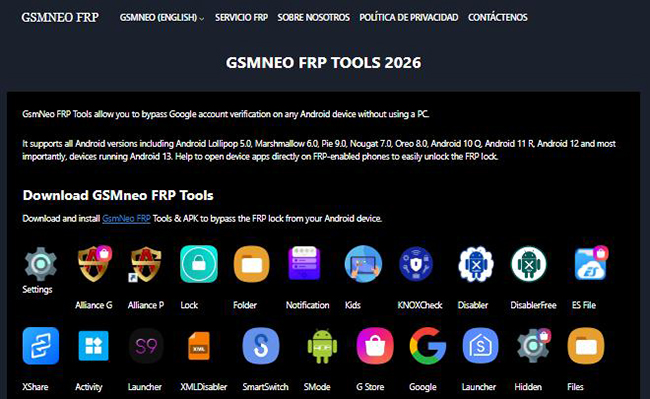
Many users mistakenly believe GSMNEO is a standalone software program you install on your computer. In reality, it is a web-based repository of shortcut APKs.
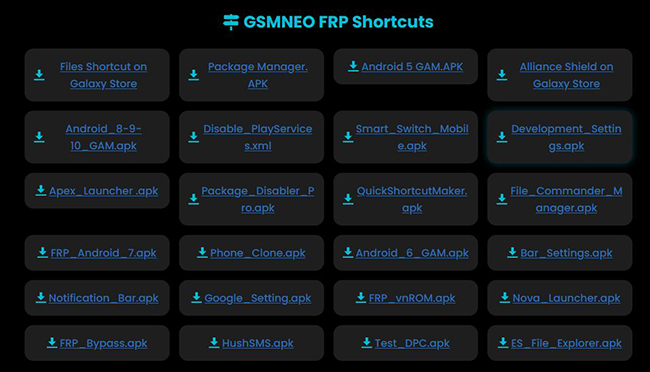
The "GSMNEO method" involves exploiting vulnerabilities in the Android setup wizard (such as the TalkBack feature or the emergency dialer) to open a web browser on the locked device. Once the browser is open, users navigate to the GSMNEO website to download specific shortcut files (like "Settings APK" or "Alliance Shield") that force the device to bypass the Google login screen.
Part 2. Supported Devices and Android Versions
According to various third-party descriptions, GSMNEO FRP Bypass claims compatibility with:
- Android brands: Samsung, Xiaomi, Oppo, Vivo, Huawei, Motorola, and others.
- Android versions: Older versions (Android 5–10) are more commonly reported as compatible.
However, in real usage, newer Android versions with updated security patches are far less likely to work. Results can differ even between devices on the same Android version. Therefore, Users with recent Android updates should expect limited or no success.
Part 3. Pros and Cons of AddROM FRP Bypass
Before deciding whether GSMNEO FRP Bypass is the right solution, it’s important to look at both its strengths and weaknesses from a practical, real-world perspective. The following pros and cons provide a balanced overview of what GSMNEO FRP Bypass offers—and where its limitations become apparent.
 Pros:
Pros:- No PC required: Many versions of GSMNEO are marketed as phone-only solutions.
- Free to download: The tool is often available without payment.
- Simple interface: GSMNEO is usually described as lightweight and easy to navigate.
 Cons:
Cons:- Inconsistent success rate: Many users report it does not work on newer Android versions.
- No official developer or support: If something goes wrong, there is no help desk or documentation.
- Temporary results: FRP may return after another factory reset or system update.
- Inconsistent sources: APK files are often hosted on third-party sites with unclear authenticity.
Part 4. Is GSMNEO FRP Bypass Safe and Legit?
Even if a tool appears convenient or effective, safety and legitimacy are far more critical considerations—especially when dealing with system-level security protections like FRP.
Safety Concerns:- APK files from unofficial sites may contain malware, adware, or tracking code.
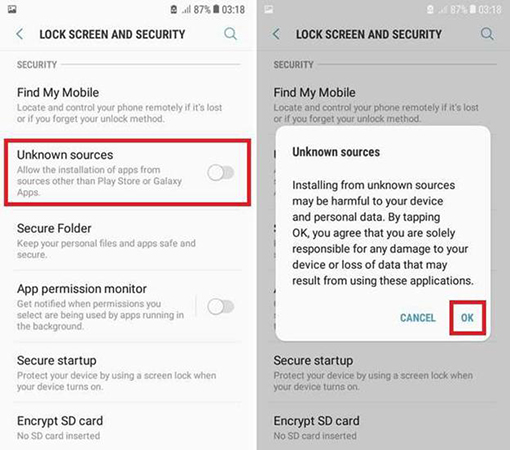
- Users must enable "Install from unknown sources," increasing security risk.
- No independent audits or verified code transparency.
Legitimacy:- GSMNEO is not affiliated with Google or Android manufacturers.
- There is no verified company, privacy policy, or clear ownership of this tool.
Part 5. How to Use GSMNEO FRP Bypass
The process of using GSMNEO is manual and relies heavily on whether your specific Android version currently has an unpatched security hole. Here are the example to show your the general steps to use GSMNEO FRP Bypass.
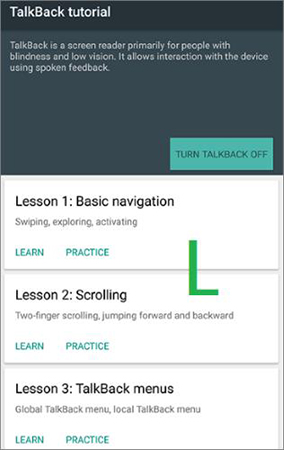
Step 1. Make sure your phone is connecting to WiFi. On the Welcome screen, press and hold Volume Up and Volume Down buttons at the same time. The TalkBack feature will be turned on after that.
Step 2. Draw an L letter on the phone screen with your finger. The TalkBack menu will appear. Next, go to My Profile > Settings > About > YouTube Terms of Service to open Chrome browser.
Step 4. Enter the GSMNEO's website in Chrome and download a frp bypass APK from the website.
Step 5. Go to Settings > Apps > Special App Access > Install Unknown Apps to allow your phone to download apps from outside the Play Store.
Step 6. You can find the APK file in your downloads. Install it on your iPhone.
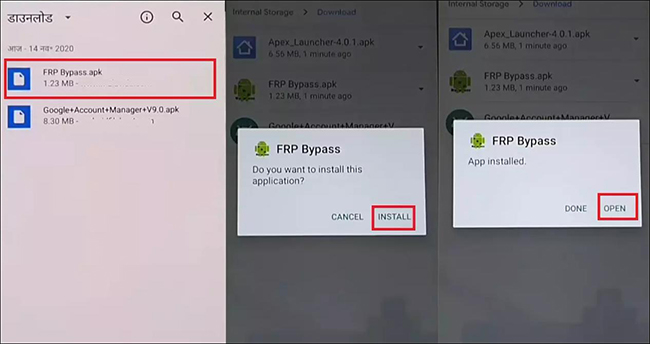
Step 7. Open the app you just installed. Then, follow the instruction to bypass the FRP lock on your phone.
Part 6. A Reliable Alternative: TunesKit Android Unlocker
If the manual exploit methods are failing—or if you simply don't have the time to navigate complex technical steps—using a dedicated unlocking tool is the most logical next step. TunesKit Android Unlocker is the recommended tool here.
Unlike the browser-based exploits of GSMNEO, TunesKit Android Unlocker interacts directly with the device's system firmware to remove the FRP lock. This approach is significantly more stable because it doesn't rely on temporary bugs that get patched in the next update. It is particularly effective for users who need a solution that works on the latest OS versions (up to Android 16) without risking malware infection from unverified APKs.
Key Features of TunesKit Android Unlocker
No complex tools, no risk - just connect, follow clear instructions, and bypass FRP lock on your Android device.
 600,000+ Downloads
If you have got the software on your computer, you can follow the tutorial below to use it to bypass FRP lock on your phone.
Step 1 Connect and Launch
Launch the program and connect your locked Android device via a USB cable. From the main interface, select the feature labeled "Remove Google FRP Lock".
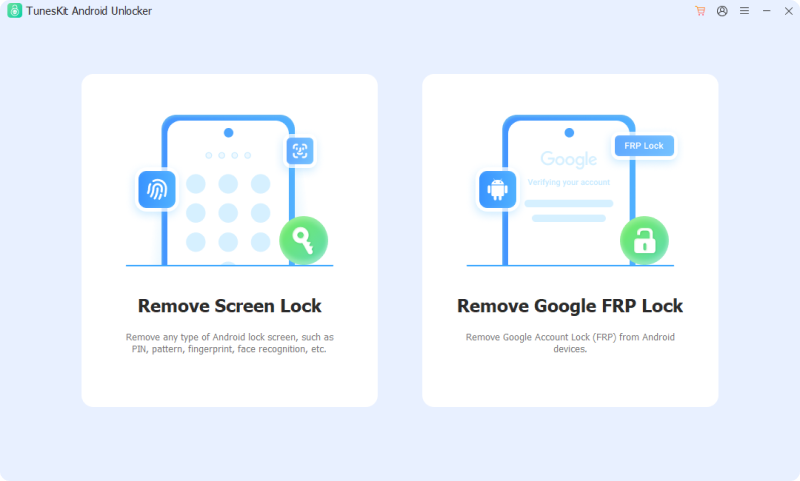
Step 2 Select Device Information
The software will ask for your device's brand. Select Samsung (or your specific manufacturer). You will then be prompted to select your Android version. Click the Start button to continue.
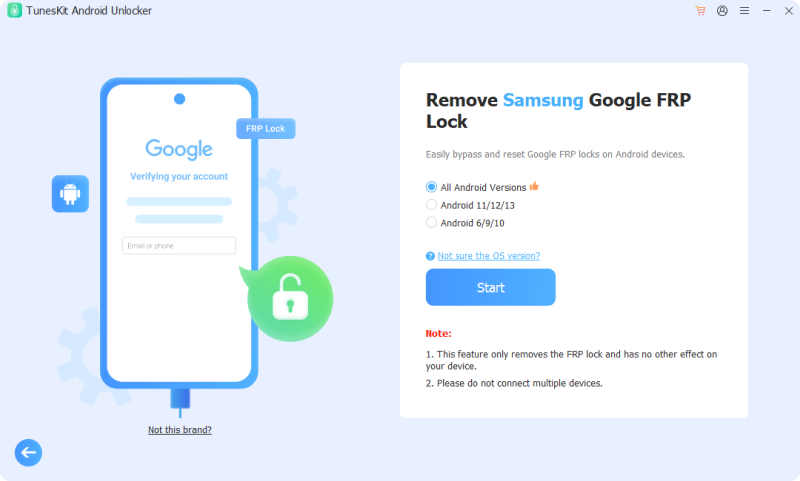
Step 3 Bypass FRP lock
In this new window, you will see an instruction. Follow it and then click the Next > Start buttons to bypass the FRP lock on your phone.
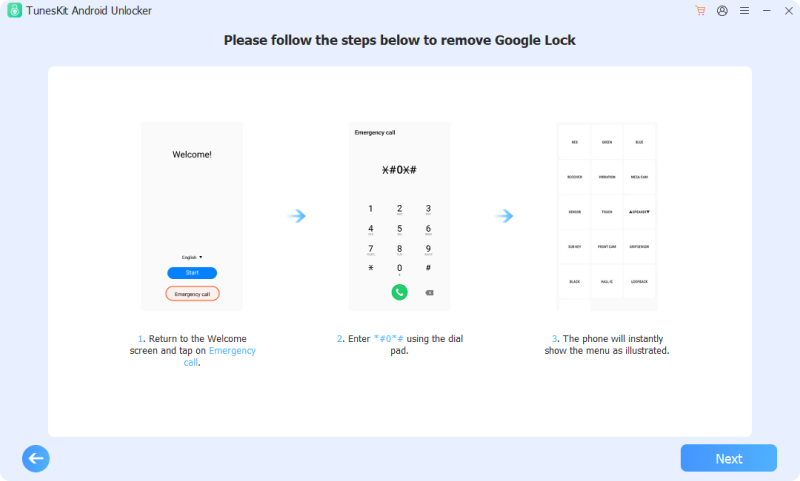
Part 7. FAQs about GSMNEO FRP Bypass
-
Q1: Is GSMNEO FRP Bypass completely free to use?
Yes, the GSMNEO website and the shortcut APKs it hosts are free to access. However, "free" comes with a hidden cost: your time. Since it is a manual method, you may spend hours attempting different exploits that might not work on your specific device.
-
Q2: Why is the "Settings" button not working when I tap it?
This is a common issue on devices running Android 13, 14, and higher. Manufacturers have updated their security policies to prevent unverified apps or browser shortcuts from opening the system Settings menu during the setup phase. If this happens, the manual GSMNEO method is effectively blocked for your device.
Part 8. Conclusion
Is GSMNEO FRP Bypass useful? For older devices running Android 10 or 11, it remains a handy, free resource. However, for modern smartphones running Android 14, 15, or 16, the "holes" it relies on have largely been closed.
If you find yourself stuck after trying the manual methods, TunesKit Android Unlocker offers a stress-free alternative. It solves the problem of accessing your device without requiring you to be a tech expert or risk your phone's security.


