


Fixfirmware APK for Android FRP Bypass: 2026 Full Review
Forgetting the Google account credentials after a factory reset can turn a functional smartphone into an expensive paperweight. This security feature, known as Factory Reset Protection (FRP), is effective but often catches legitimate owners off guard. Among the sea of recovery tools, Fixfirmware APK has emerged as a prominent repository for technicians. This review explores whether the Fixfirmware toolset remains a viable solution for Android FRP bypass in 2026, and how it works.
- Part 1. What Is Fixfirmware and How Does It Work?
- Part 2. Safety & Legality Concerns of Fixfirmware APK
- Part 3. Pros and Cons of Fixfirmware APK for FRP Bypass
- Part 4. Step-by-Step Logic: Using Fixfirmware APK to Bypass FRP Lock
- Part 5. Reliable Alternatives to Fixfirmware: TunesKit Android Unlocker HOT
- Part 6. Conclusion
Part 1. What Is Fixfirmware and How Does It Work?
Fixfirmware is not a single application but rather a specialized web repository hosting a variety of APKs designed to exploit specific vulnerabilities in the Android "Setup Wizard." When a device is locked, you cannot access the home screen to install apps normally. Fixfirmware provides the files necessary to bypass the lock.
The primary logic behind using these tools involves bypassing the Google Account Manager's verification gate. By using a combination of browser exploits and specialized APKs, users can essentially "trick" the device into accepting a new Google account as the primary one, thereby granting full access to the phone.
Part 2. Safety & Legality Concerns of Fixfirmware APK
The APKs in Fixfirmware are third-party, which means they are not verified by Google Play Protect and have no official developer support.
Key Safety Risks:
- Malware & adware exposure: Some versions request excessive permissions and may display intrusive ads or run hidden background processes.
- Data privacy issues: There is no clear privacy policy, making it difficult to know how user data is handled.
- System instability: Poorly coded APKs can cause crashes, boot issues, or settings malfunctions.
Legal Considerations:
- FRP is an anti-theft security feature created by Google.
- Bypassing FRP on a device you do not legally own may violate local laws.
- Using unofficial tools may void warranties and limit official support options.
Part 3. Pros and Cons of Fixfirmware APK for FRP Bypass
To help users make an informed decision, here is a realistic and balanced breakdown of the advantages and disadvantages of Fixfirmware APK — without exaggeration.
 Pros:
Pros:- Free to download
- No computer required
- May work on very old Android versions (Android 5–7)
 Cons:
Cons:- Very low success rate on Android 9 and above
- High security and privacy risks
- Misleading progress screens and ads
- No updates, no technical support
- Results are unstable and often fail after reboot or updates
Part 4. Step-by-Step Logic: Using Fixfirmware APK to Bypass FRP Lock
While the exact entry point varies by brand (Samsung, Xiaomi, or Motorola), the general workflow for using these tools follows a consistent pattern.
- Step 1. Reset your phone and keep going till it requests that you validate your Google account. Use a Wi-Fi network and set your location to India instead of inserting your SIM card into your phone.
- Step 2. Tap Next once you've reached the Google verification screen. Select the option from the keyboard's left side, tap the textbox to open the keyboard, then tap More.
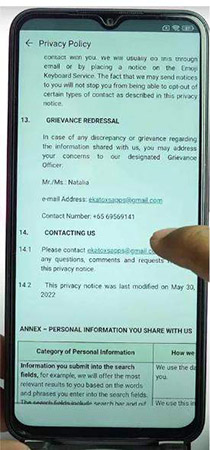
- Step 3. Choose About > Privacy policy. Scroll down until you see the section about Contact Us. Tap the email below the section and then select Messages. Follow the on-steps and reach the messaging app.
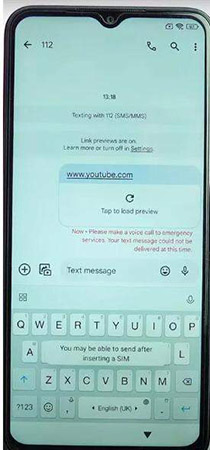
- Step 4. Enter www.youtube.com and other content on the app, and then send the message to anyone.
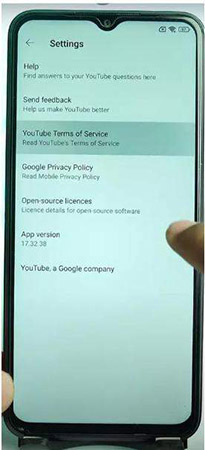
- Step 5. Tap the link and open YouTube on your phone. Tap the profile option and then select Settings. Tap YouTube Terms of Service and accept it to proceed.
- Step 6. Enter the https://fixfirmware.com/apk/in the URL box and visit the website.
- Step 7. Scroll down the page and then find the package Disabler Pro, Notification Bar, Disable Prof Fix, and Google Account Add APK. Download the four APKs.
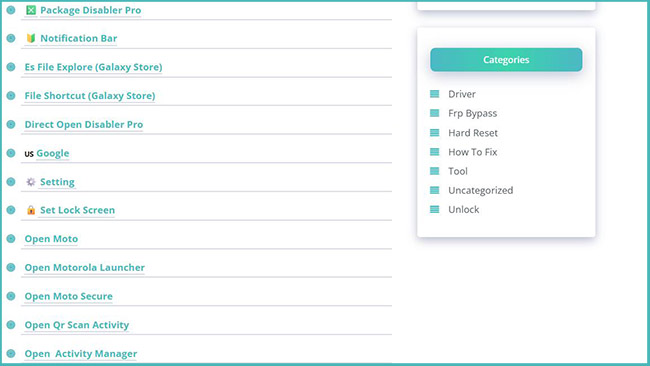
- Step 8. After downloading, tap Alliance on Galaxy Store on the page of Fixfirmware and then follow the prompts to add a new Google account.
- Step 9. Navigate to the Downloads folder to install the apps you just downloaded.
- Step 10. If the installation process is done, go back to Downloads and tap the Settings button from the notification bar. Go to Privacy > Permission Manager > Files and Media > Show System.
- Step 11. Select Package Disabler Pro and tap Allow files management. Finally, tap Allow.
- Step 12. Go back to https://fixfirmware.com/apk/ screen. Next, disable your WiFi connection, and choose Direct Open Disable Pro. Tap Agree and then Enable admin.
- Step 13. Enable your WiFi network. Tap the three-dot icon and select Import from XML > Select > Downloads > Disable Play Services. Hit Import > OK.
- Step 14. Go to Settings > Accounts and Backup > Manage accounts > Google > Continue.
- Step 15. When the prompt "Bypass FRP mobile" appears on your screen, tap it. Follow the steps on it.
- Step 16. Go to Settings > Apps > Chrome and enter Activity Tracker in the search bar. Click it to open Activity Manager.
- Step 17. Go to Android Setup > Cancel > PreDeferredSetupWizardActivity.
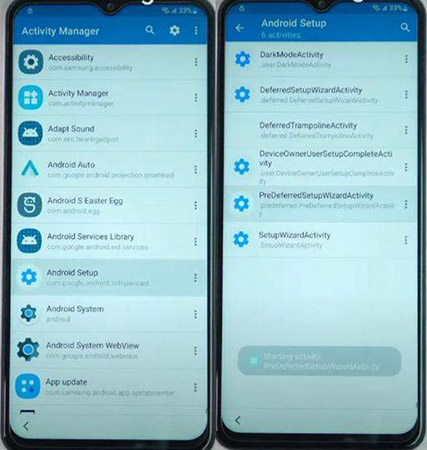
- Step 18. Tap Samsun Setup Wizard and select Always. Tap Agree. When it is done, you can get access to your phone.
Part 5. Reliable Alternatives to Fixfirmware: TunesKit Android Unlocker
While Fixfirmware is a great free resource, it requires a lot of manual trial and error. For users who find the APK method too technical or risky, a desktop-based solution like TunesKit Android Unlocker serves as a more streamlined alternative.
Unlike the manual APK injection method, TunesKit Android Unlocker handles the exploit logic through a guided PC interface. It is particularly effective for bypassing FRP on major brands like Samsung, Xiaomi, and OPPO. Because it operates via a USB connection, it can often bypass newer security patches where the browser-based "TalkBack" method has been blocked.
Key Features of TunesKit Android Unlocker
No complex tools, no risk - just connect, follow clear instructions, and bypass FRP lock on your Android device.
 600,000+ Downloads
If you want to try TunesKit, you can follow the steps below to learn how to bypass FRP lock with it.
Step 1 Connect and Launch
Download and install the software on your Windows or Mac computer. Launch the program and, on the main interface, select the specific "Remove Google FRP Lock" mode to begin the process. Connect your Android device to the computer using an original USB cable.
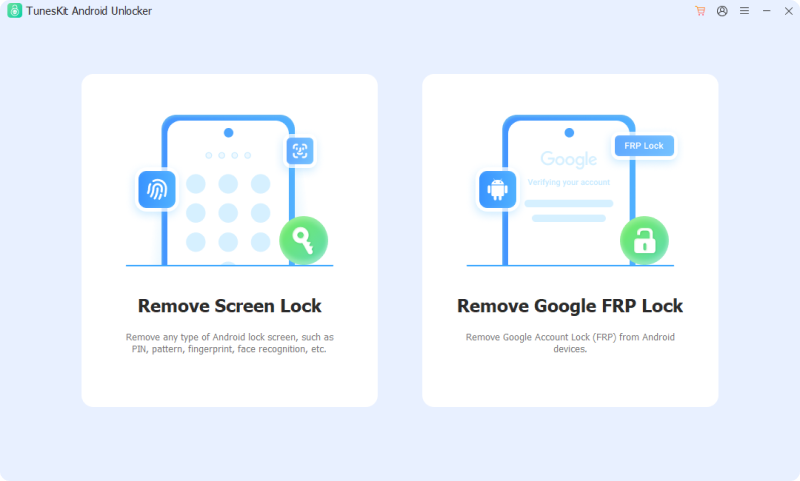
Step 2 Select Device Information
For the software to recognize the device and apply the correct exploit, you will need to select your specific device brand and model from the provided list. Click the Start button.
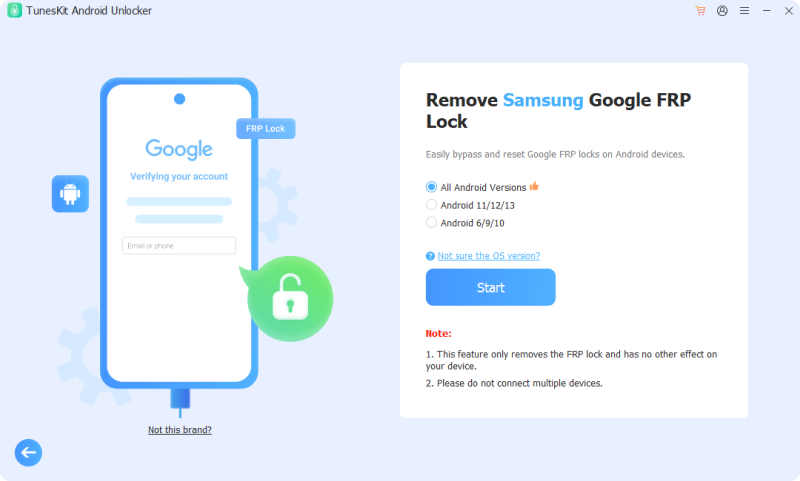
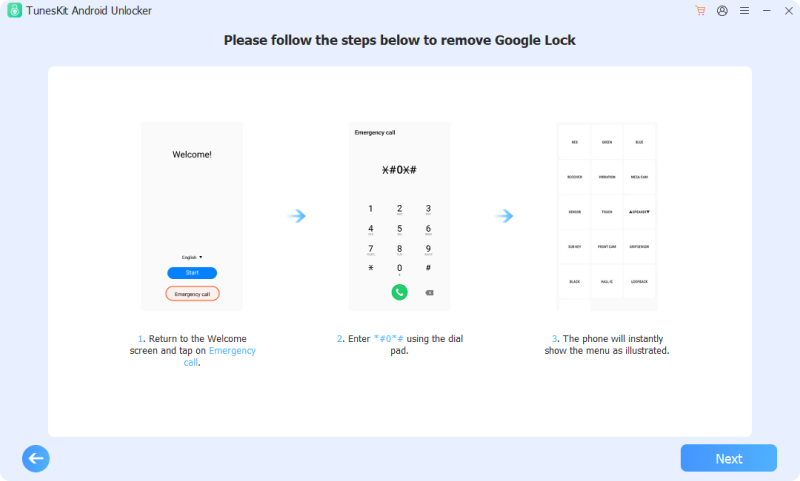
Step 3 Bypass FRP lock
You will get a instruction about how to remove the Google lock. Follow it to operate your phone. Click the Next > Start to start the bypass process.
Part 6. Conclusion
Fixfirmware remains a valuable "toolbox" for those dealing with legacy devices or mid-range smartphones with older security patches. Its greatest strength is its simplicity and the fact that it is free to use.
However, for users with the latest flagship devices running Android 14 or 15, these APKs alone may not be enough. In those cases, you can use TunesKit Android Unlocker as a better alternative, which is much easier to use.


