iOS 27 Music Changes: What's New in Apple Music?
With the release of iOS 27, Apple continues to improve the way users enjoy music on iPhone. The latest iOS 27 music changes bring exciting updates to Apple Music, including new features, interface improvements, and a smoother listening experience. Whether you are an Apple Music subscriber or a casual listener, these changes are worth exploring. In this article, we will take a closer look at what's new in Apple Music and how iOS 27 enhances your daily music experience.
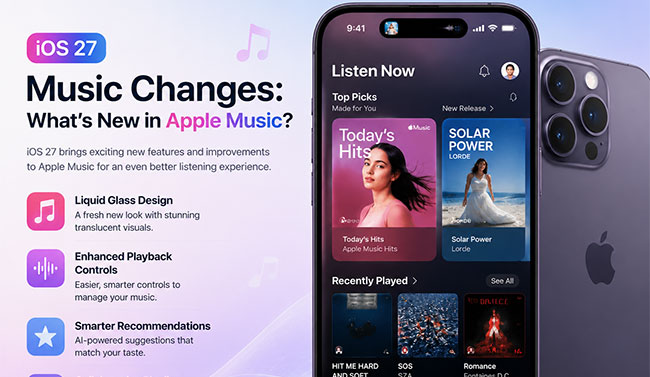
What's New in Apple Music on iOS 27?
Apple has introduced several improvements to Apple Music with iOS 27, focusing on a more personalized, immersive, and user-friendly listening experience. From a refreshed interface to smarter music discovery, these updates make it easier than ever to enjoy your favorite songs.
Landscape Mode
Apple Music now supports a dedicated horizontal layout for your device. Rotating your screen places album artwork right next to your playback controls. It also allows you to view the current track's lyrics side-by-side with the art.
This setup is perfect for when your phone is resting on a desk stand.

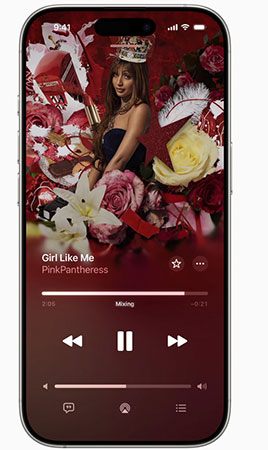
Smoother AutoMix
The automatic mixing feature has been upgraded to provide much smoother transitions between songs. This creates a continuous, DJ-like audio experience that keeps the momentum going between tracks. Apple is also bringing this seamless playback capability to more devices in their ecosystem.
- tvOS: Enjoy continuous listening on your home theater.
- HomePod: Smart speakers now blend tracks flawlessly.
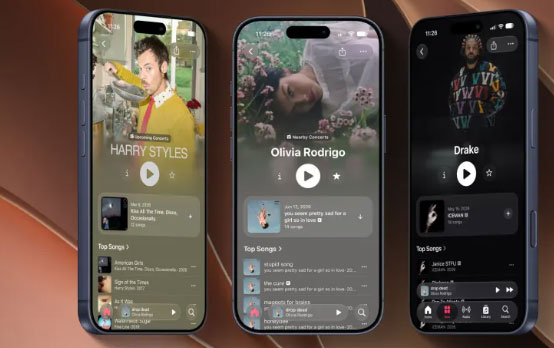
Revamped Artist Profiles
Finding music from your favorite creators is much faster with the redesigned artist pages. Essential buttons for playing and shuffling are now located at the very top of a new color-washed header. Featured releases also get their own distinct visual cards instead of getting lost in the older catalog.
You can instantly play an artist's newest drop without having to scroll.
Social Discovery and Widgets
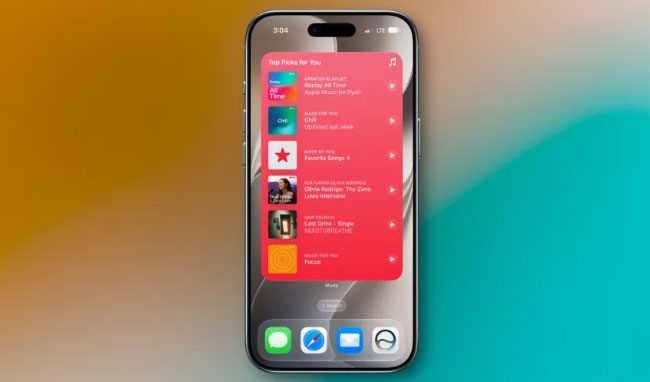
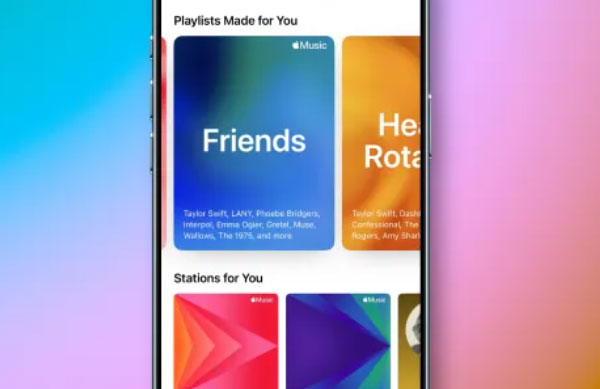
Music discovery is more interactive with the new "Friends" playlist updating every Thursday. It compiles the tracks your social circle is currently enjoying and tags which contacts are listening to them. You can also manage your listening habits straight from your home screen using new extra-large widgets. These larger visual tools let you access key features without opening the app:
- Recently Played: Quickly jump back into your current rotation.
- Top Recommendations: Find fresh, tailored tracks instantly.
 View Also:
 Fix iOS 27 Music Bugs and Glitches with One-click
With any major software update, exciting new features often come hand-in-hand with a few unexpected glitches. You might find your Apple Music app suddenly freezing when switching to the new landscape mode, or perhaps the expanded social widgets are causing your home screen to become unresponsive. These early iOS 27 Beta bugs can put a serious damper on your daily listening experience.
TunesKit iOS System Recovery is a dedicated desktop tool designed to resolve over 150 different software issues without wiping your device. If your iPhone is acting up after the recent update, this software provides a safe and effective way to fix the underlying system errors. Also, it can enables you to repair iTunes errors, back up or restore data from computer, and install the latest iOS 27 Beta version without developer account.
Fix iOS 27 Music Issues Instantly with TunesKit
Repair iOS 27 music bugs and glitches, including Apple Music crashes, playback errors, and app freezing, with one click while keeping your iPhone data safe.
 600,000+ Downloads
Here's a step-by-step guide to fix iOS 27 music bugs and glitches using TunesKit iOS System Recovery.
Step 1. Connect Your Device and Launch
Begin by using a reliable USB cable to plug your iPhone into your Mac or Windows computer. Open the application and click on the "iOS System Repair" option on the main interface, and click the "Start" button to initiate the process.

Step 2. Choose the Standard Repair Mode
You should select the "Standard Repair" mode, which is specifically engineered to handle iOS 27 bugs, freezing Music app, and system glitches without data loss.

Step 3. Download the Matching Firmware
TunesKit will automatically detect your specific iPhone model and display the corresponding device information on the screen. Click the "Download" button to fetch the correct iOS firmware package.

Step 4. Fix iOS 27 Music Bugs
Once the firmware is successfully downloaded and verified, click the "Start Standard Repair" button. TunesKit will automatically unpack the firmware and begin repairing the core iOS 27 system files. Keep your device securely connected to the computer until you see a success message and your iPhone restarts on its own.

FAQs About iOS 27 Music Changes
-
What is the new Landscape Mode?
With iOS 27, Apple Music supports a horizontal orientation. If you turn your iPhone sideways, the app splits the screen to show album artwork on one side and playback controls or lyrics on the other. This makes it incredibly easy to follow along with a song when your phone is propped up on a desk or nightstand.
-
How does the upgraded AutoMix work?
The AutoMix feature has received significant enhancements to create a flawless, DJ-like listening experience. As one track ends, it smoothly transitions into the next without any jarring pauses. Apple has also expanded this capability beyond the iPhone, letting you maintain that continuous flow on other hardware.
-
Why do the artist profiles look different?
Finding a creator's newest work is now much more straightforward and visually striking. The redesigned artist pages feature a color-washed header with immediate play controls at the very top, meaning you do not have to scroll to start listening. Furthermore, fresh releases are highlighted in their own distinct visual cards rather than being buried in a chronological list of older albums.
This layout ensures you never miss a major new drop from your favorite musicians.
-
What is the "Friends" playlist?
The "Friends" playlist is a brand-new social discovery tool that automatically compiles the music your contacts are currently loving. Every Thursday, the playlist refreshes to deliver a curated mixbased on your social circle's recent listening habits. It even tags individual tracks, so you can easily see exactly who has been playing a specific song on repeat.
Conclusion
iOS 27 revitalizes Apple Music with features like landscape mode and seamless AutoMix, but new software updates often bring frustrating bugs. If crashes interrupt your listening, TunesKit iOS System Recovery quickly resolves over 150 system issues. Its Standard Repair mode fixes your operating system without technical hassle or data loss, keeping your music library completely safe and ensuring a flawless experience.