Code for Hard Reset Samsung: What to Dial & What Works Now
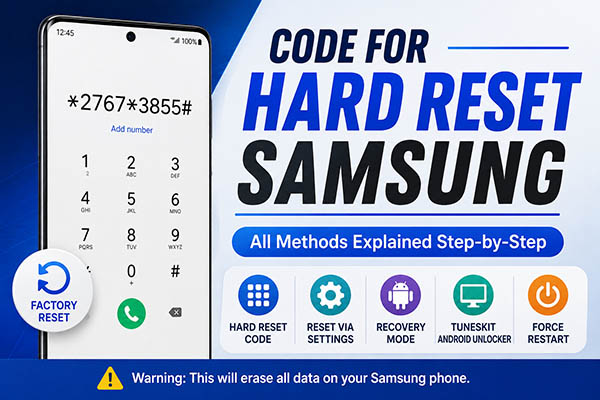
Looking for a code for hard reset Samsung? The traditional Samsung master reset code is *2767*3855#. On supported Samsung phones, this code has historically been used to wipe the device and restore it to factory settings. However, support varies by model and software version, and this code may do nothing on newer Galaxy phones running recent One UI releases. In this guide, we will show you what Samsung model you can use code for hard reset and alternatives when code is not working.
- Quick Answer: What Is the Code for Hard Reset Samsung?
- What Is the Samsung Hard Reset Code?
- How to Hard Reset Samsung Using the Reset Code
- Why Is the Samsung Hard Reset Code Not Working?
- How to Hard Reset Samsung Without a Code
- Samsung Hard Reset vs Factory Reset vs Force Restart
- FAQs About Samsung Hard Reset Codes
- Final Verdict
Quick Answer: What Is the Code for Hard Reset Samsung?
The commonly cited Samsung hard reset code is *2767*3855#. It was designed as a full/master reset command on supported Samsung devices.
Here is a quick comparison of the main ways to reset or restart a Samsung phone:
| Method | What to use | Deletes data? | Best for |
|---|---|---|---|
| Samsung hard reset code | *2767*3855# | Yes | Older or supported Samsung phones |
| Factory reset in Settings | Settings > General management > Reset > Factory data reset | Yes | Phone is accessible |
| Recovery Mode reset | Wipe data/factory reset | Yes | Settings cannot be accessed |
| TunesKit Android Unlocker | Windows/Mac computer + USB cable | Usually yes | Locked Samsung when you prefer guided computer-assisted steps |
| Force restart | Volume Down + Side button | No | Frozen or unresponsive phone |
The important limitation is compatibility. Recent testing shows that Samsung has disabled or restricted some older reset codes on newer One UI versions, so *2767*3855# may not work on a current Galaxy device.
What Is the Samsung Hard Reset Code?
*2767*3855# is commonly known as the Samsung master reset or full factory reset code. It appears in older Samsung technical-code lists and Samsung Members discussions as a command associated with wiping a supported phone.
Unlike the normal Settings reset, this type of dialer code may start its action without presenting the same step-by-step confirmation screens. For that reason, do not type the complete code into your phone simply to test whether it works.
Samsung's current official factory-reset instructions focus instead on resetting through Settings, hardware buttons, or Samsung's remote device services rather than recommending a dialer code.
Does *2767*3855# Still Work on Samsung Phones?
It depends on the phone. The code is most closely associated with older Samsung phones and earlier Android/One UI software. On a newer Galaxy S, Galaxy A, Galaxy Z, or Note device, it may simply fail to trigger.
Recent testing of Samsung secret codes reports that reset codes such as *2767*3855# and *#*#7780#*#* may be disabled on newer One UI builds. Whether a code works can also vary with the model, firmware, region, carrier configuration, and dialer app.
Samsung Members users have likewise reported newer Galaxy phones that no longer respond to *2767*3855#. So, it is more accurate to think of *2767*3855# as a legacy or compatibility-dependent Samsung reset code, rather than a universal reset command for every Galaxy phone.
How to Hard Reset Samsung Using the Reset Code
If you have an older or otherwise supported Samsung device and specifically want to try the Samsung factory reset code, take precautions first.
Before proceeding, make sure:
- Important photos, contacts, and files are backed up.
- You know the Google Account currently linked to the phone.
- You know its Google Account password.
- You understand that the command may execute without a normal confirmation screen on some older devices.
Then follow these steps only on a phone you own or are authorized to reset.
- Step 1. Open the built-in Phone app and display the keypad.
- Step 2. Type *2767*3855#. Do not enter the full sequence until you are ready to erase the phone.
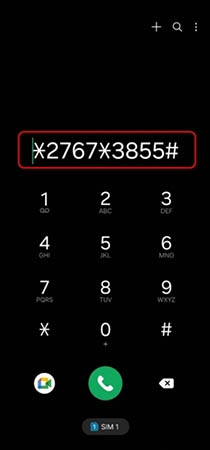
- Step 3. If the code is supported, the reset process may start immediately or the phone may respond according to its software implementation. Avoid interrupting the device while the reset is underway.
- Step 4. After the reset, follow the on-screen setup process. If Google Factory Reset Protection applies, you may be asked for account information associated with the device.
If nothing happens after entering the code, that usually means this reset command is unavailable on the current device or software. Use one of the supported methods below instead.
Why Is the Samsung Hard Reset Code Not Working?
Entering *2767*3855# and seeing no response does not necessarily indicate a problem with the phone. Several factors can prevent an old Samsung reset code from working.
1. Your Samsung Runs a Newer One UI Version
Samsung has restricted a number of legacy service and reset codes on recent One UI versions. Recent testing indicates that destructive reset codes may be among those disabled on newer releases.
2. Your Galaxy Model Does Not Support the Code
Secret-code availability varies between Samsung models, generations, regions, and firmware versions. A code that worked on an older Galaxy device may have no effect on a newer one.
3. You Are Not Using the Samsung Phone App
Some Samsung service codes rely on the stock Samsung Phone app. They may not work through Google Phone or another third-party dialer.
4. You Cannot Access the Dialer
If your Samsung is locked or cannot start Android normally, a dialer-based reset code is not practical. Recovery Mode is better suited to this situation.
Rather than trying several unverified secret codes, move to Samsung's supported Settings or Recovery Mode reset methods.
How to Hard Reset Samsung Without a Code
If the Samsung hard reset code does not work on your device, you can still reset it using other reliable methods. Depending on whether you can access the phone, use Settings, Recovery Mode, or a computer-assisted unlocking tool.
Method 1. Factory Reset Samsung from Settings
If you can unlock the phone and use Settings normally, this is the simplest method. Samsung's current instructions use the following path on recent Galaxy phones.
- Step 1. Open Settings.
- Step 2. Tap General management. Tap Reset.
- Step 3. Select Factory data reset.
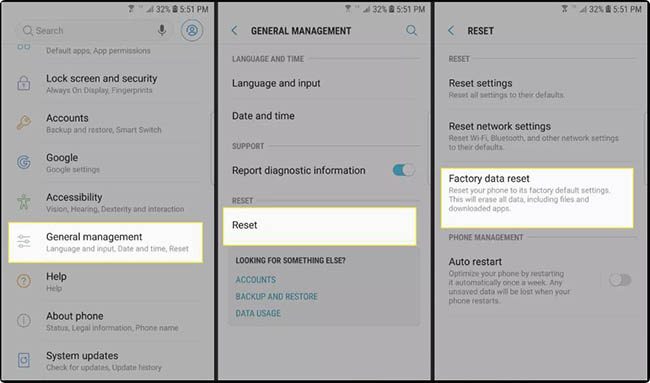
- Step 4. Review the information showing what will be removed.
- Step 5. Tap Reset and follow the authentication prompts.
The wording or menu layout can differ slightly depending on your Galaxy model and One UI version. This method is preferable when you can still access the phone because you have an opportunity to back up your information and properly remove accounts before erasing it.
Method 2. Hard Reset Samsung with Recovery Mode
Recovery Mode is useful when you cannot reach the normal Settings menu. Samsung's current support instructions also document a hardware-button factory reset for a locked or inaccessible Galaxy.
- Step 1. Power off the device.
- Step 2. Connect the phone via USB if required. Samsung's current instructions for many newer Galaxy smartphones tell users to connect the phone to a computer with a USB cable before attempting to open Recovery Mode.
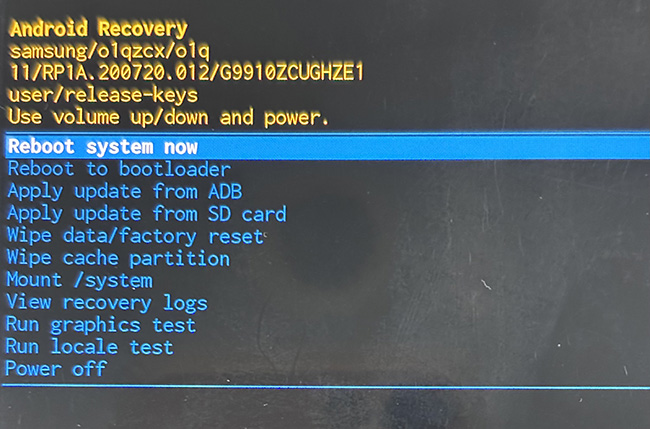
- Step 3. Put the phone into Recovery Mode. For many modern devices without a physical Home button, hold Volume Up + Side/Power while starting the device.
- Step 4. When the Android Recovery menu appears, use the Volume buttons to highlight Wipe data/factory reset. Then press the Power/Side button to select it.
Method 3. Reset a Locked Samsung with TunesKit Android Unlocker
If the Samsung hard reset code does not work and you cannot access Settings because you forgot the PIN, pattern, or password, another option is to use a computer-assisted Android unlocking tool.
TunesKit Android Unlocker supports Samsung phones and is designed to remove several types of Android screen locks, including PINs, patterns, passwords, fingerprints, and face recognition. Its standard screen-lock removal process can also return the device to an accessible state when a reset is required.
Key Features of TunesKit Android Unlocker
Unlock screen lock and bypass FRP lock without passcode with ease. No Technical Skills Needed. High Success Rate. Support lots of Android version incuding 16.
 600,000+ Downloads
- Step 1. Install and open TunesKit Android Unlocker on a Windows PC or Mac. Connect the Samsung phone using a USB cable, then choose Remove Screen Lock.
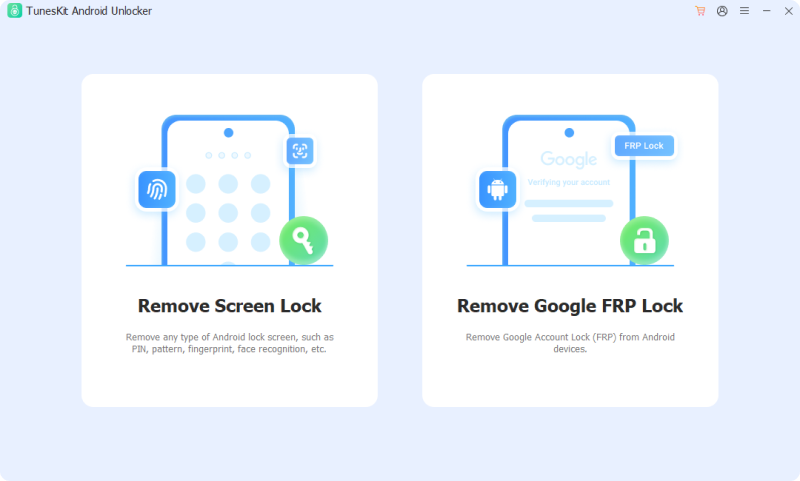
- Step 2. Choose Samsung as the device brand and continue. Read the data-loss notice carefully before proceeding. For most supported devices, removing the screen lock will erase the phone's data.
- Step 3. Follow the on-screen instructions provided for your device to enter Recovery Mode. The required button sequence can vary between Samsung models.
- Step 4. Continue according to the program's instructions. TunesKit will perform the required process to remove the current screen lock. When it finishes, restart and set up the Samsung phone again.
Samsung Hard Reset vs Factory Reset vs Force Restart
These terms are often mixed together, but they describe different actions.
| Action | What it does | Deletes personal data? | When to use it |
|---|---|---|---|
| Hard reset | Restores factory state | Yes | Erasing or resetting a Galaxy |
| Factory reset | Restores factory state | Yes | Same basic purpose as hard reset |
| Master reset | Another term for full factory reset | Yes | Older Samsung terminology |
| Force restart | Forces the phone to reboot | No | Frozen or unresponsive Galaxy |
Google describes factory resets as also being known as hard resets, while Samsung similarly uses factory reset, hard reset, and master reset terminology.
FAQs About Samsung Hard Reset Codes
-
Can I hard reset Samsung without losing data?
A true hard reset erases personal data from the phone. If your Samsung is simply frozen or behaving abnormally, try a force restart first because it restarts the operating system without deleting your files.
-
Does a Samsung hard reset remove a Google account lock?
A factory reset erases the local device data, but it does not serve as a way to bypass Factory Reset Protection. A protected phone can require a Google Account previously synced to the device during setup after a reset.
Final Verdict
The traditional code for hard reset Samsung is *2767*3855#, but it may not work on newer Galaxy phones or recent One UI versions. For most users, resetting through Settings or Recovery Mode is more reliable.
If you are locked out of your Samsung and prefer a computer-guided option, TunesKit Android Unlocker can also help remove supported screen locks, though data loss may occur. Before resetting, back up important data and make sure you know the Google Account linked to the device.