


4Easysoft iPhone Unlocker Review: Is It Safe and Worth It?
Many iOS users find themselves locked out of their devices due to a forgotten passcode or purchasing a second-hand phone tied to an existing Apple ID. When official recovery methods fail, reliable third-party software becomes the next logical step.
The 4Easysoft iPhone Unlocker claims to be a powerful solution for bypassing various iOS security barriers quickly. In this comprehensive review, we will explore its capabilities, overall safety, and whether it is truly worth your investment.
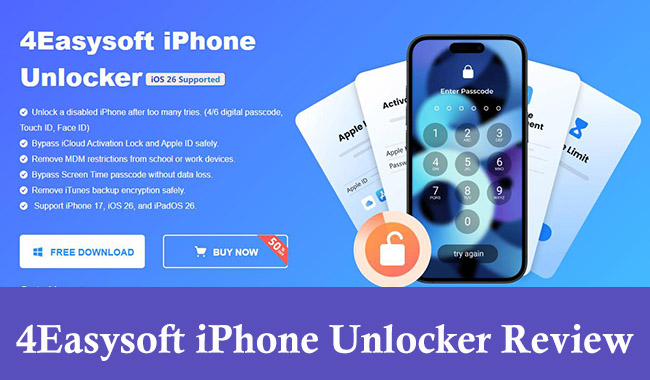
What Is the 4Easysoft iPhone Unlocker?
4Easysoft iPhone Unlocker is a specialized desktop application designed to help users regain access to their locked Apple devices. It functions as a comprehensive iOS unlocking suite capable of handling multiple security barriers from a single dashboard. Whether you are dealing with a disabled screen or restrictive parental controls, this tool aims to provide a straightforward bypass method.
Available for both Windows and Mac operating systems, it caters to a broad audience of users who may not possess deep technical knowledge. The software is continuously updated to ensure compatibility with the latest hardware and software ecosystems. It seamlessly supports everything from older iPhone models to the newest releases running the latest iOS.
Key Features of the 4Easysoft Unlocking Tool
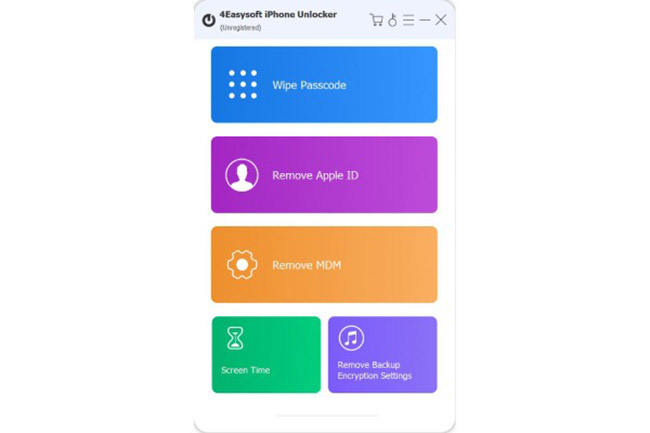
To understand the full value of this unlocking software, it is important to examine the specific types of locks it can successfully remove. The program offers several dedicated modules to address different, highly specific unlocking scenarios.
 Note
Note
4Easysoft iPhone Unlocker claims that it can bypass iCloud Activation Lock. But it is not true. The feature is not available in this software.
- Wipe Passcode: This primary feature removes 4-digit and 6-digit screen passcodes, as well as biometric locks like Touch ID and Face ID.
- Apple ID Removal: This helps users who are stuck on the iCloud activation lock or cannot sign out of an account on a second-hand device.
- Bypass MDM and Screen Time: It can remove Mobile Device Management (MDM) profiles and bypass Screen Time restrictions without erasing the device's underlying data.
- Remove iTunes Backup Encryption Settings: This feature can remove the password of encrypted iTunes backups.
Pros and Cons of 4Easysoft iPhone Unlocker
The most significant advantage of 4Easysoft is its highly intuitive interface, making complex unlocking procedures accessible to everyday users. Furthermore, it boasts a remarkably high success rate when dealing with standard screen locks and Apple ID removals.
However, there is a critical warning you must be aware of before proceeding. Utilizing the "Wipe Passcode" feature will inevitably erase all data currently stored on your iPhone or iPad.
This factory reset is an unavoidable security protocol enforced by Apple's operating system, not a flaw in the 4Easysoft software itself. While the free trial allows you to test basic device compatibility, you should know that a paid license is required to actually execute the final unlocking process.
User Reviews of the 4Easysoft Unlocking Tool
Major software review platforms like Trustpilot, G2, and Sitejabber do not have dedicated review pages or significant customer feedback for this particular unlocking tool. But its multimedia tools generally receive positive ratings for being straightforward and user-friendly.
Without a strong history of verified user reviews, anyone considering the 4Easysoft iPhone Unlocker should proceed carefully. It is highly recommended to thoroughly test the free trial version first to ensure the software can properly detect and connect to your specific device model before committing to a paid subscription.
How to Use 4Easysoft iPhone Unlocker for Disabled Devices
When you are locked out of your device, you need a solution that is both fast and incredibly easy to follow. The process of removing a screen lock with this software is designed to be as frictionless as possible. Before starting, ensure your computer has a stable internet connection so it can smoothly download the necessary iOS firmware.
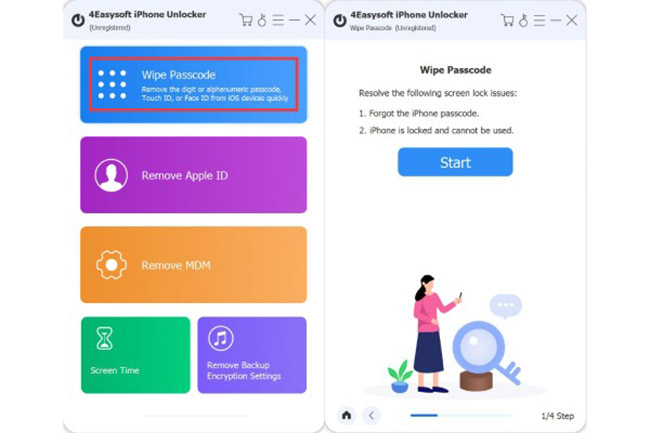
- Step 1. Download and install the software on your computer, launch the application, and select the "Wipe Passcode" mode from the main dashboard.
- Step 2. Connect your locked iPhone or iPad to the computer using a certified USB cable, allowing the software to automatically detect your device model and current iOS version.
- Step 3. Confirm your device details, click the Start button to download the appropriate firmware package, and finally click Unlock to initiate the wiping process.
A Reliable Alternative: TunesKit iPhone Unlocker
While 4Easysoft is a capable tool, users often benefit from comparing multiple options before making a software purchase. TunesKit iPhone Unlocker stands out as a highly effective alternative that solves the exact same core problems. It offers a nearly identical suite of unlocking features, including screen passcode removal, Apple ID bypassing, and MDM restriction management. Apart from those, it also allow uses to bypass iCloud Activation Lock without Apple ID.
TunesKit is particularly well-regarded for its clean interface and consistent updates that keep pace with Apple's latest iOS releases. It serves as an excellent fallback option if you encounter device compatibility issues with other software or simply want to compare pricing plans before committing.
Key Features of TunesKit iPhone Unlocker
Unlock iPhone screen without password. Bypass iCloud Activation Lock without Apple ID and password.
 600,000+ Downloads
TunesKit iPhone Unlocker has a similar process to 4Easysoft to unlock iPhone/iPad screen lock:
- Step 1. Download and install TunesKit iPhone Unlocker on your PC. Open it and select Unlock iOS Screen.
- Step 2. Connect your iPhone/iPad to the PC. Click the Start button to proceed.
- Step 3. Follow the screen instructions to set up your iPhone/iPad. Next, download the firmware package for your iPhone/iPad.
- Step 4. Finally, click Unlock to start removing the screen lock on your iPhone or iPad.

Conclusion
If you are completely locked out of your Apple device and have no official way to recover it, a third-party software like 4Easysoft or TunesKit is legitimate and highly effective. Just remember that bypassing a screen passcode will result in total data loss, so it is always wise to keep regular backups of your important information.
If you need to remove iCloud Activation Lock without a password, TunesKit iPhone Unlocker would be a better solution.


