Aiseesoft iPhone Unlocker Review 2026: Is It Safe & Worth It?
If you have forgotten your iPhone passcode, Apple ID password, Screen Time passcode, or are dealing with another iOS restriction, you may have found Aiseesoft iPhone Unlocker while searching for an unlocking tool. Aiseesoft now also uses the name iKnockin for this product on its official website. But does Aiseesoft iPhone Unlocker really work? Is it safe? Will it erase your data? And is it still worth buying in 2026?
Aiseesoft iPhone Unlocker is a legitimate and actively updated iOS unlocking utility with a broad set of functions, including screen-passcode removal, Apple ID removal, Screen Time removal, MDM bypass, backup-encryption removal, and SIM unlocking. This Aiseesoft iPhone Unlocker review 2026 examines its current features, compatibility, price, data-loss risks, user feedback, pros and cons, and how it compares with TunesKit iPhone Unlocker.

- Aiseesoft iPhone Unlocker Review: Quick Verdict
- What Is Aiseesoft iPhone Unlocker (iKnockin)?
- What Can Aiseesoft iPhone Unlocker Do?
- What We Verified for This 2026 Review
- Does Aiseesoft iPhone Unlocker Really Work?
- Does Aiseesoft iPhone Unlocker Support iOS 26 and iOS 27?
- Will Aiseesoft iPhone Unlocker Erase Your Data?
- Aiseesoft iPhone Unlocker Price: Is It Free?
- Is Aiseesoft iPhone Unlocker Safe?
- Is Aiseesoft Legit or a Scam?
- What Do Real Users Say About Aiseesoft?
- Aiseesoft iPhone Unlocker Pros and Cons
- How to Use Aiseesoft iPhone Unlocker to Remove a Screen Passcode
- Aiseesoft iPhone Unlocker vs TunesKit iPhone Unlocker HOT
- Is Aiseesoft iPhone Unlocker Worth It in 2026?
- FAQs About Aiseesoft iPhone Unlocker
- Final Verdict
Aiseesoft iPhone Unlocker Review: Quick Verdict
Here is a quick overview before we get into the details.
| Item | Verdict |
|---|---|
| Product name | Aiseesoft iPhone Unlocker / iKnockin |
| Screen passcode removal | Yes |
| Apple ID removal | Yes, conditions apply |
| Screen Time removal | Yes |
| MDM bypass | Yes |
| Backup encryption removal | Yes |
| SIM unlock | Yes, jailbreak may be required |
| Activation Lock | Available for supported devices; jailbreak required |
| Screen-lock data loss | Yes |
| Apple ID removal data loss | Yes |
| Current advertised devices | iPhone 4 through iPhone 17 series |
| Current advertised iOS | iOS 7 and later, including iOS 27 beta |
| Windows / Mac | Yes |
| Full version free? | No |
| Current lifetime price | $59.60 at the time of checking |
| Best for | Users who need several iOS unlocking functions in one desktop tool |
Our Verdict
Aiseesoft iPhone Unlocker is worth considering if your device and lock type are supported and you understand the limitations before starting.
One of its main advantages in 2026 is that it is still being updated for newer devices and iOS releases. Unlike some older iPhone unlockers, Aiseesoft's current pages explicitly mention the iPhone 17 series, iOS 26, and even iOS 27 beta.
Its biggest drawbacks are that screen-passcode and Apple ID removal erase device data, while certain functions require Find My to be disabled, two-factor authentication to be enabled, or even the device to be jailbroken. Therefore, compatibility should be checked by feature, not simply by whether your iPhone model appears on the overall compatibility list.
What Is Aiseesoft iPhone Unlocker (iKnockin)?
Aiseesoft iPhone Unlocker is a desktop utility for Windows and macOS designed to handle different iPhone and iPad locks and restrictions.
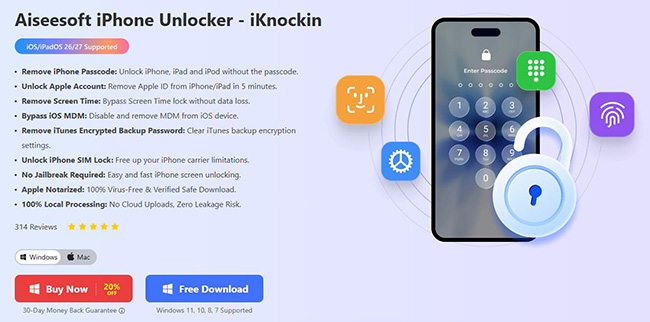
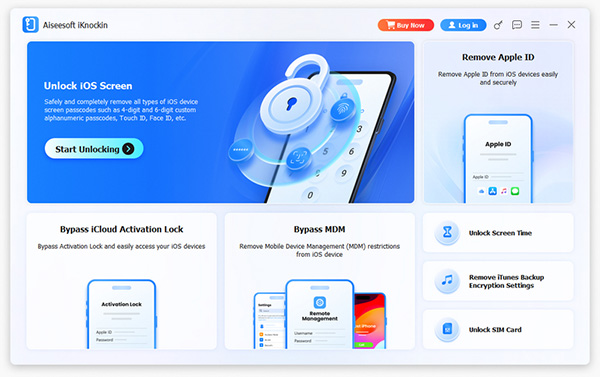
Aiseesoft now also brands the product as Aiseesoft iKnockin - iPhone Unlocker. Its current official product page lists six main modes: unlocking the iOS screen, removing Apple ID, removing Screen Time, bypassing MDM, removing backup encryption settings, and unlocking SIM restrictions. This makes it more than a basic screen-passcode remover. However, each function works differently and has its own requirements.
What Can Aiseesoft iPhone Unlocker Do?
Aiseesoft iPhone Unlocker covers several common iOS lock situations, but not every mode works under the same conditions. Before using it, check what the specific feature does, whether it causes data loss, and what device settings are required.
1. Unlock iPhone and iPad Screen Passcodes
The Unlock iOS Screen mode removes:
- 4-digit passcodes;
- 6-digit passcodes;
- Touch ID locks;
- Face ID locks.
It can be useful when you forget the passcode, enter the wrong password too many times, see an iPhone Unavailable or Security Lockout screen, or cannot use Face ID or Touch ID.
 Warning: Removing the screen passcode erases all data on the device.
2. Remove Apple ID Without the Password
Aiseesoft can also remove an Apple ID and iCloud account from an activated iPhone or iPad. However, its Apple ID mode has several conditions:
- removing the Apple ID erases device data and settings;
- if Find My is off, compatibility is broader;
- if Find My is enabled on iOS 11.4 or later, two-factor authentication must be enabled;
- an unactivated device is not supported.
This is an important distinction because "Apple ID removal" does not mean that Aiseesoft can remove any Apple ID from any device under every condition.
3. Remove or Recover a Screen Time Passcode
Aiseesoft includes a dedicated Screen Time mode. According to its current guide, if Screen Time was set directly on the device, the program can remove it without deleting other data. However, if Screen Time was configured remotely through Family settings, Aiseesoft warns that the process can wipe the device.
So "Screen Time removal without data loss" is not universal; it depends on how the restriction was configured.
4. Bypass MDM Restrictions
Aiseesoft also offers a Bypass MDM mode for iPhones and iPads and advertises this function as working without deleting existing device data.
This function is relevant mainly for a device you own or are authorized to manage. However, users should distinguish between removing or bypassing management locally and having a device permanently released by an organization. Apple allows organizations using Automated Device Enrollment to prevent users from removing the MDM enrollment profile from supervised devices.
If the iPhone or iPad still belongs to a company, school, or other organization, contact its administrator instead.
5. Remove iTunes Backup Encryption Settings
If you forgot the password used to encrypt local iPhone backups, Aiseesoft can remove the device's backup encryption settings. Its current guide states that existing encrypted backup files are not deleted or modified during this process. Find My must first be turned off.
This feature does not mean the software "recovers" the forgotten encryption password. Instead, it removes the current encryption settings so you can create new backups.
6. Unlock SIM Restrictions
Aiseesoft iPhone Unlocker now includes an Unlock SIM Card mode. This is one of the newer functions missing from many older Aiseesoft reviews.
The important limitation is that Aiseesoft's current guide checks the device's jailbreak status and says that if the iPhone is not already jailbroken, it must be jailbroken before proceeding with this SIM-unlock workflow.
For a normal carrier-locked iPhone, contacting the original carrier remains the cleaner first option when available.
7. Bypass iCloud Activation Lock on Supported Devices
Aiseesoft also promotes a dedicated Bypass iCloud Activation Lock feature in its current iKnockin-related content. Unlike its normal screen-passcode mode, this Activation Lock workflow requires the device to be jailbroken.
Therefore, do not assume that Aiseesoft's broad iPhone 17/iOS 27 compatibility claim for the main program automatically applies to Activation Lock removal. Check the exact supported devices and system versions for that feature separately.
What We Verified for This 2026 Review
For this August 2026 update, we checked Aiseesoft's:
- current iPhone Unlocker/iKnockin product page;
- latest product tutorial;
- current Windows and Mac purchase pages;
- advertised iPhone and iOS compatibility;
- requirements for each unlocking mode;
- data-loss warnings;
- refund terms;
- current public customer feedback.
We do not treat marketing claims such as "99% success rate" as independently verified test results unless comparable testing data is available.
That is important because the actual result depends on factors such as:
- iPhone/iPad model;
- iOS/iPadOS version;
- Find My status;
- activation status;
- two-factor authentication;
- lock type;
- whether jailbreak is required.
Does Aiseesoft iPhone Unlocker Really Work?
The answer is yes for supported scenarios, but not every feature works on every device in the same way.
Screen Passcode Removal
Screen unlocking is one of Aiseesoft's core functions and has relatively straightforward requirements. The software downloads compatible firmware and uses it to wipe the existing screen passcode. The trade-off is that the device is erased.
Apple ID Removal
Apple ID removal is more restrictive. An activated device is required, and Find My and two-factor authentication settings determine what steps are available. Aiseesoft's official documentation explicitly warns that Apple ID removal will delete device data.
Screen Time
Screen Time removal can preserve data when the restriction was created directly on the device. Family-managed restrictions are different and may require erasing the device.
MDM
Aiseesoft provides an MDM bypass mode and advertises it as non-destructive. However, if the device remains assigned to an organization through Automated Device Enrollment, the organization's enrollment configuration is a separate issue from a local restriction.
SIM and Activation Lock
These are more advanced cases. Both can introduce additional restrictions, and Aiseesoft's current documentation indicates jailbreak requirements in relevant workflows.
Does Aiseesoft iPhone Unlocker Support iOS 26 and iOS 27?
Yes, Aiseesoft currently advertises iOS 26 support, and its main iKnockin product page lists support through iOS 27 beta.
Its current overall compatibility information covers iPhone models from the iPhone 4 through the iPhone 17 series and iOS 7 or later, including iOS 27 beta.
However, compatibility varies by feature. For example, its dedicated screen-unlocker page currently lists iOS 26, while individual modes such as Apple ID, Activation Lock, and SIM unlocking have additional requirements beyond the iOS version.
Therefore:
- Overall compatibility: iOS 27 beta is advertised.
- Feature compatibility: Check the exact mode before purchasing.
This distinction is especially important for Activation Lock and SIM unlocking.
Will Aiseesoft iPhone Unlocker Erase Your Data?
It depends on the function.
| Aiseesoft Mode | Data Loss? |
|---|---|
| Unlock Screen Passcode | Yes — device data is erased |
| Remove Apple ID | Yes — data and settings are erased |
| Screen Time set directly on device | Usually no other data erased |
| Family-managed Screen Time | May erase device data |
| MDM Bypass | Advertised as no data loss |
| Remove Backup Encryption Settings | Existing encrypted backups remain unchanged |
| SIM Unlock | Check requirements before proceeding |
| Activation Lock | Separate jailbreak-based workflow |
The two biggest warnings are screen-passcode removal and Apple ID removal. Both erase data according to Aiseesoft's current documentation. If your information is important and you still have access to the device, make a backup before using any destructive unlocking mode.
Aiseesoft iPhone Unlocker Price: Is It Free?
Aiseesoft iPhone Unlocker is free to download, but it is not a free unlocking tool. Full functionality requires a paid plan. As checked on August 24, 2026, Aiseesoft's official iKnockin purchase page lists the following Windows plans:
| Plan | Current Price | Device Limit | Renewal |
|---|---|---|---|
| 1 Month | $31.20 | 3 iOS devices / 1 PC | Auto-renewing |
| 1 Year | $49.60 | 6 iOS devices / 1 PC | Auto-renewing |
| Lifetime | $59.60 | 6 iOS devices / 1 PC | One-time purchase |
The Mac purchase page currently lists the same prices with corresponding Mac device licensing. Prices and promotions can change, so check the official checkout before purchasing.
What About the Refund Policy?
Aiseesoft currently states that qualifying yearly and lifetime purchases can receive a refund within 30 days under its refund-policy conditions. The checkout page also specifies that refunds are not available for non-quality-related issues. Read the eligibility terms before paying.
Is Aiseesoft iPhone Unlocker Safe?
Aiseesoft iPhone Unlocker appears to be legitimate commercial software, but using an unlocking tool is not completely risk-free. There are three different types of safety to consider.
Software Safety
Aiseesoft states that its software is Apple-notarized and processes unlocking-related data locally rather than uploading it to the cloud. These are manufacturer claims rather than independent security-audit results, but they are relevant when evaluating the official installer.
Download the software only from the official site rather than cracked, keygen, or unofficial download pages.
Data Safety
Some unlocking modes intentionally erase the device. Screen-passcode and Apple ID removal both fall into this category. So safe software does not mean no data loss.
Device Modification
SIM unlocking and Activation Lock workflows can require jailbreaking. Jailbreaking changes normal iOS security behavior and should be considered separately from standard passcode removal.
Is Aiseesoft Legit or a Scam?
Aiseesoft is an established commercial software company with an active website, paid licensing, technical support, product documentation, and a long public review history.
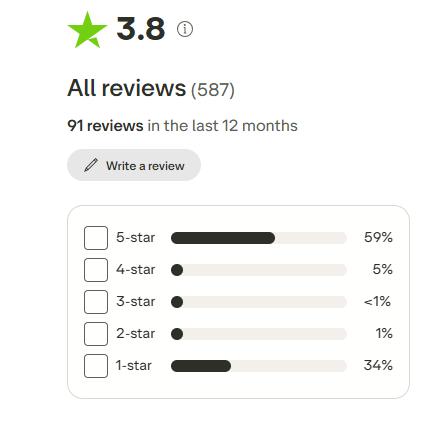
As of August 2026, Aiseesoft Studio's Trustpilot profile has an overall score of around 3.8/5 from nearly 600 reviews.
It covers Aiseesoft Studio as a company, including many products such as video converters, data recovery software, screen recorders, Android tools, and iPhone utilities. It is not a dedicated Aiseesoft iPhone Unlocker rating.
What Do Real Users Say About Aiseesoft?
Public customer feedback about Aiseesoft is mixed. Aiseesoft Studio's current Trustpilot distribution is highly polarized: about 59% of reviews are 5-star, while around 34% are 1-star.
Positive reviews often mention:
- responsive customer support;
- software that is easy to use;
- successful technical problem solving.
There is also a July 2026 review from a user who reported successfully resolving an iPhone 11 Pro "iPhone Unavailable" situation with an Aiseesoft product.
Negative feedback commonly concerns:
- software not working as expected in a particular case;
- features or limitations users did not understand before purchase;
- refund disputes or lengthy troubleshooting before refund resolution.
Again, these reviews cover the company as a whole, so they should be treated as reputation signals rather than controlled tests of iPhone Unlocker.
Aiseesoft iPhone Unlocker Pros and Cons
 Pros:
Pros:- Supports multiple iOS lock types in one application.
- Currently advertises compatibility through iPhone 17 and iOS 27 beta.
- Available for both Windows and macOS.
- Dedicated modes for Screen Time and MDM can preserve data in supported scenarios.
- Provides monthly, yearly, and lifetime plans.
- Interface and workflow are relatively straightforward.
- Product is still actively updated in 2026.
 Cons:
Cons:- Screen-passcode removal erases all device data.
- Apple ID removal also erases data and has Find My/2FA requirements.
- Screen Time data preservation depends on how the restriction was created.
- SIM unlocking may require jailbreaking.
- Activation Lock bypass requires a separate jailbreak-based workflow.
- General compatibility claims do not guarantee that every feature supports every device.
- The refund guarantee has eligibility conditions.
- Public customer feedback is noticeably divided.
How to Use Aiseesoft iPhone Unlocker to Remove a Screen Passcode
Screen-passcode removal is one of the most common reasons people use an iPhone unlocker, so it makes more sense to demonstrate this mode than the older article's Apple ID example.
- Step 1. Install and launch the latest Aiseesoft iKnockin - iPhone Unlocker on your Windows PC or Mac. From the main interface, select Unlock iOS Screen and click Start Now. Connect your iPhone or iPad to the computer with a USB cable.
- Step 2. Follow the onscreen instructions if the program asks you to place the device into the required recovery state.
- Step 3. Once Aiseesoft recognizes the device, check the displayed model and system information. Download the firmware package required for the unlocking process.
- Step 4. After the firmware finishes downloading, read the warning carefully. Click OK, then Confirm Again to allow Aiseesoft to verify the firmware package.
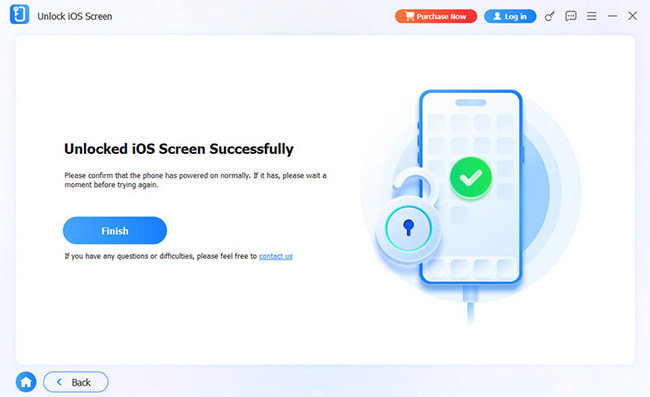
- Step 5. Keep the iPhone connected while Aiseesoft removes the existing screen lock. When the process finishes, set up the iPhone again and restore a previous backup if one is available. Aiseesoft's current official guide confirms that screen-passcode removal deletes the data on the device.
Aiseesoft iPhone Unlocker vs TunesKit iPhone Unlocker
Aiseesoft is not the only option in this category. TunesKit iPhone Unlocker is another actively updated Windows and Mac utility designed for several similar iOS lock situations.
| Feature | Aiseesoft iPhone Unlocker | TunesKit iPhone Unlocker |
|---|---|---|
| Screen passcode | Yes | Yes |
| Face ID / Touch ID screen lock | Yes | Yes |
| Apple ID removal | Yes | Yes |
| Screen Time | Yes | Yes |
| MDM | Yes | Yes |
| Backup encryption removal | Yes | Yes |
| Activation Lock | Supported scenarios | Supported scenarios |
| SIM unlock | Yes | Not a core current unlocking mode |
| Password Manager | No dedicated current mode | Yes |
| Screen unlock data loss | Yes | Yes |
| Windows / Mac | Yes | Yes |
| Latest general iOS support | Up to iOS 27 beta | Up to iOS 27 |
| Latest iPhone support | iPhone 17 series | iPhone 17 series |
| Lifetime option | Yes | Yes |
Aiseesoft's current overall specifications list iOS 27 beta, while TunesKit's current technical specifications list iOS 7 through iOS 27 for its general functions. TunesKit's Activation Lock mode has a separate, narrower compatibility range.
Key Features of TunesKit iPhone Unlocker
Remove Apple ID if you forgot Apple ID password. Unlock screen passcode in all types, even if your iPhone screen is broken. Bypass screen time restrictions and passcode without lossing data. Remove MDM lock without password
 600,000+ Downloads
When Is TunesKit iPhone Unlocker Worth Considering?
TunesKit is worth comparing when you want a broader set of iPhone utility functions beyond the basic unlocking modes. The current TunesKit iPhone Unlocker V4.0 adds a Password Manager that can scan saved Wi-Fi passwords, website/app credentials, email account information, and Apple ID details.
TunesKit released V4.0 in June 2026 and currently lists screen lock, Apple ID, Activation Lock, MDM, Screen Time, backup encryption, and password-management functions in its user guide.

Is Aiseesoft iPhone Unlocker Worth It in 2026?
Yes, for the right use case.
Aiseesoft iPhone Unlocker is still actively maintained and now covers more functions than many older reviews suggest. Its current overall compatibility includes recent iPhones and iOS releases, and the lifetime plan is relatively close in price to many competing unlockers.
Aiseesoft Is a Good Fit If:
- you need a Windows or Mac desktop unlocker;
- your device is within the supported range;
- you need several lock-removal modes in one program;
- you understand that screen unlocking erases the device;
- SIM unlocking is one of your requirements;
- you are comfortable checking feature-specific limitations before starting.
Consider an Alternative If:
- preserving screen-locked device data is essential;
- your exact lock is not supported;
- you do not want to jailbreak for SIM or Activation Lock-related workflows;
- you need different utility functions, such as a built-in password manager;
- you are unsure whether your device meets the Apple ID, Find My, or activation requirements.
Overall, Aiseesoft is a legitimate and capable iPhone unlocker, but it should not be treated as a universal one-click solution for every iPhone lock.
FAQs About Aiseesoft iPhone Unlocker
-
Can Aiseesoft bypass MDM without losing data?
Aiseesoft advertises its MDM bypass mode as working without erasing device data. However, an organization-managed device can also be enrolled through Apple's Automated Device Enrollment, where the organization may prevent user unenrollment. If the device belongs to a company or school, contact its administrator.
-
Does Aiseesoft SIM Unlock require jailbreak?
It can. Aiseesoft's current tutorial says that its SIM Unlock mode checks the device's jailbreak status and requires jailbreaking first if the device is not already jailbroken.
Final Verdict
After reviewing its current features, compatibility, pricing, and public feedback, Aiseesoft iPhone Unlocker remains a viable iOS unlocking tool in 2026. Its main strengths are broad functionality, continued support for newer iPhones and iOS versions, and dedicated tools for screen locks, Apple ID, Screen Time, MDM, backup encryption, and SIM restrictions.
If Aiseesoft supports your exact device and lock type, it is worth considering. If you want another actively maintained option with features such as Password Manager alongside screen lock, Apple ID, MDM, Screen Time, and Activation Lock tools, TunesKit iPhone Unlocker is a practical alternative to compare.