


iOS 26 Activation Lock Removal [Complete Guide]

Getting locked out of your device is an incredibly frustrating experience. With the release of iOS 26, Apple has implemented even stricter security protocols that render many older tutorials and unlocking tricks completely obsolete. The activation barrier is designed to protect user data, but it often traps second-hand buyers and forgetful original owners in a loop.
This guide provides only verified, working solutions for the modern system architecture. Let's explore the safest and most effective ways to remove Activation Lock on iOS 26 and regain access to your iPhone in 2026.
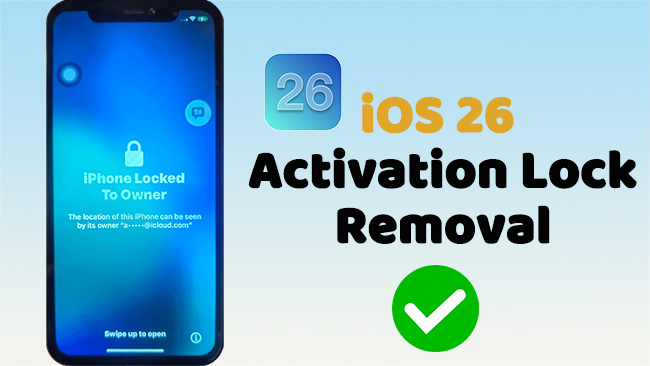
How Does the Activation Lock Work on iOS 26?
The Activation Lock is a powerful, server-side security mechanism. It is not just a local password saved on your phone; it is a cryptographic tie between your specific device and Apple's external activation servers.
Whenever an iOS 26 device connects to the internet during the initial setup phase, it immediately pings these servers to check its status. If the device is flagged as locked to an existing Apple Account, the server strictly denies access to the home screen. Because this check happens remotely, standard hardware resets cannot bypass the lock.
How to Bypass Activation Lock on iOS 26 (4 Proven Methods)
Whether you need to recover official credentials, contact a previous owner, or find an alternative method for an older device, you will find the right path forward here.
| Method | Best For | Key Requirements | Speed | Data Loss? | Cost |
|---|---|---|---|---|---|
| 1. Password Recovery | Original Owners | Trusted device or phone number | Immediate | No | Free |
| 2. Remote iCloud Removal | Second-Hand Buyers | Cooperative previous owner | Immediate | Yes | Free |
| 3. Apple Support Request | Unreachable Owners | Original proof of purchase (receipt) | Days (Manual Review) | Yes | Free |
| 4. MDM Clear Command | Corporate Devices | IT Administrator access | Immediate | No | Free |
Method 1. Apple Account Password Recovery
If you are the original owner of the device and simply forgot your login credentials, native recovery is always the safest and most effective route. Resetting your password restores full, unrestricted access to the device and all its features.
- Step 1. Navigate to the official Apple account recovery website on a secondary trusted device or computer.
- Step 2. Enter the email address or phone number associated with your Apple Account and follow the prompts to verify your identity. Then create a new password.

- Step 3. Now, enter your Apple Account and the new password on your locked iOS 26 device to clear the activation screen.

Method 2. Remote Removal via iCloud Web
This is the ideal and cleanest solution for users who purchased a used device from a cooperative seller. The previous owner does not need to physically hand over their password or be near the device. They simply need to disassociate the phone from their Apple Account remotely.
- Step 1. Instruct the previous owner to log into iCloud website using their Apple Account credentials.
- Step 2. Ask them to locate the specific iPhone or iPad under All Devices and select Remove from Account to permanently lift the lock.

- Step 3. Restart your device and proceed through the initial configuration.
 Note:
Note:
During this new setup process, you will notice that the outdated "Choose Data to Back Up" screen no longer appears, allowing you to quickly breeze straight into the data transfer or fresh setup phase.
Method 3. Contact Apple Support with Activation Lock Request
When you cannot recover your account or reach the previous owner, Apple provides a manual override. Apple support staff have the authority to update the activation servers directly and sever the tie between the device and the lost account.
This method is highly reliable but requires patience while the support team conducts a manual review. You must be able to provide the original receipt from an Apple Authorized Reseller.
- Step 1. Head to the official Apple Support portal and start an Activation Lock support request.
- Step 2. Submit the device's IMEI or Serial Number.
- Step 3. Upload a clear, legible image of the original proof of purchase.

Method 4. MDM Clear Activation Lock Command
IT administrators frequently deal with locked devices when an employee leaves the company. If the iPad or iPhone was properly enrolled in Apple Business Manager, standard consumer methods are unnecessary.
- Step 1. Log into your enterprise's Mobile Device Management (MDM) portal using your administrator credentials.
- Step 2. Navigate to your device inventory or management dashboard, then search for and select the specific locked enterprise device.
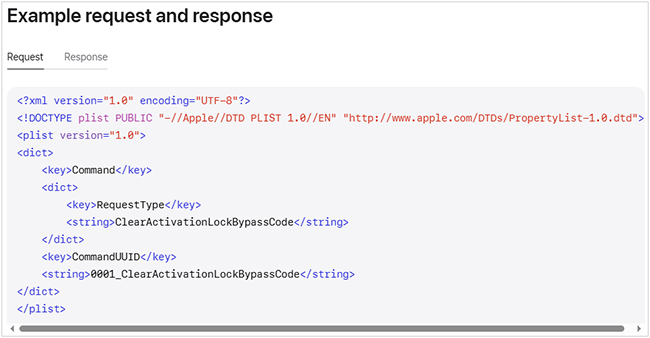
- Step 3. Choose your preferred unlocking method from the device management menu. You can push a remote Clear Activation Lock command to unlock the device instantly over the air.
- Step 4. If performing the bypass manually, retrieve the unique Activation Lock Bypass Code. On the locked iOS 26 device, please leave the Apple Account username field completely empty and type your bypass code directly into the password field.
 Source: Activation Lock on Apple devices
Extra Tip: Bypassing Activation Lock on Older Devices (iOS 12.0 to 16.7)
While strict server-side checks secure modern iOS 26 devices, users with older iPhone or iPad have alternative options. If you purchased a second-hand device running an older operating system and cannot reach the previous owner, a dedicated third-party unlocking tool is your best fallback.
TunesKit Activation Unlocker is a professional software solution designed to safely bypass the activation screen for devices running iOS 12.0 through iOS 16.7. It can help you remove the Activation Lock without password in a few clicks only.
Why Choose TunesKit Activation Unlocker?
Easily removes Activation Lock without previous owner. Supports a wide range of iOS device models and versions, with highest success rate.
 600,000+ Downloads
- Step 1. Launch TunesKit Activation Unlocker on your computer and connect your locked device using a certified USB cable.
- Step 2. Choose Remove iCloud Activation Lock option on the interface and click Start to move.
- Step 3. Follow the automated, on-screen bypass sequence to safely bypass the Activation Lock. Once the success confirmation appears, disconnect your device and access your home screen.

Warning: Methods to Avoid in 2026
For the newest iOS 26 Activation Lock removal, here are some methods that may not work any more now.
The iTunes or Finder Restore Myth
Many outdated guides claim that performing a factory reset via a computer will unlock the device. This is entirely false.
Restoring a device through iTunes or Finder only wipes the local flash storage, which is useful for removing a forgotten lock screen passcode. However, it utterly fails to remove the server-side Activation Lock. As soon as the freshly wiped device connects to Wi-Fi, it will ping Apple's servers and immediately lock you out again.

DNS Server Manipulation
In the past, some users manipulated Wi-Fi network settings to reroute the device's traffic through a custom DNS server. This old networking trick does not work on the modern iOS 26 architecture. Attempting this method is a waste of time and can potentially expose your device to significant security risks.

FAQs Related to iOS 26 iCloud Bypass
-
Can a factory reset bypass the lock?
Definitely no. A factory reset only deletes the data stored locally on the device. The Activation Lock is managed remotely on Apple's servers, meaning the lock will immediately return the moment the reset device connects to the internet.
View More: Does Factory Reset Remove iCloud Lock on iPhone? -
What happens to my data during this process?
If you use the official Apple Account recovery method, your existing data remains safely intact. However, if you are relying on an Apple Support request or the previous owner removing the device remotely, the phone must be erased to complete the unlocking process.
Wrapping Up
Bypassing the Activation Lock requires the right approach for your specific situation. The modern iOS 26 environment is heavily secured, making official methods like Apple Account recovery and remote iCloud removal the most effective solutions. By steering clear of debunked myths and following the verified steps outlined above, you can safely successfully reclaim your device.
If you have an older device (iOS 12.0 - 16.7) and cannot reach the previous owner, using a dedicated tool like TunesKit Activation Unlocker is the fastest way to safely bypass the lock screen and regain access to your phone.


