


How to Turn Off Activation Lock on iPhone(Complete 2026 Guide)

Activation Lock is deeply tied into Apple's Find My network and is designed to keep your private data safe if your device is ever lost or stolen. However, it can quickly become a massive headache if you forget your password, or buy a second-hand phone. Finding a way past this screen requires different approaches depending on your specific situation.
Fortunately, whether you have all the original credentials or find yourself completely locked out, there are paths forward. This guide covers the most effective scenarios to help you turn off the Activation Lock on your iPhone and regain full access to your device.
- Scenario 1: You Have the Device and the Apple Account Password
- Scenario 2: You Bought a Used iPhone and Need the Seller's Help
- Scenario 3: You Cannot Contact the Previous OwnerHOT
- Scenario 4: You Are the Original Owner but Forgot Your Details
- Pro Tip: How to Avoid Activation Lock When Buying Used
- FAQs About Activation Lock
- Final Thoughts
Scenario 1: You Have the Device and the Apple Account Password
If you are the original owner and simply need to prepare your phone for a trade-in or sale, disabling the lock is a very straightforward process. As long as you know your Apple Account email and password, you can remove the lock directly from the device's settings menu. This is the official and most secure method recommended by Apple.
It completely removes the device from your account and turns off Find My simultaneously.
- Step 1. Open the Settings app on your iPhone, tap on General, and scroll down to select Transfer or Reset iPhone.
- Step 2. Tap Erase All Content and Settings and follow the on-screen prompts.
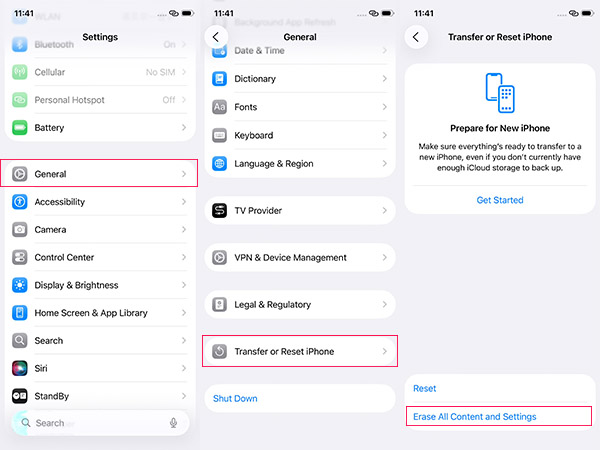
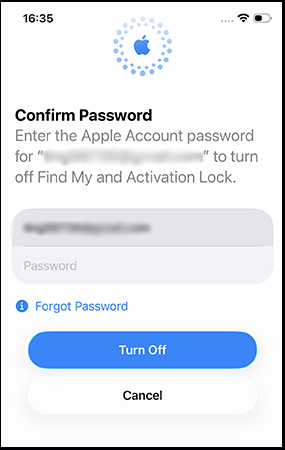
- Step 3. When the system asks for your Apple Account password, enter it to successfully disable the lock and wipe the device clean.
 Note
Note
If you are running a recent version of iOS and have Stolen Device Protection enabled, you must be aware of the "Security Delay" feature. That feature will force you to wait for one hour before you erase your iPhone.
Scenario 2: You Bought a Used iPhone and Need the Seller's Help
Purchasing a second-hand device often leads to an unexpected Activation Lock screen if the previous owner forgot to wipe it properly before handing it over. If you can still contact the seller, you do not need them to meet you in person to fix this issue. They can completely remove the lock remotely using any standard web browser.
It is absolutely crucial that the seller removes the device from their account rather than just erasing it.
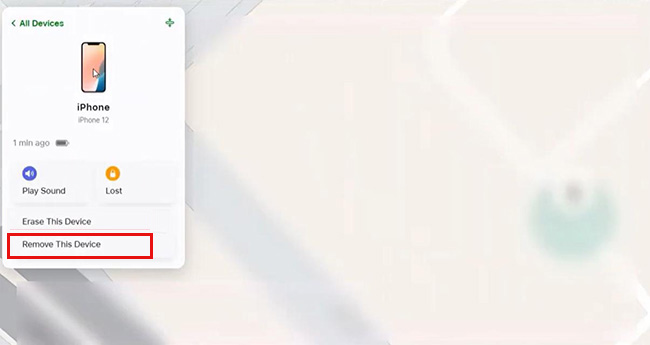
- Step 1. Ask the previous owner to log into iCloud.com with their Apple Account and navigate to the "Find My" section.
- Step 2. Have them click on the specific iPhone in their device list and select "Erase This Device" if the phone has not been wiped yet.
- Step 3. Instruct them to click "Remove This Device" to permanently unbind the hardware from their Apple Account.
Scenario 3: You Cannot Contact the Previous Owner
Sometimes, you might purchase a phone from a thrift store, an estate sale, or a seller who has completely stopped responding to your messages. When you have no way to retrieve the Apple Account credentials and official channels are blocked, you are left in a difficult position. Apple's security is strictly server-based, meaning you cannot officially remove the lock without those specific account details. In this dead-end situation, third-party bypass software offers a functional alternative to throwing the device away.
Tuneskit Activation Unlocker is designed to address this core problem by bypassing the lock screen locally. It is important to understand that this software does not permanently erase the previous owner's Apple Account from Apple's servers. Instead, it utilizes a jailbreak process to skip the initial setup activation step, allowing you to access the home screen and use the device for apps, Wi-Fi, and media.
 Warning: You should be aware that bypassing the lock often limits cellular functions, and if you factory reset the device again in the future, the activation lock screen will return.
Why Choose TunesKit Activation Unlocker?
Remove Activation Lock without password. Easy to use & high success rate. High success rate & Easy to use. iPhone, iPad, iPod Touch are supported.
 600,000+ Downloads
You can follow the steps below to turn off iCloud Activation Lock from your iPhone with a few minutes.
Step 1Connect your iPhone to PC
Download TunesKit Activation Unlocker onto your computer and connect the locked iPhone using a reliable USB cable.
Launch the tool and select the Remove iCloud Activation Lock feature. Click Start to proceed.

Step 2Jailbreak your device
In this window, you need to jailbreak your iPhone by following the procedures below. This process is different for Mac and Windows users.

 See more:
Step 3Turn Off iCloud Activation Lock
Click the Start to Remove button after you check your iPhone information. This removal process will take a few minutes.

Scenario 4: You Are the Original Owner but Forgot Your Details
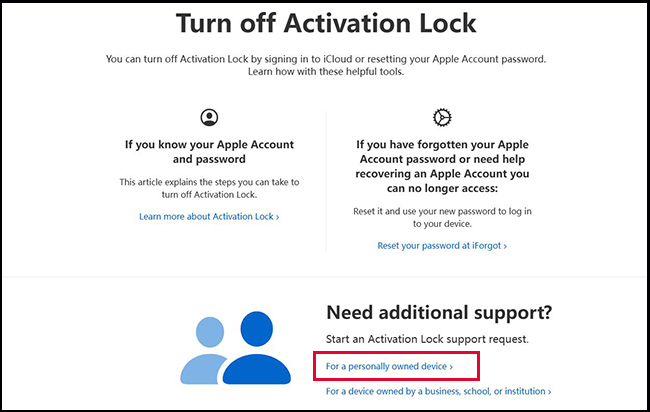
If you bought the iPhone brand new but have completely lost access to your Apple account and all recovery options, Apple can manually override the lock. This process is strictly regulated to prevent theft, so you will need to definitively prove that you are the rightful owner. You must submit a formal support request through Apple's dedicated website.
- Step 1. Navigate to Apple's official Activation Lock support page on a web browser and then click the For a personally owned device link.
- Step 2. Upload your original proof of purchase documentation. Ensure that the receipt clearly shows the store's details, the date of purchase, and the iPhone's exact serial number or IMEI.
- Step 3. Wait for Apple's support team to review your case. Once approved, they will remotely turn off the activation lock on your iPhone.
Pro Tip: How to Avoid Activation Lock When Buying Used
The absolute best way to deal with an iCloud lock is to avoid it entirely before money ever changes hands. Years ago, Apple provided a web-based checking tool to verify a device's status, but that has since been discontinued. Because of this, third-party checking websites are largely unreliable and often outright scams.
Today, the only foolproof method is to verify the phone's status in person during the transaction. Never purchase a used iPhone without seeing it turn on and reach the main Home Screen or the initial setup screen without a lock prompt.
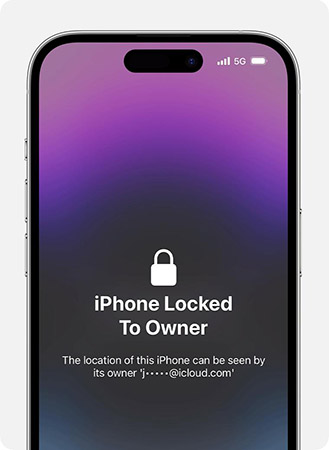
- Step 1. Turn the device on in front of the seller. If it immediately displays an "iPhone Locked to Owner" screen, hand it back and ask them to enter their credentials.
- Step 2. If it boots normally to a Home Screen, politely ask the seller to factory reset the iPhone just like the steps in Scenario 1 right in front of you.
- Step 3. Wait for the device to restart and verify that you can begin the setup process without it asking for the previous owner's Apple Account.
FAQs About Activation Lock
-
Does a factory reset remove the Activation Lock?
A factory reset will absolutely not turn off the Activation Lock on an iPhone. This powerful security feature is stored securely on Apple's servers, meaning it easily survives complete local data wipes. If you erase a phone without signing out of the Apple ID first, the lock screen will automatically trigger when the phone connects to the internet during the next setup process.
-
Is it possible to bypass the Activation Lock for free?
Yes, but your free options are highly restricted depending on your specific situation. If you are the original owner and possess the store receipt, Apple Support will remove the lock entirely free of charge.
Final Thoughts
Figuring out how to turn off the Activation Lock on an iPhone can seem daunting at first glance. However, the situation is highly manageable when you understand the different methods available to you.
When the official methods are exhausted, you still have viable paths forward to save your device. Submitting a manual request to Apple Support or relying on reputable third-party bypass tools like TunesKit Activation Unlocker can effectively rescue a smartphone from being a total loss.


