


Full Guide on Master Code to Unlock Any Phone (Android)
Getting locked out of your smartphone can be frustrating, and many users search for a universal master code to unlock any phone. While such codes existed for older feature phones, modern smartphones are built with much stronger security.
There is no single "magic number" to bypass fingerprint or Face ID locks, but certain reset codes and proven methods can still help you regain access. This guide outlines safe and effective ways to unlock your device, whether you’ve forgotten your screen lock or are facing network restrictions.
Part 1. The Truth About Master Codes and Phone Security
Before you start typing random numbers into your emergency dialer, it is crucial to understand what you are actually dealing with. In the era of modern encryption, there is no longer a single "0000" or "1234" that unlocks every device universally. When people search for a master code, they are usually dealing with one of three distinct problems:
- Screen Lock: You forgot your PIN, Pattern, or Password.
- SIM/Network Lock: Your phone only works with one specific carrier (e.g., AT&T or Verizon).
- FRP Lock: Google or Apple ID lock after a factory reset.
 Note
Note
Many websites list "Master Unlock Codes" that are actually Factory Reset Codes. Entering these will not just unlock your phone; they will wipe every photo, message, and contact from your device. Proceed with the methods below carefully.
Part 2. Master Code to Unlock Any Android Phone
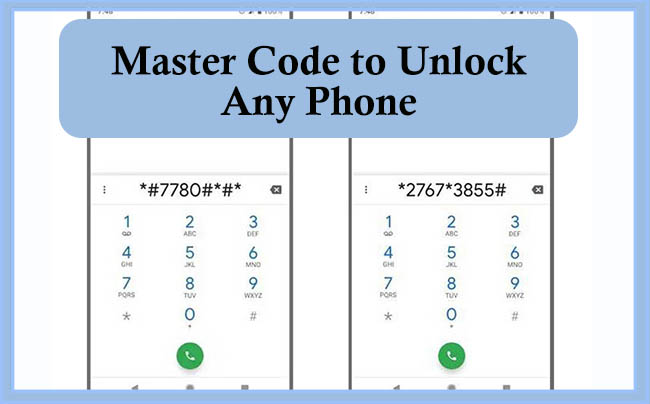
If your goal is to unlock the phone and you have accepted that you may lose your data, legitimate system codes exist that act as a "hard reset." These are technically "USSD" or MMI codes. They interact directly with the phone's firmware.
2.1 Generic Android Reset Code
For many Android devices running older operating systems or specific skins, the following code initiates a factory format:
- *2767*3855#
When entered into the dialer, this command often triggers a complete reinstallation of the firmware. It is powerful and usually irreversible once the process begins.
2.2 Brand-Specific Master Codes
Manufacturers often have unique sequences for their engineering menus or reset protocols.
| Brand | Function | Code |
|---|---|---|
| Xiaomi / Redmi | Engineering Mode (Test/Reset) | *#*#64663#*#* |
| Realme / OPPO | Wipe Mobile Data | *2767*3855# |
| Huawei | Project Menu (Reset/Restore) | *#*#2846579#*#* |
| Motorola | Master Clear | *#*#7780#*#* |
| HTC | Factory Reset | *2767*3855# |
Part 3. How to Unlock Screen Without Codes
If you are locked out of your screen and want to get back in, dialing a code on the emergency screen rarely works on Android 10. Instead, you must use remote management tools. These are the verified methods to unlock a screen in 2026.
Method 1: Using Google Find My Device
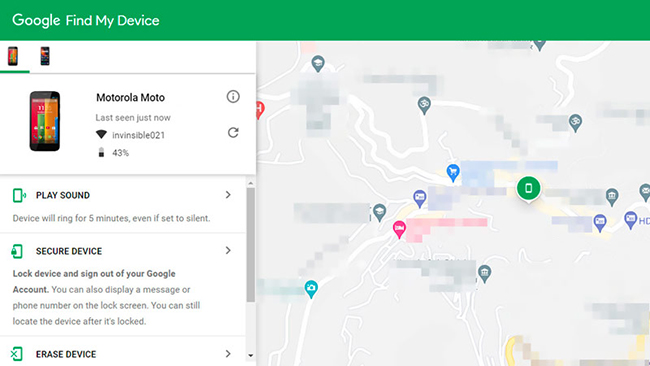
This is the most reliable "Master Method" for removing a lock screen. It works by remotely issuing a security command to your phone.
Step 1. Open a browser on a computer or another phone and visit the official Google Find My Device website.
Step 2. Log in using the exact same Google account that is currently signed in on the locked phone.
Step 3. Select your locked device from the menu bar at the top of the screen.
Step 4. Click on the option labeled "Erase Device".
Step 5. Confirm your choice. This will remotely factory reset the phone, removing the Pattern, PIN, or Password. Once the phone restarts, you will log in with your Google Account to verify ownership (FRP) and restore your backup.
Method 2. Reset Phone via Recovery Mode
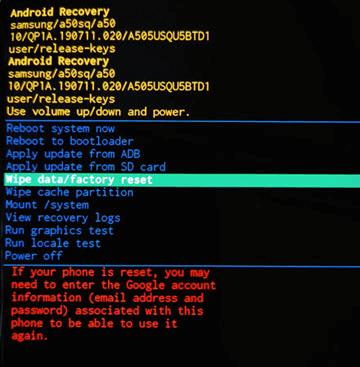
If you cannot access the internet or "Find My Device" is turned off, you must use the physical buttons to put your phone into recovery mode. This bypasses the software entirely.
Step 1. Turn the phone off completely.
Step 2. Press and hold Power + Volume Up buttons simultaneously to enter Recovery mode.
Step 3. Hold until the "Recovery Mode" screen appears (often a black screen with text).
Step 4. Use the Volume button to scroll down to "Wipe Data / Factory Reset" and press the Power button to select it.
Method 3. Unlock Phone Without Passcode via TunesKit Android Unlocker
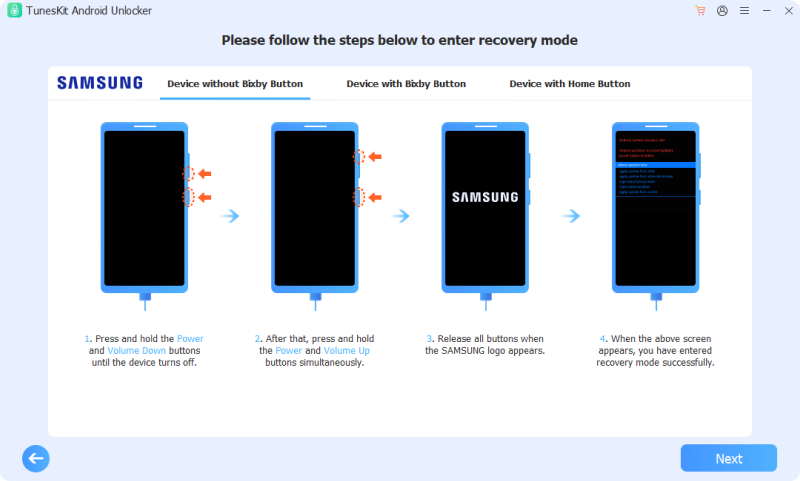
If you don't know how to enter recovery mode, you can ask TunesKit Android Unlocker for help. TunesKit Android Unlocker is an all-in-one Android device toolkit designed to help users solve a wide range of system and lock issues without any passcode, offering a detailed tutorial for users to put Android phone into recovery mode.
If you're looking for a reliable and straightforward way to unlock your Android phone without a passcode, TunesKit Android Unlocker stands out as one of the most effective options available today.
Key Features of TunesKit Android Unlocker
Unlock Android screen without passcode with ease. Supports All Android versions. Available on Windows and Mac.
 600,000+ Downloads
Let's learn how to use TunesKit Android Unlocker to unlock your Android phone step by step.
Step 1 Connect device to computer
Download and install TunesKit Android Unlocker on your computer and open it. Connect your device to the computer via a USB cable. The software will automatically recognize your device's brand.
Step 2 Enter recovery mode
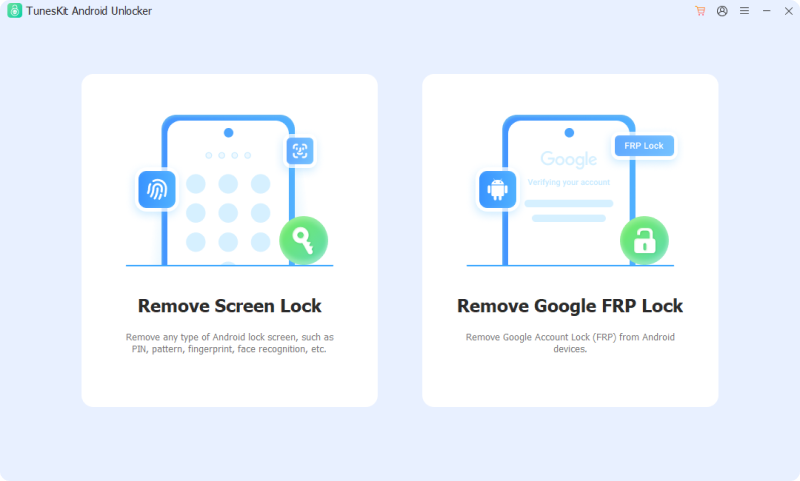
Open the tool and select the Remove Screen Lock option. You will see an instruction about how to put your phone into recovery mode. Follow it and then click the Next button.
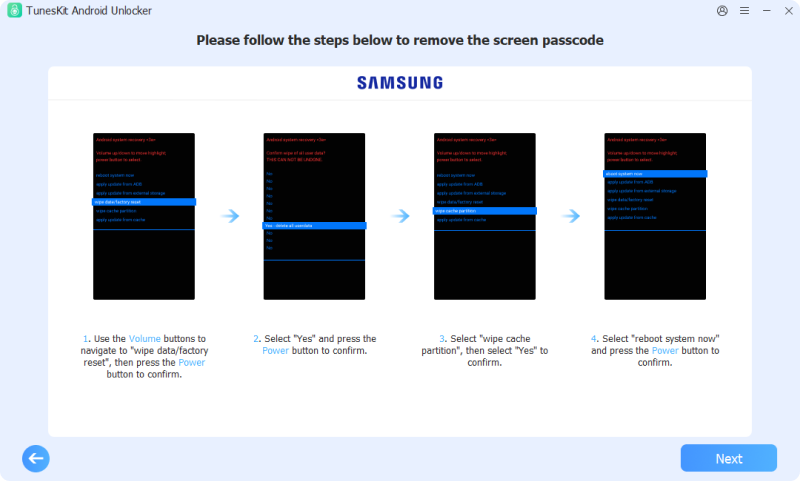
Step 3 Remove screen lock
Follow the steps shown on the computer. After that, click the Next button. TunesKit Android Unlocker will start removing screen lock.
Part 4. FAQs about Master Code to Unlock Any Android Phone
-
1. Are master code generators online legitimate?
No. Websites or apps claiming to generate universal master codes are fake and unsafe, often used to distribute malware or phishing scams. Android's security architecture makes such codes impossible.
-
2. Can I unlock my phone using IMEI or a master code?
No. IMEI numbers cannot be used to derive any kind of unlock code for screen locks. IMEI-related services only apply to carrier unlocking, not removing screen lock passwords.
Part 5. Conclusion
Master code to unlock any phone is not working for all phones. Before you attempt any unlock method, always ask yourself: "Do I need to save the data inside?" If the answer is yes, avoid the raw reset codes and look for backup solutions first. If your priority is simply regaining access to a working device, you now have the professional tool, TunesKit Android Unlocker, and genuine codes to do so safely.


