


Can You Still Downgrade iOS 26 to iOS 18? [2026 Guide]
Downgrading iOS 26 to 18 is difficult due to unsigned firmware. Data loss is mandatory, so please back up your data before downgrading. Use TunesKit iOS downgrade tool for the safest attempt.
The release of iOS 26 marked one of the most significant shifts in Apple's history, introducing the controversial Liquid Glass design. While some users love the new aesthetic, many are finding the update buggy, battery-draining, or simply visually overwhelming.
If you are one of the many users asking, "How do I go back to iOS 18?", this guide is for you. Here, I have analyzed the current landscape to provide you with the most accurate, safe, and effective methods to attempt this downgrade in 2026.
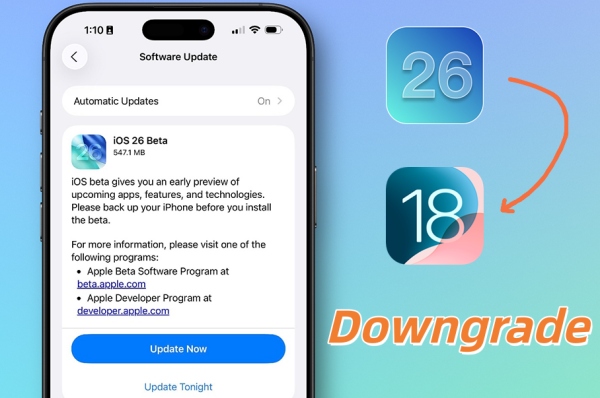
1. Can You Downgrade from iOS 26 to iOS 18? [Hard Truth]
Before we dive into the methods, we must address the "Elephant in the Room": Apple's Signing Window.
As of January 2026, Apple has officially stopped signing iOS 18 (specifically the last stable versions like iOS 18.7).
What this means? You cannot simply download an iOS 18 IPSW file and restore it via iTunes/Finder, as Apple's servers will reject the installation request.
There is always exception. If you previously saved your SHSH Blobs (digital signatures unique to your device) for iOS 18 before upgrading, you may have a chance. If you did not, your options are severely limited.
However, to assist those who may still have access to signed beta profiles or specific enterprise loopholes, we will outline the standard procedures below.
Try TunesKit iOS Downgrade Tool
Quick downgrade from iOS 26 to iOS 18 in a few clicks. Easy to operate for anyone, thanks to its friendly UI.
 900,000+ Downloads
2. Prerequisites Before Downgrading iOS 26 to iOS 18
Regardless of the method you choose, perform these steps first to ensure safety and avoid bricking.
- Backup Your Data: Downgrading will wipe your device. Create a full backup on iCloud or your computer.
- Disable "Find My iPhone": Go to Settings > [Your Name] > Find My and turn it off. This is mandatory for any firmware flash.
- Charge Your Device: Ensure you have at least 70% battery to prevent bricking during the process.
 Note
Note
An iOS 26 backup cannot be restored onto an iOS 18 device. You will need to set up the device as new or use a third-party tool to extract specific data.

3. How to Downgrade from iOS 26 to iOS 18
In this part, I’ll show you 3 different methods to downgrade iOS 26 to iOS 18 respectively. You can choose one based on your specific situations.
Method 1: Downgrade iOS 26 to 18 via iTunes/Finder (Standard Way)
 Best For:
- Users attempting to downgrade while the window is still open or using signed IPSW files.
If you have a signed IPSW file or are attempting this immediately after a new release (when the window briefly re-opens), follow these steps:
Step 1. Visit a trusted repository like ipsw.me and download the iOS 18 firmware specifically for your iPhone model.

Step 2. Connect your iPhone to your PC (iTunes) or Mac (Finder) using a high-quality USB-C or Lightning cable.
Step 3. Enter Recovery Mode. For iPhone 8 and later, press and release Volume Up, press and release Volume Down, then press and hold the Side Button until the Recovery Mode screen appears.
Step 4. Initiate the Restore.
- On Mac: Hold the Option key and click "Restore iPhone".
- On Windows: Hold the Shift key and click "Restore iPhone".

Step 5. Browse for the iOS 18 IPSW file you downloaded and open it. If signed, the process will begin.
Method 2: Downgrade iOS 26 to 18 via TunesKit (Professional Downgrade Tool)
Best For:- Users who want a simplified interface or need to fix those stuck devices during downgrade.
If iTunes throws errors (like Error 3194) or you are stuck in a boot loop, third-party tools are often the only solution. Tools like TunesKit iOS System Recovery are designed to handle these specific transition errors. It can help you downgrade from iOS 26 to the previous version in a few clicks.
Why Use TunesKit iOS Downgrade Tool?
One-click to downgrade iOS 26 to 18. No complicated manual process. No jailbreak needed, and keep your device safe.
600,000+ Downloads
Now, let's watch the following guide and learn how to quickly downgrade from iOS 26 to 18 with TunesKit step by step.
Step 1. Download and install a reputable TunesKit iOS downgrade tool on your computer.
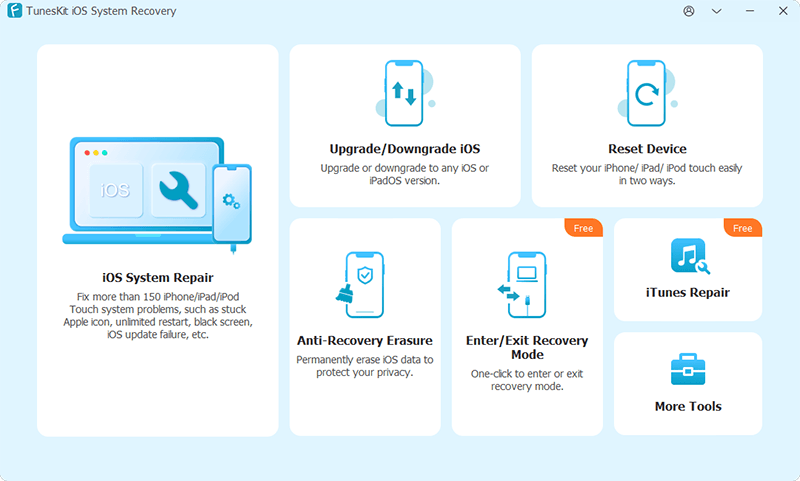
Step 2. Connect your device and select the "Upgrade/Downgrade iOS" feature from the main interface.

Step 3. Choose "iOS Downgrade". The software will automatically detect your device and list available firmware packages.

 Pro Tip:
If iOS 18 is not listed, it confirms that Apple has completely closed the signing window for your specific device model.
Step 4. Click "Download" to get the firmware package, then hit "Start Downgrade". The tool will attempt to flash the old version onto your device.

Method 3: Downgrade iOS 26 to 18 with SHSH Blobs (For Advanced Experts Only)
Best For:- Tech-savvy users who prepared months in advance.
If you saved your SHSH2 blobs for iOS 18 using a tool like TSS Saver or shsh.host before updating to iOS 26, you can use FutureRestore.
Step 1. Gather your specific SHSH2 blob file and the iOS 18 IPSW.
Step 2. Put your device into PwndDFU mode (requires specific tools depending on your chip, e.g., checkm8 devices).
Step 3. Use Terminal (macOS) or Command Prompt to run FutureRestore commands to manually stitch the signed blob with the firmware.
Warning:This process is highly technical. One wrong command can permanently brick your device.

4. FAQ Related to Downgrading iOS 26 to iOS 18
Here are the most frequently asked questions from users attempting this downgrade. Check them out and find your answers.
-
Can I downgrade from iOS 26 without a computer?
No. Downgrading the operating system requires a complete firmware wipe and re-installation, which can only be done by connecting your device to a PC (iTunes) or Mac (Finder). Be wary of any apps or profiles that claim to downgrade without computer. They are often scams or malware.
-
Will I lose my data if I downgrade?
Yes, the downgrade process wipes your device completely. Furthermore, you cannot restore an iOS 26 backup onto an iOS 18 device. Unless you have an archived backup made before you upgraded to iOS 26, you will have to set up your iPhone as a new device and manually sync your photos and contacts from iCloud.
-
Why can't I just use iTunes to "Update" back to the old version?
iTunes prevents you from installing older software once Apple stops "signing" it. As of early 2026, Apple has stopped signing iOS 18 to ensure users stay on the latest secure version. You must use specialized tools or catch the signing window immediately after a release.
-
Will my Apple Watch still work if I downgrade my iPhone?
Likely not. If you updated your watch to watchOS 26, it will no longer pair with an iPhone running iOS 18. Apple Watches cannot be downgraded by the user; you would need to send the watch to Apple Support to have it manually reverted, a service they rarely offer for free.
-
Is it safe to stay on iOS 18?
Staying on an older OS means missing out on the latest security patches. While iOS 18 was stable, it is now vulnerable to newer exploits that iOS 26 has patched. Only downgrade if the bugs in iOS 26 make your device unusable.
-
My phone is stuck in a boot loop (Apple logo) after trying to downgrade. What do I do?
This is a common "soft brick" scenario. You need to force restart your iPhone and enter Recovery Mode or DFU Mode again. Then, use a system repair tool like TunesKit iOS System Recovery to flash the firmware again properly.
-
Can I keep the new Liquid Glass theme if I go back to iOS 18?
No. The Liquid Glass UI is exclusive to the iOS 26 framework. Downgrading will revert your interface entirely back to the flat design language of iOS 18.
5. Conclusion: Is It Worth It?
Downgrading from iOS 26 to iOS 18 is technically one of the hardest tasks in 2026 due to the massive version jump and strict security protocols.
If you successfully downgrade, you will regain the classic interface and potentially better battery life on older hardware. If you cannot downgrade, we recommend waiting for iOS 26.3, which is rumored to fix the major Liquid Glass glares and battery drain issues.
Don't hesitate to try TunesKit iOS System Recovery to downgrade your iOS. It can also help you fix any stuck issues without data loss while downgrading your device!


