Top 10 Solutions to Fix iOS 27 Beta Battery Drain Issue
"Hi, I am facing serious heating issues, and my iPhone battery draining very fast after upgrading my iPhone 17 Pro Max to iOS 27 Beta. Also, I can see the mobile charging speed is very low. Any recommendations to fix the issue?" – Kanta from Apple Forum
With the iOS 27 Beta release, many users are eager to update it to test new features! It may be exciting when you experience the amazing points of iOS 27. However, you must be frustrated when you notice that your battery drains so fast. Have you ever encountered the same issue with the users above? Don't panic. In this post, we will cover you how to fix the iOS 27 Beta battery drain fast issue.
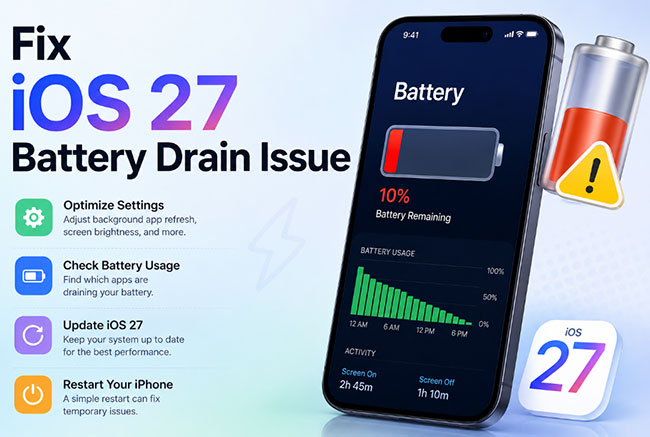
- Why My iPhone Battery Drain So Fast After Updating to iOS 27 Beta?
-
How to Fix iOS 27 Beta Battery Drain Issue?
- Method 1. Restart iPhone
- Method 2. Find Out the Apps that Drains Battery
- Method 3. Close Apps in Background
- Method 4. Limit Background App Refresh Feature
- Method 5. Turn on the Low Power Mode
- Method 6. One-Stop Solution to Fix iOS 27 Beta Battery Drain Without Data Loss HOT
- Method 7. Reset All Settings
- Method 8. Update to the Latest iOS Version
- Method 9. Downgrade iOS 27 Beta to 26
- Method 10. Check Battery Health or Change Battery
- Conclusion
Why My iPhone Battery Drain So Fast After Updating to iOS 27 Beta?
There are several reasons that may lead to your iPhone battery drain fast, and some of the main ones are as follows:
- 01 iOS 27 Beta bugs or system problems. Updating to the most current version iOS 27 might cause your iPhone battery to drain faster than usual. Since it brings several significant new features and it is still not so stable.
- 02 Some apps not compatible with iOS 27. Some apps are not optimized with the new iOS 27 version. Some may still run when you are not using them and even when the screen is off. Besides, your iPhone will always record where you are and monitor your location. All these make your iPhone battery draining faster.
- 03 Your battery is unhealthy. A big factor is battery itself. There may be some problems with your battery of the iPhone. Moreover, there is also the possibility that the battery is damaged.
How to Fix iOS 27 Beta Battery Drain Issue?
In this part, we've tested 10 possible solutions to help you solve iPhone battery drain so fast after the iOS 27 Beta update. You can try them one by one and share your experience with us if you have any other questions.
Method 1. Restart iPhone
In many situations, restarting your device is the easiest solution when we need to fix iOS 27 Beta battery drain issue. You can follow the quick steps below to restart your iOS device.
For iPhone X, 11, 12, 13, or Later: Press and hold either Volume button or the Side button until the power-off slider appears. Drag the slider and wait 30 seconds for your iPhone to turn off. If unresponsive, force restart. To turn it back on, press and hold the Side button until the Apple logo appears.
For iPhone 6, 7, 8, or SE2 or SE3: Press and hold the Side button until the power-off slider appears. Drag the slider and wait 30 seconds for your iPhone to turn off. If unresponsive, force restart. To turn it back on, press and hold the Side button until the Apple logo appears.
For iPhone SE1, 5, or Earlier: Press and hold the Top button until the power-off slider appears. Drag the slider and wait 30 seconds for your iPhone to turn off. If unresponsive, force restart. To turn it back on, press and hold the Top button until the Apple logo appears.

Method 2. Find Out the Apps that Drains Battery
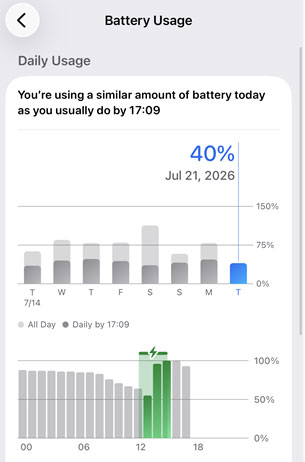
If you think the root of iOS 27 Beta battery draining fast is some APPs, you really need to know what they are. Go for Settings > Battery, tap the View All Battery Usage option, Then you will find some apps that need a lot of power. If they are not so important, just delete them to extend iPhone battery life.
Method 3. Close Apps in Background
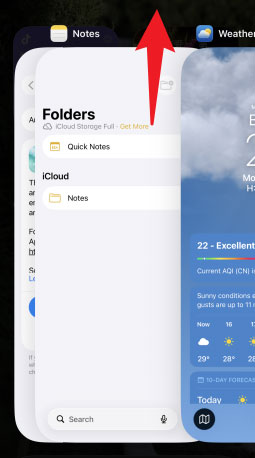
When you leave apps on your iPhone, they stay loaded in the background. They'll be available immediately if you wish to utilise them again. However, when applications run in the background of your iPhone, they continue to transmit and receive data, which might cause iPhone battery drain fast. There's also a potential they'll crash, causing your iPhone battery to drain.
- Step 1. To access the iPhone app switcher, slide up from the bottom to the middle of the screen.
- Step 2. To dismiss an app, swipe up on it and slide it off the top of the screen with your finger.
Method 4. Limit Background App Refresh Feature
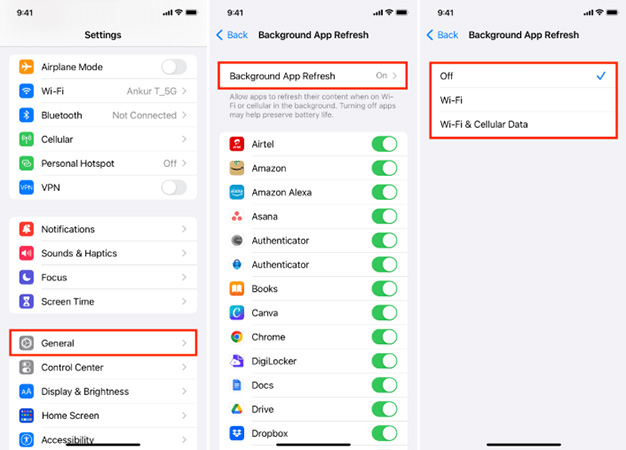
Leaving Background App Refresh enabled for many applications may dramatically deplete your iPhone's battery life since the apps will continually download new data or information using your Wi-Fi or data network connection. We suggest looking through your applications and deciding which ones you want to enable to download fresh material even when you aren't using them.
- Step 1. Tap General in the Settings app.
- Step 2. Then, choose Background App Refresh.
- Step 3. Turn off Background App Refresh by tapping the switch next to the applications you wish to disable.
Method 5. Turn on the Low Power Mode
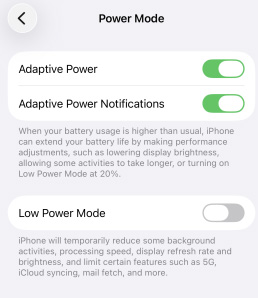
When iPhone battery drain fast after iOS 27 Beta update, you are suggested to do something to save more power on iPhone. Apple offers a Low Poer Mode that can help you. By enabling this feature, it will reduce the amount of power that your iPhone uses when the battery gets low. Now follow the simple steps to turn Low Power Mode on: go to Settings > Battery > Power Mode > Low Power Mode. When Low Power Mode is on, the battery in the status bar will turn yellow.
Method 6. One-Stop Solution to Fix iOS 27 Beta Battery Drain Without Data Loss
Once your iPhone has some iOS system problems like iOS 27 battery drain issue, I would like to suggest a kind of useful software -- TunesKit iOS System Recovery. This professional software focuses on solving the system errors of the iOS, which supports the latest iOS version.
TunesKit iOS System Recovery software can fix 150+ iOS system issues, including iPhone stuck in recovery mode/DFU mode/white Apple logo, or becoming black/frozen/disabled screen, etc. The iOS System Repair feature offers two modes for you: Standard Repair and Deep Repair. The Standard Repair is to solve some glitches that are usually seen and the Deep Repair is for more serious issues. Another important feature that you should know is that there is no data loss during the repairing process with the Standard Repair. So, there is no need to worry that you have to reset everything on your iPhone.
Fix iOS 27 Beta Battery Drain Issue
Repair abnormal battery drain on iOS 27 Beta without data loss and restore your iPhone to optimal performance in just a few clicks.
 600,000+ Downloads
Only 3 steps can you fix iPhone battery drain fast after update issue using TunesKit iOS System Recovery.
Step 1. Connect the iPhone to PC
Connect the iPhone via the USB cable. Start TunesKit iOS System Recovery after downloading it. Then you can choose "iOS System Repair" option on the main interface. Click "Start".

Choose the "Standard Repair" button and "Next". (If the Standard Repair cannot solve your problem, try again and use Deep Repair. But do remember that the Deep Repair will clean all data of your iPhone.)

Step 2. Download Firmware Package
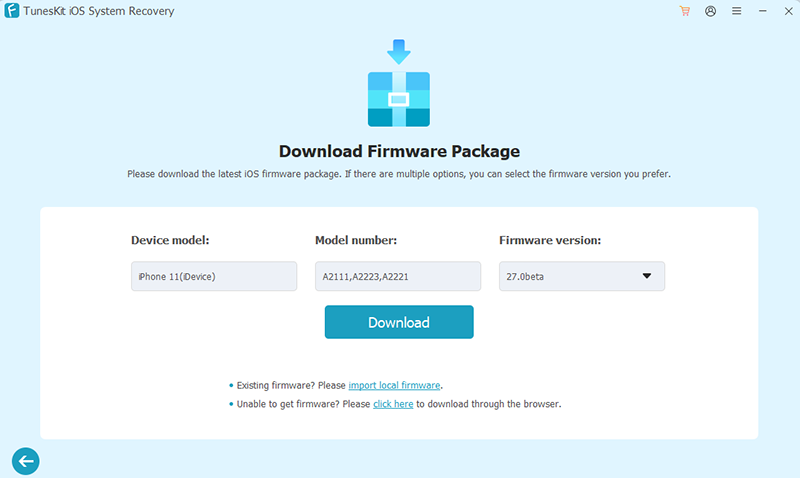
What you should do now is to confirm that the information of your iPhone presented here is correct. If all is correct, click the "Download" button.
Step 3. Fix iOS 27 Beta Battery Drain Issue
When the firmware is downloaded, just click the "Start Standard Repair" button, which is the last step. Wait for a while until the process comes to an end.

Method 7. Reset All Settings
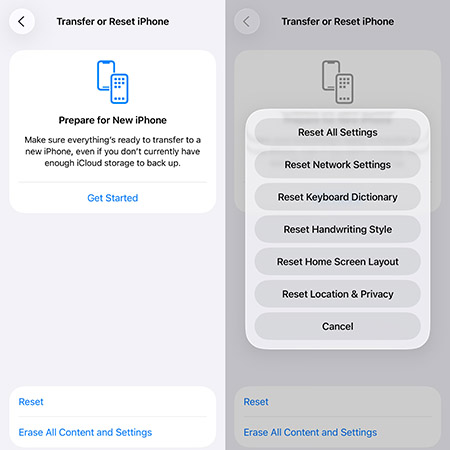
A useful way to solve the problem of iPhone battery drain fast is to reset all settings of your iPhone. This can also be used in many other problems about iOS system. But the disadvantage is that you have to reset every setting, which is a little troublesome. Worse still, in this way, you will lose all data on your iPhone. So before resetting, you are suggested to make a backup of your iPhone data. Then just go to: Settings > General > Transfer or Reset iPhone > Reset > Reset All Settings to fix iOS 27 Beta battery drain issue.
Method 8. Update to the Latest iOS Version
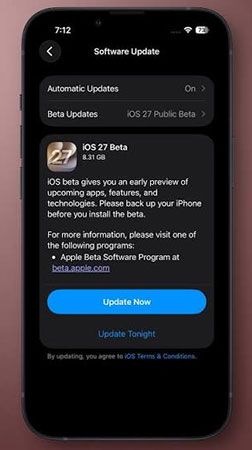
Another thing you should try to fix the iPhone battery drain fast issue is updating your iOS version. If you're using an older iOS 27 beta version, then you can try to update to the latest iOS 27 Beta. To update your iOS version, follow these steps:
- Step 1. Go to Settings and navigate to General.
- Step 2. Now, click on Software Update to proceed.
- Step 3. If the update is available, click on Update Now to upgrade your iOS version.
If the problem still exists after updating, you can reinstall the iOS 27, or wait for the next iOS update.

Method 9. Downgrade iOS 27 Beta to 26
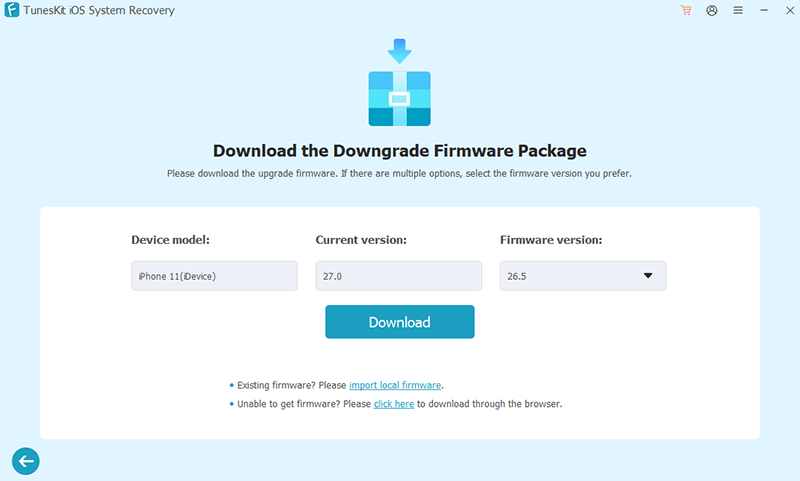
Since the battery in iOS 27 Beta is not the most optimized, you can try to downgrade from iOS 27 to the previous stable iOS 26 version. TunesKit iOS System Recovery also works as a powerful iOS downgrade tool. It can help you downgrade from iOS 27 to the previous version still signed. The process is quite simple, and all can be done in a few clicks.
- Step 1. Launch TunesKit iOS System Recovery and connect your iPhone to the computer with a USB cable.
- Step 2. After your device is detected by TunesKit, choose Upgrade/Downgrade iOS option.
- Step 3. Next, choose iOS downgrade > Download > Start Downgrade and wait for the process ends. Your iPhone will be downgraded to a still signed iOS 26 version successfully.
Method 10. Check Battery Health or Change Battery
When you find that your battery is not healthy anymore, you just need to change it for a new one. To figure out whether your battery is healthy or not, you can check the Settings of your iPhone. It is so easy to find the Battery button, then choose the Battery Health button. Your battery is unhealthy if you find the Maximum Capability is below 80% and the Peak Performance Capability does not show "Your battery is currently supporting normal peak performance".

Conclusion
This article mainly talks about 10 methods to fix the problem of the iOS 27 Beta battery drain fast. Some possible reasons for that are listed, too. Among the methods, using qualified software to fix your problem is the best choice, because the TunesKit iOS System Recovery is such reliable software, which fixes 150+ iOS system issues like black screen, iOS update failure, restore error, iPhone activation error, and the others without data loss. Why not download it and have a try!