


Tenorshare 4uKey Review 2026: Real Test Results, Pros, Cons & Best Alternatives
For many iOS users, dealing with a disabled iPhone can be incredibly knotty. Whether you've forgotten your passcode, are locked out of your device, or facing other access restrictions, the tight security of iOS makes unlocking a real challenge. Therefore, iOS unlocking tool like Tenorshare 4uKey iPhone Unlocker come and help you to unlock iOS devices without entering any passcode.
But, is it safe to use an iOS unlocking tool to unlock an iPhone? In this post, I will make an in-depth Tenorshare 4uKey review, which will focus on the features, pros and cons, price, and the best alternatives.
| Category | Rating |
|---|---|
| Ease of Use | 9/10 |
| Features | 8.5/10 |
| Success Rate | 8.5/10 |
| Compatibility | 9/10 |
| Pricing | 7.5/10 |
| Customer Support | 8/10 |
| Overall Score | 8.4/10 |
- Tenorshare 4uKey Review in Details [4uKey for iPhone]
- 1.1 What Is Tenorshare 4uKey?
- 1.2 Our Testing Environment
- 1.3 Key Features of Tenorshare 4uKey
- 1.4 Does Tenorshare 4uKey Really Work?
- 1.5 Is Tenorshare 4uKey Safe?
- 1.6 Is Tenorshare 4uKey Legit?
- 1.7 What Real Users Say About Tenorshare 4uKey
- 1.8 Tenorshare 4uKey Pricing
- 1.9 FAQs about Tenorshare 4uKey
- Best Tenorshare 4uKey iPhone Unlocker Alternatives [Free/Paid]
- Comparison Between Tenorshare 4uKey and Its Best Alternatives
- Conclusion
Tenorshare 4uKey Review in Details [4uKey for iPhone]
Tenorshare 4uKey is a capable iPhone unlocking tool that performs well in common lock-removal situations. Here is everything you should know about it.
1.1 What Is Tenorshare 4uKey?
Tenorshare 4uKey is an iOS unlocker with various unlocking features, including unlock iOS screen lock, Screen Time passcode, MDM restriction, and Apple Account for iPhone, iPad, and iPod touch. Developed by Tenorshare, 4uKey is now one of the best iOS unlocking tools in the market. With it, you will have no worry about being locked out from your iOS device when forgot iPhone passcode.

1.2 Our Testing Environment
To evaluate Tenorshare 4uKey fairly, we tested the software on a real device under typical conditions.
| Item | Details |
|---|---|
| Device | iPhone 13 |
| iOS Version | iOS 26.1 |
| Computer | Windows 11 |
| Test Date | June 2026 |
| Software Version | Latest Version |
Features Tested
- Screen Passcode Removal
- Apple Account Removal
- Screen Time Removal
1.3 Key Features of Tenorshare 4uKey
Here we discuss the most popular features of Tenorshare 4uKey.
Remove iPhone Screen Passcode
Tenorshare 4uKey can remove various screen locks, including 4-digit passcodes, 6-digit passcodes, Face ID locks, Touch ID locks, and custom passwords. The feature is useful when an iPhone displays messages such as "iPhone Unavailable" or "Security Lockout."
Remove Apple Account
The Apple Account removal feature helps users regain access to devices when account credentials are unavailable. Compatibility depends on the specific device and iOS version.
Unlock Screen Time Passcode
Users who forget Screen Time restrictions can remove the password without manually resetting the device. The process is simple and beginner friendly.
1.4 Does Tenorshare 4uKey Really Work?
One of the biggest questions users ask is whether Tenorshare 4uKey actually works. Based on our testing, the software successfully completed several common unlocking tasks. Results may vary depending on the device model, iOS version, and security configuration, but overall performance was solid.
| Feature | Results |
|---|---|
| Screen Unlock | Successful |
| Apple Account Removal | Successful |
| Screen Time Removal | Successful |
| MDM Bypass | Supported |
| Activation Lock Removal | Limited |
- Screen Passcode Removal Test: We tested Tenorshare 4uKey on an iPhone protected by a forgotten 6-digit passcode. The software downloaded firmware automatically and successfully removed the screen lock in approximately 20 minutes.
- Apple Account Removal Test: The Apple Account removal process was straightforward and required only a few steps. The software successfully completed the task under supported conditions.
- Screen Time Removal Test: The Screen Time password removal feature worked smoothly during testing. The forgotten restriction password was removed without major issues.
Pros and Cons of Tenorshare 4uKey
 Pros:
Pros:- Unlock all types of screen locks: 4-digit, 6-digit, custom numeric or alphanumeric passcodes, Touch ID, and Face ID;
- Remove Screen Time passcodes without data loss;
- Bypass MDM restrictions without needing login credentials;
- Delete Apple Account from iPad/iPhone without a password;
- Available on both Windows and Mac;
- Beginner-friendly interface - no tech knowledge required;
- Fully supports the latest iOS 26 and iPhone 17 series.
 Cons:
Cons:- All data will be erased after unlocking;
- May fail to detect the iOS device occasionally;
- Requires iTunes to be installed on your computer.
1.5 Is Tenorshare 4uKey Safe?
Safety is one of the most frequently searched questions related to Tenorshare 4uKey. Based on our analysis, the software appears safe when downloaded from the official Tenorshare website. We found no evidence of malware, suspicious behavior, or unwanted bundled applications during testing.
Why Users Consider It Safe
- Developed by an established software company.
- Frequently updated.
- Large user base worldwide.
- No widespread malware reports.
Potential Risks
Like most unlocking tools, some operations may erase device data. Users should always back up important information before starting the unlocking process.
1.6 Is Tenorshare 4uKey Legit?
Yes. Tenorshare 4uKey is a legitimate commercial software product developed by Tenorshare. The company has been providing mobile utility software for many years and offers customer support, product updates, and detailed documentation.
Most complaints focus on pricing, refund requests, or unsupported unlocking scenarios rather than concerns about legitimacy. Based on our testing and public feedback, Tenorshare 4uKey appears to be a legitimate software solution for iPhone unlocking.
1.7 What Real Users Say About Tenorshare 4uKey
Besides our own testing, we reviewed discussions on Reddit and public review platforms to understand how real users evaluate Tenorshare 4uKey.
Reddit Reviews
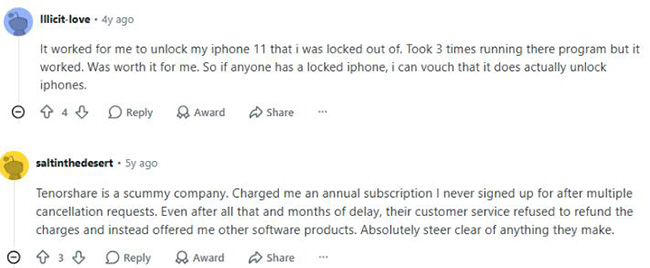
Reddit discussions show both positive and negative experiences with Tenorshare 4uKey. Several users reported that the software successfully removed MDM restrictions or helped unlock devices when other methods failed. Others stated that the software did not work in their specific situations and criticized the refund process.
Trustpilot Reviews
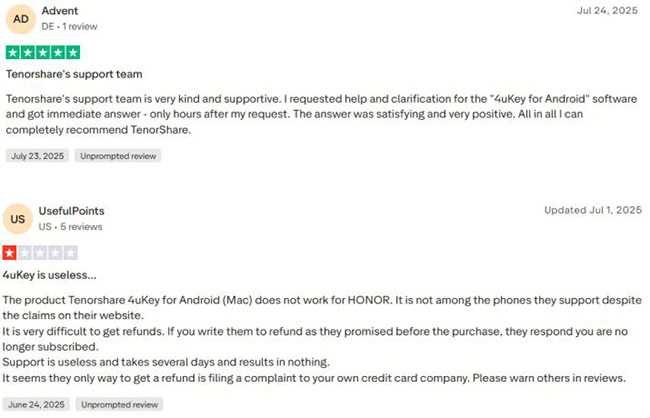
Trustpilot ratings for Tenorshare show a mixed but generally positive picture. At the time of writing, the company profile had nearly 15,000 reviews and an overall TrustScore of approximately 3.5 out of 5. Many reviewers praise the effectiveness of it and customer support responsiveness, while negative reviews often focus on subscription management and refund disputes.
1.8 Tenorshare 4uKey Pricing
Tenorshare 4uKey for iPhone typically charges $35.95/month for the Windows version and charges $37.95/month for the Mac version. Discounts and special offers are often available, so keep an eye out for coupon codes or seasonal sales. Below is the pricing plans from official Tenorshare website as of 2026.
| Tenorshare 4uKey Price and Plans | Windows | Mac |
|---|---|---|
| 1 Month | $35.95 for 1 PC and 5 iOS Devices | $37.95 for 1 Mac and 5 iOS Devices |
| 1 Year | $59.95 for 1 PC and 5 iOS Devices | $59.95 for 1 Mac and 5 iOS Devices |
| Lifetime | $75.95 for 1 PC and 5 iOS Devices | $75.95 for 1 Mac and 5 iOS Devices |
Is Tenorshare 4uKey Free?
No. While a free trial version is available, most unlocking functions require a paid license before they can be completed.
1.9 FAQs About Tenorshare 4uKey
-
Does Tenorshare 4uKey erase data?
Some unlocking operations may erase device data. A backup is recommended before use.
-
Does Tenorshare 4uKey support the latest iOS versions?
Tenorshare regularly updates compatibility for newer iOS releases.
-
Does Tenorshare 4uKey really work?
Yes. When downloaded from the official website, Tenorshare 4uKey appears safe and free from widespread malware concerns.
-
Can Tenorshare 4uKey Unlock Android Phones?
No. TenorShare 4uKey iPhone Unlocker is only designed for iOS devices. If you need to unlock an Android phone, you'll need to look for Tenorshare 4uKey for Android.
Best Tenorshare 4uKey iPhone Unlocker Alternatives [Free/Paid]
Still want more cheaper or free alternatives to Tenorshare 4uKey? Here're 3 more alternatives to it!
Top 1. TunesKit iPhone Unlocker
If you think Tenorshare 4uKey is not the best choice for you, I will recommend TunesKit iPhone Unlocker to you. TunesKit iPhone Unlocker is a well-established iOS unlocking program that helps users unlock their iPhone, iPad, and iPod touch in any situation.
Besides unlocking iOS screen lock, TunnesKit iPhone Unlocker also supports removing Apple Account from any iOS device, bypassing MDM restriction from any iOS device, and turning off the Screen Time limitation without entering any passcode. With the concise and intuitive user interface, using TunesKit iPhone Unlocker will be a hassle-free job, which means that no expert skills are required.
Why Choose TunesKit iPhone Unlocker?
Unlock iPhone without password with high success rate. Also, it can remove Apple Account and activation lock, bypass MDM restrictions, Screen Time limit, etc.
 600,000+ Downloads

Top 2. 3uTools MDM Bypass [Free]
3uTools is a free, all-in-one tool for iOS devices that offers MDM bypass functionality. It allows users to manage files, jailbreak devices, and bypass MDM restrictions during the setup process. So if you only need a tool to remove MDM without password, 3uTools can be the best Tenorshare 4uKey free alternative.
However, some users have reported issues with the MDM bypass feature being unavailable or not functioning as expected. In this case, it's suggested to install the V2.63 of 3uTools for help. Besides, it only supports skipping iPhone or iPad running iOS 14.0 and earlier version.
 View Also: How to Bypass MDM via 3uTools [Full Guide]

Top 3. PinFinder Screen Time Removal [Free]
Pinfinder is a completely free application that can recover Screen Time passcodes from iTunes backups for iPhone, iPad, and iPod touch. It is compatible with devices running iOS 7.0 to iOS 12.4 and supports Windows, Mac, and Linux systems. If you just have forgotten your Screen Time passcode and cannot turn off Screen Time, PinFinder is a great Tenorshare 4uKey free alternative.

Comparison Among Tenorshare 4uKey and Its Best Alternatives
To help you make a quick decision after reading the 4uKey review, here's a comparison table among Tenorshare 4uKey iPhone Unlocker and its best alternatives.
| Tenorshare 4uKey for iOS | TunesKit iPhone Unlocker | 3uTools | PinFinder | |
|---|---|---|---|---|
| Price | $35.95/month | $34.95/month | Free | Free |
| Supported System | Win/Mac | Win/Mac | Win | Win/Mac |
| Key Features | ✅ Remove iOS Screen Lock, Apple Account, MDM, iCloud Activation Lock, and Screen Time passcode ✅ Extract information from Password Manager |
✅ Remove iOS Screen Lock, Apple Account, iCloud Activation Lock, and Screen Time passcode ✅ Turn off iTunes Backup Encryption |
Remove MDM limit | Recover Screen Time passcode |
| Unlocking Speed | Faster | Faster | Fast | Fast |
| Success Rate | High | High | Medium | Medium |
| Ease of Use | Ease | Ease | Ease | Quite Difficult |
Conclusion
That's the in-depth Tenorshare 4uKey review in 2026! If you are still having other questions about Tenorshare 4uKey, please feel free to leave us a comment below. If Tenroshare 4uKey does not work well for you, you can download and try using TunesKit iPhone Unlocker.


