Passixer iPhone Unlocker Review 2026: Is It Safe and Does It Really Work?
Forgot your iPhone passcode or got locked out of your iPad? Passixer iPhone Unlocker claims to help users remove several types of iOS and iPadOS locks without the original passcode. But does Passixer really work, and is it safe to use in 2026?
In this Passixer iPhone Unlocker review, we'll take a closer look at its features, supported lock types, pricing, safety, ease of use, and limitations. We'll also examine its hands-on performance and compare it with alternative iPhone unlocking tools to help you decide whether Passixer is worth trying.

- Quick Verdict: Is Passixer iPhone Unlocker Worth It in 2026?
- What Is Passixer iPhone Unlocker?
- What Can Passixer iPhone Unlocker Do?
- Passixer iPhone Unlocker Compatibility
- Is Passixer iPhone Unlocker Free?
- How Much Does Passixer iPhone Unlocker Cost?
- Is Passixer iPhone Unlocker Safe and Legit?
- What Do Users Say About Passixer?
Quick Verdict: Is Passixer iPhone Unlocker Worth It in 2026?
Passixer iPhone Unlocker is a desktop-based tool designed to help users deal with various iPhone and iPad lock situations. Its main selling point is the ability to remove certain screen locks and other restrictions without relying entirely on Apple's standard recovery process.
Based on our testing, Passixer successfully removed the screen passcode from our test iPhone under the conditions described below. However, this does not mean that every feature will work on every device. Compatibility can vary significantly depending on the iPhone or iPad model, iOS or iPadOS version, and the specific type of lock. Before purchasing Passixer, you should carefully check whether your device and the lock you are dealing with are supported.
| Question | Our Verdict |
|---|---|
| Does Passixer work? | Yes, it worked in our tested screen-passcode scenario |
| Is Passixer safe? | Generally safe when obtained from the official source |
| Is Passixer free? | The software may offer a free download, but unlocking features require a paid license |
| Does Passixer erase data? | Screen lock removal may erase the data on the device |
| Is Passixer easy to use? | The desktop workflow is relatively straightforward |
| Does it work on every iPhone? | No. Compatibility depends on the device and iOS version |
| Is Passixer worth it? | It depends on your specific unlocking needs |
| Should you check alternatives? | Yes, especially if your device is not supported |
Passixer can be a useful option for supported iPhone and iPad lock scenarios, but users should verify compatibility before paying for a license. If your device is unsupported or you need a broader range of unlocking options, comparing Passixer with other iPhone unlockers may be worthwhile.
What Is Passixer iPhone Unlocker?
Passixer iPhone Unlocker is a desktop software program designed to help users unlock or remove certain restrictions from iPhones and iPads. Unlike Apple's standard recovery process, which generally requires you to erase and restore a locked device, third-party unlocking software provides a guided workflow for specific lock situations.
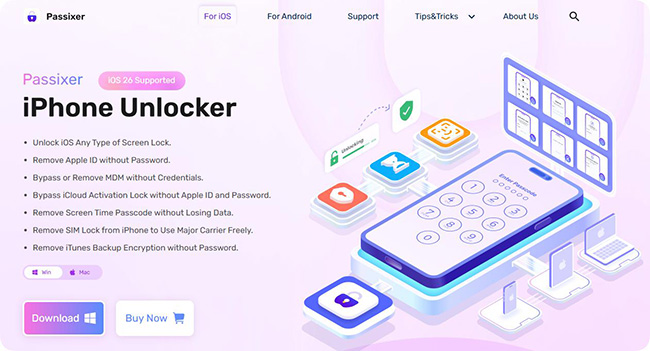
Depending on the supported device and iOS or iPadOS version, Passixer may be used for situations involving:
- Forgotten iPhone screen passcodes
- Disabled or unavailable iPhones
- Certain Apple Account or Apple ID-related lock situations
- Screen Time passcode restrictions
- Some MDM-related restrictions
- Other supported iOS or iPadOS lock scenarios
However, these features should not be interpreted as a guarantee that every lock can be removed from every device. Apple's security mechanisms are constantly updated, and compatibility can change when new iOS and iPadOS versions are released. Therefore, the most important question is not simply whether Passixer supports "iPhone unlocking," but whether it supports your specific device, operating system, and lock type.
What Can Passixer iPhone Unlocker Do?
Passixer positions itself as an all-in-one iPhone and iPad unlocking solution. Its supported features may include several different types of lock removal. Here's a general overview:
| Lock Type | Passixer Support | Data Loss |
|---|---|---|
| Screen Passcode | Supported on compatible devices | Yes |
| Disabled iPhone | Depends on device and iOS version | Yes |
| Apple Account/Apple ID-related locks | Depends on specific scenario | Yes |
| Screen Time Passcode | Supported in certain scenarios | No |
| MDM Restrictions | Depends on device and management status | No |
| Activation Lock | Compatibility may vary | Yes |
Passixer iPhone Unlocker Compatibility
Compatibility is one of the most important factors to consider before using any iPhone unlocker. Passixer's effectiveness may depend on:
- Your iPhone or iPad model
- The installed iOS or iPadOS version
- The type of lock
- Whether the device can enter recovery or DFU mode
- Whether the device has additional security restrictions
Older iPhones and iPads may have different compatibility requirements from newer models. Similarly, a method that works on one version of iOS may not work on another. For this reason, don't assume that a tool supporting "iOS" automatically supports every iPhone running every iOS version.
Does Passixer Support the Latest iPhone and iOS Versions?
The latest iPhone and iOS version that Passixer supports are iPhone 17 series and iOS 26. But not all features support the latest versions. This is one area where you should check the latest compatibility information of the specific feature before purchasing. Apple regularly updates iOS and iPadOS, and new security changes can affect third-party unlocking tools. The availability of a particular unlocking method may therefore change over time.
If you're using a newer iPhone or a recently released iOS version, confirm the following before starting:
- 1. Your exact iPhone or iPad model.
- 2. Your current iOS or iPadOS version.
- 3. The specific lock you want to remove.
- 4. Whether Passixer officially supports that combination.
- 5. Whether the unlocking process will erase your data.
This is particularly important in 2026, as compatibility information that was accurate a year ago may no longer be current.
Is Passixer iPhone Unlocker Free?
Passixer can generally be downloaded and installed without paying upfront, but its main unlocking functions require a paid license. This means that you may be able to download the software and explore its interface for free, while completing the actual unlocking process requires a purchase.
If you're considering Passixer, pay attention to the difference between:
- Free download
- Free device detection
- Free scanning
- Free trial
- Paid unlocking
These terms are not interchangeable. A software program may allow you to download it for free but still require payment before it can complete the unlocking process.
How Much Does Passixer iPhone Unlocker Cost?
The price of Passixer may vary depending on the license type, operating system, promotions, and current pricing policies. Before purchasing, check the official product page for the latest price and available plans.
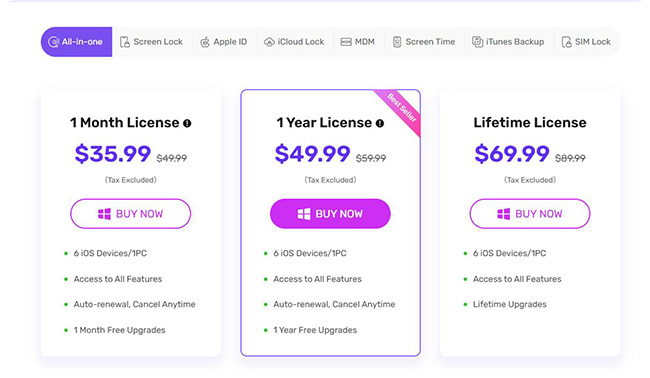
| Features | Price | Device Limit | Refund Policy |
|---|---|---|---|
| 1 Month | $35.99/PC or Mac | 6 iOS Devices on 1 PC/Mac | 30-day money back guarantee after analysis |
| 1 Year | $49.99/PC or Mac | 6 iOS Devices on 1 PC or Mac | 30-day money back guarantee after analysis |
| Lifetime | $69.99/PC or Mac | 6 iOS Devices on 1 PC or Mac | 30-day money back guarantee after analysis |
The cheapest plan is not always the best option. If you only need to unlock one device, a short-term license may make more sense. If you regularly troubleshoot multiple iPhones or iPads, a longer-term license may provide better value.
Is Passixer iPhone Unlocker Safe and Legit?
This is one of the most important questions to ask before installing any third-party iPhone unlocking software. In general, Passixer is presented as a legitimate commercial software product rather than an unknown free unlocking tool. However, that does not mean every download source is equally trustworthy.
If you decide to use Passixer, download it from the official product website rather than third-party software repositories or suspicious download pages. You should also avoid modified or cracked versions of the software. Besides being illegal in many cases, cracked software can introduce security risks such as malware, unwanted programs, or compromised installers.
Is Passixer Malware-Free?
The safest approach is to download the installer directly from the official source and keep your security software enabled. Before installation, you can also:
- Check the download domain.
- Verify the installer publisher when possible.
- Scan the downloaded file with reputable security software.
- Avoid unofficial cracked versions.
- Keep your operating system updated.
No third-party software should be considered automatically risk-free. However, downloading the official installer and following basic security practices can reduce unnecessary risks.
Is Passixer Legit?
Passixer is marketed as a commercial iOS unlocking utility and has been available as a software product for users who need help with supported iPhone and iPad lock scenarios. However, "legitimate" does not mean that it can unlock every iPhone or bypass every Apple security mechanism.
A legitimate unlocking tool should clearly communicate its supported devices, limitations, and potential data loss. You should be particularly cautious of any service that promises:
- Guaranteed unlocking of every iPhone
- Permanent removal of every Apple security feature
- No data loss in every situation
- Unlimited support for all iOS versions
- Instant Activation Lock removal without verification
What Do Users Say About Passixer?
As of 2026, online user reviews of Passixer iPhone Unlocker remain limited. However, feedback from platforms such as Trustpilot, CNET, Reddit, and other software review sites provides some insights. Here's a quick summary:
⭐ Passixer iPhone Unlocker on CNET: 4.5 stars in total
⭐ Passixer on FileHorse: 4.5 stars in total
⭐ Passixer.com on ScamAdviser: 1 star of 1 review
To sum up, most positive reviews on these platforms praise its multimedia tools like screen recorder, video converter, etc.
However, many negative reviews focus on issues related to customer support, refund difficulties, and fail to work with Passixer iPhone Unlocker and data recovery tools on certain iOS.

Does Passixer iPhone Unlocker Really Work?
The short answer is yes, Passixer can work for certain supported iPhone and iPad lock scenarios. However, its effectiveness depends heavily on the device model, iOS or iPadOS version, and the type of lock you are trying to remove. To provide a more practical evaluation, we tested Passixer's screen passcode removal feature on a test iPhone.
Our Test Environment
| Item | Details |
|---|---|
| Device | iPhone X |
| iOS Version | iOS 26 |
| Computer | Windows PC |
| Operating System | Windows 10 |
| Passixer Version | 7.0.6 |
| Tested Feature | Screen Passcode Removal |
| Test Result | Successful |
| Approximate Time | About 20 minutes |
Our test focused specifically on removing a forgotten screen passcode. It should not be interpreted as a test of every Passixer feature or every supported iPhone model.
Our Hands-on Test Result
During our test, Passixer successfully guided us through the process of removing the screen passcode from the test iPhone.
The general process involved connecting the device to the computer, entering the required recovery or DFU mode, downloading the appropriate firmware, and allowing the software to complete the unlocking process. The overall workflow was relatively straightforward, even for users who may not be familiar with recovery mode or DFU mode.
However, there is an important limitation that is removing an iPhone screen passcode generally requires erasing the device. This means that you should not expect Passixer to recover the existing data on a locked iPhone after removing the passcode. If you have a recent iCloud or computer backup, you may be able to restore your personal data after completing the unlocking process.
What We Liked About the Test
The main advantages we noticed were:
- The interface was relatively easy to navigate.
- The software provided clear instructions.
- The device detection process was straightforward.
- The firmware download was integrated into the workflow.
- The unlocking process required little technical knowledge.
For users who are unfamiliar with Apple's recovery or DFU modes, having step-by-step instructions can make the process less intimidating.
How to Use Passixer iPhone Unlocker to Remove a Screen Passcode
If you've forgotten your iPhone passcode, Passixer provides a guided desktop workflow for supported devices. The exact interface may change between software versions, but the general process is similar.
Step 1. Download and Install Passixer iPhone Unlocker
Visit the official Passixer website and click the "Free Download" button that matches your operating system (Windows or Mac). Once downloaded, open the installer and follow the on-screen instructions to install the software.
Step 2. Launch the Software and Connect Your iPhone to Computer
Open Passixer iPhone Unlocker on your computer. Then, using a USB cable, connect your locked iPhone to the computer.
On the main interface, select "Wipe Passcode", which is designed to remove 4-digit/6-digit passcodes, Touch ID, and Face ID locks.
Step 3. Confirm iPhone/iPad Information
The software will automatically detect and display your iPhone's details, including its model and system version. Double-check that the information is correct, then click "Start" to proceed.

Step 4. Download the Firmware Package to Wipe Passcode
Next, Passixer will prompt you to download the required firmware package. Once the download is complete, click "Unlock". Before proceeding, you’ll need to enter "0000" to confirm that you understand the risks of using this software.
 Note
Note
If you're using the free version, a registration window will pop up at this stage. You’ll need to purchase a license before you can unlock your iPhone.
Step 5. Wait for the Unlocking Process to Complete
Once you confirm, Passixer will start wiping the screen passcode. In our test, the entire process took about 10 minutes. When finished, a notification appeared confirming that the iPhone screen lock was successfully removed.

- Using Passixer iPhone Unlocker to remove the screen lock will erase all data on your device.
- Ensure that you have the latest version of iTunes installed on your computer for optimal performance.
- Ensure at least 20% battery on your iPhone/iPad.
Passixer iPhone Unlocker Pros and Cons
 Pros:
Pros:- Easy-to-follow desktop interface
- Supports various iPhone and iPad lock scenarios
- Provides guided instructions
- Can help users who have forgotten their screen passcode
- Supports recovery and DFU mode workflows
- No advanced technical knowledge is required for basic operations
- Provides a dedicated solution instead of manually troubleshooting complex recovery procedures
 Cons:
Cons:- Screen passcode removal may erase all data
- Compatibility depends on the device and iOS version
- Not every unlocking feature was independently tested
- A paid license is required for the main unlocking functions
- New iOS versions may affect compatibility
- It cannot be considered a universal solution for every Apple security mechanism
- Users should verify the exact supported model and iOS version before purchasing
The Best Alternative to Passixer iPhone Unlocker
From our Passixer iPhone Unlocker review, we found that it successfully unlocked an iPhone X running iOS 16. However, since user feedback is still limited, its effectiveness on other iPhone models remains uncertain.
If you're looking for a more reliable and well-established tool, Tuneskit iPhone Unlocker can be a great alternative to Passixer iPhone Unlocker. It offers similar features, has received positive reviews from both users and experts, and provides a more seamless experience.
It has been proven to support a wide range of iPhone models and iOS versions while maintaining a user-friendly interface, according to amount of user reviews. Moreover, its speed is comparable to Passixer with a secure unlocking process and a high success rate.
Key Features of TunesKit iPhone Unlocker
Remove screen lock if you forgot passcode. Support unlocking when iPhone screen is broken. Compatible with all iPhone/iPad models and versions.
 600,000+ Downloads
Why Choose TunesKit iPhone Unlocker Instead Of Passixer iPhone Unlocker
When comparing TunesKit iPhone Unlocker to Passixer, several advantages make it a better alternative:
- Flexible subscription plans: Offers plans covering multiple (even unlimited) iDevices, plus bundle discounts with iOS system recovery and iPhone data recovery tools, ensuring minimized data loss when unlocking iPhone and streamlined iOS-issue solutions.
- Beginner-Friendly: No complex steps; just follow the on-screen instructions to unlock your iPhone in a few clicks.
- Reliable & Secure: Frequently updated for improved performance, with responsive customer support available.
- Proven Effectiveness: Highly rated by users and tech experts, with more positive feedback compared to Passixer.
Passixer vs. TunesKit
| Feature | Passixer | TunesKit iPhone Unlocker |
|---|---|---|
| Remove Screen Passcode | Yes, on supported devices | Yes, on supported devices |
| Disabled iPhone | Supported scenarios | Supported scenarios |
| Screen Time Passcode | Supported scenarios | Supported scenarios |
| MDM-Related Restrictions | Supported scenarios | Supported scenarios |
| Apple Account-Related Issues | Depends on scenario | Depends on scenario |
| Data Loss | Depends on the feature | Depends on the feature |
| Free Full Unlock | No | No |
| Best For | Users looking for a guided unlocking workflow | Users comparing multiple iOS unlocking options |
FAQs on Passixer iPhone Unlocker
-
Does Passixer Work Without a Computer?
Passixer is primarily a desktop-based unlocking solution, so a compatible Windows PC or Mac is generally required for its main unlocking workflows. This allows the software to communicate with the iPhone or iPad through a USB connection and perform the necessary recovery or firmware-related operations. If you don't have access to a computer, Apple's built-in recovery options may be more appropriate.
-
How Long Does Passixer Take to Unlock an iPhone?
The time varies depending on the device, iOS version, internet connection, and firmware download speed. In our test, the screen passcode removal process took approximately 20 minutes, excluding factors such as network speed and firmware download time.
Conclusion
That's all about Passixer iPhone Unlocker review! This tool provides a simple way to bypass various iPhone locks, including screen passcodes, Apple Account locks, and MDM restrictions.
However, as a relatively new brand, Passixer still lacks extensive user feedback. If you're looking for a more reliable and trusted alternative, TunesKit iPhone Unlocker is highly recommended. It offers better customer support, proven performance, and more flexible pricing options.