


Passvers iPhone Unlocker Review 2026: Does It Really Work?
Staring at a disabled iPhone screen is a nightmare. Whether you forgot your password, bought a locked second-hand device, or had a child lock your iPad, the result is the same. You are locked out, and it is incredibly stressful.
That is where Passvers iPhone Unlocker comes in. It claims to remove these locks easily. But is it safe? Does it actually work on the latest iOS 26? Is it better than the competitors? We answer all these questions in this comprehensive review to help you regain access to your device.
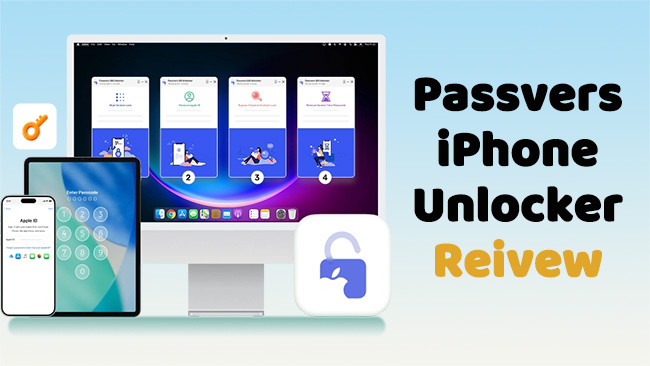
- Does it work? Yes. It successfully removed 4-digit and 6-digit passcodes, as well as Face ID, in our tests.
- Is it Safe? Yes. The software is 100% malware-free and processes data locally on your computer.
- Data Loss: Yes. Like all unlocking tools, removing the screen lock will erase your data. (Exceptions: MDM and Screen Time removal usually do not erase data).
- Best Alternative: TunesKit iPhone Unlocker. We found TunesKit to be slightly faster with a more intuitive interface for beginners, often at a better price point.
- Overall Rating: ⭐⭐⭐⭐ (4.5/5)
- What is Passvers iPhone Unlocker?
- Key Features Tested: Does Passvers Actually Work?
- Is Passvers iPhone Unlocker Safe & Legit?
- How to Use Passvers iPhone Unlocker (Step-by-Step)
- Best Alternatives to Passvers iPhone Unlocker HOT
- Comparison: Passvers vs. TunesKit vs. Tenorshare
- Passvers iPhone Unlocker Crack vs. Official Code
- FAQs Related to Passvers iPhone Unlocker
- Conclusion
What is Passvers iPhone Unlocker?
Passvers iPhone Unlocker is a dedicated iOS utility tool designed for Windows and Mac. Unlike iTunes, which can be clunky and prone to errors (like the infamous Error 4013), Passvers is built for a single purpose: bypassing security locks on Apple devices.
It is not just a password remover. It is a suite of tools designed to handle various lock scenarios. Whether you are stuck at the iPhone Unavailable screen or locked out of an Apple ID, this software automates the recovery process that usually requires complex button combinations and command-line knowledge.
Technical Specifications & Compatibility:
- Supported OS: Windows 11/10/8.1/8/7 and macOS (10.7 and later).
- Supported iOS: iOS 12 through the latest iOS 26.
- Supported Devices: iPhone 4s up to the new iPhone 17 series; all iPad and iPod Touch models.
Key Features Tested: Does Passvers Actually Work?
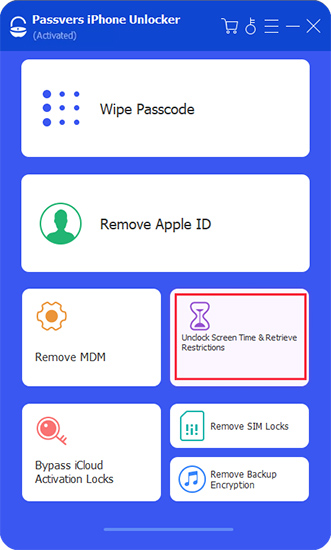
We tested the software's four primary modes to see how they perform in real-world scenarios.
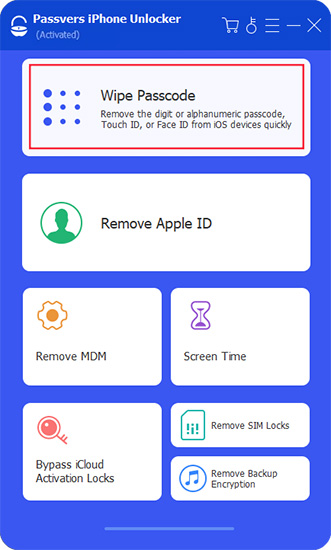
1. Wipe Screen Passcode (4-digit/6-digit/Face ID)
This is the feature most users need. If your iPhone is disabled or you have broken the screen and cannot type the code, this mode forces the device to factory reset and remove the lock.
The Test: We used an iPhone XS locked with a forgotten 6-digit code. Passvers detected the device in Recovery Mode immediately. It downloaded the firmware and removed the lock in about 15 minutes.
 Warning:
All the data on your device will be lost after removing the screen lock with Passvers iPhone Unlocker. You will need a backup to restore your photos and contacts.
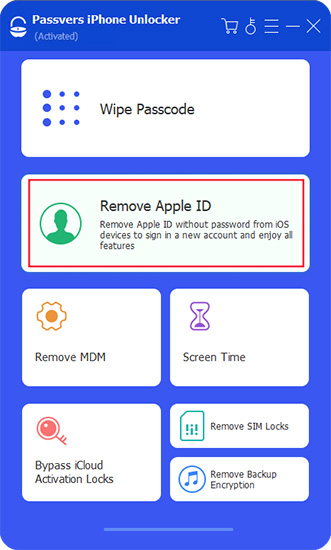
2. Remove Apple ID Without Password
This feature is a lifesaver if you bought a used iPhone that is still logged into the previous owner's Apple ID, or if you simply forgot your credentials.
How it Works:
- If Find My iPhone is OFF, Passvers can unlock the Apple ID immediately without data loss.
- If Find My iPhone is ON, the software can still remove the ID, but it requires the device to be on a specific iOS version and Two-Factor Authentication to be enabled.
3. MDM (Mobile Device Management) Bypass
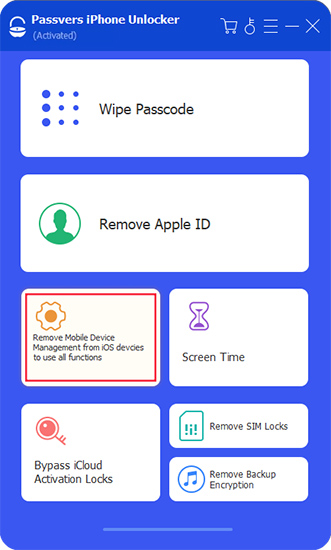
This is a high-value feature for users with school or corporate devices that have a Remote Management lock screen. Passvers can bypass this lock, allowing you to use the device freely without the administrator's supervision.
4. Bypass Screen Time Passcode
If you have set strict app limits but forgot the PIN to change them, Passvers can remove the Screen Time passcode.
The Benefit: Unlike the screen lock removal, this process does not erase your data. We tested this on an iPad running iPadOS 18, and it successfully removed the restrictions while keeping all apps and photos intact.
Is Passvers iPhone Unlocker Safe & Legit?
When downloading software that interacts with your phone's operating system, skepticism is healthy. We analyzed the security aspects of Passvers.
Virus & Malware Scan
We ran the Passvers installer through reputable antivirus software (including Norton and Malwarebytes). The result was a clean bill of health. There was no adware, bloatware, or malicious code bundled with the installation.
Data Privacy
One of the biggest advantages of using desktop software like Passvers over online unlocking services is privacy. The unlocking process happens locally on your computer. Your personal data is not uploaded to the cloud, meaning Passvers does not see your photos or messages during the unlock process.
Is it a Scam?
No. Passvers is a legitimate company with a functioning support team. They offer a "try before you buy" version (free trial) that allows you to check if your device is supported before paying. Furthermore, they provide a 30-day money-back guarantee if the software fails to resolve your issue solely due to a technical error.
How to Use Passvers iPhone Unlocker (Step-by-Step)
The user interface is designed for non-technical users. You do not need to be a coder to use this.
Step 1. Download and install Passvers iPhone Unlocker from the official website. Launch the program and select "Wipe Passcode" from the main menu.
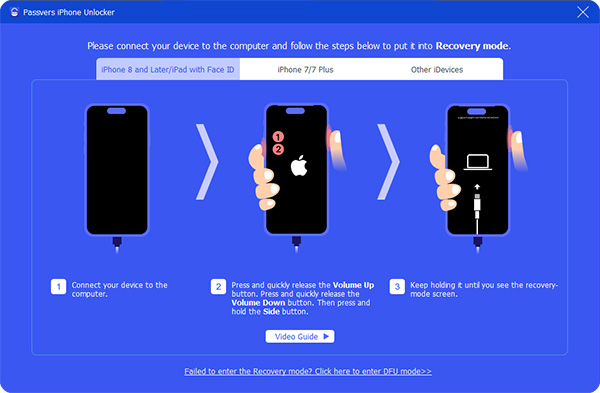
Step 2. Connect your locked iPhone to the computer using a USB cable. If the software does not detect your device (because it is locked), follow the on-screen instructions to put your phone into DFU Mode or Recovery Mode.
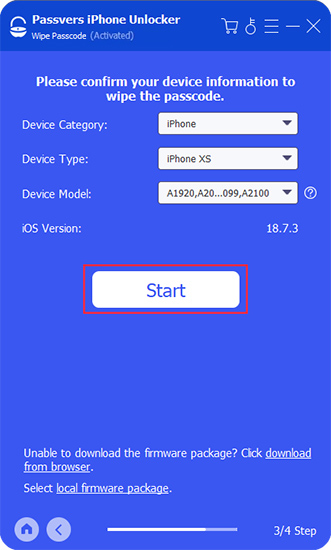
Step 3. Verify your device information. The software will automatically detect your iPhone model. Click "Start" to begin downloading the firmware package. This file is large (several GBs), so it may take a few minutes depending on your internet speed.
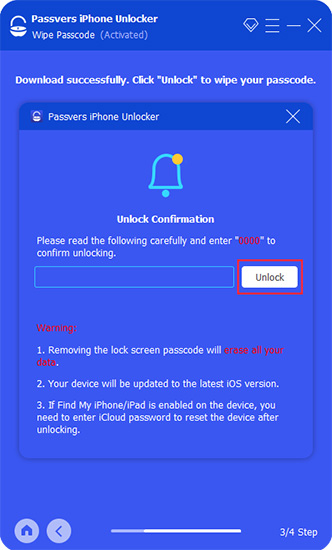
Step 4. Once the firmware is downloaded, click "Unlock". You will be asked to enter "0000" to confirm the action. The software will then wipe the passcode and reset the iPhone.
Best Alternatives to Passvers iPhone Unlocker
While Passvers is effective, it is not the only player in the game. Depending on your budget and technical comfort level, other tools might be a better fit.
Top Choice: TunesKit iPhone Unlocker
If you are looking for the best balance of speed, price, and ease of use, we highly recommend TunesKit iPhone Unlocker.

Why Consider TunesKit?
During our comparison testing, TunesKit consistently downloaded firmware packages faster than Passvers. The interface is also slightly more streamlined; it feels less cluttered and guides you through the DFU mode steps with clearer animations.
 600,000+ Downloads
 Key Advantages:
- Higher Success Rate: TunesKit has an exceptionally high success rate for unlocking disabled devices on the first try.
- Cost-Effective: TunesKit often runs sales that make it cheaper than Passvers for a monthly or annual license.
- Simplicity: It is arguably the most "dummy-proof" tool on the market. If you are afraid of messing up your phone, TunesKit is the safer bet.
Runner Up: Tenorshare 4uKey
Tenorshare is a massive brand in the software utility space. Their tool, 4uKey, is powerful and very similar to Passvers. However, it tends to be pricier. It is a solid choice if you need a bundle that includes other repair tools, but for standalone unlocking, you might be paying for the brand name.

Comparison: Passvers vs. TunesKit vs. Tenorshare
To help you decide, here is a direct comparison of the top three contenders.
| Feature | Passvers | TunesKit | Tenorshare |
|---|---|---|---|
| Success Rate | High | Very High | High |
| User Interface | Modern | Simple & Clean | Professional |
| Unlock Speed | Fast | Very Fast | Fast |
| Pricing (Monthly) | ~$35.95 | ~$24.95 (Varies by promo) | ~$35.95 |
| MDM Support | Yes | Yes | Yes |
| Compatibility | iOS 12-26 | iOS 7-26 | iOS 12-26 |
The Verdict on Alternatives: Passvers is a strong tool, but TunesKit iPhone Unlocker edges it out slightly in terms of value and user experience. If you want to save a few dollars without sacrificing performance, TunesKit is the smart choice.
Passvers iPhone Unlocker Crack vs. Official Code
A quick search on Google will reveal dozens of sites claiming to offer a "Passvers iPhone Unlocker Crack" or "Free Registration Code".
Do not click these links. Here is why:
- Malware Risk: "Crack" files are the #1 delivery method for ransomware and trojans. You might unlock your phone only to have your computer's credit card data stolen.
- Bricking Risk: Cracked versions are often outdated. Using old unlocking logic on a new iOS 26 device can permanently damage the software, "bricking" the phone.
- No Support: If a cracked version fails halfway through the process, you have no customer support to help you recover the device.
The Smart Alternative: Both Passvers and TunesKit offer free trial versions. Download the official trial to ensure the software connects to your device. If it works, pay for the license—it is cheaper than buying a new phone or paying for data recovery after a virus attack.
FAQs Related to Passvers iPhone Unlocker
-
1. Is Passvers iPhone Unlocker free?
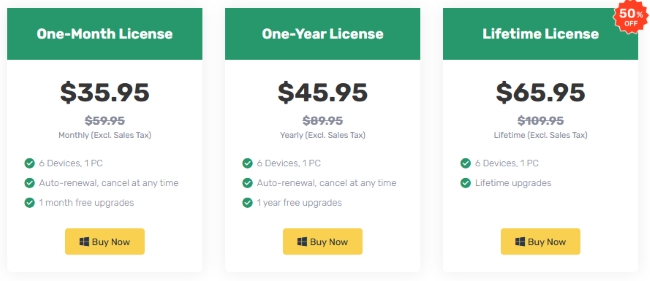
No, Passvers is not free. It offers a free trial version that allows you to scan the device and check compatibility, but you must purchase a license to perform the final unlock. Passvers iPhone Unlocker price ranges from $35.95 for one month, $45.95 for one year, to $65.95 for lifetime.
-
2. Can I use Passvers iPhone Unlocker without a computer?
No. Passvers is desktop-only software. You must have a Windows PC or Mac and a USB cable to use it. This is because the software needs to download a large firmware file (often 8 GB+) and install it onto your iPhone to overwrite the lock. If you do not have a computer, you cannot use Passvers.
-
3. Will unlocking my iPhone delete my photos?
Yes, if you are removing the screen lock passcode. No software can bypass the screen lock without a factory reset. However, if you are removing Screen Time passcodes or MDM locks, Passvers can often do this without data loss.
-
4. Can Passvers remove iCloud Activation Lock?
Yes, but with limitations. Passvers can bypass the Activation Lock on older devices (iPhone 5s through iPhone X). However, after the bypass, cellular calls and mobile data will not work; the phone will function like an iPad (Wi-Fi only). For newer devices (iPhone 11 and later), it generally cannot bypass Activation Lock unless you have the original Apple ID credentials.
-
5. Does TunesKit work better than Passvers?
In our side-by-side testing, TunesKit iPhone Unlocker was slightly faster and easier to navigate. Both tools use similar underlying technology to communicate with Apple's firmware, so both are effective, but TunesKit offers a better user experience.
-
6. Is it legal to use these unlockers?
Yes, it is legal to use these tools on devices you own. It is illegal to use them to unlock stolen devices.
Conclusion: Should You Buy It?
Passvers iPhone Unlocker is a legitimate, safe, and effective solution for iOS lock issues. It delivers on its promises and provides a vital lifeline when you are locked out of your digital life.
However, the market is competitive. Choose Passvers if you want a reliable tool that covers Screen Locks, Apple ID, and MDM in one package. Choose TunesKit iPhone Unlocker if you want a faster, more affordable, and easier-to-use alternative that achieves the same results.
Don't leave your phone useless. Download the TunesKit iPhone Unlocker free trial today to see if your device is supported and get back into your phone in minutes.


