


BuhoUnlocker Review (2026): Is This Unlocking Tool Safe & Legit?
Getting locked out of your iPhone or iPad is a digital nightmare. In your search for a solution, you've likely stumbled upon BuhoUnlocker. It promises to help you reaccess your devices instantly, but in an industry riddled with scams and malware, you are right to be skeptical.
Is BuhoUnlocker safe to install on your Mac? Does it actually work on the latest iOS 18/26? And is it worth paying for? In this review, we will show you the features, safety, pricing, and usage of BuhoUnlocker. If you are hesitating, reading this article will help you decide.

Part 1. What is BuhoUnlocker?
BuhoUnlocker is a specialized iOS unlocking software developed by Dr. Buho, a company best known for its popular macOS utility, BuhoCleaner. Unlike many competitors that are clunky ports from Windows, BuhoUnlocker is built with a Mac-first philosophy. It is designed to help non-technical users resolve common iOS lock issues without needing to visit a repair shop.
Part 2. Key Features of BuhoUnlocker
Marketing claims are one thing, but performance is another. We tested the tool across different scenarios to see how it handles the complex security layers of modern iOS versions. Here is how the tool performs in the real world.
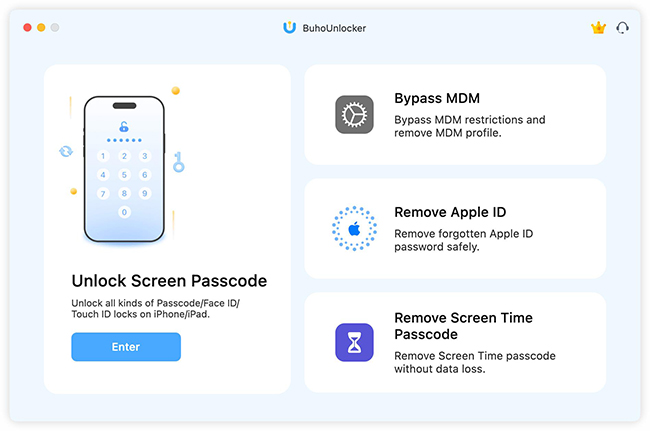
1. Unlock Screen Passcode
This is the most common use case. If your iPhone says "iPhone Unavailable" or is disabled, BuhoUnlocker automates the complex process of putting your device into Recovery Mode and installing a fresh iOS firmware to wipe the lock.
- Supported: 4-digit/6-digit codes, Face ID, Touch ID.
- Performance: It automatically detects the correct firmware for your device model, saving you from the headache of manually searching for and downloading IPSW files.
- Result: High success rate, but remember - all data will be erased.
2. Bypass MDM (Mobile Device Management)
This is arguably BuhoUnlocker's strongest feature. Many users purchase second-hand iPads only to find they are locked to a school or corporation's "Remote Management" system. BuhoUnlocker can bypass this login screen efficiently. Unlike screen unlocking, this process usually does not result in data loss.
 Note
Note
The MDM lock is "bypassed," not permanently deleted. It may return if you factory reset the device again in the future.
3. Remove Screen Time Passcode
If you (or your child) forgot the Screen Time passcode, you might be unable to access specific apps or change settings. BuhoUnlocker can remove this specific passcode without wiping the rest of the device. To use this feature, you must turn off Find My iPhone first.
4. Remove Apple ID
One of BuhoUnlocker's most sought-after features is the ability to remove an Apple ID without the password. This is commonly used when people buy a second-hand iPhone and the previous owner forgot to sign out. However, this is not a magic button. The success of this feature depends entirely on one specific setting: "Find My iPhone".
Part 3. Is BuhoUnlocker Safe and Legit?
BuhoUnlocker is a legitimate software utility, not a scam or virus. r. Buho is an Apple Certified Developer, meaning the app is notarized by Apple and safe to install. They also maintain a verified, positive presence on Trustpilot. Our tests confirmed the software is clean of adware. Critically, it processes data locally on your Mac and Windows PC, so your personal info is never uploaded to a server.
BuhoUnlocker is honest about the fact that removing a screen passcode will erase your device. Be wary of any tool that claims otherwise, as that is technically impossible.
Part 4. Pricing: Free vs. Paid
BuhoUnlocker operates on a "Freemium" model, which can sometimes be confusing for first-time users. It is crucial to understand exactly what you are getting before you hit the download button.
- Free Trial: The free version acts as a diagnostic tool. You can download the app, connect your device, and scan it to see if the software supports your specific phone model and iOS version. However, you cannot complete the final unlock step.
- Paid License: To actually remove the lock, you must purchase a license code.
| Single Plan (3 Devices) | Family Plan (6 Devices) |
|---|---|
| $49.99 | $89.99 |
Part 5. How to Unlock iPhone Screen with BuhoUnlocker
If you have decided that BuhoUnlocker is the right tool for you, the actual process is designed to be as simple as possible. However, because this procedure involves erasing your device, it is critical to follow the steps exactly to avoid getting stuck in a boot loop.
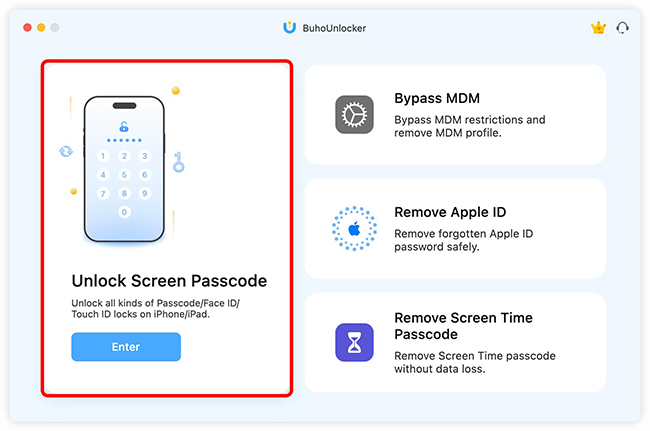
Step 1: Open BuhoUnlocker and select "Unlock Screen Passcode". Connect your iPhone to a computer using a USB cable.
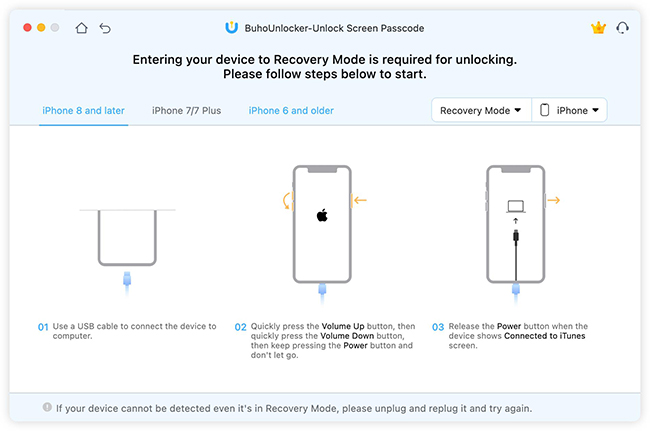
Step 2: If your disabled iPhone isn't detected automatically (common with disabled devices), follow the on-screen prompts to put your device into Recovery Mode. The software will show you the specific button combination for your model. Click the Unlock Now button.
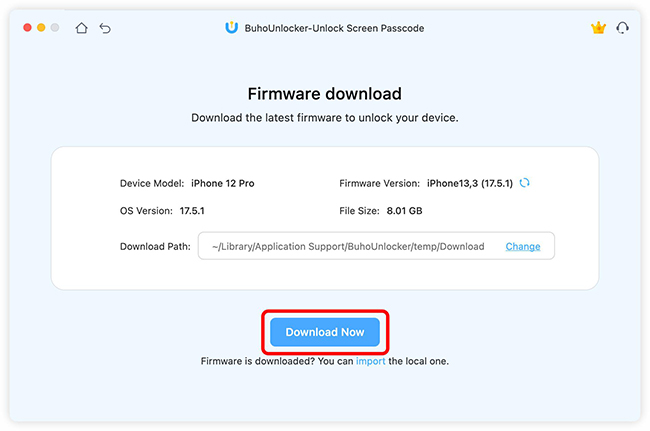
Step 3: Confirm your device model matches what is shown on screen, then click Download to get the latest iOS firmware package for your device.
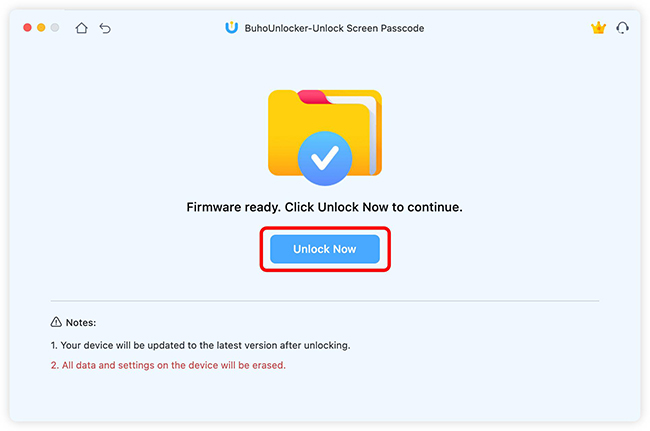
Step 4: Once the download is finished, click Unlock Now. Keep your device connected while the software verifies the firmware and removes the passcode. When the process hits 100%, your iPhone will restart to the "Hello" screen. You can now set it up as a new device or restore your data from a backup.
Part 6. The Best Alternative: TunesKit iPhone Unlocker
If you are looking for a robust alternative—particularly if you need more granular features like iCloud Activation Lock removal—we recommend TunesKit iPhone Unlocker.
TunesKit iPhone Unlocker is often rated as a top-tier utility because of its high success rate and stability across both Windows and Mac platforms. Unlike some clunky competitors, it shares the same clean, user-friendly design philosophy as BuhoUnlocker but packs a few extra punches.
Key Features of TunesKit iPhone Unlocker
Unlock iPhone screen without password. Bypass iCloud Activation Lock without Apple ID and password.
 600,000+ Downloads
The following guide will show you the detailed steps to unlock iOS devices screen via TunesKit iPhone Unlocker.
Step 1Launch and Connect
Open TunesKit iPhone Unlocker and select "Unlock iOS Screen". Connect your device via USB.

Step 2Put Device in DFU/Recovery Mode
Click the "Start" button. Follow the clear on-screen animation to enter Recovery Mode. Once the "Next" button turns blue, your device is ready.

Step 3Download Firmware Package
Verify your device details and click Download. The software will fetch the necessary firmware to reset your passcode.

Step 4Unlock the Screen
Click Unlock. Wait patiently while TunesKit unzips the firmware and restores your device. When the progress bar hits 100%, the software will say "Unlock Completed." Your iPhone will restart as a fresh device.

Part 7. Conclusion
Getting locked out of your iPhone is stressful, and the fear of choosing the wrong software only adds to the anxiety. After extensive testing, our conclusion is clear: BuhoUnlocker is a safe, legitimate, and effective tool. If you want a slightly more versatile utility that covers a wider range of technical scenarios, TunesKit iPhone Unlocker will be the best alternative.


