


2026 How to Remove OurPact from iPhone: The Ultimate Guide
OurPact is a powerful parental control application, but there comes a time when you might need to remove it entirely. Whether you are a parent who forgot the account credentials or someone looking to regain full access to an iOS device, getting rid of this software can be tricky. You might have already tried deleting the app from your home screen, only to realize the restrictions are still firmly in place.
This is a common frustration for many iOS users today. This comprehensive guide will explain exactly how the system works and provide the best methods to delete OurPact completely from iPhone, even if you do not have the password.

- Why Simply Deleting the OurPact App Does Not Work
- How to Remove OurPact from iPhone on Settings (Requires Password)
- How to Remove OurPact from iPhone Without Password (No Data Loss)HOT
- How to Remove OurPact from iPhone via Computer
- Factory Reset Your Device to Remove OurPact from iPhone
- FAQs on Removing OurPact on iPhone
- Conclusion
Why Simply Deleting the OurPact App Does Not Work
Many users assume that long-pressing the OurPact icon and hitting "Remove App" will instantly lift the restrictions. Unfortunately, this parental control software operates on a much deeper system level using Mobile Device Management (MDM). When OurPact is initially set up, it installs a specific MDM configuration profile onto the iPhone or iPad.
This underlying profile is what actually enforces the screen time limits, app blocking, and web filtering. Therefore, uninstalling the surface-level application does absolutely nothing to remove the core management profile. To truly free your device and regain unrestricted access, you must eliminate the MDM profile from your iOS system settings.
How to Remove OurPact from iPhone on Settings (Requires Password)
If you have the OurPact password, removing the app through your iPhone's Settings is simple. This method works if your device is still monitored after deleting the OurPact Jr. app or if you accidentally set the parent device as a child device.
Here's how to delete OurPact from iPhone of your child:
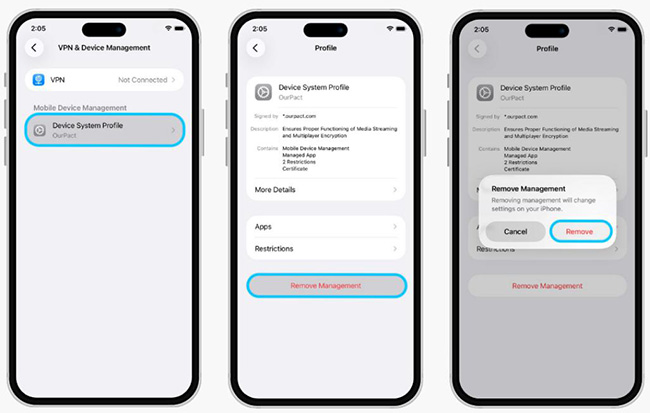
- Step 1. Open Settings on your iPhone and tap General > Profiles or Device Management.
- Step 2. Find and tap the OurPact profile.
- Step 3. Tap Remove Management at the bottom. Tap Remove to confirm it.
- Step 4. Enter the OurPact MDM passcode when prompted.
 Pro Tip:
If you're a parent who no longer needs OurPact but still receives email notifications, you can delete old or lost child devices using the OurPact Parent App:
- Step 1. Launch OurPact parent app on your phone and tap the Menu icon on the left.
- Step 2. Tap My Family > Child's iPhone > Trash Can icon > Delete.
How to Remove OurPact from iPhone Without Password [No Data Loss]
Many users may face situations where they need to remove OurPact from iPhone without a password. This is especially common when purchasing a second-hand device that is still under OurPact MDM restrictions. In other cases, you may have an urgent need to regain full access but don't have the necessary credentials.
If you're facing these challenges, TunesKit iPhone Unlocker offers a practical solution. TunesKit iPhone Unlocker simplifies the process of removing MDM profiles. It helps you regain full access to your device when you find "This iPhone is supervised and managed by ..." on Settings. With just a few clicks, you can remove OurPact from your iPhone quickly and effortlessly. Click the Try It Free button below to begin your smooth and hassle-free removal experience!
Why Choose TunesKit iPhone Unlocker?
Remove OurPact from iPhone without password quickly. Bypass parental control restrictions including Screen Time Limits. Supports all iOS versions and iPhone models.
 600,000+ Downloads
Here are the detailed guide on how to bypass OurPact on iPhone using TunesKit iPhone Unlocker:
Step 1 Link Your iPhone to Mac/Windows Computer
Use a USB cable to connect your iPhone to a Mac or Windows computer. Then, launch TunesKit MDM Removal Tool and select "Remove MDM" from the main interface.

Step 2 Remove OurPact from iPhone Without Password
Open Settings on your iPhone and click Start button on the computer to begin the removal process. Wait for a few seconds to complete this task. Once completed, your iPhone will be free from the OurPact restrictions without data loss.

How to Remove OurPact from iPhone via Computer
If you originally installed OurPact on your iPhone using OurPact Connect, or if you're unable to completely uninstall OurPact from your device, you'll need to remove it via the OurPact Connect app on a computer. This is likely due to the Tamperproofing feature being enabled, which prevents children from deleting the app.
Pro Tip:Before proceeding, Windows users must install iTunes on their computer. Mac users can continue without this step.
Here is how to delete OurPact from iPhone via OurPact Connect on computer:
- Step 1. Install or launch OurPact Connect on your computer.
- Step 2. Use a USB charing cable to connect your iPhone to the computer.
- Step 3. Click Remove > iOS on the OurPact Connect interface.
- Step 4. Click Start to proceed with the on-screen instructions.

How to Bypass OurPact on iPhone via Factory Reset
If you don't have the password, performing a factory reset is another effective way to remove MDM without password. However, keep in mind that a factory reset will erase all data on your device. Be sure to back up your important information before proceeding.
Here is how to factory reset your iPhone to remove OurPact:
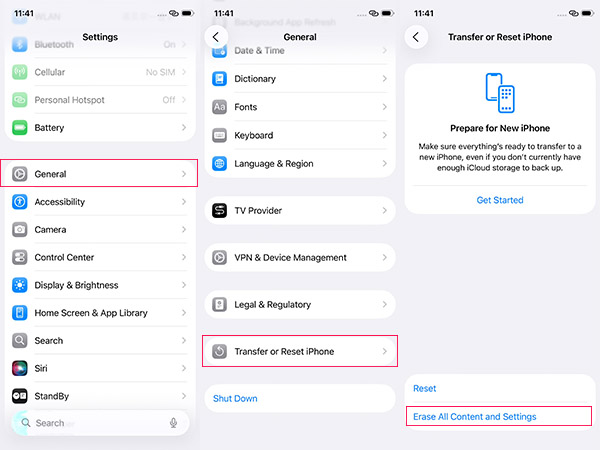
- Step 1. Open Settings app on your iPhone.
- Step 2. Go to General, then tap on "Transfer or Reset iPhone."
- Step 3. Select "Erase All Content and Settings" and enter the passcode if prompted.
- Step 4. Your iPhone will restart and begin the reset process. After the reset, OurPact should be completely removed.
FAQs on Removing OurPact on iPhone
-
Can OurPact be removed without a password?
Yes, you can remove OurPact from iPhone even without a password. The most effective methods include using TunesKit iPhone Unlocker or performing a factory reset. These solutions are especially helpful if you don't have the necessary credentials or if you purchased a second-hand iPhone with OurPact MDM restrictions.
-
What happens if I delete the OurPact app but not the profile?
Simply deleting the OurPact app does not remove its restrictions. Even without the OurPact jr app installed, device limitations will still apply. To fully eliminate OurPact's control, you must also remove the MDM profile from your iPhone.
-
Will parents get notifications if kids remove OurPact from iPhone?
Yes, parents may receive a notification if their child removes OurPact from their iPhone. The OurPact Parent App may display a message stating, "This device is not managed".
Additionally, if the child's device remains unmanaged for more than 48 hours, OurPact will send an email to the parent, notifying them that the device is no longer detectable. -
Does TunesKit MDM removal delete my photos and apps?
No, it does not. When you utilize the specific "Remove MDM" feature within TunesKit iPhone Unlocker, it exclusively targets the configuration profile, leaving your personal data perfectly intact.
Conclusion
In conclusion, there are multiple ways to remove OurPact from iPhone, whether you need a quick bypass or a permanent removal. From using professional MDM removal tools like TunesKit iPhone Unlocker to performing a factory reset, you can regain control of your device.
Most importantly, if OurPact's restrictions interfere with your daily usage, consider having an open conversation with your parents or children to find a balanced approach to screen time management.


