


FoneGeek iPhone Passcode Unlocker Review 2026
Getting locked out of your iPhone is one of the most panic-inducing tech problems you can face. In your search for a fix, you have likely encountered FoneGeek iPhone Passcode Unlocker. But with so many software tools claiming to perform miracles, it is hard to know which ones are legitimate and which are scams. Does FoneGeek actually work? Is it safe to install?
In this review, we will provide a transparent, unbiased look at FoneGeek iPhone Passcode Unlocker's features, safety, and effectiveness to help you decide if it is the right solution for you.

- Part 1. What is FoneGeek iPhone Passcode Unlocker?
- Part 2. Key Features: What Can It Unlock?
- Part 3. Pros and Cons: An Honest Assessment
- Part 4. FoneGeek Pricing: Is the Free Version Useful?
- Part 5. Is FoneGeek Safe and Legit?
- Part 6. How to Use FoneGeek to Unlock iPhone
- Part 7. Bonus: Best Alternative to FoneGeek iPhone Passcode UnlockerHOT
- Part 8. Conclusion
Part 1. What is FoneGeek iPhone Passcode Unlocker?
FoneGeek iPhone Passcode Unlocker is a desktop utility designed for Windows and Mac users. It serves as a digital key for iOS devices, aiming to bypass various security locks that prevent you from accessing your phone.
It is designed for non-technical users. Instead of using complex coding or iTunes' often confusing recovery mode, FoneGeek offers a simple graphical interface. You simply plug in your phone, click a few buttons, and the software handles the firmware flashing process to remove the lock.
Part 2. Key Features: What Can It Unlock?
FoneGeek is marketed as an all-in-one solution, but its effectiveness varies depending on the type of lock you are facing.
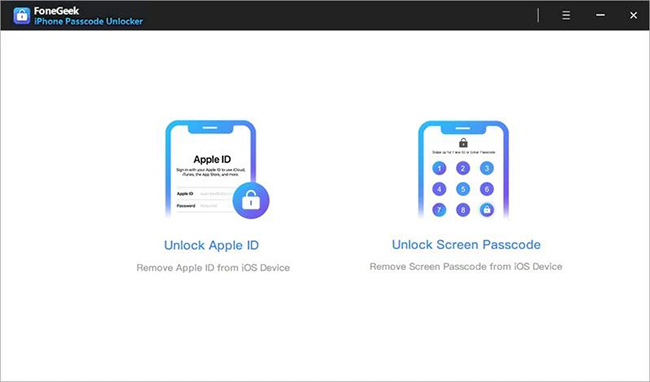
1. Unlock Screen Passcode
This is the tool's primary function. It can remove 4-digit and 6-digit passcodes, as well as Face ID and Touch ID. This is highly effective for:
- Disabled iPhones that say "Connect to iTunes."
- Devices with unresponsive or broken screens.
- Second-hand devices where the previous owner didn't wipe the code.
2. Remove Apple ID
If you can access your phone's settings but are stuck with an old Apple ID you cannot sign out of, this feature can help.
However, success here is situational. If the "Find My iPhone" feature is enabled on the device, FoneGeek's success rate drops significantly on newer iOS versions (iOS 15 and later). In some cases, it may require you to have the original credentials to finish the setup after the removal process.
3. Bypass MDM and Screen Time
One of the software's stronger points is its ability to bypass Mobile Device Management (MDM) profiles without a username or password. This is useful for users with corporate or school-locked devices who want full control. Additionally, it can remove Screen Time passcodes, often without causing data loss.
Part 3. Pros and Cons: An Honest Assessment
 Pros:
Pros:- Simplicity: The interface is clean and easy to navigate for beginners.
- MDM Support: Effectively removes corporate supervision profiles.
- Compatibility: Works with most iPhone models, including the latest series.
 Cons:
Cons:- Data Erasure: Unavoidably wipes your device during screen unlocking.
- Activation Lock: It cannot bypass the iCloud Activation Lock (the "Hello" screen asking for the original owner's ID) if you don't know the password.
- Support Speed: Some user reviews indicate slow response times for refund requests or troubleshooting.
Part 4. FoneGeek Pricing: Is the Free Version Useful?
Many users download FoneGeek expecting it to be free, only to hit a paywall. It is important to clarify that the free version is effectively just a scanner. It allows you to check if the software supports your device, but it will not perform the actual unlock until you pay.
| 1-Month Plan (1 Devices) | 1-Year Plan (1 Devices) | Lifetime Plan (5 Devices) |
|---|---|---|
| $29.99 | $49.99 | $59.99 |
Part 5. Is FoneGeek Safe and Legit?
The short answer is yes, FoneGeek is a legitimate software tool, not malware.
When downloading and installing the software from their official website, it passes standard antivirus checks and does not bundle malicious adware. It uses standard Apple protocols (similar to iTunes restore) to reset your device, which is a recognized method for regaining access.
However, "safe" does not mean "without consequence." It is crucial to understand that using this tool to remove a screen lock will perform a factory reset. This means all data on your device will be erased. If you do not have a backup on iCloud or your computer, your photos, messages, and contacts will be lost forever. No software currently exists that can remove a forgotten screen passcode on modern iOS versions without erasing data.
Part 6. How to Use FoneGeek to Unlock iPhone
If you have decided to proceed, the process is straightforward. Here is how to use the software to remove a screen lock.
Step 1: Download and install FoneGeek iPhone Passcode Unlocker on your PC or Mac. Launch the program and select the huge blue button labeled "Unlock Screen Passcode".
Step 2: Connect your locked iPhone to the computer using a USB cable. If the software does not detect your device immediately (which is common for disabled phones), follow the on-screen animations to put your device into Recovery Mode or DFU Mode.

Step 3: Once connected, the software will display your device model and the latest iOS firmware version available. Click "Download" to save the firmware package to your computer.

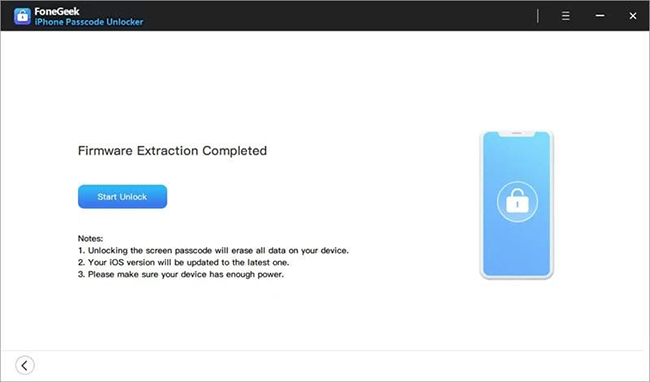
Step 4: When the download finishes, click "Start Unlock". You may be prompted to enter a code like "0000" to confirm you understand that your data will be erased. The software will then remove the screen lock.
Part 7. Bonus: Best Alternative to FoneGeek iPhone Passcode Unlocker
While FoneGeek is a solid choice, some users report issues with newer device recognition or slower support. If you are looking for an alternative with a reputation for higher success rates and faster firmware downloads, TunesKit iPhone Unlocker is recommended here.
TunesKit iPhone Unlocker offers a very similar feature set but is often praised for its stability and user support. It is particularly effective at bypassing Screen Time passcodes without data loss and handling difficult "iPhone Disabled" scenarios smoothly. Additionally, it also allows users to bypass iCloud Activation Lock with ease.
Key Features of TunesKit iPhone Unlocker
Unlock iPhone screen without password. Bypass iCloud Activation Lock without Apple ID and password.
 600,000+ Downloads
You can refer to the steps below to unlock your iPhone with the help of TunesKit iPhone Unlocker.
Step 1Connect iPhone to PC
Download and launch TunesKit iPhone Unlocker on your computer. Connect your locked iPhone using a USB cable. On the main interface, select the "Unlock iOS Screen" option and click "Start".

Step 2Enter Recovery Mode
The software will attempt to detect your device model automatically. If your device is not recognized (common when disabled), follow the on-screen instructions to put your iPhone into DFU Mode or Recovery Mode. This ensures a secure connection for the repair.

Step 3Download fireware package
Once connected, confirm your device information displayed on the screen (Model and iOS version). Click the "Download" button to fetch the correct firmware package from the server.

Step 4Unlock iPhone screen
After the download is complete, click the "Unlock" button. TunesKit will begin verifying the firmware and removing the screen lock. Keep your device connected until the process finishes and your iPhone restarts as a new device.

Part 8. Conclusion
FoneGeek iPhone Passcode Unlocker is a safe, legitimate tool that does exactly what it says on the tin. It provides a user-friendly way to factory reset a locked iPhone when you have lost the passcode.
However, it is not a magic wand. It cannot save your data if you don't have a backup, and it cannot bypass stolen device protections like iCloud Activation Lock. If you accept these limitations, it is a capable tool to get your phone working again.


