How to Jailbreak iPad mini 2 with Activation Lock (2026 Guide)

Forgot the Apple Account credentials for your iPad mini 2? Or did you purchase a used device that's locked by Activation Lock? If you've searched online, you've probably seen people recommending a jailbreak as the solution. However, the relationship between jailbreaking and Activation Lock is often misunderstood.
The truth is that jailbreaking does not remove Activation Lock by itself. Instead, it provides the low-level access required by certain bypass tools to communicate with the device. This guide explains what jailbreaking can and cannot do, whether the iPad mini 2 is still jailbreakable in 2026, and the safest ways to regain access to your device.

- Can You Jailbreak an iPad mini 2 with Activation Lock?
- Is the iPad mini 2 Still Jailbreakable in 2026?
- Before You Start Jailbreaking iPhone
- Ways to Remove Activation Lock from an iPad mini 2
- How to Remove Activation Lock from an iPad mini 2
- What Happens After Bypassing Activation Lock on iPad mini 2?
- FAQs About iPad mini 2 Activation Lock Jailbreak
- Final Thoughts
Can You Jailbreak an iPad mini 2 with Activation Lock?
Yes. The iPad mini 2 can still be jailbroken because it uses Apple's A7 processor, which is vulnerable to the permanent checkm8 bootrom exploit. However, there is an important distinction to understand that jailbreaking gives you system-level access, but it does not remove Activation Lock.
Many users assume these are the same thing, but they serve completely different purposes.
| Jailbreaking | Activation Lock |
|---|---|
| Unlocks low-level access to iPadOS | Protects the device from unauthorized activation |
| Enables system modifications | Requires the original Apple Account credentials |
| Uses exploits such as checkm8 | Is part of Apple's Find My security system |
| May be required by some bypass tools | Cannot be removed simply by jailbreaking |
Because the iPad mini 2 is based on the A7 chip, it remains compatible with hardware-based jailbreak methods. This makes it one of the older iPad models that can still be used with supported Activation Lock bypass solutions.
Is the iPad mini 2 Still Jailbreakable in 2026?
Yes. Despite its age, the iPad mini 2 continues to be one of the most jailbreak-friendly Apple devices.
Unlike software vulnerabilities that Apple can fix through updates, checkm8 is a hardware-level exploit affecting A5–A11 devices. Since the vulnerability exists in the bootrom, Apple cannot patch it with a software update. For this reason, the iPad mini 2 remains compatible with jailbreak tools that support checkm8-based devices.
| Specification | Details |
|---|---|
| Device | iPad mini 2 |
| Chip | Apple A7 |
| Latest Official iOS Version | iOS 12.5.x |
| checkm8 Supported | ✅ Yes |
| Jailbreak Available | ✅ Yes |
| Suitable for Activation Lock Bypass | ✅ On supported tools |
Although jailbreaking is still possible, not every Activation Lock removal solution supports every iOS version or device configuration. Always verify compatibility before beginning the process.
Before You Start Jailbreaking iPhone
Before attempting to jailbreak your iPad mini 2 or bypass Activation Lock, it's worth taking a few minutes to prepare. Doing so can reduce the chance of errors and help you choose the right solution.
What You'll Need
- An iPad mini 2 with sufficient battery power
- A reliable USB cable
- A Mac or Windows computer (depending on the tool you use)
- A stable internet connection
- Basic familiarity with Recovery Mode or DFU Mode
Things to Know Before You Begin
- Jailbreaking is not the same as unlocking Activation Lock. In many cases, it is only one step in the overall process.
- Activation Lock is designed to prevent unauthorized access. If you are the original owner and still have proof of purchase, contacting Apple Support is the safest and most permanent solution.
- Some bypass methods have limitations. Depending on the tool, features such as cellular service, Find My, or signing in with a different Apple Account may not be fully available after bypassing Activation Lock.
Understanding these limitations before you start can save time and help you choose the most appropriate method.
Ways to Remove Activation Lock from an iPad mini 2
There isn't a single method that works for every situation. The best approach depends on whether you know the original Apple Account, have access to the previous owner, or simply need to regain access to a second-hand device.
Below, we've compared the most common solutions to help you decide where to start.
| Method | Difficulty | Requires Previous Owner | Success Rate | Best For |
|---|---|---|---|---|
| Ask the previous owner to remove the device | Easy | ✅ Yes | Very High | Purchased used devices |
| Contact Apple Support | Easy | Sometimes | Very High | Original owners with proof of purchase |
| Activation Lock removal tool | Easy | ❌ No | High (supported devices only) | Users locked out of supported devices |
| DNS bypass | Easy | ❌ No | Low | Temporary access to limited features |
The following sections explain each method in detail, including when it works and its advantages and limitations.
How to Remove Activation Lock from an iPad mini 2
Once you've confirmed that your iPad mini 2 can be jailbroken, the next step is choosing the right way to deal with the Activation Lock. The best solution depends on whether you're the original owner, whether you can contact the previous owner, and whether your device is supported by Activation Lock bypass tools. Start with Apple's official methods whenever possible. If those aren't available, you can consider compatible third-party solutions designed for supported devices.
Method 1. Ask the Previous Owner to Remove the Device
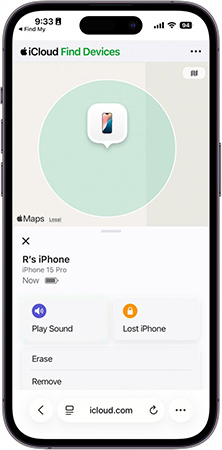
If you bought your iPad mini 2 from someone else, asking the previous owner to remove the device from their Apple Account is the easiest and most reliable solution. After the device is removed from their account, the Activation Lock disappears automatically during setup, allowing you to activate the iPad with your own Apple Account. If the previous owner no longer has the device, they can still remove it remotely by signing in to iCloud.com.
- Step 1. Ask the previous owner to sign in to their Apple Account on their Find My app or iCloud.com website.
- Step 2. Open Find My.
- Step 3. Select the locked iPad mini 2.
- Step 4. Choose Erase to delete all data on the iPhone if necessary.
- Step 5. Select Remove to remove the iPhone from their Apple Account.
- Step 6. Restart your iPad mini 2 and complete the setup process.
 View Also:
 Method 2. Contact Apple Support
If you're the original owner and can provide valid proof of purchase, Apple Support may be able to remove the Activation Lock for you. This method is intended for users who legitimately own the device but no longer remember the Apple Account credentials or inherited an older family device with proper ownership documentation.
Apple generally requires information such as:
- Original purchase receipt
- Device serial number
- IMEI (Cellular models)
- Personal identification
Whether Apple approves the request depends on its verification process. If ownership can't be confirmed, the Activation Lock won't be removed.

Method 3. Use an Activation Lock Removal Tool
If you can't contact the previous owner and Apple can't verify ownership, using a compatible Activation Lock removal tool may be the most practical option for supported devices. Unlike manually combining jailbreak utilities and terminal commands, dedicated software automates much of the process and provides clear on-screen instructions. Most tools first guide you through the required jailbreak and then perform the Activation Lock bypass.
One example is TunesKit iPhone Unlocker, which supports Activation Lock removal on compatible iPhone and iPad models. The software simplifies the workflow by integrating the necessary jailbreak preparation with the bypass process, making it a suitable option for users who are unfamiliar with command-line tools.
Key Features of TunesKit iPhone Unlocker
Removes Activation Lock on supported devices. Automatically walks you through the jailbreak process when required. No terminal commands or complex configuration.
 600,000+ Downloads
Step 1. Choose correct removing feature
Install and launch TunesKit iPhone Unlocker on your computer. Connect your iPad mini 2 using a USB cable. Choose Remove iCloud Activation Lock. Then, click Start.

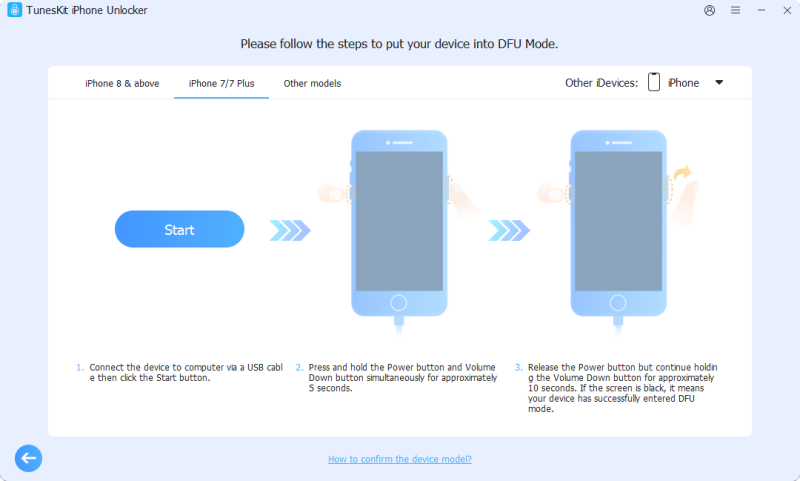
Step 2. Put iPhone into DFU Mode
Follow the on-screen instructions to put your iPhone into DFU Mode.
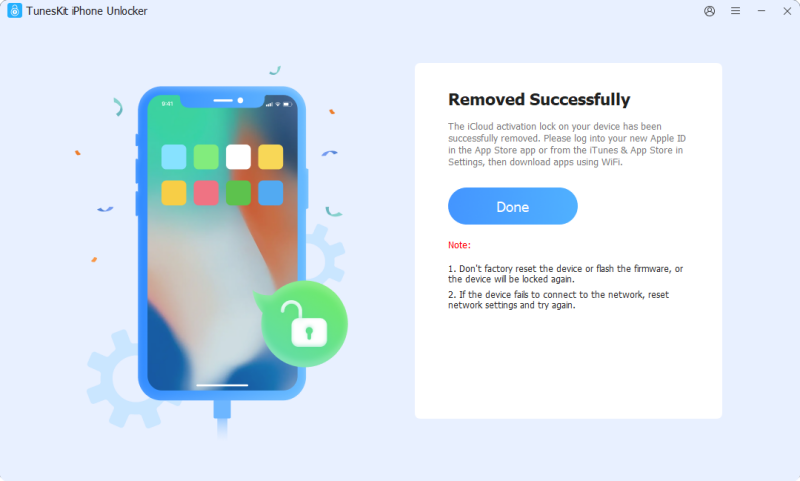
Step 3. Wait for the Removing process ending
Then, TunesKit will help you remove the Activation Lock from your iPhone without jailbreaking.
Method 4. Try DNS Bypass (Temporary Access)
DNS bypass is an older technique that redirects the activation process to a custom DNS server. It does not remove Activation Lock, but it may allow limited access to certain functions on some older iOS versions.
Because the iPad mini 2 is an older device, users may still come across this method. However, it should only be viewed as a temporary workaround rather than a permanent solution.
- Step 1. For iPad mini 2 Activation Lock bypass, you should restart your iPad to activate it again, or tap Start Over and back to the first page.
- Step 2. Set Language & Region again, and go ahead to WiFi Settings.
- Step 3. On the right of your WiFi name, you can see an icon i. Tap it and select Forgot this Network.
- Step 4. Tap Back and tap i again, and tap Configure DNS. Select Manual, and add a new DNS address for your iPad via the third-party address below.
- North America: 104.154.51.7
- South America: 35.199.88.219
- Europe: 104.155.28.90
- Asia: 104.155.220.58
- Australia and Oceania: 35.189.47.23
- Global: 78.100.17.60
- Step 5. Save your edit and tap the Back option, and connect to the WiFi. Next, a page will pop up. Tap Back. Finally, select Activation help.

What Happens After Bypassing Activation Lock on iPad mini 2?
Before attempting any Activation Lock bypass method, it's important to understand what you can and cannot do after the process. Activation Lock is deeply connected to Apple's security system. Therefore, bypassing it does not always restore every Apple feature that was available before the device was locked. The exact limitations depend on the method used and the device configuration.
| Feature | Available After Bypass |
|---|---|
| Access the iPad home screen | ✅ Usually available |
| Use installed apps | ✅ Usually available |
| Connect to Wi-Fi | ✅ Usually available |
| Download apps from App Store | ⚠️ Depends on the method |
| Sign in with a new Apple Account | ⚠️ May not work |
| Enable Find My iPad | ❌ Usually unavailable |
| Restore the device normally | ⚠️ May trigger Activation Lock again |
| Cellular service | ⚠️ Depends on device and method |
For an iPad mini 2 used mainly as a Wi-Fi tablet, media device, or learning device, an Activation Lock bypass may still make the device usable again. However, if you need full Apple Account functionality, iCloud synchronization, Find My, and all Apple services, removing the lock through the original account owner or Apple Support remains the best option.
FAQs About iPad mini 2 Activation Lock Jailbreak
-
Does jailbreaking an iPad mini 2 remove Activation Lock?
No. Jailbreaking itself does not remove Activation Lock. It only provides system access that some bypass tools may require. Activation Lock and jailbreak are two different processes.
-
Will jailbreaking delete data on my iPad mini 2?
Normally, jailbreaking does not erase personal data. However, some Activation Lock bypass processes may require device modifications or a restore process. Always back up important files whenever possible.
-
Can I update my iPad mini 2 after Activation Lock bypass?
You should be careful with software updates. Some bypass methods may stop working after restoring or updating the device because Activation Lock verification can be triggered again. Check the limitations of your specific method before updating.
Final Thoughts
Jailbreaking an iPad mini 2 with Activation Lock is possible because the device uses the A7 chip and supports hardware-based jailbreak methods. However, it is important to understand that jailbreak and Activation Lock removal are not the same thing. If you still have access to the original Apple Account, removing the device through the account owner or Apple Support is always the best choice.
For users who cannot recover the original Apple Account and have a compatible device, TunesKit iPhone Unlocker provides a simpler way to handle the Activation Lock removal process. It guides users through the necessary steps and helps complete the bypass workflow without requiring complicated technical operations.