iPhone XS Max iCloud Locked? How to Unlock It in 2026

Seeing the Activation Lock screen on your iPhone XS Max can be frustrating, especially if you've just purchased a used device or reset your own iPhone. Many websites promise a "100% free iCloud unlock," but most of these claims are misleading or outright scams.
The good news is that some legitimate methods can remove iCloud Activation Lock, depending on your situation. In this article, you'll learn what iCloud Lock is, why it appears, and the safest ways to unlock an iPhone XS Max without risking your data or money.
- What Does "iPhone XS Max iCloud Locked" Mean?
- Can You Unlock an iPhone XS Max Without the Apple Account?
- How to Unlock iPhone XS Max iCloud Lock
- Methods That Usually Don't Work (And May Cost You Money)
- iPhone XS Max iCloud Unlock Methods Compared
- FAQs About iPhone XS Max iCloud Locked
- Bonus: How to Remove iPhone X iCloud Lock (iOS 12.0 to 16.7)
- Final Verdict
What Does "iPhone XS Max iCloud Locked" Mean?
Before trying to unlock your device, it's important to understand what "iCloud locked" actually means.
Despite the name, the lock isn't caused by iCloud itself. Instead, it's Apple's Activation Lock, a security feature automatically enabled when Find My iPhone is turned on. Activation Lock is designed to prevent anyone else from using your iPhone if it's lost or stolen. Even after a factory reset, the device remains linked to the original Apple Account until that account is removed from the device.
You'll typically encounter Activation Lock if:
- You factory reset your own iPhone but forgot your Apple Account password.
- You purchased a second-hand iPhone XS Max that wasn't removed from the previous owner's account.
- The device was restored using Finder or iTunes.
- The iPhone was erased remotely after being marked as lost.
Unlike a lock screen passcode, Activation Lock cannot be removed simply by resetting the device again.
Can You Unlock an iPhone XS Max Without the Apple Account?
The answer depends on why your iPhone XS Max is locked.
If you're the original owner, recovering your Apple Account or requesting assistance from Apple is usually the best solution.
If you purchased the device from someone else, you'll likely need the previous owner to remove it from their account. If that's impossible, certain professional tools may help in supported situations.
However, there is one important fact to remember:
- No legitimate method can remove iCloud Lock from every iPhone XS Max without meeting specific requirements.
Be cautious of websites claiming they can unlock any iPhone instantly using only an IMEI number or serial number. These services often fail to deliver results or request additional payments after purchase.
How to Unlock iPhone XS Max iCloud Lock
If your iPhone XS Max is iCloud locked, the best unlock method depends on your specific situation. Below, we'll walk you through the most effective ways to unlock an iPhone XS Max iCloud Lock, starting with Apple's official solutions before exploring alternative options for supported scenarios.
Method 1. Unlock iPhone XS Max Using the Original Apple Account
- Original owners
- Users who forgot their password
- Family members who still have account access
Using the original Apple Account is the easiest and most reliable way to remove Activation Lock. If you still remember your credentials or can recover your password, this official method permanently restores access to your iPhone XS Max.
- Step 1. Turn on the iPhone XS Max and connect it to Wi-Fi.
- Step 2. When the Activation Lock screen appears, enter the Apple Account email address.
- Step 3. Type the correct password. Complete the activation process.
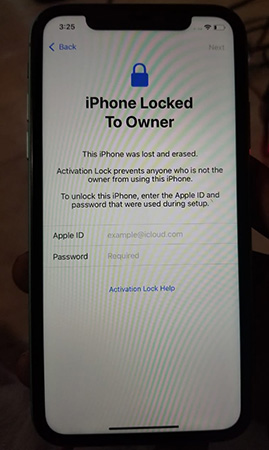
If you've forgotten your password, you can reset it using Apple's official account recovery process before trying again.
 Pros:
Pros:- Official Apple solution
- Permanent
- Safe
- No third-party software required
 Cons:
Cons:- Requires Apple Account credentials
Method 2. Ask the Previous Owner to Remove Activation Lock
- Recently purchased second-hand iPhones
- Devices from friends or family
- Marketplace purchases
If you purchased a second-hand iPhone XS Max that's still linked to someone else's Apple Account, don't panic. The previous owner can remotely remove Activation Lock without physically handling the device, making this one of the most effective official solutions.
- Step 1. Contact the previous owner. Ask them to sign in to their Apple Account in the iCloud.com website or on their another Apple device's Find My app.
- Step 2. Open Find My and locate the iPhone XS Max from All Devices.
- Step 3. Select Remove to remove the iPhone you bought from the original Apple Account.
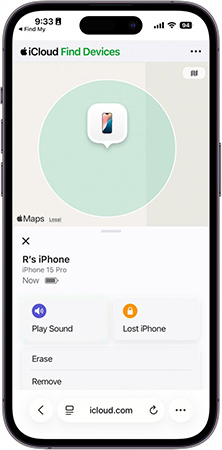
- Step 4. Restart your iPhone. Continue the setup process.
Once the device has been removed from the previous owner's account, Activation Lock disappears automatically after reconnecting to the internet.
Pros:- Official
- Permanent
- Free
Cons:- Requires cooperation from the previous owner
Method 3. Contact Apple Support with Proof of Purchase
- Original owners
- Businesses
- Users with official purchase documentation
Contacting Apple Support may help remove Activation Lock if you are the legitimate owner and can provide valid proof of purchase. Although approval isn't guaranteed, this official option is worth trying before using any third-party solutions.
Acceptable documents often include:
- Original purchase receipt
- Invoice from an authorized Apple retailer
- Carrier purchase record

Pros:- Safe
- Official
- Permanent
Cons:- Proof of purchase is required.
- Apple may decline requests if ownership cannot be verified.
Methods That Usually Don't Work (And May Cost You Money)
Searching for "iPhone XS Max iCloud unlock" online often leads to websites claiming guaranteed results. Unfortunately, many of these services are ineffective or even fraudulent. Knowing which methods to avoid can help protect both your money and personal information.
IMEI Unlock Websites
Many websites advertise permanent iCloud removal using only your IMEI number. In reality, there is no universally approved IMEI-based Activation Lock removal service for consumer devices.
"Free iCloud Unlock" Generators
These websites often promise instant results but usually:
- Never unlock the device.
- Request surveys or payments.
- Collect personal information.
- Redirect users to unrelated offers.
Permanent DNS Bypass Claims
DNS bypass can provide limited access on certain devices, but it does not permanently remove Activation Lock and should not be viewed as a complete solution.
Unknown Download Sites
Avoid downloading unknown "unlock tools" from unofficial websites. Some may contain malware or compromise your personal information.
iPhone XS Max iCloud Unlock Methods Compared
| Method | Requires Apple Account | Permanent | Difficulty | Recommended |
|---|---|---|---|---|
| Original Apple Account | Yes | ✅ Yes | Easy | ⭐⭐⭐⭐⭐ |
| Previous Owner Removal | No | ✅ Yes | Easy | ⭐⭐⭐⭐⭐ |
| Apple Support | No | ✅ Yes (if approved) | Medium | ⭐⭐⭐⭐☆ |
| DNS Bypass | No | ❌ No | Easy | ⭐⭐☆☆☆ |
| IMEI Unlock Websites | Usually No | Unreliable | Easy | ❌ Not Recommended |
FAQs About iPhone XS Max iCloud Locked
-
Does a factory reset remove iCloud Lock?
No. A factory reset erases your personal data but does not remove Activation Lock. The device remains linked to the Apple Account that enabled Find My.
-
Can jailbreaking remove Activation Lock?
Jailbreaking alone does not remove Activation Lock. Some specialized tools may require additional preparation steps depending on the device and iOS version, but success depends on compatibility and the specific scenario that you are experiencing.
Bonus: How to Remove iPhone X iCloud Lock (iOS 12.0 to 16.7)
If you have an iPhone X that is locked by Activation Lock, TunesKit iPhone Unlocker would be a good option to remove that lock without jailbreak. The tool includes an Activation Unlocker feature designed for supported devices and iOS versions. It provides a guided workflow that simplifies the removal process in eligible scenarios.
Key Features of TunesKit iPhone Unlocker
Remove Activation Lock from iPhone/iPad without Apple Account and jailbreak. Unlock screen lock, remove MDM restriction, and remove Apple Account without passcode.
 600,000+ Downloads
- Step 1. Download and install TunesKit iPhone Unlocker on your Windows PC or Mac. Use a Lightning cable to connect the device to your computer. Select the Remove iCloud Activation Lock option from the main interface.
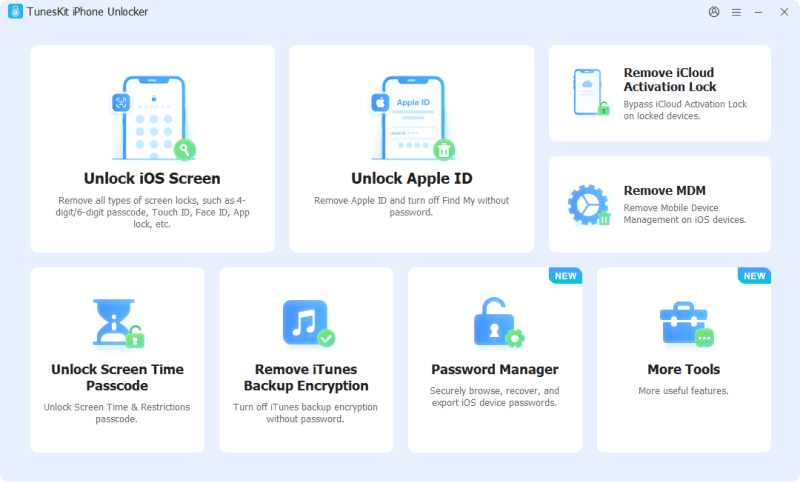
- Step 2. The software will guide you through the required preparation steps based on your device and iOS version. Once your iPhone X is on the DFU Mode, TunesKit will start removing the iCloud lock on your iPhone.
- Step 3. Wait for a while unitl the process is done.
Final Verdict
If your iPhone XS Max is iCloud locked, don't rush to pay for the first online service you find. Start with Apple's official solutions whenever possible—they're the safest and most reliable.
When official methods aren't available, a reputable Activation Lock removal can be considered for supported devices and eligible situations. Before using any third-party software, always confirm compatibility and understand its limitations.