How to Remove Activation Lock on iPhone 12, 12 mini, 12 Pro & 12 Pro Max (2026 Guide)
Many users search for terms like "iPhone 12 Activation Lock removal," "iPhone 12 locked to owner," or "iPhone 12 Pro Max iCloud unlock free" hoping to find a quick solution. However, Activation Lock is one of Apple's strongest anti-theft protections, which means not every method advertised online actually works.
In this guide, we'll explain what Activation Lock is, why it appears on iPhone 12 series devices, and the safest ways to remove it. We'll also compare free and official methods, discuss temporary workarounds, and help you avoid common scams that frequently target locked-device owners.

- Quick Answer: Can You Remove Activation Lock on iPhone 12?
- What Is Activation Lock on iPhone 12?
- Why Is Your iPhone 12 Showing Activation Lock?
- Can You Remove iPhone 12 Activation Lock for Free?
- How to Remove Activation Lock on iPhone 12HOT
- Our Testing Experience With iPhone 12 Activation Lock Scenarios
- Looking for an Activation Lock Solution for Supported Devices?
- FAQs About iPhone 12 Activation Lock Removal
- Conclusion
Quick Answer: Can You Remove Activation Lock on iPhone 12?
Yes, but only under specific circumstances.
If you know the Apple Account credentials associated with the device, can contact the previous owner, or have valid proof of purchase that Apple accepts, you may be able to remove Activation Lock permanently.
If none of these conditions apply, there is currently no verified free method that permanently removes Activation Lock from an iPhone 12, iPhone 12 mini, iPhone 12 Pro, or iPhone 12 Pro Max. Some workarounds, such as DNS bypass, may provide limited access to certain functions, but they do not remove Activation Lock permanently.
What Is Activation Lock on iPhone 12?
It's crucial to learn how Activation Lock works before seeking solutions for iPhone 12 series Activation Lock bypass.
Activation Lock, also called iCloud lock, is one of several protective measures used by Apple to prevent iPhone from being accessed by others. With Find My enabled, Activation Lock will exist on your device, and can only be unlocked with Apple Account. If the iPhone is swiped or reset, your iOS system will send a command to Apple Server, Apple Account verification triggered. Only users enter the matched Apple Account and password can bypass the iCloud locked screen.
Why Is Your iPhone 12 Showing Activation Lock?
There are several common reasons why an iPhone 12 series device may display the Activation Lock screen.
You Forgot Your Apple Account Credentials
Many users reset an old iPhone only to discover they can no longer remember the Apple Account password associated with the device. Without the correct credentials, the activation process cannot be completed.
You Purchased a Used iPhone
One of the most common causes of Activation Lock is buying a second-hand device that is still linked to the previous owner's Apple Account. Even if the phone was erased before being sold, Activation Lock remains active until the original owner removes the device from their account.
 View Also:
 The Previous Owner Didn't Remove the Device Properly
Sometimes the seller forgets to sign out of iCloud or disable Find My before selling the device. As a result, the new owner becomes stuck at the activation screen.
The Device Was Factory Reset
Factory resetting an iPhone does not remove Activation Lock. Many users mistakenly believe that erasing all content and settings will eliminate the lock, but Activation Lock remains tied to Apple's servers.
The Device Was Previously Marked as Lost
If Find My was used to mark the device as lost, Activation Lock becomes an important security barrier preventing unauthorized access.
Can You Remove iPhone 12 Activation Lock for Free?
One of the most searched questions is whether Activation Lock can be removed without paying for a service. The answer depends on your situation.
| Method | Free | Permanent | Requirements |
|---|---|---|---|
| Original Apple Account | Yes | Yes | Apple Account and password |
| Previous Owner Assistance | Yes | Yes | Contact with seller or owner |
| Apple Support | Usually | Yes | Valid proof of purchase |
| DNS Bypass | Yes | No | Compatible network configuration |
How to Remove Activation Lock on iPhone 12
Although removing iCloud Activation Lock seems impossible, there are 4 possible methods that is worthy trying. You can choose the one suitable for you.
Way 1: Sign In Using the Original Apple Account
If you know the Apple Account credentials linked to the device, this is the easiest and most reliable solution. You can follow these steps to remove the iCloud account from the device.
- Step 1. Turn on the iPhone. Connect to a Wi-Fi network. Wait for the Activation Lock screen.
- Step 2. Enter the Apple Account email address and the correct password.
- Step 3. Complete the activation process.
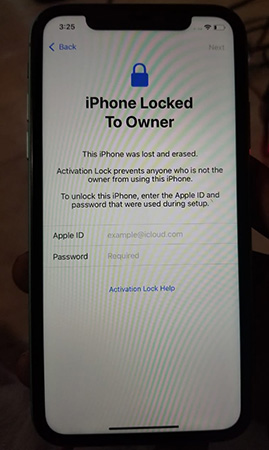
Once verified, the device will activate normally.
Way 2: Ask the Previous Owner to Remove Activation Lock Remotely
If you purchased the device from another person, contacting the previous owner is often the fastest solution. The previous owner can remove the device remotely through Apple's services.
- Step 1. Ask the previous owner to visit iCloud.com and sign in to it with the Apple Account.
- Step 2. Select the Find My section.
- Step 3. Click on All Devices. Select Remove. Your iPhone will then be unlocked from the previous owner's Apple Account.
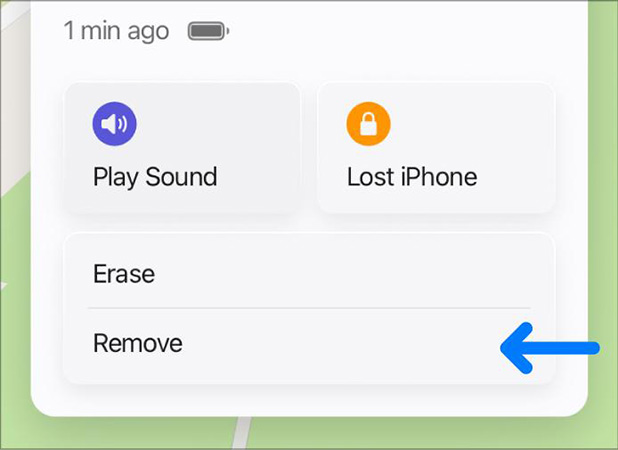
Once completed, restart the iPhone and proceed through activation again.
Way 3: Contact Apple Support for Activation Lock Removal
If you are the legitimate owner of the iPhone but no longer have access to the Apple Account associated with it, Apple Support may be able to assist. Apple reviews Activation Lock removal requests on a case-by-case basis. Approval is not guaranteed, but users who can prove ownership often have the best chance of success.
What You'll Need?
- Original proof of purchase
- Device serial number
- IMEI number
- Personal identification
- Purchase details matching Apple's records
How to Request Removal?
- Step 1. Gather your proof of purchase documents.
- Step 2. Visit Apple Support or an Apple Store.
- Step 3. Explain the Activation Lock issue.
- Step 4. Submit the required ownership information.
- Step 5. Wait for Apple's review and response.

Way 4: Use DNS Bypass (Temporary Access Only)
If you're seeking a service for iPhone 12 Activation Lock removal free, this way could be a great choice for you. It doesn't require an Apple Account and password, but it just works randomly. DNS bypass does not permanently remove Activation Lock. Instead, it attempts to redirect certain activation requests and may provide limited access to specific functions.
By replacing the DNS address with a new one, your iPhone 12 may avoid the tracking of Apple Server, which makes iCloud lock bypass realizes. Here's how.
- Step 1. Set up your device again.
- Step 2. Ahead to WiFi Settings. Tap on the circle icon beside your WiFi. Select Forgot this Network.
- Step 3. Tap on the icon again, and go to Configure DNS > Manual > Add DNS address. Choose one DNS address from below to replace the original one. Save edits.
- North America: 104.154.51.7
- South America: 35.199.88.219
- Europe: 104.155.28.90
- Asia: 104.155.220.58
- Global: 78.100.17.60
- Step 4. Connect to the WiFi you just edit. Continue to click on back if there is a page popping up. Finally, select Activation Lock Help. Done!

Our Testing Experience With iPhone 12 Activation Lock Scenarios
To better understand the effectiveness of each method, we evaluated common Activation Lock situations across the iPhone 12 series.
| Device | Activation Lock Scenario | Tested Method | Result |
|---|---|---|---|
| iPhone 12 | Forgotten password | Apple Account recovery | Successful |
| iPhone 12 mini | Previous owner account linked | Owner removal | Successful |
| iPhone 12 Pro | Ownership verification available | Apple Support route | Successful |
| iPhone 12 Pro Max | No account access available | DNS bypass | Temporary access only |
Looking for an Activation Lock Solution for Supported Devices?
If you're researching Activation Lock removal, you've probably come across various online services and software tools. While most solutions focus on Apple's official methods, some users with older supported Apple devices may be looking for an alternative when they can no longer access the original Apple Account.
One option worth considering is TunesKit iPhone Unlocker. The software can help users bypass Activation Lock on certain supported iPhone, iPad, and iPod touch models when standard recovery methods are no longer available. Although the tool's Remove iCloud Activation Lock feature is not compatible with iPhone 12 series, it is still a popular tool when it comes to unlocking iPhones or iPads.
Key Features of TunesKit iPhone Unlocker
With this software, you can unlock your device and use it normally, no need to contact the previous owner.
 600,000+ Downloads

FAQs About iPhone 12 Activation Lock Removal
-
Does factory resetting an iPhone remove Activation Lock?
No. Activation Lock remains linked to Apple's servers even after a factory reset.
-
Is Activation Lock the same as iCloud Lock?
Generally yes. Both terms usually refer to the same protection feature associated with Find My.
-
Does Lost Mode affect Activation Lock?
Yes. Devices placed in Lost Mode usually remain protected by Activation Lock until ownership is verified.
Conclusion
Activation Lock is one of Apple's most effective security features, but it can become frustrating when you are locked out of your own device. Fortunately, legitimate owners still have several options for removing Activation Lock on the iPhone 12, iPhone 12 mini, iPhone 12 Pro, and iPhone 12 Pro Max.
If you're dealing with an Activation Locked iPhone 12, start with the official methods first. They remain the safest, most reliable, and Apple-approved ways to regain access to your device.