Bought an iCloud Locked iPhone? What to Do [2026]

Buying a used iPhone can save money, but it becomes frustrating when the device shows iPhone Locked to Owner or asks for the previous owner's Apple Account during setup. If this happens, the iPhone is still protected by Activation Lock. The best solution depends on whether you can contact the previous owner, provide proof of purchase, or use a compatible removal tool.
This guide explains what to do if you bought an iCloud locked iPhone, which methods are permanent, and when returning the device may be the safest option.

Quick Answer: What Should You Do If You Bought an iCloud Locked iPhone?
If you bought a used iPhone that is still linked to the previous owner's Apple Account, contact the seller first and ask them to remove the device from Find My. This is usually the easiest and most reliable solution. If the seller is unavailable, Apple may help if you can provide acceptable proof of purchase. For certain supported devices, TunesKit iPhone Unlocker may also provide an Activation Lock removal option.
If none of these methods works, requesting a return or refund is often safer than paying for unknown unlock services.
| Method | Previous Owner Needed? | Permanent? | Best For |
|---|---|---|---|
| Previous owner removes device | Yes | Yes | Most second-hand iPhones |
| Apple Activation Lock support | No | Yes, if approved | Legitimate owners with proof |
| TunesKit iPhone Unlocker | No | Depends on compatibility | Supported iPhones/iPads |
| DNS workaround | No | No | Limited legacy access |
| Return or refund | No | — | Seller cannot remove lock |
What Does "iPhone Locked to Owner" Mean?
If your used iPhone displays iPhone Locked to Owner, it means Activation Lock is still enabled and the device remains linked to the previous owner's Apple Account. Activation Lock works together with Find My. Even after the iPhone is erased or factory reset, the previous owner's account may still be required before the phone can be activated again.
This is why simply resetting the device will not solve the problem.
Is It Activation Lock or Just a Screen Passcode?
Before trying any unlock method, make sure you know which type of lock you are dealing with.
| What You See | Lock Type |
|---|---|
| iPhone Locked to Owner | Activation Lock |
| Apple Account required during setup | Activation Lock |
| Enter Passcode | Screen lock |
| iPhone Unavailable / Security Lockout | Screen passcode lock |
| SIM Not Supported | Carrier lock |
If the device only has a screen passcode, use a passcode removal solution instead of an Activation Lock method.
How to Unlock an iCloud Locked iPhone You Bought
There are several possible solutions, but they are not equally reliable. Start with the previous owner and official Apple options before trying alternative methods.
Method 1. Ask the Previous Owner to Remove Activation Lock
If you can still contact the seller, this is the best option. The previous owner does not need to give you their Apple Account password. They can remove the iPhone remotely.
- Step 1. Ask the previous owner to sign in to Find My or iCloud.com/find.
- Step 2. Select the locked iPhone from the device list.
- Step 3. Erase the device if required.
- Step 4. Choose Remove.
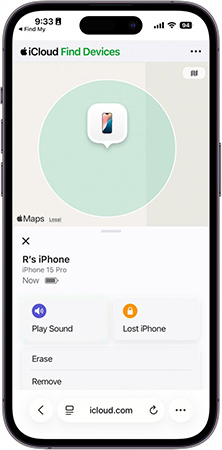
- Step 5. Restart the iPhone and go through setup again.
If the device no longer asks for the previous owner's account, Activation Lock has been removed.
Method 2. Request Activation Lock Removal from Apple
If you cannot contact the previous owner but legally own the iPhone, Apple may review an Activation Lock removal request.
You may need to provide:
- Original proof of purchase
- Device serial number or IMEI
- Retailer information
- Purchase date

Apple will review the documents and decide whether the device qualifies for removal. This method is most useful when the iPhone was purchased legitimately and you can prove ownership.
Method 3. Use TunesKit iPhone Unlocker on Supported Devices
If the previous owner is unavailable and your device is compatible, TunesKit iPhone Unlocker can be another option. Its Activation Lock removal feature is designed to help remove iCloud Activation Lock from supported iPhone and iPad models without requiring the previous owner's Apple Account password.
Key Features of TunesKit iPhone Unlocker
Remove Activation Lock on iPhone 5s through iPhone X running iOS 12.0–16.7.15. Requires no jailbreak if it is the supported devices.
 600,000+ Downloads
- Step 1. Install TunesKit iPhone Unlocker and connect the locked iPhone to your computer.
- Step 2. Choose Remove iCloud Activation Lock.
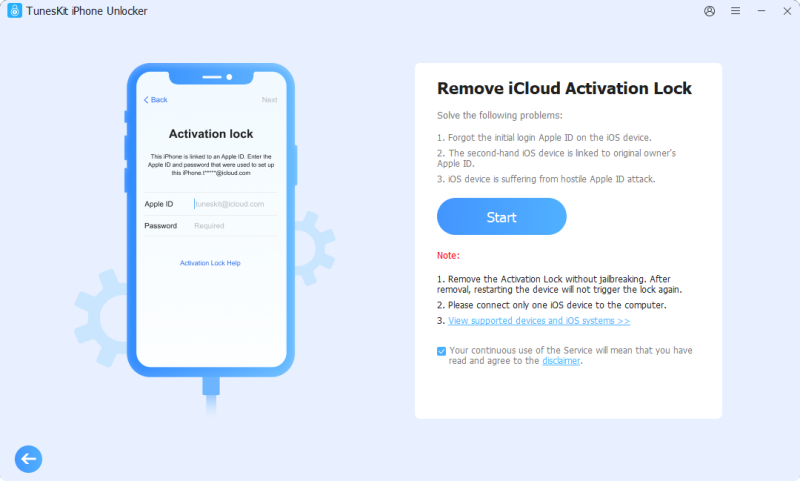
- Step 3. Follow the on-screen instructions to prepare the device.
- Step 4. Start the removal process and wait for it to finish.
Method 4. Does DNS Bypass Still Work?
DNS bypass is often described as a free way to get around Activation Lock, but it does not permanently remove the lock. On newer iPhones and modern iOS versions, DNS methods are generally unreliable. They may only provide limited access to certain features on some older devices.
Keep in mind:
- It does not remove the linked Apple Account
- It does not fully activate the iPhone
- It may stop working after a restart
- It is not a permanent unlock method
For most users, DNS should be treated as a limited workaround rather than a real solution.
Method 5. Return the iPhone or Request a Refund
If the seller cannot remove Activation Lock, returning the iPhone may be the best choice. Consider requesting a refund if:
- The seller refuses to remove the device from Find My
- The iPhone still shows iPhone Locked to Owner
- You cannot verify legitimate ownership
- The seller stops responding
- The device appears lost or stolen
- The seller asks you to pay extra for an "unlock" after the sale
If you bought the iPhone through an online marketplace, check the platform's buyer protection policy as soon as possible.
How to Avoid Buying an iCloud Locked iPhone Next Time
Before paying for a used iPhone, always verify that Activation Lock has been removed. Ask the seller to:
- 1. Turn off Find My.
- 2. Sign out of their Apple Account.
- 3. Erase All Content and Settings.
- 4. Restart the iPhone.
- 5. Let you begin setup.
Do not complete the purchase if the device shows iPhone Locked to Owner or asks for the seller's Apple Account.
FAQs About Buying an iCloud Locked iPhone
-
Can the previous owner remove Activation Lock remotely?
Yes. The previous owner can remove the iPhone from their account remotely through Find My without sharing their password with you.
-
Can I remove Activation Lock without the previous owner?
In some cases. Apple may approve removal if you have valid proof of ownership, and supported devices may be compatible with third-party removal tools.
-
Does factory reset remove iCloud Activation Lock?
No. Erasing or factory resetting the iPhone does not automatically remove Activation Lock.
Conclusion
If you bought an iCloud locked iPhone, start by contacting the previous owner and asking them to remove the device from Find My. This is the simplest and most reliable solution. If the seller is unavailable, Apple may help when valid proof of purchase is available. For supported models, TunesKit iPhone Unlocker can also provide an alternative Activation Lock removal option.
Avoid relying on DNS tricks or unknown online unlock services as permanent solutions. If the device cannot be legitimately unlocked, requesting a return or refund is often the safest choice.