


Checkra1n iCloud Bypass: Does It Really Work in 2026?

No. Checkra1n cannot directly remove iCloud Activation Lock. It is a jailbreak utility based on the checkm8 exploit, and its developers explicitly state that iCloud lock bypass is not supported. Although some third-party utilities use jailbreak-based methods, Checkra1n alone cannot remove the Apple Account associated with a device.
You've probably come across Checkra1n iCloud bypass tutorials claiming that a simple jailbreak can unlock an iPhone stuck on the Activation Lock screen. However, Checkra1n, Lockra1n, and other similarly named tools are often confused, making it difficult to understand what each one actually does.
This guide explains Checkra1n's purpose, supported devices, official download options, and how it differs from iCloud unlocking software. You'll also learn what to do if your iPhone is locked to an Apple Account.

What Is Checkra1n and How Does It Work?
Checkra1n is a free, semi-tethered jailbreak tool for certain older iPhones, iPads, and iPod touch models. It uses the checkm8 bootrom exploit to allow modifications to supported iOS systems. Unlike a traditional iPhone unlocking program, Checkra1n is designed for jailbreaking rather than removing screen passcodes or Apple Account restrictions.

Key Features of Checkra1n
- Semi-tethered jailbreak: Enables jailbreaking on supported devices, but the jailbreak environment must be restored after a reboot.
- Checkm8-based exploit: Uses a hardware-level vulnerability affecting selected A7–A11 devices.
- Cydia support: Allows users to install compatible jailbreak packages.
- Mac and Linux support: Provides official releases for these platforms.
- Free software: The official Checkra1n application is available without a purchase.
Checkra1n is distributed as a compiled application. Although some components of its underlying technology are open source, the complete Checkra1n application should not be described as fully open-source software.
Checkra1n vs. iCloud Activation Lock
It's important to understand the difference between jailbreaking and removing Activation Lock.
| Feature | Checkra1n Jailbreak | Activation Lock Removal |
|---|---|---|
| Purpose | Modify supported iOS systems | Resolve an Apple Account activation restriction |
| Technology | Checkm8 bootrom exploit | Account verification or other device-specific methods |
| Apple Account password | Not required for the jailbreak itself | Usually required for official account-based removal |
| Removes screen passcode | No | Not necessarily |
| Removes Activation Lock | No | Depends on the method |
| Permanent Apple Account removal | No | Possible through Apple's official process |
Jailbreaking a device does not automatically remove its original Apple Account association.
Checkra1n Compatibility: Supported Devices and iOS Versions
Before downloading Checkra1n, check whether your iPhone or iPad is compatible. The tool primarily targets devices using Apple's A7 through A11 chips.
Checkra1n Compatibility Overview
| Item | Compatibility |
|---|---|
| iPhone models | iPhone 5s through iPhone X |
| Chipsets | A7–A11 |
| iPad | Selected A7–A11 models |
| iPod touch | Selected compatible models |
| iOS versions | iOS 12.0–14.8, subject to device-specific restrictions |
| macOS | Officially supported |
| Linux | Officially supported, with some limitations |
| Windows | No official native version |
| iCloud Activation Lock removal | Not supported |
The Checkra1n developers identify A7–A11 as the supported chip range and note that A12 and newer chips are not vulnerable to checkm8.
Important Compatibility Limitations
Not every supported device works identically across all iOS versions. For example, Checkra1n's 0.12.4 beta notes explain that A11 devices running iOS 14 or later have additional passcode-related restrictions. Some A7 devices also have limitations when using the Linux version.
Therefore, always check the official release notes rather than assuming that every device running iOS 12–14 can use the same jailbreak procedure.
Where to Download Checkra1n Safely
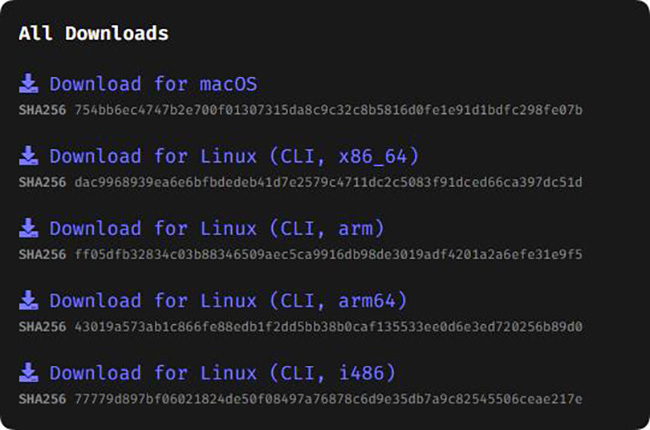
If you're looking for Checkra1n iCloud bypass download, the first thing to understand is that the official installer is for jailbreaking, not Activation Lock removal. The official website is Checkra1n Official Website. You can also view the available releases at Checkra1n Official Downloads.
How to Download Checkra1n
- Step 1. Visit the official Checkra1n website.
- Step 2. Open the latest release section. The official website currently lists Checkra1n 0.12.4 beta as its latest release.
- Step 3. Select the version compatible with your Mac or Linux computer.
- Step 4. Download the application and review its release notes before installation.
Is Checkra1n Available for Windows?
No official native Windows version of Checkra1n is available. The developers provide macOS and Linux releases. If you find a website advertising a Checkra1n Windows EXE installer, verify it before downloading. Some third-party environments allow users to run Linux-based utilities on Windows hardware, but these are not official native Windows releases.
Is Checkra1n Free?
Yes. Checkra1n is available free of charge from its official website. You do not need to purchase a license to download the official jailbreak application. Avoid websites requesting payment for a supposedly official Checkra1n download.
How to Jailbreak a Compatible iPhone With Checkra1n
If your goal is to jailbreak a compatible iPhone rather than remove Activation Lock, you can use Checkra1n's official procedure. Before starting, make sure your device is supported and back up your data whenever possible.
- Step 1. Install Checkra1n on a compatible Mac or Linux computer. Connect the supported iPhone using a USB cable. Open the application and wait for it to detect your device.
- Step 2. Click Start and follow the onscreen instructions to prepare the iPhone.

- Step 3. Checkra1n will guide you through the button combination required to enter DFU Mode. The exact instructions depend on the device model.
- Step 4. Wait while Checkra1n performs the jailbreak. Once the device restarts, follow the available instructions for installing supported jailbreak packages.
 Warning: These steps explain the jailbreak process only. They do not remove iCloud Activation Lock, reveal a forgotten screen passcode, or grant access to another person's Apple Account.
Why Checkra1n Cannot Remove iCloud Activation Lock
Some online tutorials suggest that jailbreaking an iPhone with Checkra1n automatically removes Activation Lock. This claim is incorrect. Checkra1n's developers explicitly state in their official GitHub BugTracker that the tool does not support iCloud lock bypass.
Why Doesn't Jailbreaking Remove Activation Lock?
Activation Lock is part of Apple's Find My security system. When Find My is enabled, the device is associated with an Apple Account, and activation requires authorization. Checkra1n changes the software environment on supported devices, but it does not remove the device's account association from Apple's activation infrastructure. Even when a third-party workaround appears to provide access to the Home Screen, that does not prove Activation Lock has been permanently removed from the device.
Checkra1n vs. Lockra1n: What's the Difference?
Because their names look similar, Checkra1n and Lockra1n are frequently confused. However, they are separate programs with different purposes.
| Feature | Checkra1n | Lockra1n |
|---|---|---|
| Main function | iOS jailbreak | Advertised Activation Lock bypass |
| Developer | Checkra1n development team | Independent third-party developer |
| Underlying technology | Checkm8 exploit | Device-specific bypass methods |
| Official Activation Lock removal support | No | Advertised, with limitations |
| Free availability | Yes | Version-dependent |
| Compatibility | Selected A7–A11 devices | Depends on Lockra1n version |
Is Lockra1n Part of Checkra1n?
No. Lockra1n is not an official Checkra1n feature or release. The Checkra1n developers do not provide a built-in Activation Lock bypass option through the Checkra1n Loader. If you're researching Lockra1n specifically, read our separate Lockra1n Review 2026 for its advertised functions, compatibility, download information, and risks.
Checkra1n Pros and Cons
Checkra1n can be useful for experienced users who want to jailbreak supported older iPhones, but it is not suitable for every device or unlocking problem.
 Pros:
- Free to download from the official website.
- Supports selected A7–A11 Apple devices.
- Uses the well-known checkm8 bootrom exploit.
- Available for macOS and Linux.
- Provides a guided jailbreak interface.
- Supports compatible jailbreak packages.
 Cons:
- Does not remove iCloud Activation Lock.
- No official native Windows version.
- Does not support A12 or newer iPhones.
- Limited compatibility with newer iOS versions.
- Semi-tethered jailbreak requires reactivation after reboot.
- Jailbreaking can introduce software stability and security risks.
What Actually Works to Remove iCloud Activation Lock?
If your iPhone displays iPhone Locked to Owner or an Activation Lock screen, the best recovery method depends on your circumstances. Apple provides several official ways to resolve Activation Lock for devices you own.
Method 1. Use the Associated Apple Account
- Step 1. Connect the iPhone to Wi-Fi.
- Step 2. Enter the Apple Account credentials requested on the Activation Lock screen.
- Step 3. Follow the onscreen instructions to complete activation.

Depending on the device and circumstances, Apple may also allow the previously associated device passcode.
Method 2. Ask the Previous Owner to Remove the Device
Ask the previous owner to remove the device from their Apple Account. They can visit iCloud Find Devices and remove the device when eligible. After the account association has been removed, restart the setup process.
Method 3. Contact Apple Support
Apple offers an Activation Lock support request process for eligible devices. Visit Apple's official Activation Lock removal guide and follow the instructions.
These methods address the underlying account association rather than relying on a jailbreak workaround.
Checkra1n Alternative: TunesKit iPhone Unlocker
If your goal is removing Activation Lock rather than jailbreaking, TunesKit iPhone Unlocker is another desktop option to consider for selected older Apple devices. Unlike Checkra1n, TunesKit iPhone Unlocker includes a dedicated Activation Lock removal feature. It also supports Windows and macOS computers.
Checkra1n vs. TunesKit iPhone Unlocker
| Feature | Checkra1n | TunesKit iPhone Unlocker |
|---|---|---|
| Primary purpose | Jailbreak | iOS unlocking functions |
| Activation Lock removal | No | Available on supported devices |
| Windows support | No native release | Yes |
| Mac support | Yes | Yes |
| Pricing | Free | Paid license; trial available |
| Jailbreak-free Activation Lock option | Not applicable | Available for selected models |
| Supported devices | Selected A7–A11 devices | Depends on the unlocking function |
How to Use TunesKit iPhone Unlocker
- Step 1. Download TunesKit iPhone Unlocker from its official website. Launch the program and connect your compatible iPhone or iPad. Choose the Remove iCloud Activation Lock feature and review the compatibility requirements.

- Step 2. Complete the preparation steps shown in the software. Some supported devices may require jailbreaking, while selected models have a jailbreak-free option.
- Step 3. After the operation finishes, follow the device setup instructions and verify which functions are available.
Conclusion
So, can Checkra1n bypass iCloud Activation Lock? No. Checkra1n is a jailbreak tool for selected older Apple devices, and its developers explicitly state that it does not support Activation Lock bypass. If you're interested in jailbreaking, download Checkra1n only from its official website and check the device compatibility requirements.
If your goal is to activate an iPhone locked to an Apple Account, start with Apple's official recovery methods. For compatible older devices, TunesKit iPhone Unlocker provides another option, subject to its compatibility requirements and limitations.