Lockra1n Review 2026: Is It Safe, Free, and Does It Still Work?

If you have an older iPhone or iPad stuck on the Activation Lock screen, you may have come across Lockra1n while searching for a free solution. Lockra1n is a Mac-based utility designed to bypass Activation Lock on a limited range of checkm8-compatible Apple devices.
But being able to bypass the setup screen does not necessarily mean the device will work like a normally activated iPhone afterward. This Lockra1n review examines its current version, supported devices, safety concerns, limitations, user feedback, and whether it is still worth considering in 2026.
Quick Verdict: Is Lockra1n Worth Using in 2026?
Lockra1n can still be useful for certain older iPhones and iPads, but its limitations are substantial.
As of August 2026, the Lockra1n developer website recommends Lockra1n v3.0 Beta 3. The developer lists support for checkm8-compatible A9–A11 devices, including the iPhone 6s through iPhone X, running iOS 15 through iOS 18.1.1. The software is offered free of charge.
However, several factors should affect your decision:
- Lockra1n requires a Mac and uses a jailbreak-based workflow.
- Newer iPhones such as the iPhone XS, XR, 11, and later are outside its stated Activation Lock support.
- Cellular calls, SMS, and mobile data generally remain unavailable after bypass.
- iCloud functionality can be incomplete or inconsistent.
- iPhone 8, 8 Plus, and X have an important passcode limitation.
- The iPhone X may encounter jailbreak failures.
- The Mac app may trigger unidentified-developer security warnings.
For an old Wi-Fi-only device that you legitimately own, those limitations may be acceptable. If you want an iPhone to function normally as your main phone, Lockra1n is much less suitable.
What Is Lockra1n?
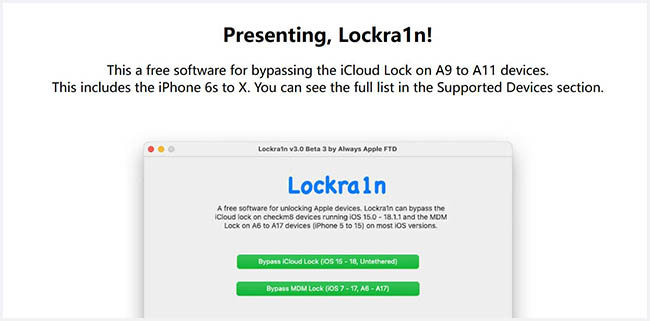
Lockra1n is a free utility developed by Always Apple FTD for bypassing Activation Lock on certain older Apple devices.
According to the developer, Lockra1n is built around the checkm8 bootrom exploit and uses several components from projects such as libimobiledevice to communicate with and modify compatible devices. Its Activation Lock workflow requires a checkm8-compatible processor, which is why support is largely restricted to older hardware.
The software also contains an MDM bypass option, but this review focuses primarily on the feature most people search for: Lockra1n iCloud/Activation Lock bypass.
Lockra1n Bypass vs. Activation Lock Removal
There is an important difference between bypassing Activation Lock and removing it through Apple.
Lockra1n modifies the device so that it can proceed beyond the Activation Lock setup stage. It does not simply remove the device from the original owner's Apple Account on Apple's servers.
Apple's official removal methods instead involve entering the linked Apple Account and password or eligible device passcode, removing the device through Find My, or submitting an Activation Lock support request with proof of purchase.
This difference explains why some functions may remain restricted after a successful Lockra1n bypass.
Lockra1n Supported Devices and iOS Versions
Checking compatibility should be your first step. Lockra1n does not support every iPhone or every version of iOS.
Lockra1n Supported iPhones
The developer currently lists the following iPhones:
| iPhone Model | Lockra1n Support |
|---|---|
| iPhone 6s | Supported |
| iPhone 6s Plus | Supported |
| iPhone SE (1st generation) | Supported |
| iPhone 7 | Supported |
| iPhone 7 Plus | Supported |
| iPhone 8 | Supported, with limitations |
| iPhone 8 Plus | Supported, with limitations |
| iPhone X | Supported, but jailbreak issues are reported |
| iPhone XR / XS / XS Max | Not supported by this method |
| iPhone 11 and newer | Not supported by this method |
The developer specifically states that the Activation Lock method works with A9–A11 checkm8-compatible devices and warns that the iPhone X can sometimes encounter jailbreak problems.
Lockra1n Supported iPads
The developer also lists several older iPads, including:
- iPad Pro 12.9-inch (1st generation)
- iPad Pro 12.9-inch (2nd generation)
- iPad Pro 10.5-inch
- iPad Air (1st generation)
- iPad Air 2
- iPad (5th generation)
- iPad (6th generation)
- iPad (7th generation)
- iPad mini 4
Independent verification is more limited for iPads. A July 2026 iFixit guide confirms the iPhone support list but notes that its author had not personally verified the advertised iPad coverage. For this reason, consider the iPad list developer-stated compatibility rather than a guarantee of success.
Which iOS Versions Does Lockra1n Support?
According to the current developer page, Lockra1n supports:
- iOS 15.x
- iOS 16.x
- iOS 17.x
- iOS 18.0–18.1.1
What Works and Doesn't Work After Lockra1n Bypass?
Compatibility tells you whether Lockra1n can attempt the bypass. It does not tell you what the iPhone will be able to do afterward. This is arguably the most important part of a Lockra1n review.
| Function | Expected Result |
|---|---|
| Reach Home Screen | Yes on a successful bypass |
| Wi-Fi | Generally works |
| Install apps | Possible, although account behavior can vary |
| App Store sign-in | Reported to work in some cases |
| Full iCloud sign-in | Advertised in v3.0 Beta 3, but inconsistent reports exist |
| Cellular calls | No |
| SMS | No |
| Mobile data | No |
| FaceTime/iMessage | May have limitations |
| Reboot persistence | Advertised as untethered |
| Passcode on iPhone 8/8 Plus/X | Significant restriction |
Is Lockra1n Free?
Yes. The official Lockra1n software is currently offered for free.
The developer explicitly states that Lockra1n is "not for sale" and that the software is free to use. The current workflow also uses free device registration rather than requiring payment for a license.
This is worth remembering when searching for a Lockra1n download. If an unrelated website claims you need to pay for the "official Lockra1n license," verify the source before entering payment information. An August 2026 Reddit discussion also included users warning that Lockra1n itself is supposed to be free.
Is Lockra1n Safe?
There is no simple yes-or-no answer because "safe" can refer to several different issues.
Is Lockra1n a Legitimate Project?
Lockra1n has more traceability than an anonymous ZIP file circulated only through download-sharing sites. It has an identifiable developer, an official project website, published compatibility information, a publicly documented development history, and links to the developer's support channels.
Why macOS May Block Lockra1n
The developer acknowledges that macOS may identify Lockra1n as software from an unidentified developer and provides instructions for users who cannot open the application.
An unidentified-developer warning does not automatically mean an application contains malware. At the same time, macOS security protections exist for a reason, so bypassing them reduces the assurances provided by signed software.
For that reason:
- download Lockra1n only from a source you can verify as belonging to the developer;
- avoid "cracked," "premium," or repackaged versions;
- do not assume a random Lockra1n download is safe merely because the filename looks correct.
How to Use Lockra1n to Bypass Activation Lock
Lockra1n uses a Mac-based, jailbreak-dependent workflow. Before starting, confirm that your iPhone or iPad model and iOS version are supported, and use the tool only on a device you own or are authorized to manage.
- Step 1. Download Lockra1n. Get the current version from the developer's verified website. As of August 2026, the developer recommends Lockra1n v3.0 Beta 3.
- Step 2. Connect your device. Launch Lockra1n on your Mac and connect the supported iPhone or iPad with a USB cable.
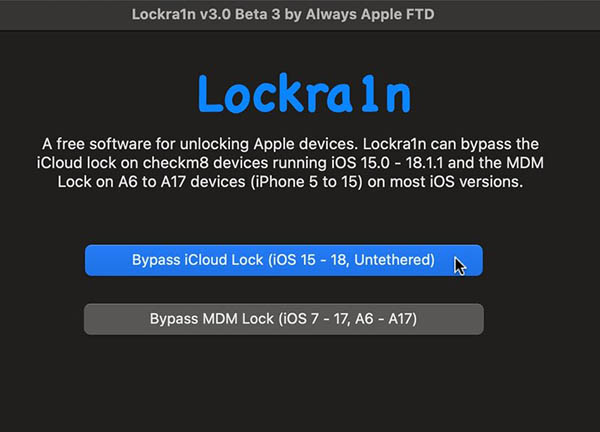
- Step 3. Follow the on-screen instructions. Complete the required device registration and follow Lockra1n's prompts to prepare the device for the jailbreak-based process.
- Step 4. Start the bypass. Follow the program's instructions to complete the Activation Lock bypass. Do not disconnect the device while the process is running.
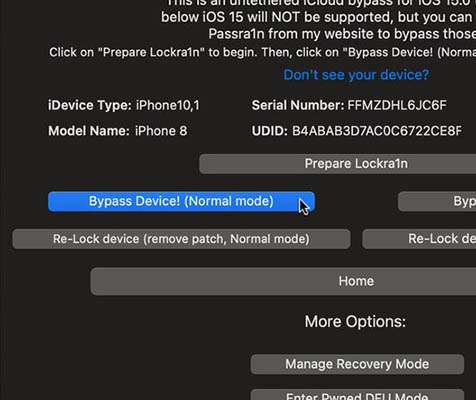
- Step 5. Check the result. After the device restarts, confirm that you can reach the Home Screen and test Wi-Fi, App Store access, iCloud sign-in, and reboot behavior.
Keep in mind that even after a successful Lockra1n bypass, cellular calls, SMS, and mobile data generally remain unavailable, while iCloud functionality may vary by device and iOS version.
Lockra1n User Reviews: What Are Users Reporting in 2026?
There are still recent Lockra1n discussions, which is useful because older reviews may describe obsolete versions. The feedback is mixed.
One August 2026 user reported successfully getting an iPad Pro past Activation Lock and eventually accessing the App Store, while being unable to sign into iCloud through Settings.
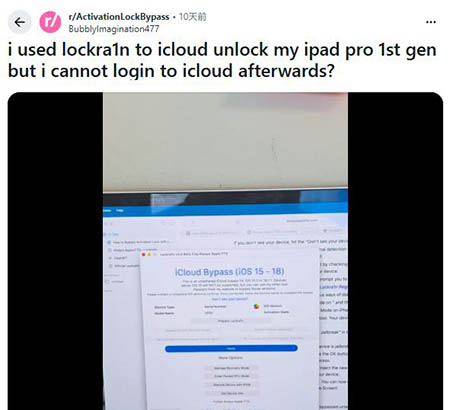
Other recent community discussions describe Lockra1n as a free choice for supported checkm8 devices while repeatedly warning that compatibility depends heavily on the exact device and iOS version.
These posts are individual experiences rather than controlled technical tests. Still, they reinforce an important conclusion:
A successful Lockra1n result on one device does not guarantee the same outcome on another supported device.
Lockra1n Pros and Cons
 Pros:
Pros:- Free to use
- Supports several older iPhones and iPads
- Covers iOS 15 through iOS 18.1.1 on compatible hardware
- Current version advertises an untethered bypass
- Has an identifiable developer and official project page
- Graphical interface simplifies parts of an otherwise technical workflow
- Can make some older locked devices usable over Wi-Fi
 Cons:
Cons:- Supports only older checkm8-compatible hardware
- Requires a Mac
- Requires a jailbreak-based process
- No normal cellular calls, SMS, or mobile data after bypass
- iCloud functionality may be incomplete or inconsistent
- A11 devices have a significant passcode restriction
- iPhone X jailbreak failures are specifically documented
- macOS may block the app as coming from an unidentified developer
- Beta software can contain bugs and produce inconsistent results
Lockra1n Alternative: TunesKit iPhone Unlocker
If you find Lockra1n too technical because of its jailbreak and DFU-related workflow, TunesKit iPhone Unlocker is another desktop option worth considering for supported devices.
Its current Activation Lock removal feature works with iPhone 5s through iPhone X running iOS 12.0-16.7.15. Unlike Lockra1n, TunesKit's current method does not require jailbreaking, making the process more straightforward for users who are less comfortable with jailbreak tools or manual device preparation.
Key Features of TunesKit iPhone Unlocker
Offers a straightforward desktop-based process with a dedicated Activation Lock removal mode and no jailbreak required.
 600,000+ Downloads
Lockra1n vs. TunesKit iPhone Unlocker
| Feature | Lockra1n | TunesKit iPhone Unlocker |
|---|---|---|
| Activation Lock removal/bypass | Yes | Yes |
| Jailbreak required | Yes | No for currently supported Activation Lock devices |
| Supported iPhones | Mainly iPhone 6s–X | iPhone 5s–X |
| Supported iOS | iOS 15–18.1.1 according to developer | iOS 12.0–16.7.15 |
| Ease of use | More technical | Guided desktop workflow |
| Cost | Free | Paid software with free download/trial option |
FAQs About Lockra1n
-
Does Lockra1n work on Windows?
The current Activation Lock workflow is designed around macOS. Users specifically looking for a native Lockra1n Windows version should not assume that Mac tutorials apply to Windows.
-
Is Lockra1n permanent after reboot?
The developer describes the current method as untethered, meaning the bypass is intended to remain after a normal reboot. The developer also notes that if a device fails to stay bypassed after reboot, an error likely occurred during the process.
-
Does Lockra1n require jailbreak?
Yes. The current Activation Lock workflow uses a jailbreak-based process on compatible checkm8 devices.
Final Verdict
Lockra1n is still a useful free option for some older iPhones and iPads, but its jailbreak requirement, Mac-only workflow, no cellular service, and inconsistent iCloud support limit its practicality.
If your device is supported and you prefer a simpler no-jailbreak desktop solution, TunesKit iPhone Unlocker may be easier to use. Always check exact device and iOS compatibility before choosing either tool.