


How to Download and Convert Facebook Video to MP3: Ultimate Guide
Founded in 2004, Facebook has grown into a leading global social media platform with over a billion users. Unlike other networks that focus on sharing ideas, Facebook prioritizes connecting friends and family across the world. Users frequently interact on the site by sharing personal moments through pictures, music, and videos.
However, while browsing, you might discover a video with a song you love but realize Facebook lacks a native feature to extract the audio. Since you cannot download these sounds directly without external help, this guide will introduce effective methods to convert Facebook videos into MP3 files easily.

Part 1. Use TunesKit Audio Capture to download Facebook to MP3
TunesKit Audio Capture is a powerful tool for downloading Facebook videos to MP3 by recording audio directly from your computer’s soundcard. It supports capturing sound from web browsers, live broadcasts, and media players like iTunes, ensuring high-quality output in popular formats such as MP3, AAC, and FLAC.
Beyond standard recording, the software enables you to capture multiple audio tracks simultaneously—for instance, recording from Facebook and YouTube at the same time without interference. It also allows for ID3 tag editing to keep your files organized. You can download and install TunesKit for free to start using these features today.
Key Features of TunesKit Audio Capture
Download and convert Facebook to MP3 in simple clicks. Record high-quality audio on Win/Mac from any source without losing any audio quality.
 600,000+ Downloads
3 steps to download Facebook to MP3
Follow the 3 steps below to use TunesKit Facebook to MP3 Converter to record audios from Facebook and save them in MP3.
Step 1 Open TunesKit Audio Capture

Launch TunesKit on your computer. There are some programs on the screen such as Chrome, IE, Windows Media Player. If you cannot find Facebook, click the + button to add Facebook.
Step 2 Set format for Facebook files

Click the Format button and choose MP3 or other audio format you like. It also supports other formats like WAV, M4A.
Step 3 Convert Facebook to MP3

Click on the Start button and go to Facebook and play the video that you want to download to MP3. The software will add a recording track automatically. When you stop playing the video and click on the Stop button, TuensKit will stop the recording. Click the Save button to export the audios in MP3 format.
 Pro-tip:
Part 2. Use online Facebook to MP3 downloaders
If you need to extract music from Facebook videos quickly, online downloaders are a convenient option. However, they generally offer lower audio quality than professional software and often include advertisements. Therefore, we recommend them primarily for urgent tasks. Below, we list two online tools to help you convert Facebook videos to MP3.
1. FDOWN
You can use FDOWN Facebook Video Downloader to download Facebook videos to MP3, MP4, 3GP, and AVI easily. This Facebook to MP3 converter is available on computers, tablets, and mobile devices. Here is how to use this downloader.
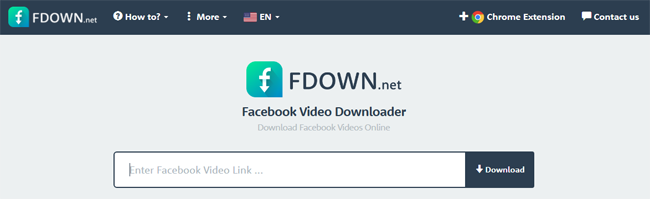
Step 1. Find the page of the video and copy the link from Facebook.
Step 2. Paste URL in this converter.
Step 3. Click the Download button to go to the converting page.
2. getVidFB
Like FbTube, getVidFB Facebook Video Downloader is an online downloader for Facebook videos. You are allowed to download Facebook to MP3 or MP4. You can go to its website directly to download directly.
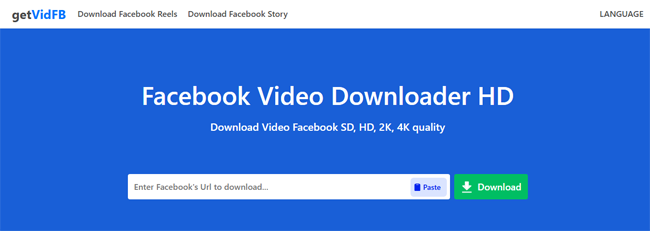
Step 1. Find the video you want to download and copy Facebook video URL.
Step 2. Paste the URL in this downloader.
Step 3. Choose the Download option to download the Facebook video.
Part 3. FAQs about Facebook to MP3
-
1. Can I download MP3 from Facebook directly?
No, Facebook does not offer a native download feature for videos or audio files to protect copyright. To save Facebook content as an MP3, you must use third-party tools. You can choose between desktop software like TunesKit Audio Capture for high quality or online downloaders for quick access.
-
2. Is it safe to use online Facebook to MP3 converters?
Most online converters are safe to use, but they often rely on aggressive advertising to stay free. Be cautious of clicking on pop-up ads or downloading unknown extensions. If you are concerned about security or privacy, a desktop recorder like TunesKit Audio Capture is a much safer alternative as it contains no ads or malware.
-
3. Can I download Facebook videos to MP3 on my phone?
Yes. The online tools mentioned in this article (such as FDOWN or getVidFB) work in mobile browsers like Chrome or Safari. Simply copy the Facebook video link, paste it into the online converter on your phone's browser, and download the file. Note that iPhone users may need to save the file to the "Files" app first.
Part 4. Conclusion and comparation
To download Facebook video to MP3, you can use TunesKit Audio Capture or an online Facebook video downloader like FbTube or GetVid. It is free to use online downloaders but you have to bear the advertisement and the unstable audio quality. If you choose TunesKit Audio Capture, you will get high-quality audio with a safe conversion process. And you can also use this tool to download any audio from Apple Music, Amazon Music, Tidal, Pandora, and so on.


