TunesKit iOS System Recovery vs ReiBoot: Features, Pricing, and Pros & Cons
TunesKit iOS System Recovery and Tenorshare ReiBoot both fix common iOS issues. TunesKit offers simple repairs, while Reiboot provides additional macOS Upgrade/Downgrade features.
Choosing the right iOS repair tool can make fixing iPhone issues much easier. TunesKit iOS System Recovery and Tenorshare ReiBoot are two popular options, but which one offers better features, performance, and value for money? In this TunesKit iOS System Recovery vs Tenorshare ReiBoot comparison, we'll explore their key features, pricing, pros and cons, and differences to help you choose the right tool for your needs.
- TunesKit iOS System Recovery vs ReiBoot: Quick Comparison
- What Are TunesKit iOS System Recovery and Tenorshare ReiBoot
- TunesKit iOS System Recovery vs ReiBoot: Detailed Feature Comparison
- TunesKit iOS System Recovery vs ReiBoot: Pricing and Value
- Pros and Cons of TunesKit iOS System Recovery and ReiBoot
- TunesKit iOS System Recovery or ReiBoot: Which One Should You Choose
- Final Verdict
TunesKit iOS System Recovery vs ReiBoot: Quick Comparison
Both TunesKit iOS System Recovery and Tenorshare ReiBoot can fix common iOS system issues, but they differ in features and functionality. Here's a quick side-by-side comparison to help you choose.
| Features | TunesKit iOS System Recovery | Tenorshare ReiBoot |
|---|---|---|
| iOS System Repair | Yes | Yes |
| Standard Repair (No Data Loss) | Yes | Yes |
| Deep Repair | Yes | Yes |
| Enter/Exit Recovery Mode | Free | Free entry and limited exits |
| iOS Upgrade/Downgrade | Yes | Yes |
| Backup & Restore | Yes(Free for back up) | Not a free feature |
| Windows & macOS Support | Yes | Yes |
| macOS Upgrade/Downgrade | No | Free |
| iTunes Repair | Free | Not a free feature |
| Anti-data Recovery Mode | Yes | Yes |
| Ease of Use | Beginner-friendly | Beginner-friendly |
| Explore iOS Beta Features | Yes | Yes |
| Reset iPhone/iPad/iPod touch | Yes | Yes |
Quick Verdict: TunesKit iOS System Recovery is a strong choice for users who want iOS repair with built-in backup and restore features, while ReiBoot is worth considering for its broader troubleshooting options.
What Are TunesKit iOS System Recovery and Tenorshare ReiBoot
Before comparing their features, let's take a closer look at what TunesKit iOS System Recovery and Tenorshare ReiBoot are.
What Is TunesKit iOS System Recovery?
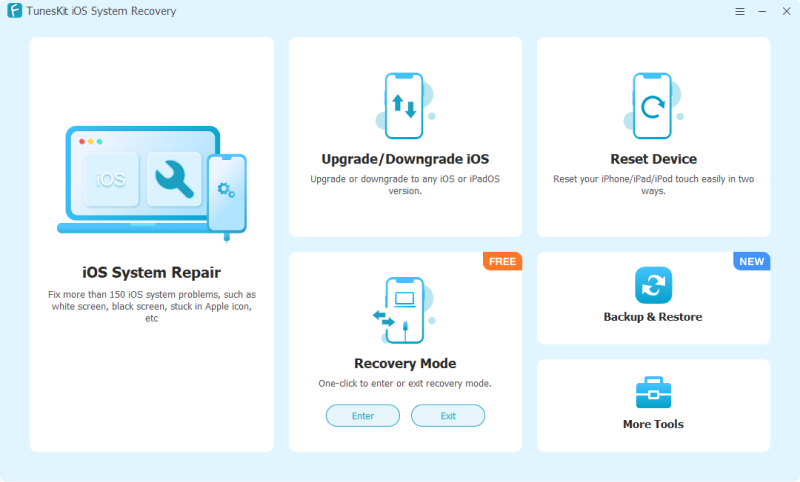
TunesKit iOS System Recovery is a professional iOS repair tool designed to fix common iPhone, iPad, and iPod touch system issues, such as iPhone stuck on preparing an update, black screens, boot loops, and recovery mode. It offers Standard Repair to fix issues without data loss and Deep Repair for more serious system problems. With its user-friendly interface, TunesKit makes iOS troubleshooting simple for beginners and experienced users alike.
Key Features of TunesKit iOS System Recovery
It fixes 150+ iOS issues with Standard and Deep Repair modes. It also supports one-click Recovery Mode, iOS upgrades and downgrades, device reset, data backup and restore, secure data erasure, and access to iOS beta features—all through a user-friendly interface.
 600,000+ Downloads
What Is Tenorshare ReiBoot?
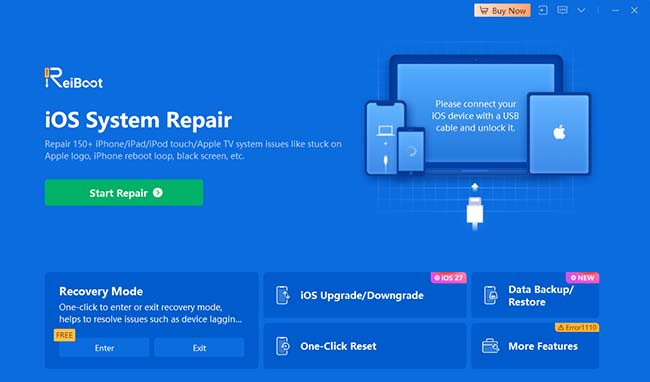
Tenorshare ReiBoot is an iOS system recovery tool that helps users troubleshoot various iPhone and iPad software issues, including frozen screens, restart loops, and failed iOS updates. It provides Standard Repair and Deep Repair modes, along with features such as entering or exiting recovery mode and iOS upgrade or downgrade options. ReiBoot aims to simplify iOS system repairs without requiring advanced technical knowledge.
TunesKit iOS System Recovery vs ReiBoot: Detailed Feature Comparison
Both TunesKit iOS System Recovery and Tenorshare ReiBoot offer powerful tools for fixing iOS system issues, but how do they compare in terms of functionality? Let's explore their key features to see which one better suits your needs.
1. iOS System Repair
Both tools can fix common iOS problems, including iPhones stuck on the Apple logo, black screens, and recovery mode.
TunesKit iOS System Recovery offers two repair modes: Standard Repair, which preserves existing data, and Deep Repair, which addresses more serious issues but erases device data. ReiBoot provides similar options, along with a DFU Repair guide for more severe system problems.
Verdict: Both are capable iOS repair tools, while ReiBoot offers an additional repair guide.
2. Recovery Mode Management
TunesKit allows users to enter and exit Recovery Mode for free with one click. ReiBoot also supports one-click Recovery Mode access, but exiting Recovery Mode is not free.
Verdict: TunesKit offers greater flexibility for free Recovery Mode management.
3. iOS Upgrade and Downgrade
Both TunesKit and ReiBoot support iOS upgrades and downgrades. TunesKit provides dedicated upgrade and downgrade functions, while ReiBoot's official FAQ states that its downgrade feature is limited to moving from beta versions to the latest official iOS release.
Verdict: TunesKit may offer more flexibility, although available firmware and Apple's signing restrictions affect both tools.
4. Data Backup and Restore
TunesKit includes built-in Backup & Restore functionality, allowing users to back up iPhone or iPad data to a computer and restore it when needed. ReiBoot also offers backup and restore features without requiring iTunes or iCloud.
Verdict: Both provide convenient backup and restore options.
5. Device Reset and Data Erasure
TunesKit and ReiBoot both offer device reset functions, including factory resets. ReiBoot additionally advertises permanent data erasure for users who want to wipe their devices before selling or giving them away.
Verdict: Both handle device resets, with ReiBoot offering a dedicated permanent data erasure feature.
6. Ease of Use
TunesKit features a straightforward interface that guides users through selecting a repair mode, downloading firmware, and repairing their devices. ReiBoot follows a similar process, making both tools accessible to users without technical experience.
Verdict: Both are beginner-friendly, with simple, guided repair processes.
 Overall Verdict
TunesKit iOS System Recovery is a practical choice for users who prioritize straightforward repairs, free Recovery Mode management, and integrated backup features. Tenorshare ReiBoot is a strong alternative for users looking for additional repair options and broader troubleshooting functionality.
TunesKit iOS System Recovery vs ReiBoot: Pricing and Value
When comparing TunesKit iOS System Recovery vs Tenorshare ReiBoot, pricing is an important factor. Both offer free trials and flexible subscription plans, including monthly, yearly, and lifetime licenses. However, TunesKit generally provides better value for long-term users.
| Pricing Plan | TunesKit iOS System Recovery | Tenorshare ReiBoot |
|---|---|---|
| Free Trial | Available | Available |
| 1-Month License | $24.95 | $24.95 |
| 1-Year License | $49.95 | $51.95 |
| Lifetime License | $79.95 | $89.95 |
| Device Support | 5 devices / 1 computer | 5 devices / 1 computer |
| Money-Back Guarantee | 30 days | Subject to refund policy |
Note
Prices in USD, checked November 2026. Promotional offers and taxes may vary.
TunesKit iOS System Recovery offers competitive pricing, especially for its yearly and lifetime plans. Its lifetime license costs $79.95, making it a more affordable option for users who need ongoing iOS repair capabilities.
Tenorshare ReiBoot starts at the same monthly price but costs slightly more for yearly and lifetime access. It remains a practical option for users interested in its additional repair features.
Verdict: TunesKit iOS System Recovery offers better long-term value, saving users $10 on the lifetime license compared to ReiBoot at the listed prices.
Pros and Cons of TunesKit iOS System Recovery and ReiBoot
Both TunesKit iOS System Recovery and Tenorshare ReiBoot offer convenient solutions for common iOS problems. However, each has its own strengths and limitations.
TunesKit iOS System Recovery: Pros and Cons
 Pros:
- Fixes 150+ common iOS system issues.
- Offers Standard and Deep Repair modes.
- Free one-click Recovery Mode entry and exit.
- Includes built-in Backup & Restore.
- Supports iPhone, iPad, and iPod touch.
- Compatible with Windows and macOS.
 Cons:
- Deep repairs erase existing device data.
- Most repair features require a paid license.
- Repair success depends on the device's condition and issue severity.
Tenorshare ReiBoot: Pros and Cons
Pros:- Fixes 150+ iOS system issues.
- Offers Standard, Deep, and DFU Repair modes.
- Supports one-click Recovery Mode management.
- Includes iOS backup, restore, and reset features.
- Supports iOS upgrades and downgrades.
- Provides a beginner-friendly interface.
Cons:- Advanced repair features require payment.
- Deep and DFU Repair may erase device data.
- Firmware downloads require sufficient storage.
- Some advanced features have usage restrictions.
TunesKit iOS System Recovery or ReiBoot: Which One Should You Choose
The right choice depends on the iOS problem you need to fix, the repair features you require, and your budget. Although both tools are designed to troubleshoot iPhone and iPad system issues, their features, repair modes, and licensing options may differ.
| Your situation | Recommended approach |
|---|---|
| Your iPhone is stuck on the Apple logo | Both tools offer iOS system repair options; compare supported repair modes and device compatibility |
| Your iPhone is stuck in Recovery Mode | Consider TunesKit's free exit recovery mode feature |
| Your iPhone has a black screen or won't turn on | Try a force restart first; consider either tool if the issue is software-related |
| Your iPhone keeps restarting or is stuck in a boot loop | Compare the standard and deep repair modes offered by both tools |
| You want to fix iOS issues without losing data | Prioritize a standard repair mode that explicitly supports data preservation |
| You need to downgrade or upgrade iOS | Check the supported iOS versions and firmware options before purchasing |
| You need a quick Recovery Mode exit without paying | Consider TunesKit's free exit recovery mode feature |
| You prefer a more affordable license | Compare current prices, device limits, and subscription terms |
| You want long-term access to the software | Consider TunesKit's lifetime plan |
| You want to upgrade or downgrade macOS | Tenorshare Reiboot can do that |
Which One Should You Choose?
- Choose TunesKit iOS System Recovery if you want a straightforward repair tool with built-in backup and restore capabilities, one-click Recovery Mode access, and a lifetime license option.
- Choose ReiBoot if you want to explore its multiple repair modes, troubleshoot a wider range of advertised iOS issues, or already use other Tenorshare products.
Overall, both tools cover many common iOS system problems. The best choice depends on your specific repair needs, data-preservation requirements, and preferred software workflow. Before purchasing either product, check device compatibility, supported firmware versions, and the conditions of its repair and refund policies.
Final Verdict
Overall, TunesKit iOS System Recovery is a better choice for users seeking an affordable, easy-to-use repair tool, while Tenorshare ReiBoot is worth considering for its additional macOS Upgrade/Downgrade features. Both can fix common iOS issues, so choose based on your needs and budget.