TunesKit iPhone Unlocker vs Dr.Fone Screen Unlock (iOS): Which Is Better?
TunesKit offers dedicated iPhone unlocking and favorable lifetime upgrades, while Dr.Fone provides broader software integration. Both handle common iOS locks, but compatibility and data-loss risks vary.
Forgetting your iPhone passcode or getting locked out of your device can be frustrating. Third-party unlocking tools offer potential solutions, but choosing the right one can be challenging. Two popular options are TunesKit iPhone Unlocker and Dr.Fone Screen Unlock (iOS). Both programs offer ways to remove screen passcodes, handle Apple ID-related restrictions, and address other iPhone locking issues. However, they differ in certain features, compatibility limitations, licensing terms, and user experience.
So, which should you choose? This TunesKit iPhone Unlocker vs Dr.Fone Screen Unlock (iOS) comparison examines their features, device compatibility, ease of use, pricing, and potential risks to help you make an informed decision.
- TunesKit iPhone Unlocker vs Dr.Fone: Quick Comparison
- What Are TunesKit iPhone Unlocker and Dr.Fone Screen Unlock?
- TunesKit vs Dr.Fone: Detailed Feature Comparison
- TunesKit iPhone Unlocker vs Dr.Fone: Pricing and Value
- Pros and Cons of TunesKit iPhone Unlocker and Dr.Fone
- TunesKit or Dr.Fone: Which iPhone Unlocker Should You Choose?
- Final Verdict
TunesKit iPhone Unlocker vs Dr.Fone: Quick Comparison
TunesKit and Dr.Fone provide many similar unlocking functions, but their differences become more apparent when you examine specific features and licensing conditions. Here is a side-by-side overview.
| Comparison | TunesKit iPhone Unlocker | Dr.Fone Screen Unlock (iOS) |
|---|---|---|
| Developer | TunesKit | Wondershare |
| Remove screen passcode | Yes | Yes |
| Unlock disabled iPhone | Yes | Yes |
| Remove Apple ID | Yes, with restrictions | Yes, with restrictions |
| Activation Lock functions | Limited device and iOS support | Limited device and iOS support |
| Remove Screen Time passcode | Yes | Yes |
| Handle MDM restrictions | Yes | Yes |
| Remove iTunes backup password | Yes | Yes |
| SIM/carrier unlocking | Not a primary advertised feature | Advertised on selected devices |
| Windows and Mac support | Yes | Yes |
| Monthly plan | $34.95 | $34.95 |
| Annual plan | $49.95 | $49.95 |
| Lifetime/perpetual plan | $59.95 | $59.95 |
| Standard Windows license | Up to 5 devices, 1 PC | Up to 5 devices, 2 PCs |
| Ease of use | Guided unlocking workflow | Guided unlocking workflow |
 Note
Pricing is based on advertised USD plans checked in November 2026 and may change. Feature availability depends on device models, iOS versions, and other requirements.
Quick Verdict
Both programs are reasonable candidates for supported iPhone screen-lock problems. TunesKit may appeal to users who prefer a dedicated unlocking utility and its advertised lifetime upgrade terms. Dr.Fone may be more attractive if you value its broader software ecosystem or a standard Windows license covering two computers.
Neither should be purchased before verifying that its specific unlocking mode supports your device.
What Are TunesKit iPhone Unlocker and Dr.Fone Screen Unlock?
Before comparing their performance and value, it helps to understand what each program is designed to do.
What Is TunesKit iPhone Unlocker?
TunesKit iPhone Unlocker is a desktop application for Windows and macOS designed to address several types of locks on iPhone, iPad, or iPod.
Its main functions include removing forgotten screen passcodes, handling disabled iPhones, removing Screen Time passcodes, and managing certain Apple ID and MDM restrictions. According to its official documentation, the software also provides functionality for iTunes backup encryption passwords and selected Activation Lock scenarios. The program uses a guided workflow. Users connect their iPhone to a computer, select the appropriate unlocking mode, confirm the device information, and follow the instructions.

TunesKit's primary advantage is its focus on iOS unlocking and password-related tasks within one application. However, its capabilities are not universal. Some features require particular device conditions, while Activation Lock support is limited to specific older iPhones and iOS versions.
Key Features of TunesKit iPhone Unlocker
Unlock iPhone or iPad passcode in seconds. Remove Activation Lock and Apple ID without password. Bypass MDM & remove MDM profile with no data loss. Remove Screen Time passcode and iTunes backup encryption.
 600,000+ Downloads
What Is Dr.Fone Screen Unlock (iOS)?
Dr.Fone Screen Unlock (iOS) is an unlocking utility developed by Wondershare. It can be purchased separately or accessed through certain packages in the broader Dr.Fone software suite.
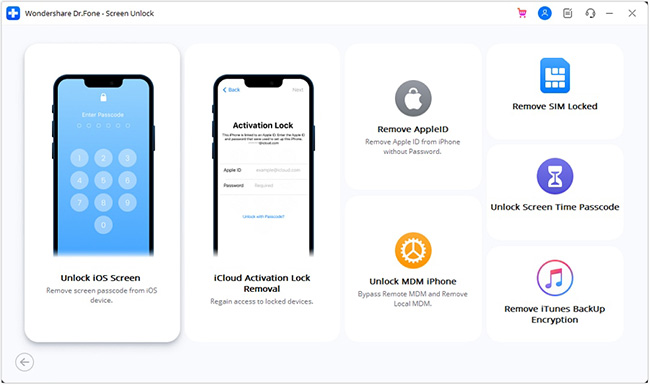
Like TunesKit, Dr.Fone provides tools for removing screen passcodes and addressing Apple ID, Screen Time, MDM, and other supported restrictions. Dr.Fone also advertises SIM/carrier unlocking for certain devices, along with features for managing iTunes backup encryption passwords and selected iPhone sound settings.
One distinguishing characteristic is its integration with the Dr.Fone ecosystem, which also offers separate tools for data recovery, system repair, phone transfers, and device management. However, purchasing Screen Unlock alone does not necessarily include these additional utilities. Users should confirm what is included in their selected plan.
TunesKit vs Dr.Fone: Detailed Feature Comparison
Although their advertised functions overlap, the practical differences between TunesKit and Dr.Fone matter when dealing with specific locking situations.
1. Screen Passcode Removal
Removing a forgotten screen passcode is one of the primary functions of both applications.
TunesKit supports scenarios involving forgotten four-digit or six-digit passcodes, disabled iPhones, and devices that cannot be accessed normally through Face ID or Touch ID.
Dr.Fone provides similar functionality, allowing users to initiate a screen-unlocking process through its desktop application.
Both programs generally follow a comparable process:
- Install the unlocking software on a Windows PC or Mac.
- Connect the locked iPhone using a compatible USB cable.
- Select the screen-unlocking function.
- Enter Recovery Mode or DFU Mode when instructed.
- Confirm the device information and download the appropriate firmware.
- Begin the unlocking operation and wait for the process to finish.
The exact sequence varies depending on the program and device condition.
2. Apple ID Removal and Activation Lock
Both programs advertise Apple ID removal and Activation Lock-related functions. However, these terms describe different problems on Apple devices.
Apple ID removal generally concerns removing an account association from a device under supported conditions.
Activation Lock, meanwhile, is an Apple security mechanism associated with Find My. It connects a device to an Apple Account and can prevent unauthorized reactivation.
According to TunesKit's technical specifications, its Activation Lock function supports selected older iPhones, including models in the iPhone 6 through iPhone X range, with specified iOS 12–16 firmware versions.
Dr.Fone also lists restricted compatibility for Activation Lock functions, including selected older devices. Its technical specifications distinguish this support from its broader iOS compatibility claims.
Consequently, neither program's advertised support for recent iOS versions means that its Activation Lock function will work on every modern iPhone.
Furthermore, a third-party workaround should not be confused with permanently removing a device's account association from Apple's activation servers. For a legitimately owned device, Apple's recommended options include signing in with the associated Apple Account, asking the previous owner to remove the device, or submitting an eligible support request with proof of purchase.
3. Screen Time, MDM, and Additional Unlocking Features
Beyond screen passcodes, both applications offer several additional functions.
Screen Time passcode removal
TunesKit and Dr.Fone advertise tools for removing forgotten Screen Time passcodes or restrictions. These features may be useful when the regular device passcode is known but Screen Time settings cannot be changed.
However, supported methods and potential data-loss consequences vary. Users should check whether the selected operation applies to their iOS version. If Screen Time was configured using an Apple Account, Apple's built-in recovery process may be a simpler solution.
MDM restrictions
Mobile Device Management (MDM) is commonly used by employers and schools to manage devices.
Both applications advertise MDM-related functions, but the results depend on the management configuration and device state. A temporary removal of a management screen should not be confused with permanently releasing a device from an organization's enrollment system.
For company- or school-managed devices, contacting the authorized administrator is the most reliable approach.
Other functions
Dr.Fone additionally advertises SIM/carrier unlocking and selected sound-control features. However, carrier unlocking compatibility is more restricted than its general screen-unlocking support.
TunesKit includes additional password-related functionality, including a password manager in newer versions.
4. iPhone and iOS Compatibility
Compatibility is among the most important factors in the TunesKit iPhone Unlocker vs Dr.Fone comparison.
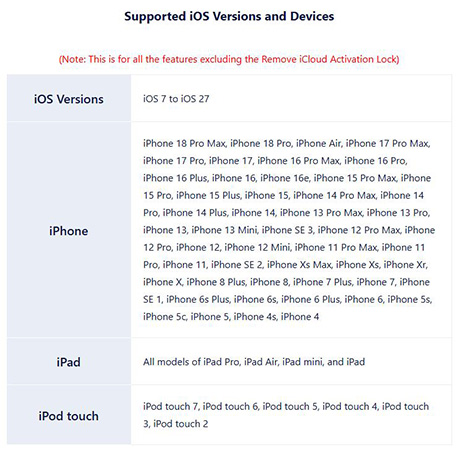
TunesKit's official specifications advertise broad support for iOS 7 through iOS 27 across its general functions, excluding Activation Lock removal.
Dr.Fone also advertises support for recent iOS versions and iPhone generations in its general screen-unlocking features.
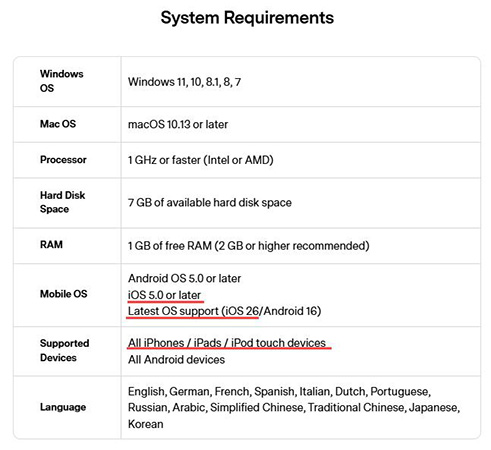
However, both vendors provide additional restrictions for specialized unlocking modes. For example, support for a recent iPhone in screen-passcode removal does not imply that the same device is supported for Activation Lock removal.
5. Ease of Use and Unlocking Process
Both TunesKit and Dr.Fone are designed for consumers rather than professional repair technicians.
TunesKit user experience
TunesKit provides a dedicated unlocking interface where users choose a function and follow instructions.
Its official guide describes automatic device detection, firmware selection, and manual Recovery or DFU Mode instructions if the device is not recognized. Users unfamiliar with recovery procedures may still need additional guidance.
Dr.Fone user experience
Dr.Fone organizes its unlocking functions within the broader Dr.Fone interface. After selecting Screen Unlock and the relevant iOS mode, users receive instructions for connecting their device, entering the required recovery state, and downloading firmware. This guided process is similar to TunesKit's.
Dr.Fone's wider software environment may appeal to users who already use Wondershare utilities, although additional toolkit options are not necessarily beneficial for someone who only needs one unlocking task.
6. Data Loss and Security Considerations
Before using either program, it is essential to understand the potential consequences.
For forgotten screen passcodes, unlocking normally requires a device reset that erases existing content and settings. This applies regardless of whether the reset is performed through official Apple recovery tools or compatible third-party software. If a backup is available, users may be able to restore their data after regaining access.
Other unlocking functions, including some Screen Time or MDM operations, may have different data-loss implications. These should be evaluated individually rather than assuming every process preserves data.
TunesKit iPhone Unlocker vs Dr.Fone: Pricing and Value
Cost can influence which unlocking application is worth purchasing, particularly when you only need to unlock one device. Based on the vendors' advertised standard plans checked in November 2026, both products have the same headline prices.
| Plan | TunesKit iPhone Unlocker | Dr.Fone Screen Unlock (iOS) |
|---|---|---|
| Monthly | $34.95 | $34.95 |
| Annual | $49.95 | $49.95 |
| Lifetime/perpetual | $59.95 | $59.95 |
| Standard Windows computer allowance | 1 PC | 2 PCs |
| Mobile device allowance | Up to 5 | Up to 5 |
| Subscription renewal | Automatic for recurring plans | Automatic for recurring plans |
Note
Prices are in USD and may vary with promotions, taxes, platform selection, or changes to the vendors' plans.
Although the prices match, the licensing details are not identical.
TunesKit advertises lifetime software upgrades with its lifetime license, subject to the applicable terms. Dr.Fone's perpetual licensing should be evaluated carefully because rights to future major upgrades may differ from ordinary updates.
The standard Dr.Fone Windows offer also lists support for two computers, compared with one computer in TunesKit's standard license.
Refund terms are another consideration. Wondershare's published policy generally specifies a seven-day refund window for Dr.Fone products, with eligibility restrictions. TunesKit advertises a longer refund period on its purchase materials, but refunds are also conditional.
Neither should be treated as an unconditional money-back guarantee.
Pros and Cons of TunesKit iPhone Unlocker and Dr.Fone
Understanding each product's strengths and limitations makes the final decision easier.
TunesKit iPhone Unlocker: Pros and Cons
 Pros:
- Offers multiple iOS unlocking and password-related functions.
- Provides a guided desktop unlocking workflow.
- Supports Windows and macOS.
- Advertises broad device compatibility for general unlocking functions.
- Offers lifetime licensing with stated upgrade benefits.
- Provides a longer advertised refund window than Dr.Fone.
 Cons:
- Screen-passcode removal generally erases device data.
- Activation Lock compatibility is limited.
- Standard licensing covers one computer.
- Some functions depend on specific device conditions.
- Actual unlocking success rates are not independently established.
Dr.Fone Screen Unlock (iOS): Pros and Cons
Pros:- Supports several common iPhone unlocking scenarios.
- Provides a guided unlocking process.
- Offers integration with the wider Dr.Fone ecosystem.
- Advertises additional specialized functions for selected devices.
- Standard Windows licensing covers up to two computers.
- Offers monthly, annual, and perpetual purchase options.
Cons:- Screen-passcode removal generally causes data loss.
- Activation Lock and carrier-related features have significant compatibility restrictions.
- Some Dr.Fone toolkit features require separate purchases.
- Perpetual licensing may have limitations regarding major upgrades.
- Its standard refund window is relatively short.
- Reliable comparative unlocking performance data is limited.
Neither product's advantages eliminate the need to check compatibility and understand the consequences of the selected operation for users' devices.
TunesKit or Dr.Fone: Which iPhone Unlocker Should You Choose?
The right choice depends on the problem you are trying to solve.
| Your situation | Recommended approach |
|---|---|
| You forgot your iPhone screen passcode | Try Apple's official recovery options first; consider either tool if compatible |
| Your iPhone is disabled | Both offer relevant functions, but expect device erasure |
| You forgot a Screen Time passcode | Check Apple's Screen Time recovery first |
| You need to remove Activation Lock | Prioritize Apple Account recovery or previous-owner removal |
| You need software for two Windows PCs | Dr.Fone may offer better license coverage |
| You prefer advertised lifetime upgrade rights | Consider TunesKit's lifetime plan |
| You already use other Dr.Fone utilities | Dr.Fone may fit your existing workflow |
| You need to remove organizational MDM | Contact the authorized device administrator |
For standard screen-passcode issues, the two products have similar documented workflows and pricing. This makes their compatibility, license conditions, and user preferences more important than broad marketing claims.
Final Verdict
Both TunesKit iPhone Unlocker and Dr.Fone Screen Unlock (iOS) offer practical solutions for common iPhone locking issues. TunesKit is a good choice for users seeking a dedicated unlocking tool with favorable lifetime upgrade terms, while Dr.Fone may appeal to those who prefer broader software integration and flexible device licensing.
However, neither guarantees successful unlocking in every situation, and screen-passcode removal typically erases data. Before purchasing, check your device compatibility, compare license terms, and consider Apple's official recovery methods. Ultimately, the better choice depends on your specific unlocking needs.