


WooTechy iDelock Review 2026: Is It Worth Using?
If you've searched for WooTechy iDelock Review 2026, you're likely dealing with a locked iPhone or iPad and want to know one thing: does this tool still work in 2026, and is it worth paying for?
In this in-depth review, we'll evaluate WooTechy iDelock from a practical, user-focused perspective, covering its features, compatibility, safety, pricing, pros and cons, and whether it's the right choice for your situation today.
- Part 1. What Is WooTechy iDelock?
- Part 2. Key Features of WooTechy iDelock
- Part 3. Supported Devices and iOS Versions
- Part 4. Is WooTechy iDelock Safe and Legit?
- Part 5. Pros and Cons of WooTechy iDelock
- Part 6. Pricing & Plans: Is WooTechy iDelock Worth the Cost?
- Part 7. How to Unlock iPhone via WooTechy iDelock
- Part 8. Best Alternative to WooTechy iDelock - TunesKit iPhone UnlockHOT
- Part 9. Conclusion
Part 1. What Is WooTechy iDelock?
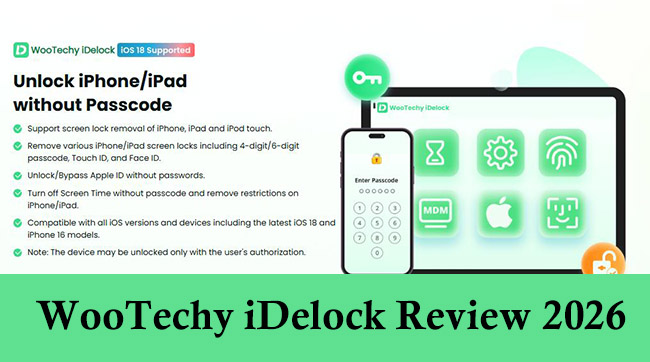
WooTechy iDelock is a desktop-based iOS unlocking tool designed to help users regain access to iPhones and iPads when they are locked due to forgotten credentials or system restrictions. It runs on Windows and macOS and supports multiple unlocking scenarios through different modes.
Unlike Apple's official recovery methods, WooTechy iDelock targets situations where users don't have the required passcodes or Apple ID passwords, making it popular among individual users, repair technicians, and second-hand device buyers.
Part 2. Key Features of WooTechy iDelock
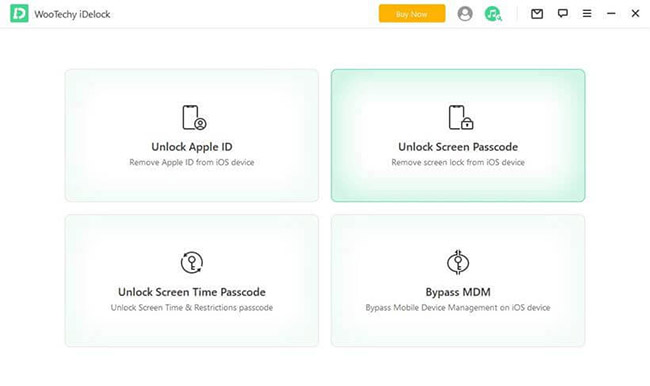
WooTechy iDelock doesn't rely on a single unlocking method. Instead, it offers multiple specialized modes, each designed for a different type of lock. This modular approach is useful - but only if users understand which feature applies to their situation and what trade-offs are involved, such as data loss or functional limitations.
1. Remove iPhone Screen Lock
This is one of iDelock's most used modes. You can remove virtually any screen passcode that's preventing access to your device including:
- Numeric passcodes (4‑digit and 6‑digit)
- Alphanumeric passcodes
- Touch ID and Face ID locks
- Devices disabled after too many failed attempts
- Broken or unresponsive screens preventing entry
2. Remove Apple ID Without Password
iDelock can remove an Apple ID from an activated iPhone or iPad without needing the password - ideal if you forgot your credentials or are unable to sign out of an older owner's account. Apple ID removal does not delete the account from Apple servers, and certain conditions, such as iOS version and Find My status, affect success.
3. Unlock Screen Time Passcode
If you've forgotten your Screen Time passcode or are blocked by content restrictions, iDelock can help you remove or reset it - often without data loss. There are two primary cases:
- Directly Set on the Device: iDelock removes the Screen Time passcode straight from the device settings.
- Set Through Family Sharing: The tool can still remove the passcode even if it was set by another family organizer.
4. Bypass or Remove MDM Profiles
Mobile Device Management (MDM) profiles are often installed by schools, workplaces, or organizations. They can severely limit what a device can do, or even lock it into a setup screen upon reset. iDelock's MDM mode offers:
- Bypass MDM Lock Screen: Allows you to get past the remote management screen without credentials.
- Remove MDM Profile: Eliminates the management profile so you can regain full control of settings and features.
Part 3. Supported Devices and iOS Versions
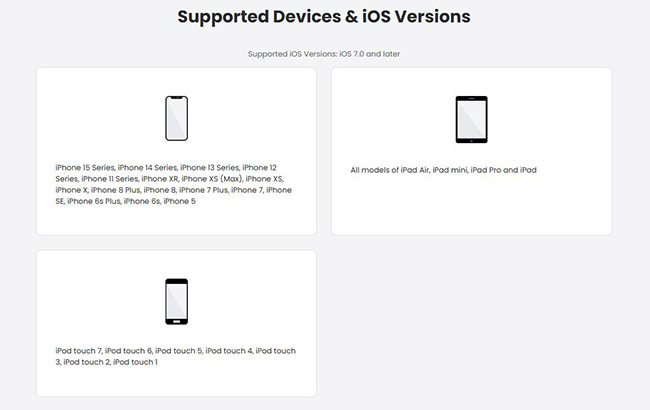
In this section, we focus on whether WooTechy iDelock remains technically relevant in 2026, including which iPhone and iPad models it supports and what iOS version it supports.
- iOS support: iOS 7.0 - iOS 18
- Operating systems: Windows PC and macOS
- Supported devices: iPhone 15 Series, iPhone 14 Series, iPhone 13 Series, iPhone 12 Series, iPhone 11 Series, iPhone XR, iPhone XS (Max), iPhone XS, iPhone X, iPhone 8 Plus, iPhone 8, iPhone 7 Plus, iPhone 7, iPhone SE, iPhone 6s Plus, iPhone 6s, iPhone 5; All models of iPad Air, iPad mini, iPad Pro and iPad; iPod touch 7, iPod touch 6, iPod touch 5, iPod touch 4, iPod touch 3, iPod touch 2, iPod touch 1
Part 4. Is WooTechy iDelock Safe and Legit?
WooTechy iDelock is generally considered a safe and legitimate tool for unlocking iOS devices, provided it's used correctly on devices you legally own. The software does not contain malware and operates through standard, firmware-based unlocking methods, minimizing the risk of damaging your device.
However, there are important safety considerations to keep in mind:
- Data loss: Certain unlocking modes, such as passcode and MDM removal, will erase all device data. Always back up your device beforehand.
- Apple ID removal limitations: While iDelock can remove Apple IDs, this does not permanently delete the account from Apple's servers. A factory reset or system update may trigger reactivation requests.
- MDM bypass caution: MDM bypass is often temporary, and profiles may return after updates or resets.
- Legal use only: The tool should only be used on devices you own or have explicit permission to unlock. Attempting to unlock stolen or unauthorized devices can lead to legal consequences.
Part 5. Pros and Cons of WooTechy iDelock
 Pros:
Pros:- Supports multiple unlock scenarios
- Beginner-friendly interface
- Works with many iOS versions
- Screen Time unlock may preserve data
 Cons:
Cons:- Data loss for passcode removal
- Apple ID removal not permanent
- MDM bypass often temporary
- Paid license required for full functionality
Part 6. Pricing & Plans: Is WooTechy iDelock Worth the Cost?
Understanding the cost of WooTechy iDelock is a key part of deciding whether it's the right unlock solution for you.
- Free Trial Version: Allows you to install the software and check whether your device is supported. The trial does not unlock devices - it's mainly for compatibility testing.
- 1-Month Plan ($35.99): Allows you to use all its feature but you are just allowed to unlock 1 iOS device.
- 1-Year Plan ($49.99): It is more cost-efficient than a 1-month plan and supports all features in this software.
- Lifetime Plan ($69.99): Apart from using all features of this tool, you can also unlock up to 5 different iOS devices.
Part 7. How to Unlock iPhone via WooTechy iDelock
Below is a general walkthrough showing how to unlock an iPhone using WooTechy iDelock, focusing on the most common scenario: screen passcode removal.
Step 1: Download and install WooTechy iDelock on your computer. Launch it and select the Unlock Screen Passcode feature. Connect your iPhone to your computer via a USB cable. Then, click Next to proceed.
Step 2: The tool will recognize your device model automatically. Confirm the info and then click the Download button to download a firmware package.
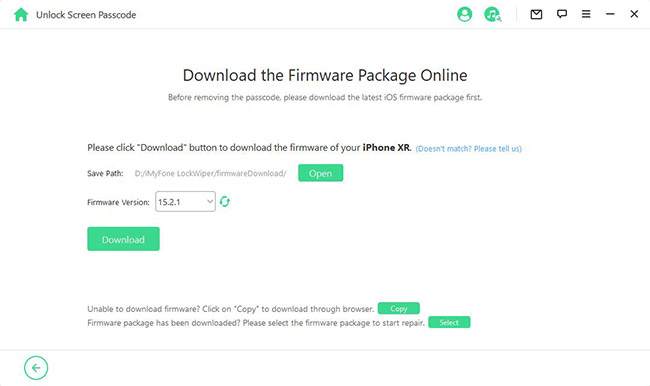
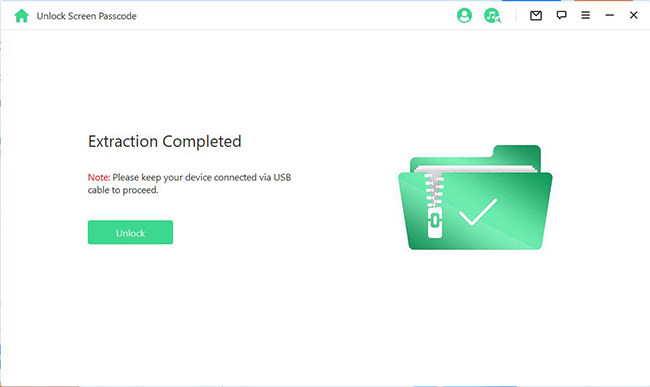
Step 3: After the firmware package download, click the Start button to proceed. Finally, click the Unlock button to begin unlock you iPhone. Enter "000000" to confirm you are agreeing to unlock your iPhone. Click the Unlock button again.
Part 8. Best Alternative to WooTechy iDelock - TunesKit iPhone Unlock
For users seeking additional options, TunesKit iPhone Unlocker is widely regarded as a reliable alternative to WooTechy iDelock. Like iDelock, TunesKit can handle multiple iPhone unlock scenarios. TunesKit tends to have broad compatibility with newer iOS versions, which may be important for devices running the latest iOS 26.
Key Features of TunesKit iPhone Unlocker
Unlock iPhone screen without password. Bypass iCloud Activation Lock without Apple ID and password.
 600,000+ Downloads
You can download and launch TunesKit iPhone Unlocker on your computer by clicing the above button and remove iPhone screen lock by following the steps below.
Step 1Link you iPhone to computer
Once installed, launch the program to enter the main interface. Connect your iPhone to the computer via a USB cable. On the main interface, choose "Unlock iOS Screen". Click the Start button to continue the process.

Step 2Enter Recovery mode
You can follow the instruction on the screen to put your iPhone into Recovery Mode.

Step 3Download and verify firmware package
Carefully confirm that the information shown on the screen is correct before proceeding. If no problem, you can click the Download button to fetch the required firmware package for your iPhone.

Step 4Start Unlocking the iPhone Screen
After the firmware download is complete and verified, click Unlock. TunesKit will begin removing the screen passcode from your iPhone.

Part 9. Conclusion
WooTechy iDelock is worth the cost if you need a reliable, multi‑purpose unlock tool and understand its limitations. Its pricing is competitive with similar unlocking software, and the range of supported scenarios increases its usefulness beyond just passcode removal.
However, if your device is on the latest iOS version like iOS 26 or you are looking for a more cost-efficient tool, TunesKit iPhone Unlocker would be a better choice which is more affordable.


