Why Is My Apple Account Recovery Taking So Long?
Apple Account recovery can take a long time because Apple needs extra time to confirm that you are the real account owner. There is no fixed recovery period for everyone, and Apple Support cannot manually shorten the wait. You can check your current recovery status at iforgot.apple.com.
If you're wondering "why is my Apple Account recovery taking so long?", the wait is usually part of Apple's security process rather than a sign that something is broken. Apple Account recovery is used when Apple cannot verify your identity through normal methods such as a trusted device or trusted phone number. Apple says the process can take several days or longer, depending on your account and the verification information available.
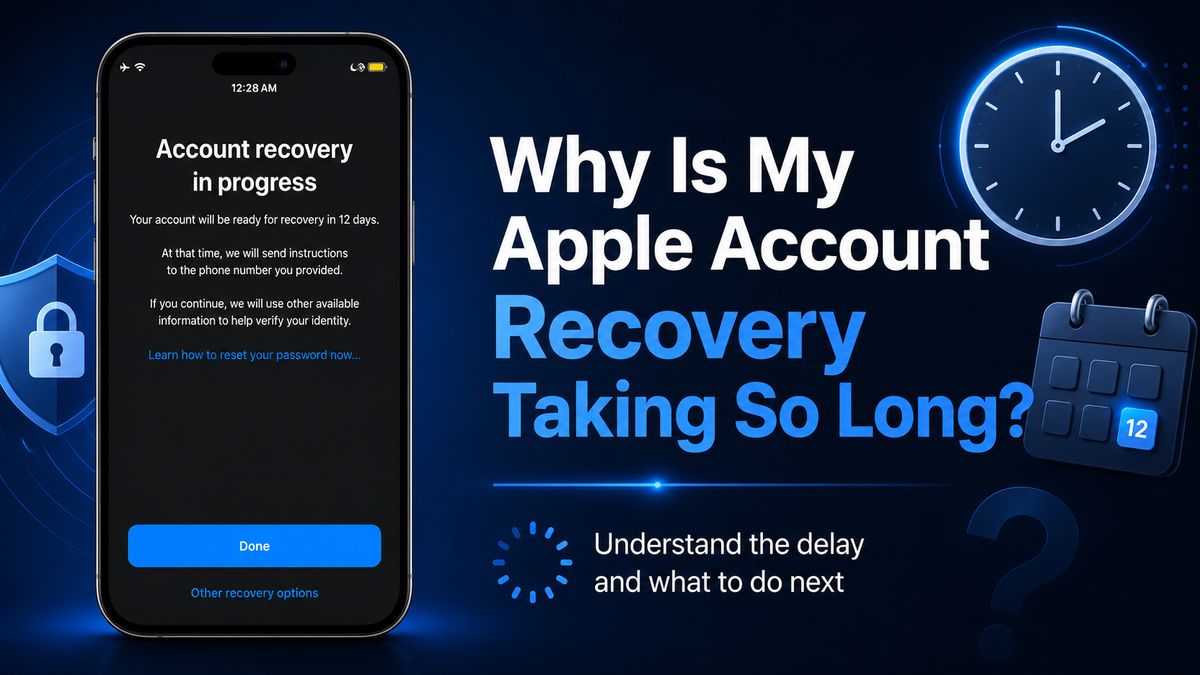
Why Does Apple Account Recovery Take So Long?
Several factors can make the recovery process longer than expected.
Apple Needs to Verify Your Identity
The main reason is security. If Apple cannot immediately confirm your identity, it adds a waiting period before allowing sensitive account changes. This helps prevent unauthorized users from taking over your Apple Account.
You Don't Have Access to Trusted Verification Methods
Recovery may take longer if you no longer have access to:
- A trusted iPhone, iPad, or Mac
- A trusted phone number
- Your usual device passcode
- An Account Recovery Contact
The fewer trusted verification options you have, the harder it is for Apple to confirm ownership quickly.
Recovery Time Is Different for Every Account
Apple does not use one standard recovery period for everyone. One user may need to wait only a few days, while another may see a much longer countdown. Your recovery time depends on your account circumstances and the information Apple can use to verify you.
Device Activity May Affect Recovery
Using other Apple devices that are still signed in to your account can interfere with an active recovery request. Apple recommends turning off other signed-in devices while recovery is pending. If you started recovery directly from Settings or the Apple Support app, you can generally continue using the device where you started the request.
How Long Does Apple Account Recovery Take?
Apple says account recovery may take several days or longer.
There is no official rule saying it must finish within 3, 7, or 14 days. If you see a countdown such as 13 days or two weeks, that does not automatically mean the process is stuck. As long as Apple still shows an active recovery date, the request is usually still pending. You can check the latest estimate at iforgot.apple.com.
Can You Speed Up Apple Account Recovery?
Usually, no. Once your account enters the recovery waiting period, there is no reliable way to manually shorten the timer. You may want to ask if Apple Support can shorten the wait time. Unfortunately, the answer is no. Apple states that Apple Support cannot reduce the account recovery waiting period. Support can explain the process, but it cannot override the security timer.
But you can use the following alternative ways to recovery your Apple Account.
1. Try a Trusted Device If You Still Have One
If you still have access to a trusted Apple device, you may be able to reset your password without waiting for full Apple Account recovery.
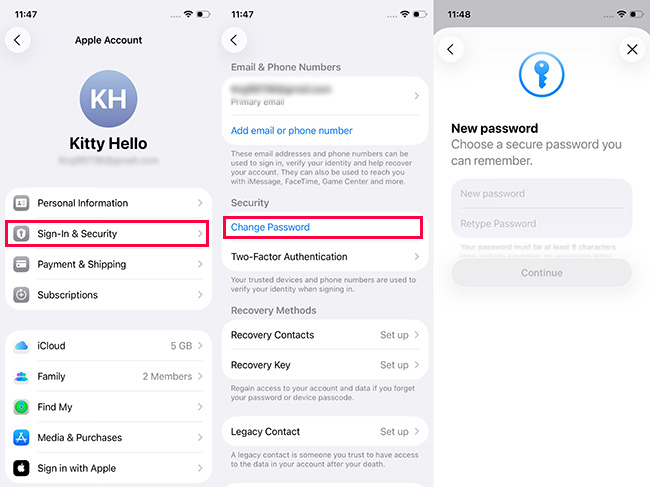
- Step 1. On iPhone or iPad, go to Settings > [your name] > Sign-In & Security > Change Password.
- Step 2. Then follow the onscreen instructions.
2. Use an Existing Recovery Contact
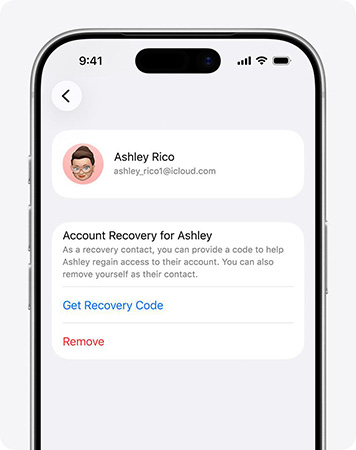
If you previously added an Account Recovery Contact, that person may be able to provide a recovery code to help you regain access.
- Step 1. Ask your friend to go to Settings on your friend's iPhone or iPad. Tap his/her name.
- Step 2. Select Sign-In & Security > Recovery Contacts.
- Step 3. Choose Account Recovery For and tap your name.
- Step 4. Tap Get Recovery Code. Once your friend get the code, ask them to tell you.
 Warning: The Recovery Contact normally needs to have been set up before you became locked out.
3. Remove the Apple Account from Your iPhone with TunesKit iPhone Unlocker
If your goal is to access your activated iPhone but cannot sign out Apple Account because you forgot the Apple Account password, TunesKit iPhone Unlocker offers an Apple ID removal feature for supported devices. This can be useful when your priority is removing the existing Apple Account from the device rather than recovering that account.
Key Features of TunesKit iPhone Unlocker
It works with most iOS devices and versions to remove Apple Account from iPhone/iPad without password. Easy to use. No tech experience required.
 600,000+ Downloads
- Step 1. Install and open TunesKit iPhone Unlocker on your computer, connect your iPhone, and choose Unlock Apple ID.
- Step 2. Follow the onscreen instructions to check your device status and confirm whether the Apple ID removal feature supports your device.
- Step 3. Download the required firmware package when prompted, then start the removal process.

Keep in mind that compatibility depends on factors such as whether Find My is enabled and which iOS version the device is running. Also, removing an Apple Account from an iPhone is not the same as recovering its password or regaining access to the account itself. If you need access to iCloud data, purchases, subscriptions, or other services tied to that Apple Account, completing Apple's official Account Recovery process remains the appropriate solution.
What to Do While Waiting for Apple Account Recovery
While your request is pending, the goal is to avoid disrupting it.
Step 1. Check Your Recovery Status
Go to iforgot.apple.com and enter the Apple Account email address or phone number used for recovery. Apple should show your current recovery status and estimated waiting time.
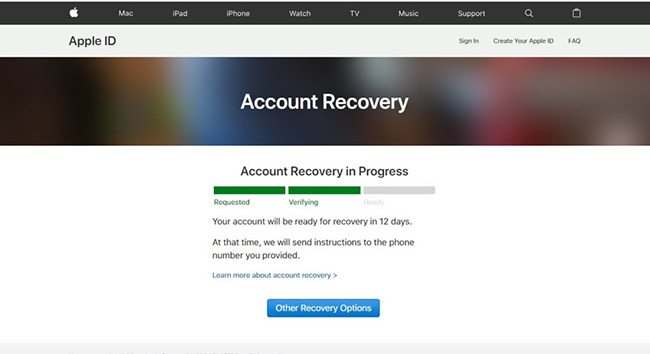
Step 2. Check Apple's Recovery Confirmation
Look for Apple's recovery message in your:
- Email inbox
- Spam or junk folder
- iMessages, if your Apple Account uses a phone number
The confirmation normally includes information about when you can continue recovery.
Step 3. Avoid Using Other Signed-In Devices
Apple recommends turning off other devices signed in to the affected account. Because using them may interfere with the recovery request.
Step 4. Keep Your Trusted Phone Number Available
When the waiting period ends, Apple may contact you by text message or automated phone call. Keep access to your trusted number if possible.
What If Apple Account Recovery Seems Stuck?
A long wait is not always the same as a stuck recovery request. Check the following situations.
Your Recovery Date Has Passed
If Apple's estimated recovery date has already passed, go back to iforgot.apple.com. You may be able to continue the recovery process there even if you did not receive a notification.
You Received No Text or Phone Call
If the waiting period has ended but no message arrives, check your recovery status online rather than immediately restarting the request.
Your Recovery Request Disappeared
A recovery request can end if you regain access another way. Using signed-in devices may also affect an active request. If the request disappears unexpectedly, check your current status at iforgot.apple.com before starting over.
Can You Use Your iPhone During Apple Account Recovery?
It depends on how you started recovery.
If you started account recovery through Settings or the Apple Support app, you can generally keep using that same device. However, other devices signed in to the same Apple Account should remain turned off.
If you started recovery through iforgot.apple.com, avoid using devices connected to the affected account whenever possible.
FAQs About Apple Account Recovery
-
Why does Apple Account recovery take 13 days?
Apple does not use the same recovery period for every account. A 13-day wait can occur when Apple needs additional time to verify account ownership.
-
Can Apple Account recovery take weeks?
Yes. Apple says account recovery may take several days or longer, so longer waiting periods are possible.
-
What happens when the waiting period ends?
Apple may send you a text message or automated phone call with recovery instructions. If you receive nothing, check iforgot.apple.com.
-
Why was my Apple Account recovery cancelled?
A request may end if you regain access another way or if activity on signed-in devices affects the recovery process. Therefore, when the Apple Account is in progress, don't use other devices with the same Apple aacount if possible.
Conclusion
If your Apple Account recovery is taking a long time, it does not necessarily mean something is wrong. Apple uses the waiting period to protect your account and verify your identity.
Check your status at iforgot.apple.com, avoid unnecessary activity on other signed-in devices, and follow the recovery date Apple provides. For the future, keeping your trusted number updated and adding an Account Recovery Contact can make account access much easier.