


Remove Microsoft Intune from Any Device on Mobile & Computer
Microsoft Intune is widely used by companies and schools to manage and secure devices. However, many users eventually need to remove Intune—whether they've left a job, finished school, switched to a personal device, or are facing management restrictions they no longer need. In this guide, you'll learn how to remove Microsoft Intune safely and correctly, covering iPhone/iPad (iOS), Android, Windows, and macOS.
How to Remove Intune from iOS (iPhone & iPad)
Removing Intune MDM (Mobile Device Management) from an iPhone or iPad is usually easy. But if you bought a second-hand device that is locked to a company, the standard settings won't work. Below are solutions for both scenarios.
Method 1: Standard Removal via Settings
If you know your device passcode and just want to remove your work email and apps, you can try to remove it via the Settings app. The steps are quick and easy.
- Step 1. Open the Settings app on your iPhone. Go to General > VPN & Device Management (on older iOS versions, this may just be "Profiles").
- Step 2. Under "Mobile Device Management", tap the Intune Management Profile.
- Step 3. Tap the red Remove Management button. Enter your iPhone's lock screen passcode to confirm.

Method 2: Remove MDM Without Password
If you bought a used iPhone that is stuck on the Remote Management login screen, or if you forgot the corporate credentials required to remove the profile, the standard settings menu will be blocked. In this scenario, you need a specialized tool like TunesKit iPhone Unlocker to bypass the restriction.

 Why Use TunesKit MDM Removal?
- It removes the Remote Management lock screen without a username/password.
- It allows you to use the device as a normal, personal iPhone.
- It does not require technical knowledge.
- Step 1. Download and install TunesKit iPhone Unlocker on your Windows or Mac computer. Launch the software and connect your iPhone/iPad to the computer via USB.
- Step 2. On the main interface, select the Remove MDM mode. Then click Start and TunesKit will start to remove the MDM lock for you.
- Step 3. Once finished, your iOS device will restart. You will now be able to go through the setup screen without being blocked by the corporate login.
How to Remove Intune from Android
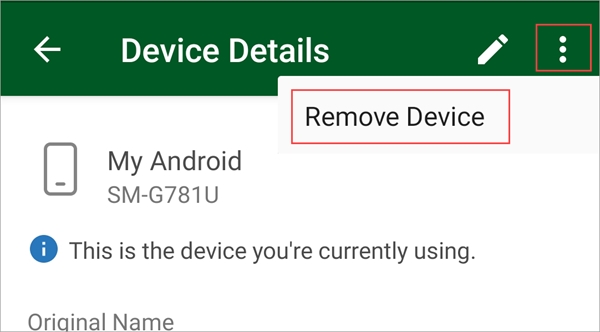
On Android, Intune often lives inside a "Work Profile" that keeps your work apps separate from your personal apps. You can try to uninstall the Company Portal app and thus remove Intune from your Android device.
- Step 1. Open the Intune Company Portal app. Tap Devices and select your current device.
- Step 2. Tap the Menu (three dots) in the top right corner and select Remove Device.
- Step 3. This will initiate the removal of the Work Profile. Once finished, you can uninstall the Company Portal app.
How to Remove Microsoft Intune from Windows 10 & 11
The most common way Intune gets onto a personal Windows computer is when you sign into Office 365 or Mail and check the box that says "Allow my organization to manage my device". Here are the two official ways to remove it.
Method 1: Disconnect Work Account via Settings Menu
This is the standard method for Bring Your Own Device (BYOD) users. It cleanly severs the link between your PC and the company servers. The following are the quick steps for you.
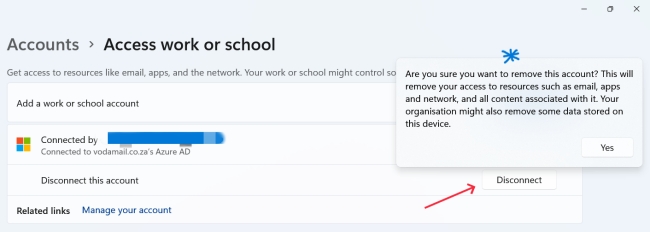
- Step 1. Open the Start Menu and click the Settings gear icon.
- Step 2. Navigate to Accounts > Access work or school. Look for the account with the briefcase icon (usually labeled with your organization's name or Azure AD).
- Step 3. Click the account to expand it, then click the Disconnect button. Finally, click Yes to confirm the action when a warning prompt appears.
Method 2: Remove via Company Portal App
If you installed the Company Portal app from the Microsoft Store to access work resources, you can use it to unenroll yourself. Now check out the simple steps below.
- Step 1. Open the Company Portal app on your PC.
- Step 2. Click on the Devices icon in the bottom-left menu.
- Step 3. Select the computer you are currently using. Click the Actions menu (or the three dots) and select Remove.
How to Remove Intune from Mac (macOS)
On a Mac, Intune installs a Management Profile that controls system settings. You must remove this profile to regain full control.
Method 1: Remove via Company Portal App
This is the cleanest method because it removes the device record from the server and prepares the app for uninstallation.
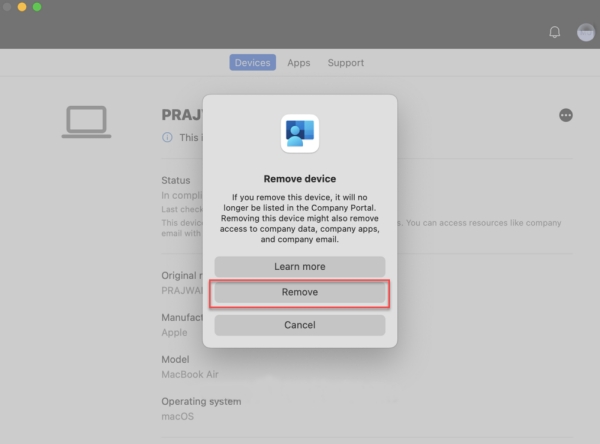
- Step 1. Launch the Company Portal app on your Mac. Go to the Devices tab and select your Mac.
- Step 2. Click the Menu (three dots) next to the device name and select Remove.
- Step 3. Once the process finishes, drag the Company Portal app to the Trash to uninstall it.
Method 2: Manually Remove Management Profile
If you don't have the Company Portal app, or if it's failing to run, you can remove the profile directly from System Settings. Here is how to do it step by step.
- Step 1. Click the Apple Menu (top left) and open System Settings (or System Preferences on older macOS).
- Step 2. Search for "Profiles" in the search bar, or navigate to Privacy & Security > Profiles.
- Step 3. Locate the Management Profile (this will usually be named after your company or "Management Profile").
- Step 4. Select the profile and click the Minus (-) button at the bottom of the list. Enter your Mac's admin password to authorize the removal.

How to Delete Devices from Azure Portal [For IT Admins]
If you are an IT Administrator looking to clean up stale records, you should know the difference between the three removal actions in the Intune Admin Center.
Retire vs. Wipe vs. Delete
| Action | What It Does | Best Use Case |
|---|---|---|
| Retire | Removes corporate data only. Leaves personal photos/apps intact. | Employees leaving with BYOD devices. |
| Wipe | Factory resets the device. Erases everything. | Lost or stolen corporate devices. |
| Delete | Removes the device record from the Intune console. | Cleaning up stale or inactive devices. |
How to Remove Stale Devices (Azure/Entra ID)
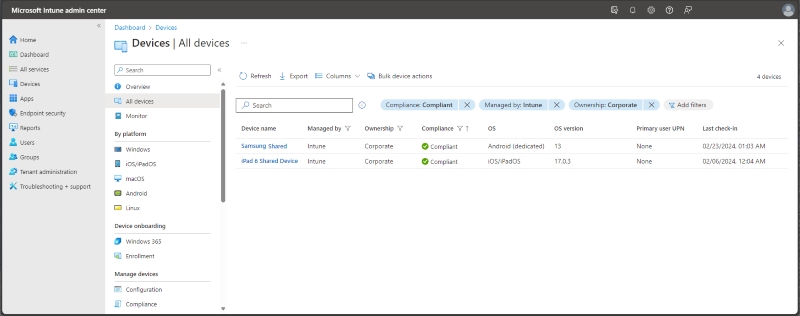
- Step 1. Log in to the Microsoft Intune Admin Center.
- Step 2. Navigate to Devices > All Devices.
- Step 3. Check the box next to the device you want to remove.
- Step 4. Click Retire (to safely unenroll) or Delete (to remove the record history).
 Pro Tip:
If a Windows device keeps reappearing after deletion, check if it is still listed in Windows Autopilot devices. You must delete the serial number from Autopilot first.
FAQs About Microsoft Intune MDM Bypass
-
Why is the "Disconnect" button greyed out on Windows?
This usually means the device is "Azure AD Joined" (Corporate Owned) rather than just "Registered". You likely cannot remove it without local administrator rights or help from your IT department.
-
Will removing the profile delete my photos?
No. The "Retire" or "Disconnect" action is selective. It removes email, Wi-Fi profiles, and corporate apps, but leaves your personal photos and data alone.
-
Can I remove Intune from a Mac without admin rights?
No. You must have the local administrator password for the Mac to make changes to the Profiles section in System Settings.
-
Why does my work account keep coming back?
If you use Microsoft Edge or Office apps, you might have signed in and accidentally re-enrolled. Ensure you uncheck "Allow my organization to manage my device" when signing into Office in the future.
Conclusion
Removing Microsoft Intune can be straightforward—or complex—depending on your device type and permissions. For most users, unenrolling through system settings or the Company Portal is enough. However, when admin access is unavailable or an iPhone is MDM-locked, specialized solutions like TunesKit iPhone Unlocker can help.
Always choose the method that fits your situation, and make sure you're authorized before removing device management.


