


iActivate MDM Bypass Review and Best Alternative [2026]
Mobile Device Management (MDM) remains one of the most restrictive security features for corporate or school-owned iPhones. iActivate has long been marketed as a specialized tool to bypass these remote management screens.
However, as Apple introduces more robust security layers in the latest iOS versions, many users wonder if iActivate still delivers on its promises. In this comprehensive review, we analyze the performance, reliability, and modern alternatives to iActivate to help you decide if it is the right tool for your device.

What Is iActivate MDM Bypass?
iActivate is specially designed for removing Apple mobile device management configuration profile from iPhone, iPad and iPod. It is available to use on Windows and Mac computer. The program operation is simple and it works to delete embedded MDM for you within minutes. With the help of it, all features on your device can be unlocked. As a result, you don't have to worry about device being supervised, locked, or even erased by an organization.
Unlike general-purpose unlockers, iActivate focuses almost exclusively on the "Remote Management" screen that appears after a factory reset. It is compatible with both Windows and macOS, aiming to provide a single-click solution for a very specific problem.

Key Features and Real-World Performance
During our testing on various firmware versions, iActivate showed consistent results on older hardware, but its performance varied on the latest security patches.
- One-Click Bypass: The software is designed for simplicity, requiring no technical knowledge to operate.
- iOS Compatibility: It officially supports versions up to iOS 26, though success rates on iOS 18 or later are being monitored now.
- No Technical Skills Required: The automated nature of the tool means you don't have to manually edit system files or use terminal commands.
Pros and Cons of Using iActivate
 Pros:
Pros:- Niche Specialization: Because it focuses only on MDM, the interface is uncluttered and easy to navigate.
- Instant Results: When successful, the bypass takes less than two minutes to complete.
- Remote Management Removal: It effectively skips the configuration profile download that prevents device access.
 Cons:
Cons:- Tethered Solution: In many cases, if you factory reset the device again, the MDM lock will return, requiring another bypass.
- No Password Removal: It cannot remove Screen Time passcodes or iCloud Activation Locks; it only handles MDM.
- Limited Support: Customer response times can be slow compared to larger software suites.
Real User Feedback: iActivate Reviews on Trustpilot
Before investing in any unlocking software, it is crucial to see what actual customers are saying. On Trustpilot, iActivate holds a mixed reputation, with feedback highlighting both its technical utility and its service limitations.
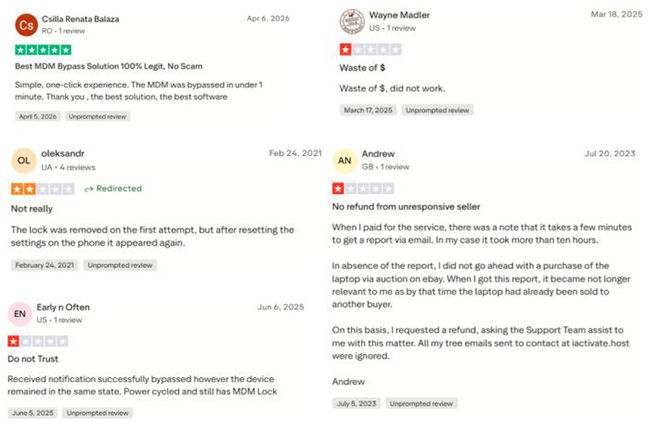
- Ease of Use: Most positive reviews praise the tool for its "one-click" simplicity. Users without technical backgrounds appreciate that they can bypass the MDM screen without navigating complex menus.
- Success on Legacy Devices: Many users report a high success rate when dealing with older iPhone models or legacy iOS versions, confirming the tool’s effectiveness for non-updated devices.
- Customer Support Concerns: A recurring pain point in negative reviews is the slow response time from the support team. Some users reported delays in receiving activation codes or troubleshooting help after purchase.
- The "Rebound" Issue: Technical users on Trustpilot often point out that the bypass is "tethered." This means the MDM lock may return if the device is factory reset, which has led to frustration for those expecting a permanent removal.
- Refund Difficulties: Some reviewers noted challenges in securing a refund when the software failed to work on their specific iOS version, suggesting that users should double-check compatibility before buying.
How Does iActivate Bypass MDM?
iActivate Bypass MDM is actually a simple-to-use tool for novices. You can apply it to remove mobile device management profile from designated Apple device. However, you should check if Find My feature is disabled in advance. Also, to enjoy everything in this program, you have to pay for MDM bypass service. If this is the first time to use it, you can follow the guide below:
- Step 1. Lead yourself to iActivate Pricing page. Enter IMEI or serial number, your first name and email address to complete ordering MDM bypass service.
- Step 2. Download iActivate software for Windows or Mac in the official website. Simply finish installation and launch it on your computer.
- Step 3. Connect your iOS device, unlock it and trust your computer.
- Step 4. Once iActivate software successfully detects the connected device, it will display information like IMEI, Serial Number, UDID, iOS version and product type on the interface.
- Step 5. Simply click on Start Bypass button to ask iActivate to bypass MDM on your device.
- Step 6. When the MDM bypass process comes to end, the device will restart itself. You can then set up your iPhone and use all features without a problem.
Remove MDM with iActivate MDM Bypass Alternative
If you find that iActivate is incompatible with your device or if you need a more versatile tool, TunesKit iPhone Unlocker is the industry-leading alternative. This software is able to help remove MDM from iPhone, iPad, iPod without data loss. It comes with user-friendly interface and brings amazing use experience, absolutely a perfect tool for beginners.
Importantly, it supports getting rid of types of MDM profiles from your device, such as Jamf, FileWave, Lightspeed, Meraki, etc. Compared to iActivate MDM Bypass, this software requires no IMEI or serial number of your device, which completely simplifies the whole MDM removal process.
Why Choose TunesKit iPhone Unlocker?
Remove MDM from iPhone, iPad, and iPod touch without passcode. Support the latest iPhone model and iOS Version including 26.
 600,000+ Downloads
Step 1 Connect iOS Device to Computer
Download, install and run the newest version of TunesKit iPhone Unlocker on your desktop. Next, use a match USB cable to connect your target iOS device to computer. In the program's main interface, simply click on Remove MDM.

Step 2Start to Remove MDM from Connected iDevice
Ensure "Find My" feature is disabled on your device. If not, you should open Settings → [Your Name] → Find My and enter the Apple Account password to turn this option off. Click the Start button and then TunesKit iPhone Unlocker will start removing the mobile device management.

FAQs About iActivate
-
Is iActivate a permanent solution?
Most MDM bypasses are "tethered," meaning the lock is hidden but not deleted from Apple's servers. If you "Erase All Content and Settings" in the future, you will likely need to run the software again.
-
Can iActivate remove a "Supervised" status?
It skips the management screen, but some traces of supervision may remain in the settings menu depending on how the original DEP: profile was configured.
Final Words
iActivate remains a viable tool for users who only need to skip a specific Remote Management screen on a budget. However, for users who want a more reliable, frequently updated, and multi-functional security tool, TunesKit iPhone Unlocker provides better value and a significantly higher success rate on the latest iOS versions.


