


How to Exit Scalefusion Without Password on iOS/Android
Scalefusion MDM (Mobile Device Management) is a popular tool used by businesses and educational institutions to manage devices remotely. While it provides essential security and management features, you may want to remove the Scalefusion MDM profile from their device due to various restrictions. But what if you don't have the password? Can you remove Scalefusion without password?
Don't worry, in this guide, you'll learn how to remove Scalefusion without password, as well as the risks involved.

Part 1. What Is Scalefusion Used for?
An MDM (Mobile Device Management) profile is a set of rules and restrictions that allow administrators to control and monitor mobile devices remotely. Organizations like school, company, and government use MDM solutions to enforce security policies, install apps, and limit certain functionalities.
As a leading MDM solution, Scalefusion provides powerful features for managing corporate devices running iOS, Android, and Windows. Once an MDM profile is installed, users typically cannot remove it without administrative credentials.
What Can Scalefusion Control on Your Device?
Here is what Scalefusion can manage on your phone:
- Remote locking and wiping of devices
- Control over app installation and removal
- Enforce VPNs, Wi-Fi configurations, security protocols, and other settings like no Never option on iPhone Auto Lock
- Track device activity and generate reports
- Track device location in real-time and restrict device usage to specific locations
Why Do Users Want to Remove Scalefusion MDM?
There are several reasons why you may want to remove Scalefusion from your device, including:
- Purchased a second-hand device with Scalefusion MDM still installed.
- Received the device as a praise from a school or government program.
- Want to regain full control over personal device settings and app installations.
- Restrictions affecting daily use, such as blocked apps or limited functionality.
If you're locked out of your device due to Scalefusion and don't have the password, removing it can be challenging. However, there are effective methods to bypass Scalefusion MDM, which we'll cover in the following sections.
Part 2. How to Remove Scalefusion Without Password [iPhone/Android]
In this section, you'll learn 4 quick and easy methods on how to bypass Scalefusion without password on iPhone or Android devices.
Way 1. Use MDM Removal Tool to Bypass Scalefusion Without Password [For iPhone/iPad Only]
Getting locked out of your iPhone because of Scalefusion MDM can be frustrating, especially when you don't have the password. But don't worry, TunesKit iPhone Unlocker is the perfect solution for you. This top MDM removal tool lets you quickly remove Scalefusion profiles on iPhone without password.
The best part? It won't cause data loss. Plus, with its user-friendly interface, you don't need to be a tech expert to get your iPhone back to normal in minutes! Apart from bypassing MDM, it can also remove Apple ID, unlock screen locks, and remove screen time limit for your iOS devices.
Why Choose TunesKit iPhone Unlocker?
Remove Scalefusion and other MDM profiles without data loss. Easily remove MDM without password in 2 quick steps. It works well on iPhone/iPad running iOS 9 and later.
 600,000+ Downloads
Simply click the Try It Free button above to install TunesKit iPhone Unlocker on your Mac or Windows computer. Then, follow the steps below to bypass Scalefusion via TunesKit iPhone Unlocker effortlessly.
Step 1 Link Your MDM-locked iPhone to Mac/Windows Computer
Launch the TunesKit iPhone Unlocker and plug the USB cable to your iPhone and your computer. On your iPhone, a prompt may appear asking for connection permission; tap Trust to continue. Then, click Remove MDM on the main interface of this MDM removal tool.

Step 2 Start to Remove Scalefusion Without Password
Then, click the Start button on the TunesKit iPhone Unlocker. Wait for a few seconds, and this program will remove Scalefusion without password. Once the removal process is done, your iPhone will restart automatically. Simply follow the on-screen instructions to set up your iPhone.

Way 2. Factory Reset Your Devices to Exit Scalefusion Without Password
If the Scalefusion agent has locked your device in Kiosk Mode and you cannot access the Settings app, a standard uninstall will not work. You must perform a Hard Reset (also known as Factory Reset via Recovery Mode) using the device's hardware buttons.
 Note:
Note:This method may erase your device data and causing data loss, so back up your important data beforehand. Additionally, if the Scalefusion administrator has enabled Factory Reset Protection (FRP) or use Scalefusion app to control your device, this method may not work. If that happens, try other methods from this guide.
Factory Reset on iPhone to Bypass Scalefusion:
You cannot hard reset an iPhone using just the buttons on the screen alone. You must put it into Recovery Mode and restore it via iTunes or Finder on a computer.
Step 1. Put your iOS device in recovery mode manually.
- For iPhone 8 and later: Press and quickly release Volume Up. Press and quickly release Volume Down. Then, press and hold the Side (Power) Button until you see the recovery mode icon.
- For iPhone 7 and older: Press and hold Side Button + Volume Down together until the recovery screen appears.
- For iPad (without Home Button): Press and quickly release Volume Up. Press and quickly release Volume Down. Press and hold the Top Button until the recovery screen appears.
Step 2. Connect your device to a PC (with iTunes installed) or a Mac (Finder).
Step 3. A pop-up window will appear on your computer saying: "There is a problem with the [Device Name] that requires it to be updated or restored". Click Restore.
Step 4. Confirm by clicking Restore and Update. iTunes will download the software and wipe the Scalefusion profile from the device.

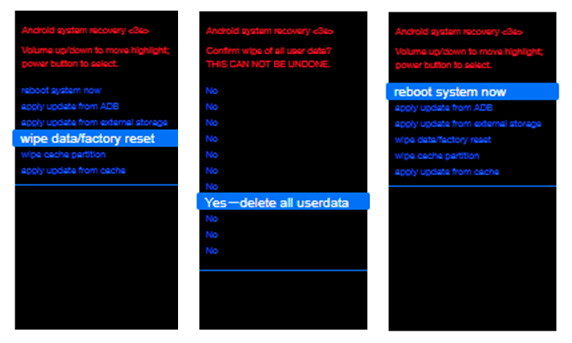
How to Bypass Scalefusion on Android via Factory Reset:
Android devices require you to boot into Recovery Mode. The button combinations vary slightly by brand. Here is how to remove Scalefusion from Samsung phones and tablets.
Step 1. If the screen is locked and you can't turn it off, press and hold Volume Down + Power for 7–10 seconds until the screen goes black.
Step 2. Hold Volume Up + Power simultaneously to enter recovery mode.
Step 3. Once the Samsung logo appears, release the keys. Use the Volume Buttons to scroll down to Wipe data/factory reset and press the Power Button to select it.
Step 4. Select Factory data reset > Yes. Once the wipe is done, select Reboot system now.
Way 3. Ask the Admin to Remove Your Devices on Scalefusion Dashboard
If your device was previously managed by a company or school, you might be able to find contact details such as a company phone number, email, or branding on your device. Then, you can contact and request removal from the Scalefusion Dashboard.
This method is most effective if you purchased a used corporate device and the company still has access to its Scalefusion settings. If the administrator provides you with the necessary credentials, follow these steps to remove Scalefusion from your device:
Step 1. Visit Scalefusion Dashboard and log into the Admin's account.
Step 2. Click Device Profiles & Policies > Device Profiles.
Step 3. Click the iOS tab or iOS Kiosk profile.
Step 4. Click the red Delete button and choose Remove devices.
Step 5. Choose your iOS device in the device list and click Remove devices at the bottom right.

Way 4. Contact Scalefusion Customer Support For Help
If you can't reach out the previous owner or the company that previously owned the device, you can also contact the Scalefusion Customer Support for help. Just tell them details about your situation, like:
- Where you got the device (e.g., second-hand purchase, school gift, corporate hand-me-down).
- Why you need to remove Scalefusion (e.g., personal use, device restrictions).
- Why you don't have the password (e.g., lost credentials, previous owner unavailable).
Maybe Scalefusion has additional methods to help you disable its MDM restrictions on your device. However, it may request proof of ownership before assisting you. If you have prepared some documents beforehand, you may get help more smoothly. Here are some documents might be useful:
- A purchase receipt
- A gift certificate or authorization letter
- Any payment details or other files proving ownership of the device
Part 3. How to Exit Scalefusion With Passcode
In some cases, you may get the Scalefusion admin passcode from somewhere. Then, you can follow these steps to easily remove Scalefusion on your devices with passcode.
List of Common Default Exit Passcodes
If the IT administrator did not set a complex custom password, one of these generic defaults might unlock the Exit Kiosk menu.
| Passcode Type | Common Codes | Success Rate |
|---|---|---|
| Standard Defaults | 0000, 00000, 1234, 12345 | High (for setups with weak security) |
| Repeating Digits | 1111, 2222, 5555, 9999 | Medium |
| Simple Sequences | 1122, 1212, 4321, 2580 | Medium |
| Visual Patterns | 2580 (Center column of keypad), 0852 | Low (but worth trying) |
Note:Most IT administrators use the 4-digit PIN format for quick access. If you have 3 failed attempts, stop immediately! Some devices are configured to take a photo of the user or lock permanently after too many wrong guesses.
Remove Scalefusion on iOS Devices
Step 1. Open Settings > General > VPN & Device Management.
Step 2. Check if Scalefusion MDM is listed under Device Management.
Step 3. If you have admin credentials, tap Remove Management and enter the password.
Step 4. Restart your device to complete the process.
If there is no option to remove MDM profile, you may need to try Way 1 or Way 3 on Part 2.

Disable Scalefusion on Android Devices
If your device is limited in the Scalefusion app and can't exit, here's how to exit Scalefusion on Android with passcode:
Step 1. Tap the three-dot icon at top right corner.
Step 2. Tap Settings and enter the Scalefusion admin passcode if prompted.
Step 3. Choose Uninstall Scalefusion or Exit Scalefusion at the bottom.

Part 4. FAQs on Exiting Scalefusion MDM Control
-
1. What Happens If I Remove Scalefusion MDM from a Company Device?
If you remove Scalefusion via factory reset or passcode, you'll lose access to your device data and corporate files. However, with TunesKit iPhone Unlocker, you can keep your device data on the iPhone.
After removing Scalefusion MDM, you can regain access to previously restricted apps and features, restoring your device to a normal, unrestricted state. Be aware that in some cases, removing MDM without authorization could violate company policies. -
2. Is It Safe to Bypass Scalefusion via Third Party Tool?
Yes, as long as you use a reliable tool like TunesKit iPhone Unlocker, it is safe. With it, you'll not lose any device data and it will not collect any of your private information.
-
3. Will My Device Be Controlled Again After Removing Scalefusion MDM?
It's possible. If the device is still registered in the Scalefusion dashboard, it may be remotely locked again. To prevent this, make sure the device is completely removed from the Scalefusion system by contacting the administrator.
However, if your device gets locked again, TunesKit iPhone Unlocker allows unlimited MDM removals until your license expires, ensuring you always have a way to regain control of your device.
Part 5. Conclusion
By following this guide, you now know how to remove Scalefusion without password safely and effectively. If you have the passcode, exiting Scalefusion is straightforward. Thanfully, there are also several ways to regain control of your device without password, whether you use an MDM removal tool, factory reset, or request admin removal. But if you're afraid of losing data, using a professional and reliable tool like TunesKit iPhone Unlocker is the best option.
No matter your situation, there is a solution to regain full control of your device. Try these methods and let us know which one worked for you!


