


Apple ID vs iCloud: Are They the Same Thing?
No, Apple ID and iCloud are not exactly the same thing.
An Apple ID is your main Apple account used to access Apple services such as the App Store, Apple Music, FaceTime, and iCloud.
iCloud is one of the services connected to your Apple ID and is primarily used for cloud storage, syncing, backups, and device management.
In most cases, you use the same email address and password for both, which is why many users confuse them.
If you're new to the Apple ecosystem, it's natural to wonder: Is iCloud the same as Apple ID? Many users confuse these terms, but they're not identical. In this guide, we'll break down the differences and clarify their unique roles to help you navigate Apple's services with ease.

Apple ID vs iCloud: Key Differences
The easiest way to understand the difference is to compare their purposes.
| Feature | Apple ID | iCloud |
|---|---|---|
| Purpose | Apple account | Cloud service |
| Used For | Access Apple services | Store and sync data |
| Required For | App Store, Apple Music, FaceTime | iCloud Backup, Photos, Find My |
| Email Address | Can be Gmail, Outlook, Yahoo, or iCloud | Usually linked to Apple ID |
| Password | Apple account password | Usually uses Apple ID password |
| Can Be Different? | Yes | In some cases |
What Is an Apple ID?
Apple ID is the account that allows you to access all of Apple's services, including iCloud. It connects your devices, like your iPhone, iPad, or Mac, making them part of the same ecosystem.
Still confused? Just think of it as your virtual key to unlock almost everything in Apple's world.
🌟 Key Features of Apple ID:
- Access iTunes and the App Store: Purchase and download apps, music, movies, and other digital content.
- Apple Services: Sign in to services like Apple Music, iMessage, FaceTime, and iCloud.
- Third-Party Integrations: Use your Apple ID to log in to apps like Spotify, Tidal, and other platforms.
- Device Synchronization: Manage your devices under one account for seamless connectivity.

What Is iCloud?
iCloud is Apple's cloud storage service that allows you to sync and access files, photos, and other data across your devices. In other words, iCloud acts as a storage hub for all the data generated through your Apple ID activities. While your iCloud ID is essentially the Apple ID you use to manage iCloud-specific features.
For example, if you take a photo on your iPhone and have iCloud enabled, that photo automatically appears on your iPad, Mac, or any other device linked to your Apple ID.
 Note
Note
Some users might mistakenly regard the @icloud.com suffix as their iCloud ID. In reality, this is an iCloud email address, used specifically for email services, and it is separate from the Apple ID.
🌟 Key Features of iCloud:
- Cloud Drive: Store and access photos, videos, files, and documents from any Apple device.
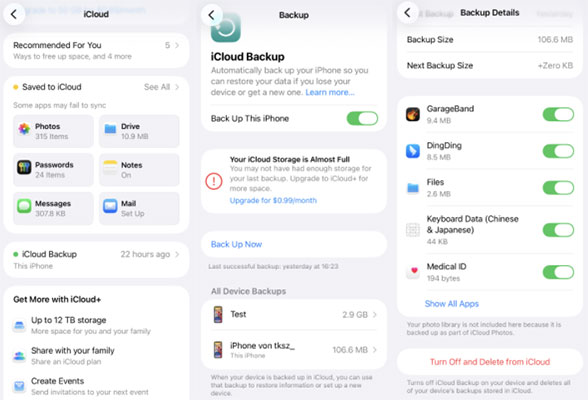
- Backup and Restore: Automatically back up your iPhone, iPad, or Mac to simplify data restoration.
- Find My Feature: Locate, lock, or erase lost Apple devices remotely.
- Sync Data: Keep emails, calendars, reminders, and contacts synced across devices.
 View Also: What Happens When You Sign Out of iCloud?
Is Apple ID the Same as iCloud Email?
Not necessarily. Many users assume that their Apple ID must be an @icloud.com email address, but that is not always true. For example:
- Apple ID: johnsmith@gmail.com
- iCloud Email: johnsmith@icloud.com
In this case, the Apple ID and iCloud email are different, but they are linked to the same Apple account. An iCloud email address is simply one type of email that can be associated with an Apple ID.
Is iCloud Password the Same as Apple ID Password?
In most cases, yes. Apple uses a single account system, which means your Apple ID password is generally the same password used to access iCloud services. For example:
- Apple ID: johnsmith@gmail.com
- Password: MyPassword123
The same password is used for iCloud, App Store, Apple Music, FaceTime, and iMessage.
Can I Use Different Apple ID and iCloud Accounts?
Yes, in certain situations. Apple allows users to sign in with different accounts for different services. For example:
- App Store Account: john@gmail.com
- iCloud Account: john@icloud.com
Some users do this when sharing purchases with family members or when migrating between accounts. However, Apple generally recommends using the same account whenever possible to avoid syncing and purchase-related complications.
Why Is My Apple ID Different from My iCloud Account?
There are several reasons why your Apple ID and iCloud account may appear different.
- You Created Your Apple ID Using Gmail: Many users originally created an Apple ID using a Gmail or Outlook address and later enabled iCloud Mail.
- You Switched Apple IDs: If you've changed your Apple account over the years, some services may still be associated with an older account.
- Different Accounts for App Store and iCloud: Some users use separate accounts for purchases and cloud storage.
- Family Sharing Setup: Family members may share purchases while maintaining separate iCloud accounts.
Real Examples of Apple ID and iCloud Accounts
To let you understand different situations, we list some examples to help you.
Example 1: Same Account
- Apple ID: john@icloud.com
- iCloud Email: john@icloud.com
In this case, everything uses the same account.
Example 2: Different Emails
- Apple ID: john@gmail.com
- iCloud Email: john@icloud.com
In this case, different email addresses, same Apple ecosystem.
Example 3: Separate App Store and iCloud Accounts
- App Store: john@gmail.com
- iCloud Email: john@icloud.com
This situation is allowed, but may cause syncing confusion.
Bonus: How to Sign Out of Apple ID Without Password?
If you wonder "Is Apple ID same as iCloud" because you're struggling with password login, you're not alone. Many users face issues such as forgetting Apple ID password or discovering that their iPhone is tied to someone else's account, common with second-hand devices. Fortunately, there's an easy fix.
TunesKit iPhone Unlocker is a powerful tool designed to help you remove Apple ID without password. It's perfect for regaining access to your device, even if your Apple ID and iCloud accounts are different. Apart from removing Apple ID, it can also unlock the screen lock, screen time lock, and MDM lock on iPhone/iPad/iPod Touch across all models and iOS versions. This way, you'll be able to access your Apple devices and data hassle-free.
Why Choose TunesKit iPhone Unlocker?
Remove Apple ID different from iCoud in few steps if forgot Apple ID password. Compatible with all iPhone/iPad/iPod Touch models and versions.
 600,000+ Downloads
Here's how you can use TunesKit iPhone Unlocker to remove Apple ID without a password:
Note
Before proceeding, back up your device data using iTunes to avoid data loss. If Find My iPhone is enabled, disable it via the iCloud website to ensure smooth unlocking.
Step 1 Choose unlock Apple ID on TunesKit iPhone Unlocker
Start by downloading and installing TunesKit iPhone Unlocker on your computer. It's compatible with both Windows and Mac devices. Launch the program and connect your iPhone to your computer using a USB cable. Then, click "Unlock Apple ID" option at the left.

Step 2 Check your iPhone/iPad device status
On Settings, ensure the Two-Factor Authentication and device lock screen is toggled on. Then, go to the General > About section to check your iOS version. After all is confirmed, click Confirm on the computer screen.

Step 3 Put your iPhone in DFU mode
Then, power off your Apple device, and press on the Power button until it shows the Connect to Computer screen. This is a simple process to enter the Device Firmware Upgrade or Recovery Mode, allowing TunesKit Apple ID Remover to communicate directly with your device.

Step 4 Remove your Apple ID in few minutes
TunesKit will display your device details on the screen. Verify and click Download to install the compatible firmware package. Then, click the Unlock button to begin the unlocking process. TunesKit iPhone Unlocker will bypass the Apple ID restrictions and unlock your device in just a few minutes.

After the Apple ID is successfully removed, your device will reboot to the Hello screen. If it still shows a locked screen, unlock it with your device passcode and sign in with your new Apple ID, which will now sync with iCloud. Then, sign into your Apple ID same as iCloud on your phone.
FAQs on Apple ID and iCloud
-
Can I Use Different Apple IDs for iCloud and Other Apple Services?
Yes, you can use separate Apple IDs for iCloud and other services, but it can lead to complications. For instance, if you use separate IDs for the App Store and iCloud, it may cause issues like Apple ID verification pop up, unable to update apps, verification required on App Store, etc.
-
Why My iCloud Backup Includes Purchases Made with A Different Apple ID?
This happens when apps, songs, or other purchases made with a different Apple ID are backed up via iCloud. These items remain tied to the account used for the original purchase.
-
Can I Transfer iCloud to Different Apple ID?
While you can't directly transfer iCloud data between Apple IDs, you can move certain items manually. For example, you can download files from iCloud Drive, export contacts, or manually copy photos. However, your iCloud settings, emails, and other data will stay tied to the original Apple ID.
Conclusion
Is Apple ID the same as iCloud? While both are interconnected, they serve different purposes. Apple ID is your master account for accessing all Apple services, while iCloud specifically stores your account and device data.
If you're dealing with an unknown or forgotten Apple ID and need a solution, TunesKit iPhone Unlocker is here to help. Remove an unknown Apple ID without a password and regain control of your device today!


