


FonesGo iPhone Unlocker (2026): Is It Safe and Does It Work?
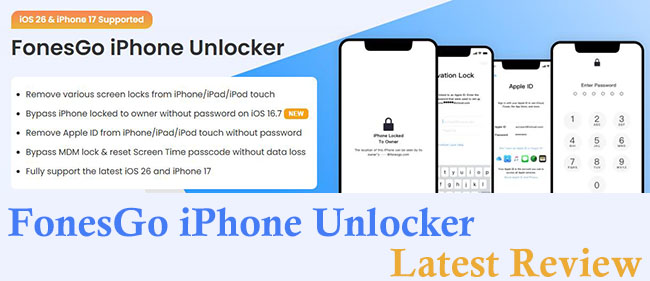
If you are reading this, you are likely staring at an iPhone that says "iPhone Unavailable" or are stuck at the dreaded iCloud Activation Lock screen. The panic of losing access to your device is real, and in your search for a solution, you've likely come across FonesGo iPhone Unlocker.
But is this software legitimate? Can it really bypass Apple's strict security measures without damaging your device? In this review, we will cover FonesGo iPhone Unlocker's core features, safety profile, real-world performance, and the critical limitations you need to know before you pay.
- Part 1. What is FonesGo iPhone Unlocker?
- Part 2. Key Features: What Can It Actually Unlock?
- Part 3. Is FonesGo Safe and Legit?
- Part 4. Pros and Cons of FonesGo iPhone Unlocker
- Part 5. FonesGo Pricing and Plans
- Part 6. Step-by-Step Guide: How to Use FonesGo iPhone Unlocker
- Part 7. Best Alternative - TunesKit iPhone UnlockerHOT
- Part 8. Conclusion
Part 1. What is FonesGo iPhone Unlocker?
FonesGo iPhone Unlocker is a dedicated desktop software tool (available for both Windows and Mac) designed to bypass various security locks on iOS devices. Unlike complex jailbreaking methods that require coding knowledge, FonesGo is built for the average user. Its primary goal is to help you regain access to your iPhone, iPad, or iPod Touch when you have forgotten your credentials.
Part 2. Key Features: What Can It Actually Unlock?
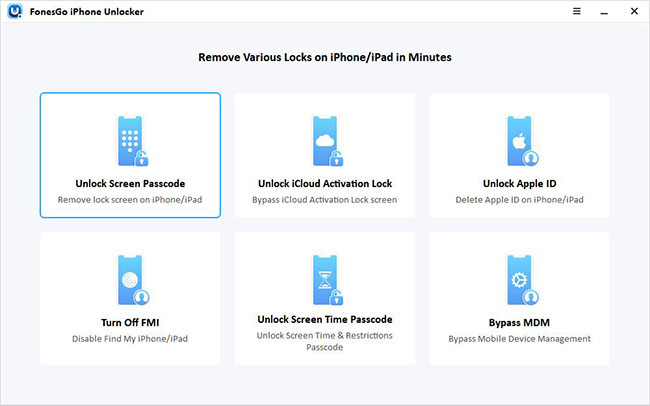
To provide genuine value, we need to look past the marketing and understand technical capabilities. FonesGo offers four main unlocking modes:
1. Unlock Screen Passcode
This is the most popular feature. If you have forgotten your 4-digit or 6-digit passcode, or if Face ID/Touch ID has stopped working, FonesGo can remove the lock screen.
2. Bypass iCloud Activation Lock
If you bought a second-hand iPhone that is linked to the previous owner's Apple ID, this feature allows you to bypass the "Activation Lock" screen without the password.
3. Remove Apple ID
This allows you to sign out of an Apple ID on an activated device if you don't know the password. This is useful if you want to prepare a device for sale or switch to a new account.
4. Bypass MDM (Mobile Device Management)
For users with school or corporate iPads that are restricted, FonesGo can bypass the MDM login screen, allowing you to use the device freely without the administrator's supervision.
Part 3. Is FonesGo Safe and Legit?
Based on my analysis, FonesGo is a legitimate software utility. It is not malware or a virus. However, because the software performs actions that modify system files (similar to jailbreaking exploits), your computer's antivirus might flag it as a "potentially unwanted program" (PUP). This is a false positive common in the unlocking industry.
Credibility Check:
- Data Privacy: The software processes the unlocking locally on your computer.
- Guarantee: They offer a money-back guarantee, though you should read the refund policy terms carefully, as "changing your mind" is usually not covered.
Part 4. Pros and Cons of FonesGo iPhone Unlocker
 Pros:
Pros:- User-friendly interface
- High success rate for unlocking iPhone screen
- Support MDM removal
- Support a wide range of iOS versions, including iOS 26 (for screen unlocking).
 Cons:
Cons:- Data Loss is Inevitable
- Not support all iPhone for the Remove Activation Lock feature
- It is a paid software
Part 5. FonesGo Pricing and Plans
FonesGo operates on a "Freemium" model. You can download the tool and check if your device is supported for free, but the final unlocking step requires a license.
| 1-Month Plan | 1-Year Plan | Lifetime Plan |
|---|---|---|
| $35.95 | $39.95 | $49.95 |
Part 6. Step-by-Step Guide: How to Use FonesGo iPhone Unlocker
To demonstrate the user experience, here is a walkthrough of how the Screen Unlock feature works.
Step 1: Download the official version from the FonesGo website. Once installed, launch the program and select "Unlock Screen Passcode" from the main menu. Connect your locked iPhone to the computer using a lightning or USB-C cable. If your phone is disabled, FonesGo provides on-screen instructions to put your specific model into Recovery Mode or DFU Mode so it can be recognized.
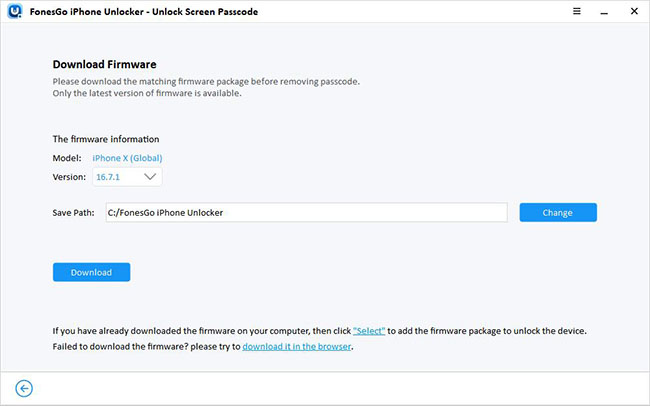
Step 2: Before unlocking, the software needs to download the latest iOS firmware compatible with your device. This ensures your phone functions correctly after the reset. Click "Download" and wait for the file to finish.
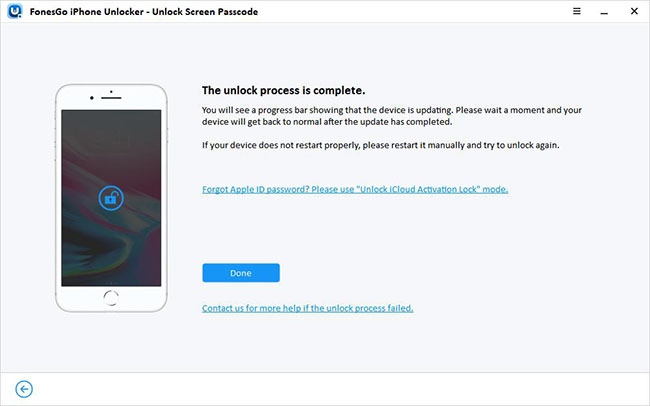
Step 3: Once the firmware is ready, click "Unlock Now." The software will begin verifying the package and removing the screen lock. Your iPhone will restart several times during this process. Once finished, you can set up the device as new.
Part 7. Best Alternative - TunesKit iPhone Unlocker
While FonesGo is a reliable tool, software performance can sometimes vary depending on your specific computer configuration or the exact state of your iOS device. If you find that FonesGo is unable to detect your device or if you simply want to compare options, TunesKit iPhone Unlocker is widely considered the best alternative in the market.
TunesKit iPhone Unlocker effectively solves the same core problem: regaining access to a locked device. It is renowned for its high success rate and extremely lightweight interface, making it a favorite for users who want a "no-frills," fast solution. Like FonesGo, it supports the latest iOS versions and can handle 4-digit/6-digit passcodes, Face ID, and Touch ID.
Key Features of TunesKit iPhone Unlocker
Unlock iPhone screen without password. Bypass iCloud Activation Lock without Apple ID and password.
 600,000+ Downloads
If you choose to use TunesKit as your unlocking solution, the process is straightforward. Here are the detailed steps to remove the screen lock.
Step 1Launch and Connect
Open TunesKit iPhone Unlocker on your computer. You will see a clean interface with several options. Connect your locked iPhone or iPad via USB cable and select the "Unlock iOS Screen" panel on the left.

Step 2Enter DFU or Recovery Mode
Click the "Start" button. If your device is not automatically detected (which is common for disabled phones), the software will show you clear illustrations on how to put your specific model into DFU Mode or Recovery Mode.

Step 3Download Firmware Package
Once the device is in the correct mode, TunesKit will auto-detect your device model. Confirm that the information displayed matches your device. Click the "Download" button to fetch the matching firmware package.

Step 4Unlock the Screen
After the download is complete, click "Unlock." TunesKit will verify the firmware and begin the unlocking process.

Part 8. Conclusion
FonesGo iPhone Unlocker is a robust solution for specific problems. It is not a magic wand that opens stolen phones, but it is a powerful utility for legitimate owners who are locked out. Overall, FonesGo offers a balanced mix of speed, safety, and simplicity, making it a competitive choice in the iOS unlocking market. By the way, if you want to try another tool, TunesKit iPhone Unlocker would be a good choice.


