


iHello HFZ Tool Review 2026: Download, Safety & Versions

iHello HFZ is a third-party utility that advertises iCloud Activation Lock-related services for selected Apple devices. Its AIO Premium V6.8.4 release claims expanded A12/A13 support, but compatibility varies by device and service. Some downloads may be free, while premium operations can require payment. Its overall safety and success rate have not been independently verified here.
Looking for the latest iHello HFZ Tool download but unsure which version supports your iPhone or iPad? With multiple HFZ releases, premium services, and different device requirements, choosing the right tool can be confusing. Some versions target older devices, while newer releases advertise additional A12/A13 compatibility.
This review covers iHello HFZ's features, latest version, supported devices, download sources, pricing, and potential risks. We'll also compare it with TunesKit iPhone Unlocker and explain the official recovery options available for Activation Lock.

What Is iHello HFZ Tool?
iHello HFZ, also searched as HFZ Tool or HFZ iHello, refers to a family of third-party Apple device servicing utilities that advertise Activation Lock-related functions. Different HFZ releases target specific Apple devices, firmware versions, and device states. These include iPhones displaying the Hello setup screen, devices in Passcode or Disabled mode, and certain Intel T2 Macs. The available functions depend on the software version and service.
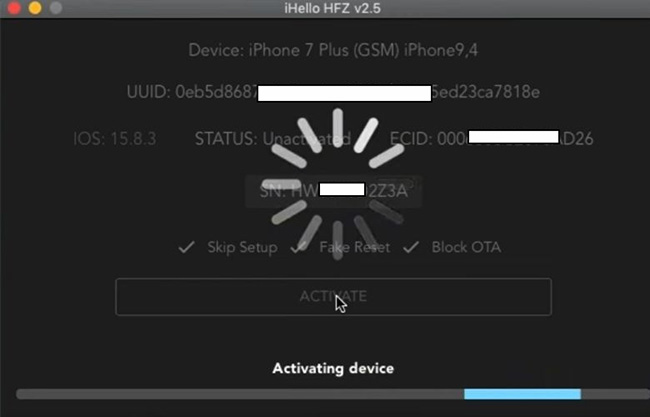
Key Features of iHello HFZ
According to publicly available HFZ release information, the tool family advertises:
- Activation Lock-related services: Workflows for selected devices displaying the Hello setup screen.
- Passcode/Disabled device services: Separate options for supported devices in specific lock states.
- A12/A13 compatibility: Newer releases advertise support for selected A12 and A13 iPhones and iPads.
- Windows and Mac utilities: Software availability depends on the HFZ product and release.
- Device registration: Some services involve checking device information and registration eligibility.
- Apple service-related functions: Certain releases advertise App Store, FaceTime, notification, and other device features.
These are developer-advertised capabilities, not guaranteed results. An important distinction is that bypassing an activation screen does not necessarily remove the original Apple Account association from Apple's servers.
iHello HFZ Latest Version and Compatibility
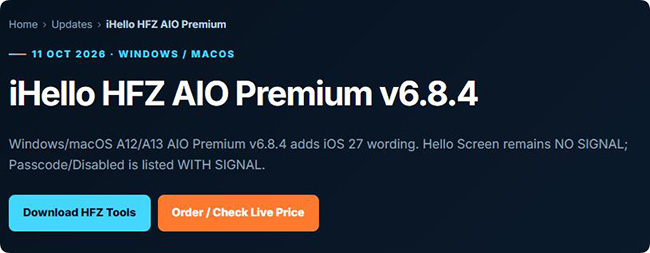
The HFZ software family has changed considerably since the older versions commonly discussed in iCloud bypass tutorials. A related HFZ release resource announced iHello HFZ AIO Premium V6.8.4 on October 11, 2026. The release notes advertise additional A12/A13 workflows and Windows/macOS availability.
What's New in iHello HFZ V6.8.4?
According to the published release notes, V6.8.4 includes the following advertised functions:
- Expanded A12/A13 device support.
- Hello-screen operations listed as No Signal.
- Passcode/Disabled operations listed as With Signal.
- iCloud login-related functionality.
- App Store, FaceTime, and notification support.
- Reboot-related functions.
- OTA and reset-related controls.
The release also mentions iOS 27 support for eligible workflows. However, this does not mean every listed A12/A13 device can run iOS 27. Compatibility must be checked against the exact model, firmware version, and available service.
iHello HFZ V6.8.4 Supported Devices
The published release information lists the following models.
| Device Category | Advertised Models |
|---|---|
| iPhone XS series | iPhone XS, XS Max, XR |
| iPhone 11 series | iPhone 11, 11 Pro, 11 Pro Max |
| iPhone SE | iPhone SE (2nd generation) |
| iPad Air | iPad Air (3rd generation) |
| iPad mini | iPad mini (5th generation) |
| iPad | iPad (8th generation) |
Hello Screen vs. Passcode/Disabled: What's the Difference?
HFZ release information distinguishes these two scenarios.
| Device State | Advertised Service | Cellular Signal |
|---|---|---|
| Hello Screen | Activation-related workflow | No Signal |
| Passcode/Disabled | Separate device servicing workflow | With Signal |
This distinction is particularly important. A tool that advertises cellular connectivity for a Passcode/Disabled device should not automatically be assumed to provide cellular functionality for a device at the Hello screen. Check the exact service description before proceeding.
Is iHello HFZ Free or Paid?
One common question is whether iHello HFZ Tool is free. Some HFZ software releases and downloads are advertised as free. However, downloading an installer does not necessarily include free access to every Activation Lock-related service. Premium services may require payment, registration, or access through a distributor.
iHello HFZ Pricing Overview
| Item | Pricing Status |
|---|---|
| Software download | May be free |
| Basic device detection | Depends on version |
| Premium activation services | May require payment |
| Device registration | May require registration or fees |
| Signal-related services | Service-specific pricing |
| Technical assistance | Depends on provider |
There is no single verified price that applies to every HFZ device and service. Before purchasing, confirm the exact model, firmware version, device state, and service cost.
Where to Download iHello HFZ Safely
If you're searching for iHello HFZ free download, you'll find several websites offering older and newer versions. However, not all websites distributing HFZ files are directly associated with its developers.
A useful starting point for checking version announcements is iHello HFZ V6.8.4 Release Information. You can also consult HFZ Download and Release Resources. HFZTool.com describes itself as an authorized HFZ resource, but its authorization and the safety of individual downloadable files have not been independently audited in this review.
How to Find the Right iHello HFZ Download
- Step 1. Review the published version and release notes before downloading. Make sure you're looking at the correct HFZ product rather than another utility with a similar name.
- Step 2. Check your device model, iOS/iPadOS version, and whether the iPhone or iPad is at the Hello screen or in Passcode/Disabled mode.
- Step 3. Confirm whether the selected version supports Windows, macOS, or both.
- Step 4. Look for verifiable developer information, a release history, and consistent software version details.
- Step 5. Use reputable security software to scan the downloaded package before installation.
Avoid modified installers or files requiring you to disable security protections.
How Does iHello HFZ Work?
Unlike conventional screen passcode recovery software, iHello HFZ offers separate device servicing workflows depending on the model and lock state. Earlier versions were associated with jailbreak-based methods for older devices. Newer releases advertise different workflows for selected A12/A13 models. Consequently, there is no single procedure that applies to every iHello HFZ version.
General iHello HFZ Workflow
- Step 1. Determine the exact iPhone or iPad model, software version, and current lock state.
- Step 2. Use the published compatibility information to determine whether a relevant service is advertised for your device.
- Step 3. Check whether the service requires device registration, payment, or additional preparation.
- Step 4. Use the compatible Windows or Mac version and review all installation and security requirements.
- Step 5. If an authorized operation is performed, check the resulting activation state and whether the expected device functions remain available.
Does iHello HFZ Really Work in 2026?
iHello HFZ has published release information describing support for selected devices, including A12/A13 models. However, there is a difference between a developer's compatibility claim and a confirmed result from independent testing.
iHello HFZ Effectiveness Overview
| Question | Current Assessment |
|---|---|
| Is there a newer HFZ release? | V6.8.4 is advertised |
| Does it claim A12/A13 support? | Yes, for selected models |
| Does every service provide cellular signal? | No |
| Is a reliable success rate published? | Not independently established here |
| Does it support every iPhone? | No |
| Is Activation Lock permanently removed? | Not guaranteed |
| Will all Apple services work afterward? | Depends on the device and operation |
Does iHello HFZ Permanently Remove Activation Lock?
Not necessarily. Apple's Activation Lock is associated with the Apple Account linked to a device.
Some third-party utilities advertise ways to bypass the activation screen, but gaining access to the Home Screen does not automatically mean that Apple's original account association has been removed. After certain bypass operations, device features may also be restricted.
Possible limitations include:
- No cellular signal.
- Restrictions involving iCloud or other Apple services.
- Problems after a device restore.
- Compatibility issues following an iOS update.
- Reappearance of the activation screen under certain conditions.
Is iHello HFZ Safe to Download and Use?
The safety of iHello HFZ depends on the download source, software version, and device operation being performed. Although the tool family has publicly available release information, that alone does not prove every installer is safe.
- 1. Download Security: Third-party websites may distribute outdated or modified installers. Avoid unknown mirrors and scan all installation packages before running them.
- 2. Device Stability: Some unlocking-related operations modify the device's system environment or activation state. Unsupported procedures can lead to device instability or unexpected behavior.
- 3. Privacy and Device Information: Some services require device identification information or registration. Verify the provider before sharing serial numbers, ECIDs, or other identifiers. Never submit your Apple Account password to an unverified third party.
- 4. Payment Risks: Premium services may require payment before a device operation can be performed. Check the final cost, compatibility requirements, and refund policy before purchasing.
- 5. Long-Term Functionality: A device that appears accessible immediately after a workaround may behave differently after a restart, update, or restore. Verify the service's limitations rather than assuming the result will be permanent.
Safety verdict: iHello HFZ cannot be considered universally safe or reliable without checking the installer and the relevant device-specific service. Treat unsupported promises of guaranteed results with caution.
iHello HFZ Pros and Cons
 Pros:
- Offers different tools for selected Apple device generations.
- Has publicly available release information.
- Advertises Windows and macOS support for certain versions.
- Newer releases claim support for selected A12/A13 devices.
- Provides separate services for Hello Screen and Passcode/Disabled scenarios.
 Cons:
- Not all advertised services are free.
- Device compatibility varies by version and lock state.
- Current success rates are not independently established here.
- Some operations may leave device features unavailable.
- Device registration or payment may be required.
- Unverified download sources can introduce security risks.
iHello HFZ Alternative: TunesKit iPhone Unlocker
If iHello HFZ doesn't suit your requirements, TunesKit iPhone Unlocker is another option for certain compatible Apple devices. TunesKit offers a consolidated desktop application with several unlocking features, including screen passcode removal and Activation Lock removal for supported devices. It also provides published compatibility requirements and Windows/macOS versions.
iHello HFZ vs. TunesKit iPhone Unlocker
| Feature | iHello HFZ | TunesKit iPhone Unlocker |
|---|---|---|
| Windows | Selected versions | Yes |
| macOS | Selected versions | Yes |
| Activation Lock functions | Service and version dependent | Supported on specified devices |
| A12/A13 support | V6.8.4 advertises selected models | Not listed for Activation Lock removal |
| Pricing | Free and premium offerings | Commercial license |
| Jailbreak-free option | Depends on service | Available for selected older iPhones |
| Compatibility information | Release and service specific | Published technical specifications |
| Technical support | Depends on distributor | Official TunesKit support |
How to Use TunesKit iPhone Unlocker
- Step 1. Install TunesKit iPhone Unlocker from its official website and connect your compatible iPhone or iPad to the computer. Open the software and choose the Remove iCloud Activation Lock feature. Check the supported model and iOS/iPadOS version.

- Step 2. Complete the device-specific preparation steps displayed by the software. Some supported devices may require jailbreaking, while selected older iPhones can use a jailbreak-free option.
- Step 3. After the process, review the device's activation status and available functions.
How to Remove Activation Lock Without iHello HFZ
 Further Reading: How to Remove Activation Lock Without Previous Owner [2026]
If you're the device's owner, consider Apple's official recovery options before using a third-party unlocking service.
Method 1. Sign In With the Associated Apple Account
If you remember the Apple Account linked to the device, enter its credentials on the Activation Lock screen. Depending on the situation, Apple may also accept a previously associated device passcode.
Method 2. Ask the Previous Owner to Remove the Device
If you purchased a second-hand iPhone or iPad, contact the previous owner. They can sign in to iCloud Find Devices and remove the device from their account when eligible.
Method 3. Contact Apple Support
If you own the device and have acceptable proof of purchase, Apple may be able to assist through its Activation Lock support request process. Visit Apple's official Activation Lock removal guide for more information.
These options address the device's underlying account association rather than relying on an unsupported workaround.
Conclusion
iHello HFZ Tool offers several advertised Activation Lock-related services for selected Apple devices. Newer releases such as AIO Premium V6.8.4 claim expanded A12/A13 compatibility, but the supported functions, signal availability, and pricing vary by device and service. Before downloading, verify the software version, supported model, installation source, and payment requirements. Don't assume that a free download guarantees successful or permanent Activation Lock removal.
For compatible older devices, TunesKit iPhone Unlocker offers another desktop option with published technical requirements. Whenever possible, Apple's official Activation Lock recovery methods remain the preferred approach.