


007 Ramdisk Tool Review 2026: Is It Safe, Free & Worth Using?

007 Ramdisk is a free Windows-based tool for older iPhones and iPads, mainly used for Activation Lock bypass. However, compatibility, download safety, and cellular support can vary by version.
If you search for a free way to deal with iCloud Activation Lock on an older iPhone or iPad, you may come across 007 Ramdisk Tool. But in 2026, information about the tool is scattered across third-party websites, and details about supported devices, available versions, and download sources are often inconsistent. So, is 007 Ramdisk still worth using today? In this review, we look at its main features, compatibility, safety, limitations, and current availability.

What Is 007 Ramdisk Tool?
007 Ramdisk Tool is a Windows-based iOS servicing utility mainly used with older iPhones and iPads. It is commonly associated with Activation Lock-related operations and other low-level device servicing tasks.
The tool works by loading a temporary ramdisk environment and using checkm8-compatible access on supported devices. This allows it to communicate with certain system components outside the normal iOS startup process.
Because checkm8 only applies to specific older Apple hardware, 007 Ramdisk is mainly used with older iPhones and iPads rather than recent models. Its actual compatibility also depends on the 007 Ramdisk version, device model, iOS version, and selected function.
Main Features of 007 Ramdisk Tool
The features available in 007 Ramdisk can vary by version and device. Commonly reported functions include:
- Activation Lock-related functions: Provides iCloud Hello Screen and Activation Lock-related operations on compatible iPhones and iPads.
- Checkm8-based access: Uses checkm8-compatible hardware access to perform certain low-level iOS servicing operations.
- Passcode-related functions: Some versions include options for working with passcode-locked devices, depending on the device state and iOS version.
- Purple Mode: Supports entering Purple Mode on certain devices for diagnostics and device servicing.
- Device information functions: Some releases include tools for viewing or modifying supported device information, including serial-number-related data.
- Factory Reset: Allows supported devices to be reset to factory settings. This erases user data, so a backup is recommended when possible.
Keep in mind that having a feature listed in 007 Ramdisk does not mean it works on every supported device. Availability and results depend on the tool version, iPhone or iPad model, iOS version, and device condition.
Is 007 Ramdisk Free?
Yes, legacy versions of 007 Ramdisk are available for free. Older releases can still be found online and used without purchasing a license, although available features and compatibility depend on the specific version.
However, the original 007 Ramdisk free tool does not appear to be actively maintained through a clearly verified official website. Current community reports associate its later development with MR GSM PRO, which now offers newer commercial tools and paid features. The current MR GSM PRO website lists its own actively maintained releases, but it does not provide a clear official archive for legacy 007 Ramdisk versions.
Free 007 Ramdisk downloads are therefore mainly distributed through third-party websites, forums, and community pages. Before downloading any copy, check the version and device compatibility, scan the file with security software, and avoid sources that require you to disable antivirus protection.
007 Ramdisk Supported Devices and iOS Versions
Commonly reported compatibility includes the following devices. Actual support may vary by 007 Ramdisk version, iOS version, and selected function.
| iPhone | iPad | iOS Version |
|---|---|---|
| iPhone 6s, 6s Plus | iPad (5th to 7th generation) | iOS 12 through 16.6, though features may vary based on the specific device and iOS version. |
| iPhone 7, 7 Plus | iPad Pro (1st and 2nd generation) | |
| iPhone 8, 8 Plus | iPad mini 4 | |
| iPhone X | iPad Air 2 |
Does 007 Ramdisk Really Work?
Yes, 007 Ramdisk can work on certain compatible iPhones and iPads, but it does not work equally well on every device. The result depends on the device model, iOS version, lock status, and the specific 007 Ramdisk version being used.
Activation Lock Bypass
007 Ramdisk is mainly known for Activation Lock-related operations on older checkm8-compatible devices, including models such as the iPhone 6s, iPhone 7, iPhone 8, and iPhone X. On a compatible device, the tool may allow access past the iCloud Hello Screen without the original Apple Account password.
However, successful bypass does not mean the device is fully restored to normal activation. Available functions can differ depending on the device and the bypass method used.
Cellular Signal Limitation
One important limitation is cellular service. Some 007 Ramdisk Activation Lock workflows may bypass the Hello Screen but leave the iPhone without SIM or cellular signal.
This means the device may be usable over Wi-Fi while calls, SMS, and mobile data remain unavailable. Signal support varies by device state, iOS version, and the specific method used, so users should check this limitation before starting the process.
How Reliable Is 007 Ramdisk?
007 Ramdisk should not be considered a guaranteed one-click solution. Users may encounter problems such as device detection failures, DFU Mode errors, unsupported configurations, or unsuccessful bypass attempts.
In short, 007 Ramdisk works best on certain older supported devices and for users familiar with DFU and ramdisk-based tools. Its results are less predictable when device compatibility, iOS support, or the download version is unclear.
Is 007 Ramdisk Safe?
007 Ramdisk is not necessarily unsafe, but there are risks to consider before using it. The main concerns are whether the downloaded file can be trusted and whether the selected operation is compatible with your device.
Download Safety
Legacy versions of 007 Ramdisk are mainly distributed through third-party websites, forums, and file-sharing pages rather than a clearly verified official download site. This makes it harder to confirm whether a particular installer is original, outdated, or modified.
To reduce the risk, download only from sources you trust, scan the file with reputable security software, and avoid packages that ask you to disable antivirus protection or install unrelated programs.
Device Risk
007 Ramdisk performs low-level iOS servicing operations, so using the wrong version or an unsupported function can cause problems. Some operations may erase data, fail to complete, or leave the device unable to boot normally until it is restored.
Before using 007 Ramdisk, confirm your exact device and iOS compatibility, back up important data when possible, and keep the device connected during the entire process. Users unfamiliar with DFU Mode or ramdisk-based tools should be especially careful.
Pros & Cons of 007 Ramdisk Tool
 Pros:
Pros:- Free: The tool is entirely free, making it accessible to a wide range of users.
- Multiple Functions: Includes Activation Lock-related, reset, Purple Mode, and device servicing options.
- iPhone/iPad Compatible: Compatible with a wide range of iPhone and iPad models, especially those susceptible to the checkm8 exploit.
 Cons:
Cons:- Windows-only: The tool is only available for Windows users, excluding macOS users.
- Older Devices Only: Primarily targets older checkm8-compatible devices; iPhone XS and later models are not supported by the legacy checkm8-based workflow.
- May Lose Data: Some operations, such as factory resets, can result in the loss of personal data.
- Limited Official Documentation: There is no clearly maintained official website, compatibility database, or centralized support channel for legacy 007 Ramdisk versions.
- Risk: Improper use can pose a risk of damaging or bricking the device.
- Limitation: For devices running iOS 15 to 16.6, removing the iCloud lock can result in the loss of SIM card signal functionality unless the passcode is successfully bypassed.
How to Download 007 Ramdisk Tool for Free
There is no clearly verified official download page for legacy 007 Ramdisk releases. OneJailbreak is one third-party source where legacy versions have been distributed.
Step 1: To download the 007 Ramdisk Tool free, you can go to OneJailbreak page here: 007 Ramdisk Tool Download.
Step 2: Select the 007 Ramdisk version that matches your device and the instructions provided by the source.

Step 3: Ensure your system meets the necessary requirements:
- Operating System: Windows 7, 8, 10, or 11
- Processor: 64-bit architecture recommended
- Storage: Sufficient free space for installation and operation
Step 4: After downloading, extract the compressed file using tools like WinRAR or 7-Zip. Open the installer file and follow the on-screen instructions to complete the installation.
Step 5: Once installed, launch the 007 Ramdisk Tool and follow the prompts to utilize its features.
How to Perform iCloud Bypass via 007 Ramdisk Tool?
Here's a general guide on how to use the 007 Ramdisk tool for iCloud bypass:
Step 1: Extract the 007 Ramdisk tool to a folder on your PC. Ensure that you have the necessary drivers for your iPhone installed on your PC (iTunes should suffice).
Step 2: Use a USB cable to connect your iPhone or iPad to your PC. Ensure the device is detected by the system (check in the Device Manager).
Step 3: Open the 007 Ramdisk tool from the extracted folder. Some versions of this tool may require you to run it as an administrator, so right-click the file and select "Run as administrator."
Step 4: Choose the function you want to execute from the main menu and allow the process to finish.

Step 5: After the bypass process completes, the tool may prompt you to reboot your iPhone. After rebooting, check if the iCloud Activation Lock screen has been bypassed.
Best 007 Ramdisk Alternative: TunesKit iPhone Unlocker
007 Ramdisk can be useful on certain older iPhones and iPads, but its fragmented download sources, Windows-focused workflow, device limitations, and relatively technical operation may not suit every user. If you prefer a more guided iPhone unlocking solution, TunesKit iPhone Unlocker is a practical alternative to consider.
TunesKit iPhone Unlocker combines several iOS unlocking functions in one program. In addition to removing Activation Lock on supported devices, it can remove iPhone and iPad screen passcodes, Apple Account, MDM restrictions, and Screen Time passcodes. Its Activation Lock removal feature currently supports iPhone 5s through iPhone X running iOS 12.0–16.7.15 and does not require jailbreaking.
Why Choose TunesKit iPhone Unlocker Instead?- Remove Activation Lock on supported iPhones and iPads without jailbreaking
- Unlock iPhone Unavailable, Security Lockout, and forgotten screen passcodes
- Remove Apple Account, MDM restrictions and Screen Time passcodes on devices you own or are authorized to manage
- Available for both Windows and Mac
- Guided interface designed for users without advanced technical experience
| Feature | 007 Ramdisk | TunesKit iPhone Unlocker |
|---|---|---|
| Windows | Yes | Yes |
| Mac | Limited/No | Yes |
| Activation Lock removal | Supported on compatible devices | Yes, supported devices |
| Jailbreak required for Activation Lock removal | Depends on workflow | No |
| Screen passcode removal | Version-dependent | Yes |
| Apple Account removal | Version-dependent | Yes |
| MDM removal | Version-dependent | Yes |
| Screen Time removal | No | Yes |
| Official support | Limited/community based | Yes |
| Beginner friendly | Moderate/technical | Easier guided workflow |
Now follow these steps to remove iCloud Activation Lock without passcode using TunesKit iPhone Unlocker.
Step 1: Connect Your iPhone/iPad to Your PC
Download the software compatible with your operating system (Windows or macOS). Install the program and open it. Use a USB cable to connect your iPhone or iPad to your computer. From the main interface, select "Remove iCloud Activation Lock." The software will detect your connected device automatically. Click the Start button to begin the process.

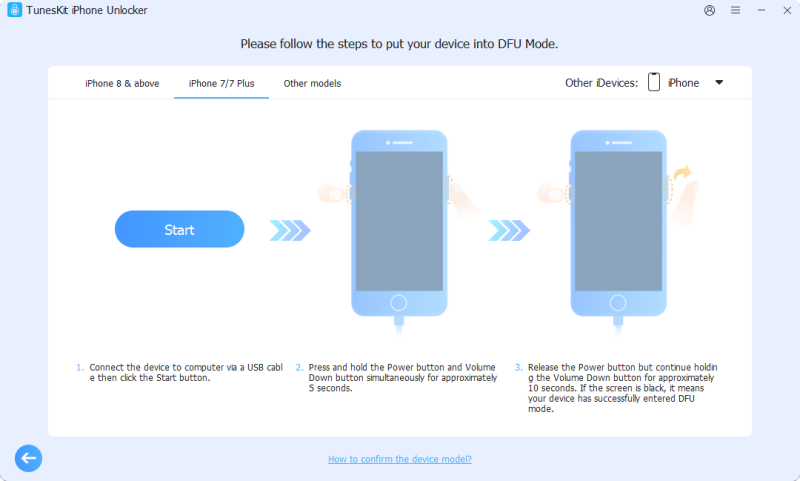
Step 2: Put Your Device into DFU Mode
Confirm your device's information such as iOS version and model, etc. Then the software will put your device into Recovery mode automatically. You can then follow the on-screen prompt to put it into DFU mode manually.
Step 3: Remove the Activation Lock and Set Up Your Device
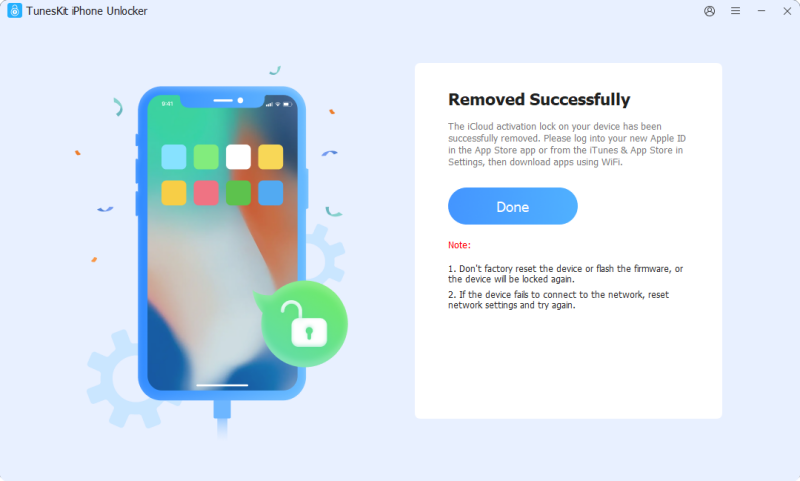
TunesKit will begin the process of bypassing the iCloud Activation Lock on your device without jailbreaking. This may take a few minutes to complete. After the unlock is successful, your device will no longer show the iCloud Activation screen. Follow the on-screen instructions to set up your device as a new iPhone or iPad.
 Note:
Note:
Activation Lock is an anti-theft feature. Before using any third-party unlocking utility, make sure you own the device or have authorization to manage it. If you know the linked Apple Account credentials or can contact the previous owner, Apple's official removal methods should be used first.
FAQs Related to 007 Ramdisk
-
Does 007 Ramdisk require jailbreak?
Not always. 007 Ramdisk mainly uses checkm8, DFU Mode, and ramdisk-based methods rather than a traditional jailbreak. However, the exact requirements depend on the tool version, device, and selected function.
-
Does 007 Ramdisk work on iPhone 11 or later?
Generally, no. Legacy 007 Ramdisk versions mainly target older checkm8-compatible devices up to the iPhone X. The iPhone 11 and later models use newer hardware that is not supported by the same checkm8-based workflow.
-
Does 007 Ramdisk support iOS 17 or later?
Legacy 007 Ramdisk versions are mainly associated with iOS 12 through iOS 16 on supported older devices. Claims of iOS 17 or later support may refer to newer or related tools, so check the exact version and device compatibility before use.
-
Why does 007 Ramdisk have no signal?
Some Activation Lock bypass methods can provide access to the iPhone without restoring normal cellular activation. In these cases, Wi-Fi may work while calls, SMS, and mobile data remain unavailable. Signal support depends on the device, iOS version, and bypass method.
Conclusion
007 Ramdisk remains an option for certain older, checkm8-compatible iPhones and iPads, but its limited compatibility, unclear download sources, and technical workflow make it less suitable for beginners. If you want a more guided solution, TunesKit iPhone Unlocker provides Activation Lock removal for supported devices together with screen passcode, Apple Account, MDM, and Screen Time unlocking features in one program.


