


How to Download Taylor Swift Songs to MP3: The Ultimate 2026 Guide
Taylor Swift reigns as a music titan, boasting a diverse discography from country roots to poetic pop. However, the streaming era creates a dilemma: you don't actually own the music. Fans often face frustration when subscriptions lapse or internet connections fail, sparking a strong desire to download her songs to MP3. True ownership allows for permanent backups and the freedom to listen offline on any device.
This guide details the best methods on how to download Taylor Swift's music to MP3 for offline listening, covering 3 effective options so you can enjoy her amazing music without relying on streaming services.
Method 1: Download Taylor Swift Songs from Purchasing
The most straightforward, legal, and artist-supportive way to get Taylor Swift MP3s is to buy them. Unlike streaming, purchasing a digital file gives you a DRM-free (Digital Rights Management free) file that you can copy to any device, play on any software, and keep forever.
Amazon is one of the few remaining major platforms that sells standard MP3 files directly.
Why choose this method:
- Bitrate: Usually high-quality VBR (Variable Bit Rate) averaging around 256kbps to 320kbps.
- Compatibility: Works on every device immediately.
- Support: Directly contributes to Taylor Swift's sales numbers.
How to use:
Step 1: Go to Amazon and search for "Taylor Swift MP3." You can choose individual songs (e.g., "Anti-Hero") or entire albums.
Step 2: Click the "Buy MP3" button. The price is typically around $1.29 per song or $10-$15 for an album.
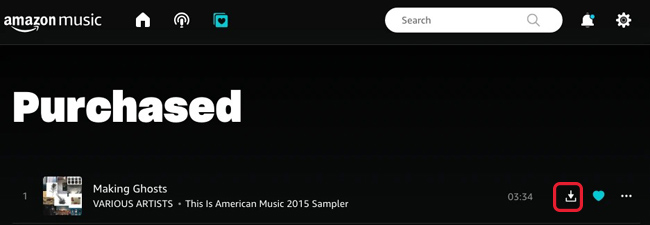
Step 3: Once purchased, go to your Amazon Music Library.
Step 4: Select the Purchased filter. Click the three dots next to the song and select Download. The file will save directly to your computer's "Downloads" folder as a ready-to-play MP3.
 Pro-tip:
Method 2: Download Taylor Swift Songs to MP3 via iTunes/Finder
Many users believe that buying from Apple limits you to their ecosystem. This is a myth. Songs purchased from the iTunes Store come as M4A (AAC) files, which are superior in quality to MP3s. However, if you specifically need the .mp3 format for a legacy device (like an older car stereo), Apple has a built-in converter tool that few people know about.
Step 1: Open the Apple Music app (macOS) or iTunes (Windows). Search for the Taylor Swift track you want and purchase it.
Step 2: Go to Preferences > Files > Import Settings. Change the "Import Using" dropdown to MP3 Encoder.
Step 3: Set the Setting to Higher Quality (192 kbps) for the crispest sound.
Step 4: Go back to your library and highlight the Taylor Swift song you just bought.
Step 5: Go to File > Convert > Create MP3 Version.
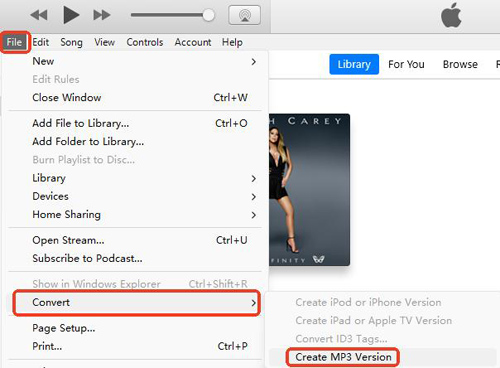
Apple will instantly create a duplicate of the song in MP3 format, sitting right next to the original M4A file. You can now drag and drop this MP3 anywhere.
Method 3: Converting Streaming Taylor Swift Music to MP3
If you are a premium subscriber to Spotify, Apple Music, or YouTube Music, you might want to liberate your playlists for offline use on non-supported devices. This is where Music Converter software comes into play.
By using tools like TunesKit Audio Capture, users can easily record and download Taylor Swift's songs from streaming platforms like Spotify. TunesKit Audio Capture is a versatile sound recording software designed to capture any audio playing on your computer with lossless quality, including streaming music from Spotify.
Key Features of TunesKit Audio Capture
Record and download Taylor Swift songs to MP3 easily. Record high-quality audio on Win/Mac from any source without losing any audio quality.
 600,000+ Downloads
Let's see how to use TunesKit Audio Capture to download Taylor Swift songs to MP3.
Step 1Install the Software
First, download and install TunesKit Audio Capture. Once launched, navigate to the main interface and select the application where you intend to play Taylor Swift's music.

Step 2Set Output Format
Before downloading songs, you can click on the Format button to set the preferred format like MP3, M4V, etc.

Step 3Record and Download Taylor Swift's Songs
Click on the Start button, and TunesKit Audio Capture will launch the program automatically. Just play the song that you want to download and TunesKit Audio Capture will download it to your computer concurrently.

Step 4Save the Audio
Click on the Stop button to finish the recording. You can trim the audio by clicking the Edit button. Hit the Save button to save the recorded audio on your computer, and you can find it in History list.

How to Keep the Best Audio Quality
Not all MP3s are created equal. When downloading Taylor Swift songs, especially tracks with complex production like Midnight Rain or acoustic details like cardigan, file settings matter.
1. Bitrate is King
- 128 kbps: "Radio quality." Avoid this. The highs will sound tinny, and the bass will be muddy.
- 192 kbps: Acceptable for standard listening.
- 320 kbps: The Gold Standard for MP3. This is virtually indistinguishable from CD quality for most listeners. Always ensure your converter or purchase settings are set here.
2. ID3 Tags and Artwork
One of the biggest issues with "free" downloaders or YouTube-to-MP3 sites is the lack of metadata. You end up with a file named Track_01_Unknown_Artist.mp3.
- Official Purchases: Come with perfect metadata.
- High-End Converters: Will scrape the metadata from Spotify, ensuring your MP3 player displays the correct album art for Reputation or Lover.
FAQs About How to Download Taylor Swift Songs to MP3
-
1. Can I download MP3s directly from the Spotify app?
No. Spotify Premium allows "Offline Listening," but the files are encrypted cached data (OGG Vorbis format) hidden deep in your system folders. They cannot be played by other MP3 players.
-
2. Is it legal to convert Spotify songs to MP3?
Recording streaming audio for personal use falls into a legal grey area known as "format shifting" in some jurisdictions, but it violates Spotify's Terms of Service. Distributing or sharing those files is strictly illegal.
-
3. Where can I find Taylor Swift's unreleased tracks in MP3?
Unreleased tracks (often called "Vault Tracks" before they are officially released) sometimes circulate on fan forums or YouTube. However, for the best quality and to support Taylor, wait for the official Taylor's Version releases, which have systematically included these gems.
Conclusion
Purchasing directly from Amazon or iTunes is recommended for pristine quality and artist support. Alternatively, modern music converters like TunesKit Audio Capture offer a powerful workaround for bridging streaming subscriptions with offline devices. Choose the method that fits your needs and keep the music playing—forever and always.


