


TrollStore IPA Download (2026): Free Install Guide for iOS 14–17
TrollStore is a powerful iOS utility that allows users to permanently install IPA files without jailbreaking their devices or dealing with the 7 days app expiration limit. If you're looking for a free way to download TrollStore IPA on iPhone or iPad, this guide will walk you through everything you need to know. From supported iOS versions to safe download methods and installation instructions, you'll learn how to use TrollStore to sideload apps securely and keep them installed forever.
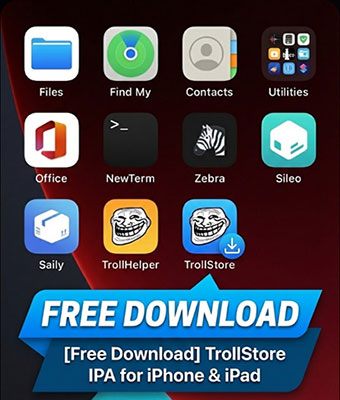
What Is TrollStore IPA?
TrollStore IPA is an iOS tool — a special permanent IPA installer — that lets you sideload and permanently install iOS apps (.IPA files) on an iPhone or iPad without needing to jailbreak the device and without the usual 7-day expiry that most sideloaded apps have.
What It Lets You Do?
- Install IPA files permanently — even ones not available on the App Store.
- No 7-day re-signing limits like AltStore or Sideloadly.
- Works without jailbreaking your iOS device (on supported versions).
- Useful for apps like emulators, utility tools, or mods that Apple won't distribute.
How It Works?
- TrollStore takes advantage of a bug in Apple's CoreTrust/AMFI system (a part of iOS that verifies app signatures).
- This bug allows the installer to give installed IPA apps a persistent trust status so they remain valid and usable indefinitely — without requiring a jailbreak.
Limitations
- Only works on certain iOS versions where the CoreTrust vulnerability exists. Newer iOS releases often patch the exploit, so TrollStore won't function on those.
- You still must install the TrollStore IPA itself using a sideload method (e.g., AltStore, Sideloadly, SideStore).
- The IPA files you install through TrollStore need to be compatible and safe — malicious IPAs can harm your device.
TrollStore Compatibility Table
| iOS Version | Supported |
|---|---|
| 14.x | Yes |
| 15.x | Yes |
| 16.6.1 | Yes |
| 17.0 | Yes |
| 17.0.1+ | No |
How to Download and Install TrollStore IPA?
After understanding what is TrollStore IPA, you now know that it's a powerful tool that allows permanent IPA installation without jailbreaking your device. So, how do you download and install TrollStore IPA? Below, we'll introduce three common and effective methods to help you choose the one that best fits your device.
Critical Prerequisite: Check Your iOS Version
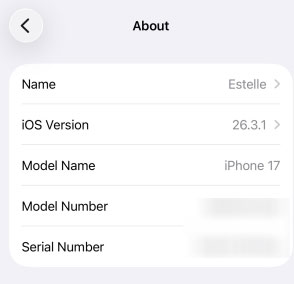
Before downloading anything, you must verify your iOS version (Settings > General > About > iOS Version). TrollStore relies on a specific CoreTrust bug that Apple has patched in newer versions.
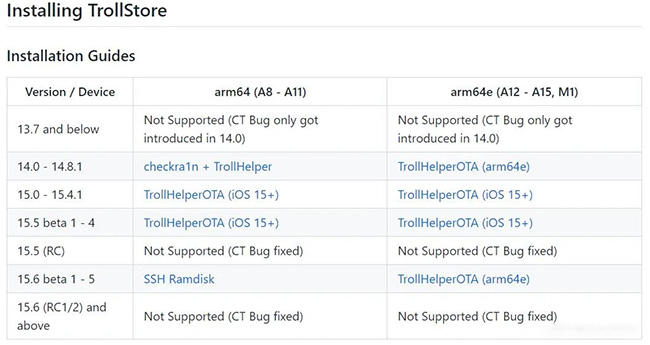
- Supported: iOS 14.0 – 16.6.1, iOS 16.7 RC, and iOS 17.0.
- Unsupported: iOS 16.7 (versions other than RC), iOS 17.0.1, and any version newer (iOS 17.1+, iOS 18, etc.).
 Note
Note
If you are on an unsupported version, there is currently no way to install TrollStore, and downgrading to an unsigned iOS version is generally not possible. But if you want to downgrade to a still signed iOS version, TunesKit iOS System Recovery is your best choice.
Method 1: TrollInstallerX (Recommended for iOS 14.0 – 16.6.1)
This approach installs TrollStore by sideloading the TrollInstallerX IPA using a computer-based signing tool. It is the most widely used and reliable option for devices running iOS 14.0 to 16.6.1, and works for the majority of supported models.
Downloads Required:
- TrollInstallerX IPA: Download the latest .ipa from the official GitHub releases.
- Sideloading Tool: Sideloadly (Windows/macOS) or AltStore.
Installation Steps:
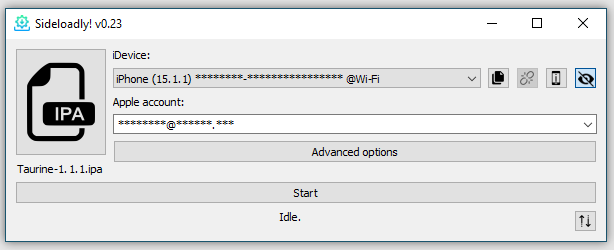
- Step 1. Sideload the IPA: Open Sideloadly on your computer, connect your iPhone/iPad, and drag the TrollInstallerX.ipa into the tool. Enter your Apple ID to sign and install it.
- Step 2. Trust the App: On your iPhone, go to Settings > General > VPN & Device Management, tap your Apple ID, and select Trust.
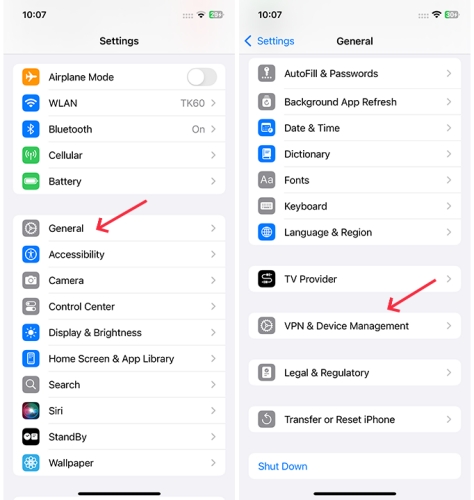
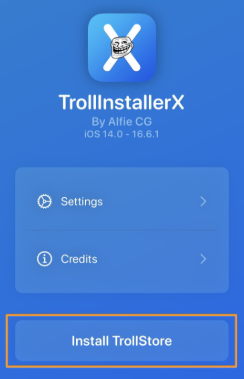
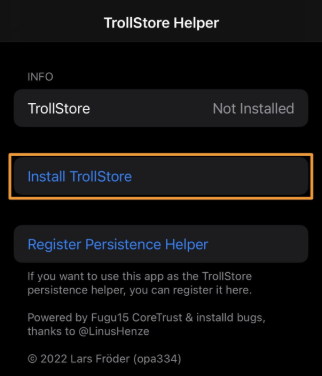
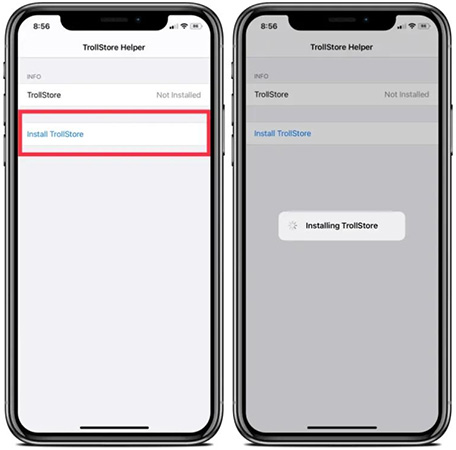
- Step 3. Run the Installer: Open the TrollInstallerX app on your home screen and tap Install TrollStore.
- Step 4. Install Persistence Helper: The app will ask you to select a system app (usually "Tips" or "Books") to replace as a "Persistence Helper." Select one you don't use.
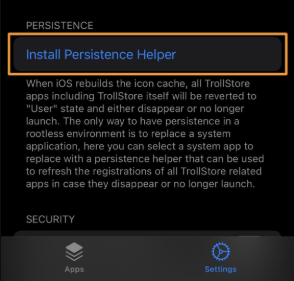
Note for iOS 16 users
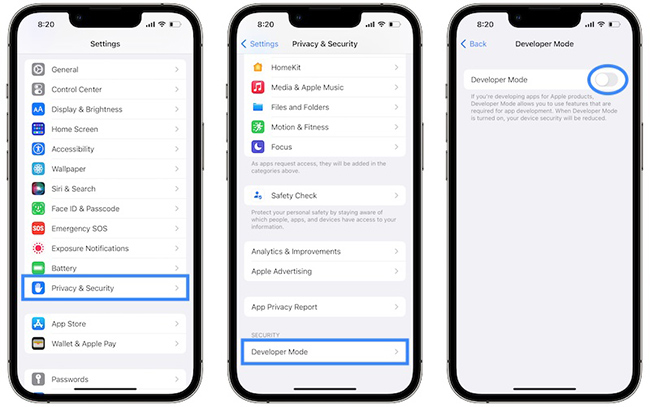
You may need to enable Developer Mode in Settings > Privacy & Security.
Troubleshooting
If the exploit fails, reboot your device and try again.
Method 2: TrollRestore (Required for iOS 17.0)
If you are on iOS 17.0 (or 15.2–16.7 RC), you cannot use the standard IPA method easily. Instead, use TrollRestore, a computer-based tool that injects TrollStore via a system backup modification.
- Step 1. Download TrollRestore: Get the tool for your OS (Windows/macOS/Linux) from the official GitHub.
- Step 2. Connect Device: Connect your iPhone to your computer.
- Step 3. Run the Tool: Open TrollRestore (or run the Python script) and follow the on-screen prompts to select a system app (like "Tips") to replace.
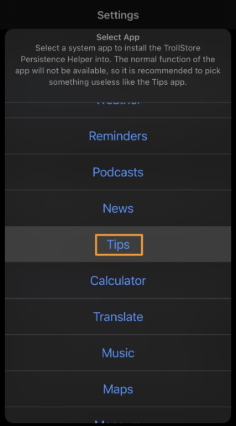
- Step 4. Reboot & Install: Your device will reboot. Open the "Tips" app (or whichever app you chose), and it will now be the TrollHelper. Tap Install TrollStore.
Method 3: TrollHelperOTA (No PC - iOS 14.0 – 15.6.1 Only)
This option allows you to install TrollStore directly on your device without using a computer. It works for supported devices running iOS 14.0 to 15.6.1 and uses a Safari-based installation process for quick setup.
- Step 1. Visit the official link (usually https://api.jailbreaks.app/troll64e) in Safari.
- Step 2. Tap to install the TrollHelper app.
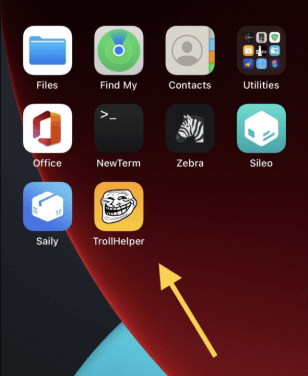
- Step 3. Open TrollHelper and tap Install TrollStore.
Post-Installation: Essential Setup
Once the "TrollStore" app appears on your home screen, you must perform these final steps to ensure it works permanently:
- 01 Open TrollStore: Launch the app. It will automatically install ldid (a signing component).
- 02 Configure Persistence Helper: Go to Settings within TrollStore. Under "Persistence," ensure a helper is installed (e.g., into the Tips app). This is crucial! If TrollStore ever crashes or fails to open, you launch the Tips app to revive it.
- 03 Install Apps: To install an IPA, simply download it in Safari, tap the "Share" icon, and select TrollStore from the list. The app will install instantly and never expire.
Fix TrollStore IPA Installation Errors with TunesKit iOS System Recovery
While installing TrollStore unlocks powerful capabilities for your iPhone or iPad, exploiting system vulnerabilities to sideload apps can occasionally lead to instability. Users may sometimes encounter frustrating issues such as iPhone no sound, freezing on the Apple logo, or facing a white screen of death during the installation process.
If your device becomes unresponsive, you don't need to resort to a full restore that wipes your data. TunesKit iOS System Recovery offers a professional and safe solution to fix these common iOS system errors, allowing you to repair your device and get back on track without losing any of your important files.
Fix TrollStore IPA Installation Errors Easily
TunesKit iOS System Recovery helps fix iOS system glitches that may block TrollStore IPA installation—no data loss and no technical skills required.
 600,000+ Downloads
If your iPhone or iPad becomes unresponsive during the TrollStore installation process, follow these steps to restore it to a normal state:
Step 1Connect iPhone to PC
Launch the TunesKit iOS System Recovery software on your computer (Windows or Mac) and connect your iOS device using a USB cable. Wait for the software to detect your device, then select iOS System Repair and click the Start button.

Step 2Select Standard Repair
Select the Standard Repair mode from the options provided. This mode is designed to fix common issues like the white Apple logo or black screen without causing any data loss. (Avoid "Deep Repair" unless Standard Repair fails, as Deep Repair will erase all data).

Step 3Download Firmware Package
Check the device information displayed on the screen (Model, iOS version) to ensure it is accurate. Once confirmed, click the Download button to start downloading the specific firmware package required for your device repair.

Step 4Repair Your Device
After the firmware package has finished downloading, click the Repair button. The software will automatically begin repairing the iOS system. Keep your device connected until the process is complete and the device restarts normally.

FAQs About TrollStore IPA
-
Which iOS versions does TrollStore support?
TrollStore currently supports iOS 14.0 through iOS 16.6.1, iOS 16.7 RC (20H18), and iOS 17.0. It does not support iOS 16.7 (stable releases), iOS 17.0.1 or later, or any version of iOS 18. If you are on a newer version, the specific CoreTrust exploit required for TrollStore is patched, and there is no workaround.
-
Is TrollStore safe to use?
TrollStore itself is a tool, but it removes Apple's security checks on the apps you install. While the installer is safe, you are responsible for the IPAs you download. Because TrollStore apps have high system privileges, installing a malicious IPA (like one containing SeaShell malware) can be dangerous. Always download IPA files from trusted developers or official GitHub repositories
-
Can I update my iOS version after installing TrollStore?
If you update to an unsupported version (e.g., from iOS 17.0 to iOS 17.2), TrollStore and all installed apps will stop working. To keep TrollStore, you must stay on your current firmware and block automatic iOS updates.
-
Does TrollStore require jailbreak?
No — TrollStore does not require a jailbreak. TrollStore works by exploiting a CoreTrust bug in certain iOS/iPadOS versions, which lets it permanently sign and install IPA files (apps) without Apple revoking them after 7 days, unlike normal sideloading.
Conclusion
TrollStore IPA enables permanent app sideloading on iOS without revokes, but the installation process can occasionally trigger system instability. TunesKit iOS System Recovery acts as a safeguard for these modifications, repairing over 150 iOS issues—including boot loops and stuck Apple logos—to ensure you can fix any installation errors without losing your data.


