Get iOS 27 Public Beta Now – 5 Solutions For You!
Apple has officially released the iOS 27 Public Beta, giving iPhone users an early glimpse into the future of iOS. With the liquid glass refinements, Siri AI feature enhancements, and Apple Intelligence upgrades, many users are eager to get their hands on the update. But as with any beta software, the process can sometimes be confusing or riddled with errors.
Whether you're a first-time beta tester or a seasoned Apple enthusiast, this guide is here to walk you through how to download and install iOS 27 Public Beta safely and efficiently. Plus, if you hit any snags along the way, we've outlined five effective solutions to help you troubleshoot and complete the installation successfully.
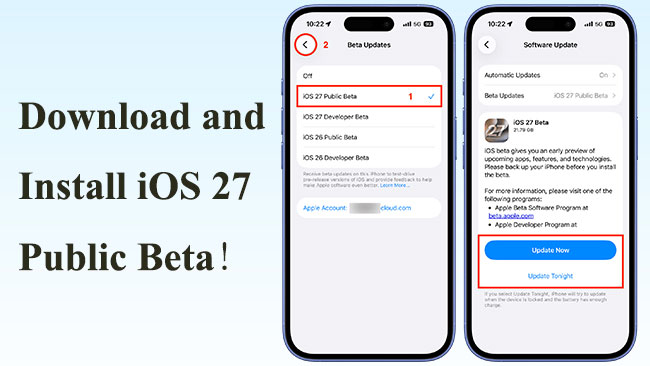
- What's New in iOS 27 Public Beta?
-
How to Download and Install iOS 27 Public Beta?
- Method 1: Install via Apple Beta Software Program (Recommended for Most Users)
- Method 2: Install iOS 27 Public Beta Using TunesKit iOS System RecoveryHOT
- Method 3: Install via Finder or iTunes (Using IPSW File)
- Method 4: Use Apple Configurator (For Developers or Advanced Users)
- Method 5: Wait for Public Beta to Appear in Software Update (Auto Enrollment)
- FAQs About iOS 27 Public Beta
- Conclusion
What's New in iOS 27 Public Beta?
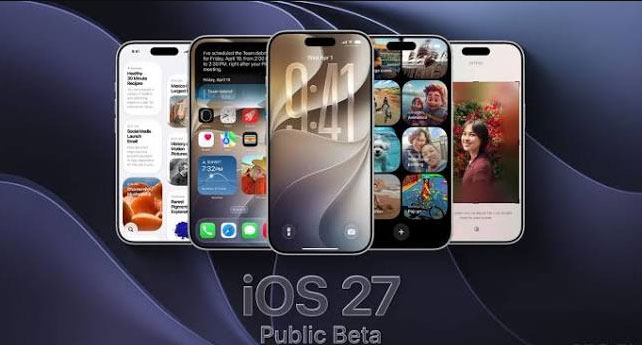
Apple has introduced several major updates in iOS 27 Public Beta, focusing on artificial intelligence, interface customization, performance improvements, and smarter everyday features. While the update continues to refine the overall iPhone experience, the biggest changes come from the upgraded Siri experience, expanded Apple Intelligence capabilities, and a more customizable Liquid Glass design.
- 01 Smarter Siri with AI-Powered Features: The biggest highlight of iOS 27 is the redesigned Siri experience. Siri now offers more conversational interactions, better understanding of personal context, and improved ability to work across apps. Users can ask Siri to handle more complex tasks, generate text, summarize information, and provide assistance based on what is displayed on the screen.
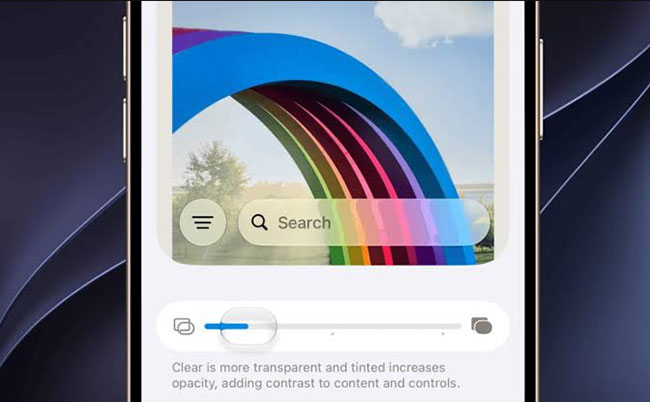
- 02 More Customizable Liquid Glass Design: iOS 27 continues Apple’s Liquid Glass visual style with additional customization options. Users can adjust the transparency and appearance of interface elements through a new Liquid Glass slider, making the design easier to personalize and improving readability.
- 03 Enhanced Apple Intelligence Features: Apple Intelligence receives deeper integration across iPhone apps. New AI-powered tools improve writing assistance, photo editing, visual recognition, and automation features. Users can also create smarter shortcuts and perform tasks using more natural language commands.
- 04 AI Improvements in Photos and Camera: The Photos app gains new AI editing capabilities, including improved object removal, image adjustments, and smarter photo organization. Visual Intelligence features are also expanded, allowing users to interact with their surroundings through the camera more effectively.
- 05 Faster Performance and System Improvements: Beyond new features, iOS 27 focuses on speed and stability. Users may notice faster app launches, smoother animations, quicker AirDrop transfers, and general performance improvements across the system.
- 06 Improved Privacy and Safety Features: Apple has also introduced updates to child safety controls, app permissions, and system protections, giving users more control over privacy and device usage.
How to Download and Install iOS 27 Public Beta?
Before installing iOS 27 Public Beta, make sure your iPhone is compatible and back up your data. Beta software may contain bugs, cause battery drain, or affect app stability, so it is recommended to install it on a secondary device if possible.
Important Tips Before Installing:
- Free up space: Make sure you have at least 10–20 GB free.
- Charge your iPhone: Battery must be above 50% or plugged in.
- Expect bugs: Beta versions are unstable; not recommended for primary devices.
- Know how to downgrade: You can revert to the previous signed iOS version using TunesKit iOS System Recovery.
Method 1: Install via Apple Beta Software Program (Recommended for Most Users)
This is the simplest method for most users. Once your iPhone is enrolled in Apple's Beta Software Program, you can download the update directly through the Settings app—no computer required.
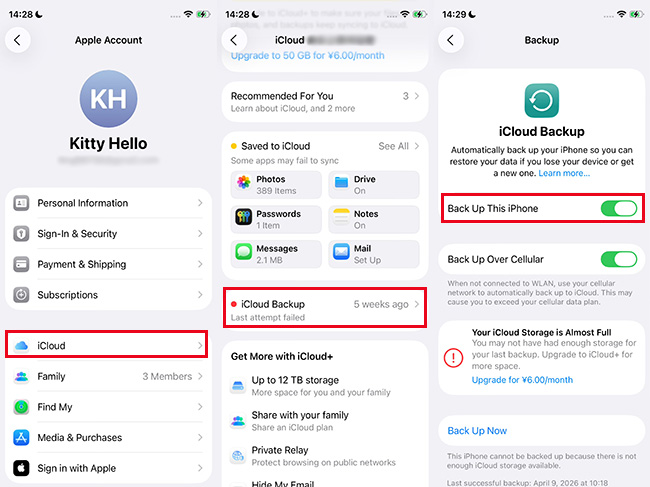
- Step 1. Open Settings > Your Apple Account > iCloud > iCloud Backup > Back Up This iPhone. Or use Finder/iTunes on Mac/PC for a full backup.
- Step 2. Visit beta.apple.com in Safari, Sign in with your Apple Account, and tap Enroll Your Devices, then choose iOS.
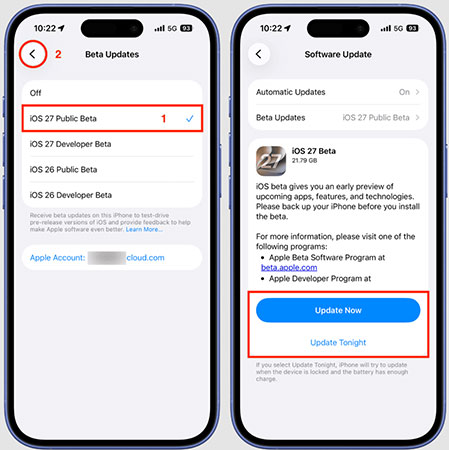
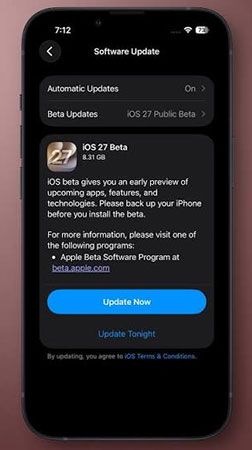
- Step 3. On your iPhone: go to Settings > General > Software Update. Tap Beta Updates, then select iOS 27 Public Beta.
- Step 4. Go back to Software Update. Tap Update Now button, enter your passcode, and follow the prompts to install iOS 27 Public Beta on your iPhone.
Method 2: Install iOS 27 Public Beta Using TunesKit iOS System Recovery
If you're experiencing issues updating your iPhone through the usual methods or simply want a more straightforward way to install the iOS 27 Public Beta, TunesKit iOS System Recovery offers a reliable alternative. Originally designed to fix common iOS problems like iPhone stuck in boot loop, black screens, or failed updates, TunesKit also allows users to upgrade or downgrade iOS versions safely—without the need for iTunes, Finder, or a developer profile. It's a great option for anyone looking for a quick, no-risk way to try out the iOS 27 Public Beta.
Seamless iOS 27 Beta Upgrade with TunesKit
Bypass standard update errors and safely install the iOS 27 Public Beta in just a few clicks, ensuring your device data remains completely secure.
 600,000+ Downloads
Here are the steps to install iOS 27 Public Beta with TunesKit iOS System Recovery.
Step 1. Choose Upgrade/Downgrade iOS Feature
Download TunesKit iOS System Recovery for Windows or macOS, and install and launch the program. Use a Lightning cable to connect your iPhone to the computer. On the main screen, select "More Tools" section. On the next page, select the "Explore iOS Beta Features" option.

Step 2. Download iOS 27 Public Beta Firmware
TunesKit will display a list of available firmware versions for your device. Select iOS 27 Public Beta, click Download, and wait for the firmware package to finish downloading. It may take a few minutes.

Step 3. Install iOS 27 Public Beta on Your iPhone
Once downloaded, click Start Upgrade option. TunesKit will verify the firmware and begin installing iOS 27 Public Beta on your iPhone. Your iPhone will reboot automatically after the update. Once reboot, you can explore the latest iOS 27 Public Beta hassle free.

Method 3: Install via Finder or iTunes (Using IPSW File)
It is ideal for users who want more control or prefer a clean install. This method uses a computer to manually install the iOS 27 Public beta using an IPSW file.
- Step 1. Backup your iPhone via Finder (Mac) or iTunes (Windows).
- Step 2. Download the iOS 27 IPSW file for your device model. You can download the free iOS 27 beta IPSW file from trusted sources such as ipsw.me or beta.apple.com.
- Step 3. Connect your iPhone using a USB cable and launch Finder/iTunes.
- Step 4. Hold the Option key (Mac) or Shift key (Windows) and click Restore iPhone.

Method 4: Use Apple Configurator (For Developers or Advanced Users)
This method is designed for developers or experienced users who want to manage multiple devices or install beta versions in a controlled environment.
- Step 1. Download Apple Configurator from the Mac App Store.
- Step 2. Connect your iPhone via USB cable. Download the iOS 27 IPSW file from Apple's Developer site (you'll need a developer account).
- Step 3. In Configurator, select your device > Actions > Advanced > Erase & Install.
- Step 4. Choose the downloaded iOS 27 beta file and begin installation. After installation, follow on-screen setup instructions on your iPhone.

Method 5: Wait for Public Beta to Appear in Software Update (Auto Enrollment)
If you previously joined the beta program and are running iOS 16.4 or later, your device can auto-detect the iOS 27 public beta without needing a new profile.
- Step 1. Make sure your iPhone is running iOS 16.4 or later.
- Step 2. Go to Settings > General > Software Update > Beta Updates.
- Step 3. Confirm that iOS 27 Public Beta is selected.
- Step 4. Wait a few minutes, then the update should appear.
- Step 5. Tap Update Now button to install iOS 27 Public Beta immediately.
FAQs About iOS 27 Public Beta
-
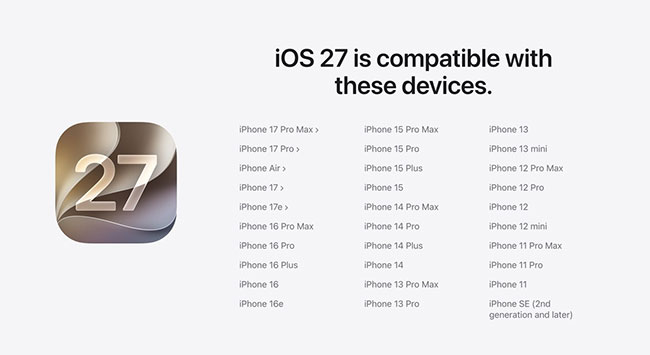
Which devices support iOS 27 Public Beta?
Compatible models include iPhone 11 and newer and iPhone SE (2nd generation and later). Older devices like iPhone XS, XS Max, and XR are not supported.
-
Is the Siri AI update available for everyone immediately?
Not quite. While Siri AI is the standout feature of iOS 27, it faces a few initial launch restrictions.
Because the underlying models demand significant cloud and on-device processing, Apple is rolling the assistant out cautiously. You might be placed on a waitlist before gaining full access to the new chatbot-style Siri. Additionally, Siri AI is initially launching only in select English variants and remains unavailable in the EU and China due to ongoing regulatory requirements.
-
What happens if I dislike the new Liquid Glass design?
Apple recognizes that the Liquid Glass aesthetic introduced in iOS 26 was polarizing. To fix this, iOS 27 includes a brand-new appearance slider directly in your Settings app.
You can now adjust the UI's translucency from ultra-clear to completely tinted. Dialing it to a fully tinted appearance removes the transparency almost entirely, which greatly improves readability for those who dislike the fluid background animations.
Conclusion
In this post, we have listed five effective methods to download and install the iOS 27 Public Beta, from the official Apple Beta Software Program to manual IPSW installation. Among these methods, TunesKit iOS System Recovery, a powerful tool that helps get iOS 27 Public Beta without enroll your device. With its one-click upgrade feature and beginner-friendly interface, TunesKit ensures a smooth and safe update process.