


How to Downgrade iOS 27 Beta With/Without iTunes

"I accidently updated my iPhone 17 to the iOS 27 beta without back up, and now I want to go back to iOS 26. How can I do?" --From Apple Community
If you have installed iOS 27 Beta and are experiencing bugs, app compatibility issues, battery drain, or performance problems, you may want to return to a more stable iOS version. Many users are now searching for how to downgrade iOS 27 Beta with or without iTunes to restore their devices safely.
In this guide, we'll explain why users choose to downgrade from iOS 27 Beta and provide step-by-step instructions on how to downgrade iOS 27 Beta to a supported iOS version using iTunes or other available methods.

- Read This First: Your Guide to a Safe iOS Downgrade
- Why Users Downgrade from iOS 27 Beta?
- Downgrade iOS 27 to iOS 26 Without iTunes - TunesKit iOS System RecoveryHOT
- How to Remove iOS Beta Updates and Switch Back to Stable iOS Version?
- How to Use iTunes to Downgrade iOS 27 Beta to iOS 26?
- Conclusion
Read This First: Your Guide to a Safe iOS Downgrade
Before downgrading iOS, you should take a few important steps to protect your data and avoid problems. Here's a clear checklist you can follow
1. Back Up Your Data
Downgrading will erase everything on your iPhone.
- Use iCloud Backup (Settings > [your name] > iCloud > iCloud Backup > Back Up Now).
- Or back up to a computer via Finder (Mac) or iTunes (Windows).
 Warning: You can't restore a backup made on iOS 27 to a device running iOS 26. So your backup is mainly for preserving photos, contacts, and files you can re-sync later.
2. Check if Apple is Still Signing the iOS Version You Want
- Apple stops "signing" old versions after some time.
- If iOS 26 is no longer signed, you can't install it.
- You can check signing status at sites like ipsw.me.
3. Download the Correct IPSW File
- The IPSW file is the installer package for iOS.
- Make sure you get it from a reliable source.
4. Update iTunes / Finder
- If you're restoring via computer, make sure you're on the latest version of iTunes (Windows) or Finder (macOS).
5. Charge Your iPhone
- Make sure your battery is at least 50% or plugged into power.
6. Turn Off Find My iPhone
- Go to Settings > [your name] > Find My > Find My iPhone, then turn it off.
Why Users Downgrade from iOS 27 Beta?
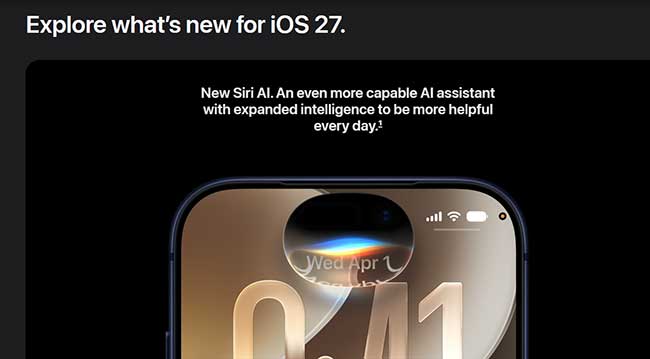
After installing the iOS 27 Beta, many iPhone users quickly opt to revert to previous versions. While beta software offers an exciting sneak peek at upcoming features, the reality of daily usage often drives testers back to stable releases.
There are several core issues that typically prompt this decision.
System Instability and Frequent Crashes
Early beta software is inherently unstable, often leading to a variety of frustrating performance flaws. Apps, including Apple's native services like Mail and Messages, may quit unexpectedly during routine tasks. In more severe cases, the entire system can freeze entirely, forcing a manual restart to regain basic functionality.
Sluggish Performance and iPhone Overheating
Devices running beta software frequently feel significantly slower compared to their stable iOS counterparts. Common user complaints highlight a lagging keyboard, choppy animations when swiping between screens, and noticeable delays when opening applications.
Furthermore, iPhones tend to run unusually hot on early beta profiles. This excessive heating can cause the device to throttle performance and force mobile applications to crash unexpectedly.

Widespread App Incompatibility
A major source of frustration for beta testers is the lack of third-party application support. Many developers will not have updated their software for the new OS yet.
An essential banking app might fail to launch, a social media platform could lose camera access, or a work-critical tool might become completely unusable. While some of the most popular apps receive swift updates, many others will remain broken until the official public release in the fall.
Downgrade iOS 27 Beta to iOS 26 without iTunes - TunesKit iOS System Recovery
If you want to downgrade your iOS 27 beta version due to the reasons mentioned above, you can hire the prestigious services of TunesKit iOS System Recovery. It is a prestigious iOS system recovery program with a 100% success rate. Using this fantastic third-party tool, you can easily downgrade your iOS 27 Beta to iOS 26 within the Apple signing period. Moreover, the user interface TunesKit iOS System Recovery comes up with its truly remarkable and doesn't ask you to gather prior knowledge of this program to put things in order.
Key Features of TunesKit iOS System Recovery
TunesKit iOS System Recovery allows you to easily downgrade iOS 27 Beta to iOS 26 within the Apple signing period.
 600,000+ Downloads
 Here's the guide that will show you how to downgrade iOS 27 to iOS 26 with ease.
Step 1Connect Your iPhone
First of all, you'll need to download and install TunesKit iOS System Recovery,and launch it. Connect your iPhone to your PC using a USB cable, then select Upgrade/Downgrade iOS feature on the main screen. Then click the iOS Downgrade .

Step 2Download iOS Downgrade Firmware
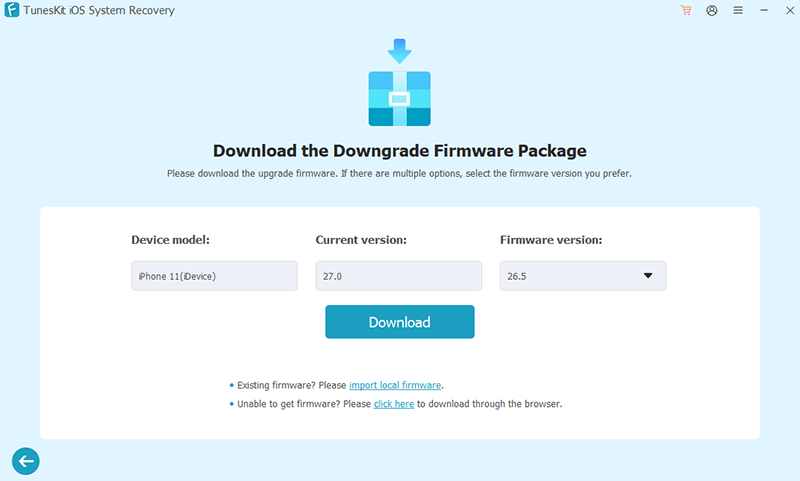
TunesKit will automatically identify your device's information, then choose the appropriate firmware package from the drop-down menu, and click the Download button once confirmed.
Step 3Downgrade Completed
Once the firmware has been downloaded successfully, you can click the Start Downgrade button to initiate the downgrade process. Keep your iPhone connected and do not unplug it. Wait patiently. Your iPhone will restart automatically once the downgrade is done. After rebooting, it should be running iOS 26.

How to Remove iOS Beta Updates and Switch Back to Stable iOS Version?
If you don't have access to a computer or iTunes, you can still stop receiving beta updates and switch back to official iOS releases directly from your iPhone's Settings. However, note that this method does not immediately revert your device to an earlier iOS version—it only unsubscribes your device from beta updates so you can install the next available official release when it becomes available.
Below are the steps depending on your iOS version:
For iPhone models running iOS 16.3.1 or earlier:
- Step 1. Go to Settings > General > VPN & Device Management.
- Step 2. Locate and remove the beta iOS Profile.
- Step 3. Wait for the next official iOS version to appear in Settings > General > Software Update, then download and install it on your iPhone.

For iPhone models running iOS 16.4 or later:
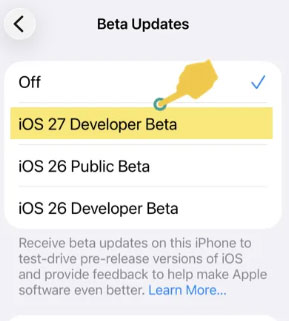
- Step 1. Open Settings > General > Software Update > Beta Updates.
- Step 2. Tap Beta Updates and choose Off.
- Step 3. This will stop your iPhone from receiving any future beta updates.
 Note:
Note:Turning off beta updates or removing the beta profile does not instantly downgrade your iPhone to an earlier iOS version. Instead:
- Your iPhone will remain on the currently installed beta until a newer official release becomes available.
- Once Apple publishes the next public iOS update, you can install it to move off the beta build.
For example, if you're using an iOS 27 beta and disable beta updates, your device will stay on that version until the next official iOS version is released, at which point you can update to the stable build.
How to Use iTunes to Downgrade iOS 27 Beta to iOS 26?
If you're going to the iOS downgrade, using iTunes won't be a bad idea, as iTunes allows you to get your job done with minimal effort. However, the disadvantage you carry by restoring your device via iTunes is that you'll lose all your important data. That's why you need to back up your data before restoring your device via iTunes. After backing up your data, you can follow the guide below to put the thing in order.
- Step 1. First of all, you'll need the Download the IPSW file after visiting the ipsw.me. Later, you'll need to navigate to your Apple Account within the Settings app, select the Find My option. Next, you'll need to turn off Find My iPhone.

- Step 2. Navigate to the Device icon after connecting your iPhone device to Mac or PC using a reliable USB cable.
- Step 3. Later, you'll need to hit the Restore iPhone button to restore your device.
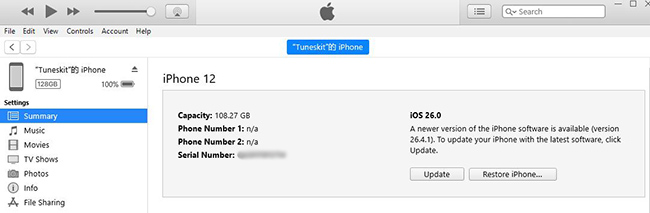
- Step 4. In the file browser window that appears, navigate to and select the IPSW file you downloaded. Your computer will verify the file with Apple's servers and, if it is still signed, will proceed to erase your iPhone and install the older iOS version. Do not disconnect your iPhone during this process.
- Step 5. Once complete, your iPhone will restart to the factory setup screen for the iOS version you installed. You can then set it up as a new device or restore it from an older, compatible backup if you have one.
Conclusion
In today's guide, we discussed why iOS 27 Beta updates didn't turn out to be where they should have been. Moreover, you'll learn about the issues people face with iOS 27 Beta version. Luckily, we've also been exploring the way to downgrade via iTunes. However, if you what to downgrade without iTunes, you can take the mind-blowing services of TunesKit iOS System Recovery. It comes with a flawless interface and the ability to downgrade your iPhone faster than you expect.


