How to Find Email Password on iPhone: Saved Passwords and Recovery
Forgot your email password but still have access to the account on your iPhone? You may be able to view it without resetting. If the login was previously saved, iPhone can display it through the Passwords app or another password manager.
This guide explains how to find an email password on iPhone, including Gmail, Outlook, Yahoo, iCloud Mail, and other accounts. You'll also learn what to do when the password isn't saved and how to reconnect Mail after changing it.
Quick Answer: Can You See Your Email Password on iPhone?
Yes, you can see an email password on your iPhone if the password was previously saved in Apple Passwords, Google Password Manager, TunesKit iPhone Unlocker Password Manager, or another password manager.
For iOS 18 and later, including iOS 27, first open the Passwords app, authenticate with Face ID, Touch ID, or your device passcode, and search for your email provider or email address.
If the password isn't stored there, you can check another password manager or use a password-management tool to scan credentials already stored on the device. If no saved copy exists, you'll need to reset or recover the password through your email provider.
Where Are Email Passwords Stored on iPhone?
There isn't one dedicated folder called "Email Passwords" on an iPhone. Where the password appears depends on how you originally saved or signed in to the account.
Most saved email credentials can be found through:
- Apple Passwords/iCloud Keychain: Common if you saved the login through Safari or Apple's password system.
- Google Password Manager: Common if you use Chrome or save passwords to your Google Account.
- Password-management software: Some desktop tools can scan credentials already stored on a connected iPhone.
- Third-party password managers: Apps such as 1Password or Bitwarden may contain the credentials instead.
- Your email provider: Modern services may authenticate Mail through a secure sign-in process without exposing the actual account password inside the Mail app.
Another important point is that the saved account may appear under the provider's website or company name rather than the word "Mail."
For example, Gmail credentials may appear under Google or google.com, while an Outlook account might appear under Microsoft, Outlook, Live, or your email address.
How to Find a Saved Email Password on iPhone
The easiest solution is to check the password manager where your login may already be stored.
Method 1. Find Email Password on iPhone with the Passwords App
On newer versions of iOS, Apple provides a standalone Passwords app for saved website and app credentials.
For iOS 18 and Later
- Step 1. Open the Passwords app on your iPhone.
- Step 2. Authenticate using Face ID, Touch ID, or your iPhone passcode.
- Step 3. Tap All, or use the search field.
- Step 4. Search for your email provider, such as Google, Gmail, Microsoft, Outlook, Yahoo, or the website domain.
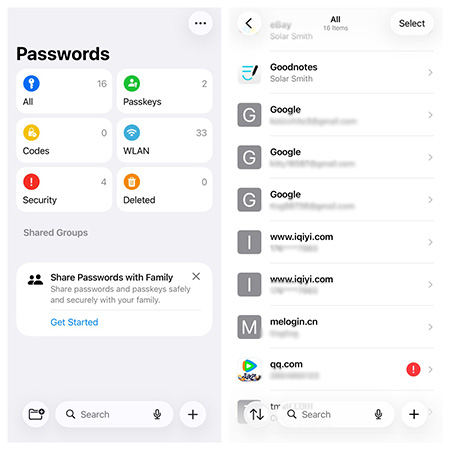
- Step 5. Tap the matching account.
- Step 6. Tap the password field to view or copy the saved password. You can also search using your email address if you aren't sure which website name the credential is stored under.
For iOS 17 and Earlier
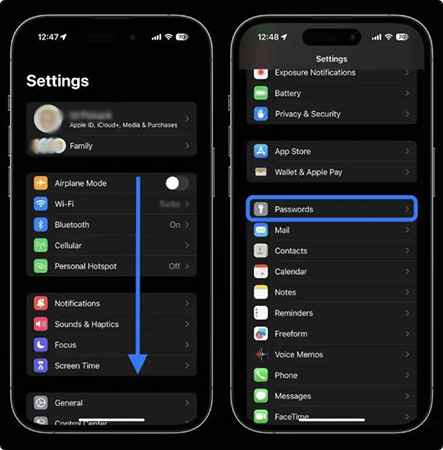
Older iOS versions store saved passwords inside Settings instead of the standalone Passwords app. Go to Settings > Passwords and then authenticate yourself, search for the relevant email provider, and open the saved account to view its password in detail.
Method 2. Find Gmail or Other Email Passwords with Google Password Manager
If you use Chrome on your iPhone, your email password may have been saved to Google Password Manager instead of Apple Passwords. This isn't limited to Gmail. Google Password Manager can store passwords for Outlook, Yahoo, custom email services, and other websites as well.
- Step 1. Open Chrome on your iPhone.
- Step 2. Tap the three-dot menu at bottom right of the home screen. Select Password Manager.
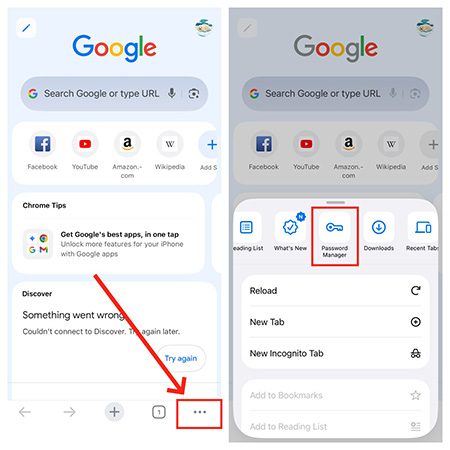
- Step 3. Authenticate if prompted.
- Step 4. Search for the provider, website, username, or email address.
- Step 5. Open the saved login to view the password.
If your Chrome passwords sync with your Google Account, saved credentials may also be available on your other signed-in devices like iPad.
Method 3. Find Stored Email Passwords with TunesKit iPhone Unlocker
If you cannot easily locate the correct credential in Apple Passwords, another option is to scan the passwords stored on the iPhone from a computer.
The current version of TunesKit iPhone Unlocker includes a Password Manager designed to read credentials already stored on an iPhone or iPad. According to TunesKit, it can display saved email account information along with website and app credentials, Wi-Fi passwords, and other stored password data. It also supports exporting scanned password records to a CSV file so that you can search for passwords with ease.
- Step 1. Install and open TunesKit iPhone Unlocker on your PC or Mac. Connect your iPhone to the computer using a USB cable. Choose Password Manager from the main interface.
- Step 2. Click Start Scanning and follow the onscreen instructions to grant the required device permissions.
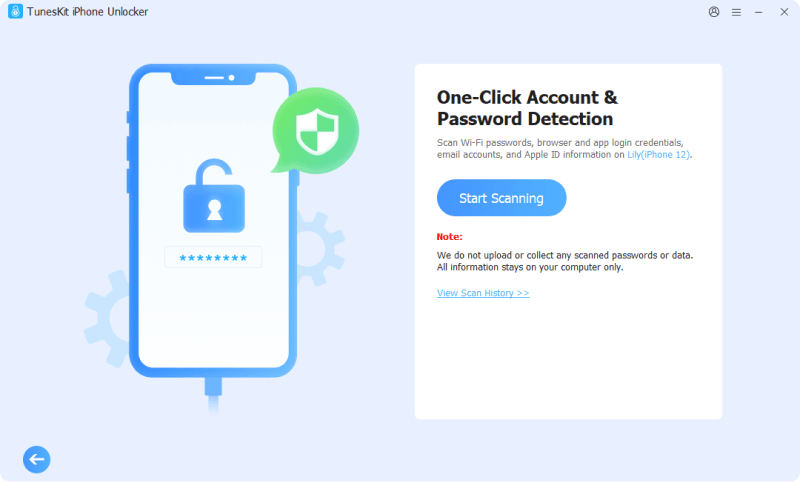
- Step 3. Unlock the iPhone and enter any required backup password when prompted.
- Step 4. After the scan finishes, review the stored credentials and look for your email account.
- Step 5. Use the eye icon to view a password or export the password records if needed.
Method 4. Check Another Password Manager on Your iPhone
If Apple Passwords, Google Password Manager, and your stored-device credentials do not contain the login, think about whether you previously used another password manager.
For example, you may have saved the credential in an app such as 1Password, Bitwarden, Dashlane, or another password-management service. Open the password manager you normally use, authenticate, and search for your email provider, email address, or provider domain.
If no saved credential exists in any password manager, you'll need to recover or reset the password instead.
What to Do If Your Email Password Isn't Saved on iPhone
An iPhone or password manager can't reveal a password that was never stored. In this situation, the practical solution is to recover access through the company that provides the email account.
How to Recover a Gmail Password on iPhone
Your Gmail password is also your Google Account password, so changing it affects Gmail and other Google services linked to the same account.
- Step 1. Open the Gmail app and tap your profile picture in the upper-right corner.
- Step 2. Tap Manage your Google Account.
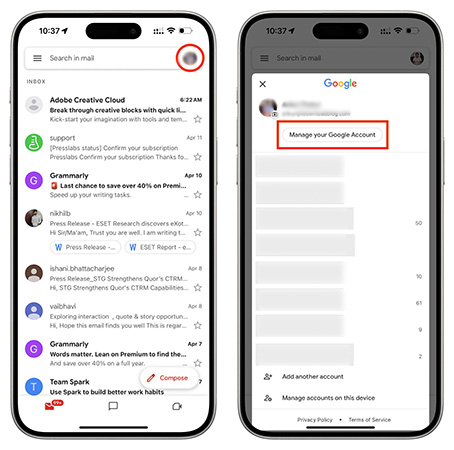
- Step 3. Select Personal info, then tap Password.
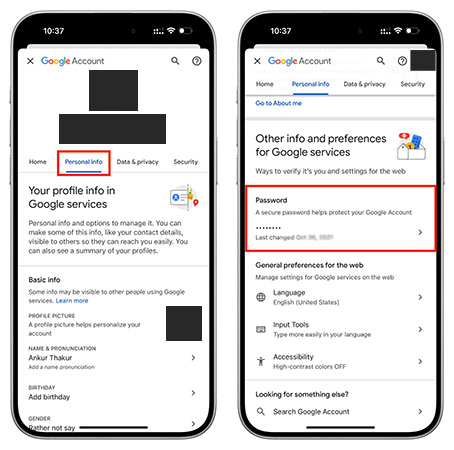
- Step 4. Complete Google's identity verification if prompted.
- Step 5. Enter a new password and tap Next.
How to Reset an Outlook or Hotmail Password on iPhone
Outlook.com, Hotmail, and many personal Microsoft email accounts use your Microsoft account password.
- Step 1. Open Safari or other browsers and go to the Microsoft account recovery page.
- Step 2. Enter your Outlook, Hotmail, or Microsoft email address and tap Next.
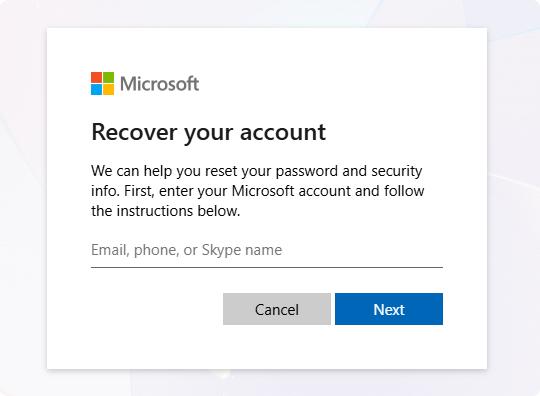
- Step 3. On the password screen, select Forgot password? Choose an available verification method, such as your recovery email address or phone number.
- Step 4. Confirm the requested part of the recovery email address or phone number and request a verification code.
- Step 5. Enter the code Microsoft sends you.
- Step 6. Create and confirm your new Microsoft account password.
How to Reset a Yahoo Mail Password on iPhone
Yahoo recommends using its Sign-in Helper when you forget your Yahoo Mail password.
- Step 1. Open Safari and access Yahoo's Sign-in Helper.
- Step 2. Enter your Yahoo email address, recovery phone number, or recovery email address.
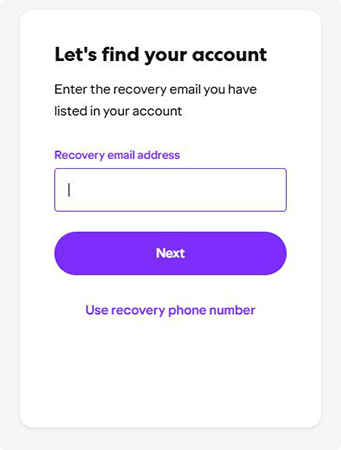
- Step 3. Tap Next and select an available identity-verification method.
- Step 4. Enter the verification code sent to your recovery phone number or email.
- Step 5. Follow the onscreen instructions to regain access to the account.
- Step 6. When prompted, create a new Yahoo password.
How to Reset an iCloud Mail Password on iPhone
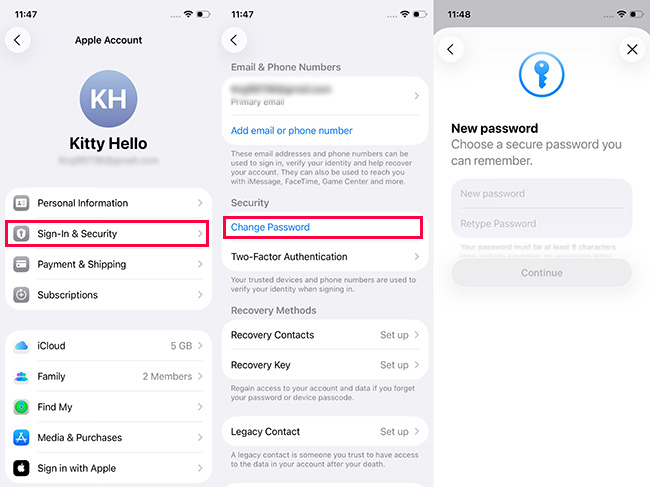
An @icloud.com email address uses your Apple Account password. If the password is not saved but your iPhone is already signed in to your Apple Account, the easiest way to reset it is directly from Settings.
- Step 1. Open Settings on your iPhone. Tap [your name] at the top.
- Step 2. Tap Sign-In & Security.
- Step 3. Tap Change Password.
- Step 4. Enter your iPhone passcode.
- Step 5. Follow the onscreen instructions to create a new Apple Account password.
 Further Reading: Forgot Apple ID Password? 8 Ways to Reset It and Regain Access
FAQs About How to Find Email Password on iPhone
-
Can TunesKit iPhone Unlocker find an email password?
Its Password Manager can scan and display email-account credentials and other passwords that are already stored on a connected iPhone. It cannot recover the original password if the email credential was never saved on the device.
-
Can I find my email password without resetting it?
Yes, if a copy of the password is already stored in Apple Passwords, Google Password Manager, TunesKit Password Manager, or another password manager. If no saved copy exists, resetting or recovering the account is usually necessary.
-
Can I see an email password directly in Apple Mail?
Usually not. Apple Mail manages access to the email account, while saved passwords are generally handled through the Passwords app or another password-management system.
Conclusion
To find an email password on iPhone, first check the Passwords app or Google Password Manager for saved credentials. If you want to review stored iPhone passwords from a computer, TunesKit iPhone Unlocker's Password Manager can also scan saved account information.
When no saved password is available, use the official recovery process for Gmail, Outlook, Yahoo, iCloud Mail, or your email provider, then sign back into Mail with the new password if needed.